limited connection problems

Hermitt

New member
Hello all, I've been lurking on these forums for a couple of years now if not longer and the people here have been a great help in a number of thing I needed to do with both Vista and now in the last year Windows seven, and for that I want to thank all the helpful members at the Windows seven forums.


Now that we have the sucking up out of the way,:D I'll get to the reason that I've finally made an actual post on the forums.


Here is my problem, I was asked by a very nice lady if I could look at her computer and find out why it would not connect to the internet. It is an hp a6000n running Vista home premium.
It connects through AT&T DSL directly through a modem, no router. For awhile she had trouble with intermittent connections, and finally it wouldn't connect at all. at&t tech support was no help. When she boots up she immediately gets a limited connection message.
A couple of weeks ago I went over to see if I could help her. (Disclaimer here. I am no computer guru, just a hobbyist so while I have built my own computers in the past I in no way claim to be an expert especially when It come to networks. Disclaimer off.)
The first thing I did after confirming she could not get on the internet was disconnect the internet connection from her computer and plug it in to my laptop, wala instant internet with no trouble at all. So I ruled out modem problems and seemed to rule out network cable problems. Next I tried to check the network adapter on the computer, according to windows devise manager it was working properly. A visual of the back of the computer showed a green light if that is really an indication.
Trying to reload the drivers did nothing, system restore did nothing. So finally since the whole system was running dog slow I suggested a reload of Vista, She agreed but this also was of no help. I was stumped so I asked her to let me take it home for further research, she agreed. She would be out of town for a bit so it was not a problem.
Now for the end of this long winded discourse. When I got the silly thing home and plugged it in it immediately connected to the internet and has not had a hiccup since.
So what am I missing.


I should also say that since I got it home I was able to do all of the updates and service packs plus I upgraded it from 1 gig to 3 gigs of ram, it runs much nicer now as you would expect.
One more thing, excuse my grammar I know it's not that good.:o It's one reason I don't post to often.
 

My Computer

Computer Manufacturer/Model Number
HomeBuilt
OS
Win7-Professional 64bit
CPU
AMD Athlon(TM)64 X4 630 Processor 2.81 GHz
Motherboard
System Model GA-MA790GPT-UD3H
Memory
8 GB
Graphics Card(s)
ATI Radeon HD 3300 Graphics
Sound Card
On board
Monitor(s) Displays
1-SOYO TOPAZ S 24" / 2-SOYO 19"
Screen Resolution
1920 x 1200 / 1680 x 1050
Hard Drives
WD 500GB
PSU
650W
Keyboard
Logitech K350
Mouse
Logitech V450
Internet Speed
10mb
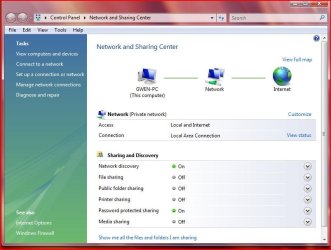
Hi and you did a wonderful job in telling us the facts and they are very helpful but WOW I'm stumped as you but I do have one suggestion. Could you go into control panel and open Network and make a copy of the screen using the snipping tool.
Here is what mine looks like.
Thanks
 

My Computer

Computer type
PC/Desktop
Computer Manufacturer/Model Number
Self Built
OS
Windows 10 Pro
CPU
Intel i5
Motherboard
I have a fatherboard
Memory
I'm old and lost a few chips
Graphics Card(s)
Yup
Sound Card
Yup
Monitor(s) Displays
Samsung 32" UHD
Screen Resolution
3840 x 2160
Hard Drives
Samsung 860 EVO drives
PSU
450 Watt and some fans that blow
Case
Small tower
Cooling
Yes I am cool. lol
Keyboard
Who needs a keyboard?
Mouse
Logitech Laser G7 wireless
Internet Speed
Zippy fast UP and DOWN
Antivirus
I got a shot
Browser
The new Improved EDGE 2020
Here you go, and thanks for the reply IggyAZ.

Capture.JPG
 

My Computer

Computer Manufacturer/Model Number
HomeBuilt
OS
Win7-Professional 64bit
CPU
AMD Athlon(TM)64 X4 630 Processor 2.81 GHz
Motherboard
System Model GA-MA790GPT-UD3H
Memory
8 GB
Graphics Card(s)
ATI Radeon HD 3300 Graphics
Sound Card
On board
Monitor(s) Displays
1-SOYO TOPAZ S 24" / 2-SOYO 19"
Screen Resolution
1920 x 1200 / 1680 x 1050
Hard Drives
WD 500GB
PSU
650W
Keyboard
Logitech K350
Mouse
Logitech V450
Internet Speed
10mb
Hi Hermitt, that computer looks like it's running Vista, is it??? Anyway, with the internet issue over at her house, it looks like maybe a setting on the adapter, perhaps DNS issue. Is that network diagram off the PC, and at her house?
 

My Computer

Computer Manufacturer/Model Number
Lenovo ThinkPad T60
OS
Windows 7 Ultimate 64Bit
CPU
GenuineIntel Intel(R) Core(TM) DuoCore T2400 @ 1.83GHz
Motherboard
Intel(R) 82801G (ICH7 Family)
Memory
2.00 GB
Graphics Card(s)
Mobile Intel(R) 945 Express Chipset
Sound Card
SoundMAX Integrated Digital HD Audio
Monitor(s) Displays
ThinkPad Display
Screen Resolution
1400x1050
Hard Drives
100Gb SATA
Keyboard
Standard Keyboard
Mouse
HID-compliant Mouse
Internet Speed
Cable Broadband - 54Mbps
Other Info
Intel(R) PRO/1000 PL Network Connection
11a/b/g Wireless LAN Mini PCI Express Adapter
Good morning aem, thanks for the reply. Yes it is running Vista home premium and unfortunately the network picture is at my house where it is running fine, I don't have access to her house for the time being.
When I checked the the networking at her house I did not see any thing out of the way. A DNS issue? I have a basic understanding of what DNS is but as I said I'm not an expert so I could have missed something.
 

My Computer

Computer Manufacturer/Model Number
HomeBuilt
OS
Win7-Professional 64bit
CPU
AMD Athlon(TM)64 X4 630 Processor 2.81 GHz
Motherboard
System Model GA-MA790GPT-UD3H
Memory
8 GB
Graphics Card(s)
ATI Radeon HD 3300 Graphics
Sound Card
On board
Monitor(s) Displays
1-SOYO TOPAZ S 24" / 2-SOYO 19"
Screen Resolution
1920 x 1200 / 1680 x 1050
Hard Drives
WD 500GB
PSU
650W
Keyboard
Logitech K350
Mouse
Logitech V450
Internet Speed
10mb
It's hard diagnosing the issue if the machine isn't connected to the lan that it is having issue with. Best to wait till you go over there, plug the machine back in and then see what the issue is.

If you have used your laptop at her house and it's all fine, then it looks like either a setting on the machine's adapter (tcp/ip). Cos the laptop was able to connect to the router/modem with no issue. Best thing i suppose is try and compare your laptop and machine interms of tcp/ip. Troubleshooting using process of elimination is always good.
 

My Computer

Computer Manufacturer/Model Number
Lenovo ThinkPad T60
OS
Windows 7 Ultimate 64Bit
CPU
GenuineIntel Intel(R) Core(TM) DuoCore T2400 @ 1.83GHz
Motherboard
Intel(R) 82801G (ICH7 Family)
Memory
2.00 GB
Graphics Card(s)
Mobile Intel(R) 945 Express Chipset
Sound Card
SoundMAX Integrated Digital HD Audio
Monitor(s) Displays
ThinkPad Display
Screen Resolution
1400x1050
Hard Drives
100Gb SATA
Keyboard
Standard Keyboard
Mouse
HID-compliant Mouse
Internet Speed
Cable Broadband - 54Mbps
Other Info
Intel(R) PRO/1000 PL Network Connection
11a/b/g Wireless LAN Mini PCI Express Adapter
Yes, I know it is a problem not being at her house, and I'm not sure when I will be she is going to call when she's back. I had checked the setting before I brought it home but as I said I could have missed something. I'm hoping to get some more ideas of what to look for before I go back over but certainly will compare setting to see if something was missed. which knowing me is possible.

Thanks again aem, any ideas you might have will be welcome.
 
Last edited:

My Computer

Computer Manufacturer/Model Number
HomeBuilt
OS
Win7-Professional 64bit
CPU
AMD Athlon(TM)64 X4 630 Processor 2.81 GHz
Motherboard
System Model GA-MA790GPT-UD3H
Memory
8 GB
Graphics Card(s)
ATI Radeon HD 3300 Graphics
Sound Card
On board
Monitor(s) Displays
1-SOYO TOPAZ S 24" / 2-SOYO 19"
Screen Resolution
1920 x 1200 / 1680 x 1050
Hard Drives
WD 500GB
PSU
650W
Keyboard
Logitech K350
Mouse
Logitech V450
Internet Speed
10mb
Ok so it could be a difference in the tcp/ip setting. We don't know that till you compare.

We could start thinking about the modem, as you said her machine is directly connected to it.
However, you have also said that when you tried connecting your laptop and there was no issues. This is a stumbling block isn it?
 

My Computer

Computer Manufacturer/Model Number
Lenovo ThinkPad T60
OS
Windows 7 Ultimate 64Bit
CPU
GenuineIntel Intel(R) Core(TM) DuoCore T2400 @ 1.83GHz
Motherboard
Intel(R) 82801G (ICH7 Family)
Memory
2.00 GB
Graphics Card(s)
Mobile Intel(R) 945 Express Chipset
Sound Card
SoundMAX Integrated Digital HD Audio
Monitor(s) Displays
ThinkPad Display
Screen Resolution
1400x1050
Hard Drives
100Gb SATA
Keyboard
Standard Keyboard
Mouse
HID-compliant Mouse
Internet Speed
Cable Broadband - 54Mbps
Other Info
Intel(R) PRO/1000 PL Network Connection
11a/b/g Wireless LAN Mini PCI Express Adapter
One thing that you guys did not catch


He said that this was a DSL connection so he needed to set up a DSL Dial Up connection to log into the DSL modem..... there may be something wrong with her vista/computer/modem. I would defintily log into her modem and see if you could make that DSL modem log into it automatically or set up the dial up on her computer and see if you can dial into the modem.. *sorry if i repeat myself* watching george lopez, laughing my butt off...

there has got to be something weird... another thing that i can suggust is get a cheap router that handles PPOE and have the modem auto redial so it keeps a stead connection... that way she can go either wired or wireless.

The guy said that he plugged it into his computer and it worked. Something is weird going on.... so my suggestion is try what i said...

but the thing is that your going to have to call AT&T and get her user name and password for the PPOE DSL if she doesn't have it and sometimes AT&T customer service are air heads.
 

My Computer

Computer Manufacturer/Model Number
HP Pavilion Elite HPE-410f
OS
Windows 7 Ultimate x64
CPU
AMD Phenom x6 1045t
Motherboard
N/A
Memory
8 GB
Graphics Card(s)
ATI Radeon HD 5570
Sound Card
Realtek Highdefinition Audio / 5.1 Dolby Setup
Monitor(s) Displays
HP w2207h Widescreen
Screen Resolution
1680*1050
Hard Drives
1 TB (fixed), 320 Portable maxtor, Server Hard drives
PSU
350 Watt
Case
HP CASE
Cooling
Bass
Keyboard
Logitech MX 5500
Mouse
Logitech MX 5500
Internet Speed
ROAD RUNNER 16MB D/512 U
We could start thinking about the modem, as you said her machine is directly connected to it.
However, you have also said that when you tried connecting your laptop and there was no issues. This is a stumbling block isn it?

I'm not sure what you mean here aem, when I disconnected the network cable from her computers LAN port I plugged it into the LAN port on my laptop and it worked perfectly which to me seemed to rule out modem problems. I am going to take another network cable over when I go and try that, but the modem does seem to work.

Let me mention one thing that she said to me about the at&t guy who came and checked her connection. She said that he told her the modem was working, but before he left he told her that the modem was empty. She had no idea what he meant but told me hoping I would, well I don't have any idea either. I blew it off thinking there was no way of knowing at this point, and since the modem works when connected to my laptop I figured he didn't know what else to do for her so just told her something to get out of there.
 

My Computer

Computer Manufacturer/Model Number
HomeBuilt
OS
Win7-Professional 64bit
CPU
AMD Athlon(TM)64 X4 630 Processor 2.81 GHz
Motherboard
System Model GA-MA790GPT-UD3H
Memory
8 GB
Graphics Card(s)
ATI Radeon HD 3300 Graphics
Sound Card
On board
Monitor(s) Displays
1-SOYO TOPAZ S 24" / 2-SOYO 19"
Screen Resolution
1920 x 1200 / 1680 x 1050
Hard Drives
WD 500GB
PSU
650W
Keyboard
Logitech K350
Mouse
Logitech V450
Internet Speed
10mb
One thing that you guys did not catch


He said that this was a DSL connection so he needed to set up a DSL Dial Up connection to log into the DSL modem..... there may be something wrong with her vista/computer/modem. I would defintily log into her modem and see if you could make that DSL modem log into it automatically or set up the dial up on her computer and see if you can dial into the modem.. *sorry if i repeat myself* watching george lopez, laughing my butt off...

there has got to be something weird... another thing that i can suggust is get a cheap router that handles PPOE and have the modem auto redial so it keeps a stead connection... that way she can go either wired or wireless.

The guy said that he plugged it into his computer and it worked. Something is weird going on.... so my suggestion is try what i said...

but the thing is that your going to have to call AT&T and get her user name and password for the PPOE DSL if she doesn't have it and sometimes AT&T customer service are air heads.

I thank you for your help here acurasd, but I'm lost as to what you mean. the dsl modem is hooked by a network cable into the LAN port on her computer, not to a modem on her computer.
I'm sorry if I'm missing what your trying to tell me.
 

My Computer

Computer Manufacturer/Model Number
HomeBuilt
OS
Win7-Professional 64bit
CPU
AMD Athlon(TM)64 X4 630 Processor 2.81 GHz
Motherboard
System Model GA-MA790GPT-UD3H
Memory
8 GB
Graphics Card(s)
ATI Radeon HD 3300 Graphics
Sound Card
On board
Monitor(s) Displays
1-SOYO TOPAZ S 24" / 2-SOYO 19"
Screen Resolution
1920 x 1200 / 1680 x 1050
Hard Drives
WD 500GB
PSU
650W
Keyboard
Logitech K350
Mouse
Logitech V450
Internet Speed
10mb
Most DSL modems come in on a phone line, trust me I lived in Germany and it just seemed like that is all they had.

They just don't know how to upgrade.. Maybe they need a hiroshima... anyways....

I had alot of limited connectivity with my internet there and the main reason for that is becuase you have to log into the modem from your computer at times. This is the way to do it...You have to log in with your user name and password you recieved from the ISP

1) Open your network and Sharing Center

2) Setup a new connection or network

3) Connect to the internet

4) Setup a new connection anyways (if it saids your connected anyways)

5) Select Broadband PPPoE

6) Enter information.

7) Information comes from her ISP

That is why i dont mess with DSL , its a pain in the butt.
 

My Computer

Computer Manufacturer/Model Number
HP Pavilion Elite HPE-410f
OS
Windows 7 Ultimate x64
CPU
AMD Phenom x6 1045t
Motherboard
N/A
Memory
8 GB
Graphics Card(s)
ATI Radeon HD 5570
Sound Card
Realtek Highdefinition Audio / 5.1 Dolby Setup
Monitor(s) Displays
HP w2207h Widescreen
Screen Resolution
1680*1050
Hard Drives
1 TB (fixed), 320 Portable maxtor, Server Hard drives
PSU
350 Watt
Case
HP CASE
Cooling
Bass
Keyboard
Logitech MX 5500
Mouse
Logitech MX 5500
Internet Speed
ROAD RUNNER 16MB D/512 U
Thank you acurasd, I will try this when I get the computer back over to her place. I'm not sure when this will be as she has not called me yet to tell me she is back and ready for the computer.
 

My Computer

Computer Manufacturer/Model Number
HomeBuilt
OS
Win7-Professional 64bit
CPU
AMD Athlon(TM)64 X4 630 Processor 2.81 GHz
Motherboard
System Model GA-MA790GPT-UD3H
Memory
8 GB
Graphics Card(s)
ATI Radeon HD 3300 Graphics
Sound Card
On board
Monitor(s) Displays
1-SOYO TOPAZ S 24" / 2-SOYO 19"
Screen Resolution
1920 x 1200 / 1680 x 1050
Hard Drives
WD 500GB
PSU
650W
Keyboard
Logitech K350
Mouse
Logitech V450
Internet Speed
10mb
Not saying that it is a fix but it is a possibility... I am not sure why yours work and her doesn't.. Maybe her computer is just being goofy with her Internet Connection.
 

My Computer

Computer Manufacturer/Model Number
HP Pavilion Elite HPE-410f
OS
Windows 7 Ultimate x64
CPU
AMD Phenom x6 1045t
Motherboard
N/A
Memory
8 GB
Graphics Card(s)
ATI Radeon HD 5570
Sound Card
Realtek Highdefinition Audio / 5.1 Dolby Setup
Monitor(s) Displays
HP w2207h Widescreen
Screen Resolution
1680*1050
Hard Drives
1 TB (fixed), 320 Portable maxtor, Server Hard drives
PSU
350 Watt
Case
HP CASE
Cooling
Bass
Keyboard
Logitech MX 5500
Mouse
Logitech MX 5500
Internet Speed
ROAD RUNNER 16MB D/512 U
I understand acurasd

Thank you aem, acurasd and aggAZ for your help thus far. Any other suggestions are also welcome and appreciated.
Well I'm off to bed, I have work in the morning. I'll check back in tomorrow at some point when I get a chance.
 

My Computer

Computer Manufacturer/Model Number
HomeBuilt
OS
Win7-Professional 64bit
CPU
AMD Athlon(TM)64 X4 630 Processor 2.81 GHz
Motherboard
System Model GA-MA790GPT-UD3H
Memory
8 GB
Graphics Card(s)
ATI Radeon HD 3300 Graphics
Sound Card
On board
Monitor(s) Displays
1-SOYO TOPAZ S 24" / 2-SOYO 19"
Screen Resolution
1920 x 1200 / 1680 x 1050
Hard Drives
WD 500GB
PSU
650W
Keyboard
Logitech K350
Mouse
Logitech V450
Internet Speed
10mb
Out of curiosity, is there a MAC clone option in your router's setting?
 

My Computer

Computer Manufacturer/Model Number
Lenovo ThinkPad T60
OS
Windows 7 Ultimate 64Bit
CPU
GenuineIntel Intel(R) Core(TM) DuoCore T2400 @ 1.83GHz
Motherboard
Intel(R) 82801G (ICH7 Family)
Memory
2.00 GB
Graphics Card(s)
Mobile Intel(R) 945 Express Chipset
Sound Card
SoundMAX Integrated Digital HD Audio
Monitor(s) Displays
ThinkPad Display
Screen Resolution
1400x1050
Hard Drives
100Gb SATA
Keyboard
Standard Keyboard
Mouse
HID-compliant Mouse
Internet Speed
Cable Broadband - 54Mbps
Other Info
Intel(R) PRO/1000 PL Network Connection
11a/b/g Wireless LAN Mini PCI Express Adapter
Hi Hermit (Hi All)
From what I understand, the problem appears to be isolated to her machine. There are some things that you can do to check the connectivity issue.
  • From her PC on her network, open an elvated comand prompt and type IPCONFIG /ALL post the results here. NOTE: - you can also do a IPCONFIG /RELEASE, IPCONFIG /FLUSHDNS, ARP -D, IPCONFIG /RENEW (in that order, to refresh her IPaddress).
  • If DNS is missing, ensure that the correct DNS details are being issued from her modem to her PC (i.e. ensure that the modem knows them).
  • Open 'Control Panel\All Control Panel Items\Network and Sharing Center' and click on 'Change adapter settings'. Select your adapter, right click and choose properties. Under IPv4 and IPv6, ensure that IPaddresses are being obtained automatically.
  • Also in the adapter properties for IPv4 check that the 'Alternate Configuration tab', it should also be automatic. Back on the general tab, click advanced and ensure that there are no ipaddresses hard coded into any of the tabs for ipaddress, default gateway, DNS, and WINS. Lastly check that Netbios is set to default.
  • Click on the START globe and type notepad in the search box, when notepad appears, right click and open it as an administrator (i.e. elevated). Navigate to %windir%\System32\drivers\etc and open the hosts file with notepad (you may need to select 'all files' else notepad will only look for text files). Under '# localhost name resolution is handled within DNS itself.' you should only see two entries for ::1 & localhost (you can check this on your laptop and compare to yours).
  • Right click on computer and choose properties, now select 'advanced system settings'. On the computer name tab, click change, click more. ensure that the primary DNS is empty (unless she is on a domain).
  • Temporarily turn off her firewall and ascertain whether this is blocking internet access.
  • Check to see if the browser is expecting to run through a proxy server
  • Ensure that the latest drivers have been downloaded and installed for the network access point (get these from the manufacturers website, not MS update)
  • Do a full virus scan
  • Disable IPv6 (in the network adapter settings, by unticking it) and reboot to see if this helps.
  • Check her modem to ensure that her MAC address is not being denied access OR that internet access is only occuring during certain hours.
  • Replace the LAN cable that she uses
  • If you have another lan adapter, just try it to rule out hardware failure.
  • Create a new account on her PC and try with this new user.

Well that's all I can think of. If you require further clarification then I'm happy to post up more details, pictures etc (I kept this to text only coz I had so much to say...as usual ;) )
 

My Computer

Computer Manufacturer/Model Number
Custom Hack job
OS
Windows 7 Ultimate 64 bit
CPU
Intel(R) Core(TM)2 Quad CPU Q8200 @ 2.33GHz
Motherboard
GigaByte EP45-UD3
Memory
8 GB Kingston
Graphics Card(s)
Nvidia GeForce 9600GT
Sound Card
Soundblaster Audigy
Monitor(s) Displays
AOC x2 22"
Hard Drives
2 x Samsung 500GB (RAID)
2 x Samsung 2TB
1 x WD Green 2TB
1 x Seagate 1TB
1 x Samsung 500GB
PSU
Thermaltake QFan 750W
Case
CM Scout Gaming
Cooling
Coolermaster V10
Keyboard
Microsoft Wireless Keyboard 1000
Mouse
Microsoft Wireless Optical 2000
Internet Speed
320
Other Info
Winfast PVR2000CP
LG DVD-RAM DVD/RW/DL Super Multi
Linksys WMP300Nx2 Wireless Adapter
Out of curiosity, is there a MAC clone option in your router's setting?


Yes aem, there is a MAC clone option on my router? but It's disabled.
 

My Computer

Computer Manufacturer/Model Number
HomeBuilt
OS
Win7-Professional 64bit
CPU
AMD Athlon(TM)64 X4 630 Processor 2.81 GHz
Motherboard
System Model GA-MA790GPT-UD3H
Memory
8 GB
Graphics Card(s)
ATI Radeon HD 3300 Graphics
Sound Card
On board
Monitor(s) Displays
1-SOYO TOPAZ S 24" / 2-SOYO 19"
Screen Resolution
1920 x 1200 / 1680 x 1050
Hard Drives
WD 500GB
PSU
650W
Keyboard
Logitech K350
Mouse
Logitech V450
Internet Speed
10mb
Hi Hermit (Hi All)
From what I understand, the problem appears to be isolated to her machine. There are some things that you can do to check the connectivity issue.
  • From her PC on her network, open an elvated comand prompt and type IPCONFIG /ALL post the results here. NOTE: - you can also do a IPCONFIG /RELEASE, IPCONFIG /FLUSHDNS, ARP -D, IPCONFIG /RENEW (in that order, to refresh her IPaddress).
  • If DNS is missing, ensure that the correct DNS details are being issued from her modem to her PC (i.e. ensure that the modem knows them).
  • Open 'Control Panel\All Control Panel Items\Network and Sharing Center' and click on 'Change adapter settings'. Select your adapter, right click and choose properties. Under IPv4 and IPv6, ensure that IPaddresses are being obtained automatically.
  • Also in the adapter properties for IPv4 check that the 'Alternate Configuration tab', it should also be automatic. Back on the general tab, click advanced and ensure that there are no ipaddresses hard coded into any of the tabs for ipaddress, default gateway, DNS, and WINS. Lastly check that Netbios is set to default.
  • Click on the START globe and type notepad in the search box, when notepad appears, right click and open it as an administrator (i.e. elevated). Navigate to %windir%\System32\drivers\etc and open the hosts file with notepad (you may need to select 'all files' else notepad will only look for text files). Under '# localhost name resolution is handled within DNS itself.' you should only see two entries for ::1 & localhost (you can check this on your laptop and compare to yours).
  • Right click on computer and choose properties, now select 'advanced system settings'. On the computer name tab, click change, click more. ensure that the primary DNS is empty (unless she is on a domain).
  • Temporarily turn off her firewall and ascertain whether this is blocking internet access.
  • Check to see if the browser is expecting to run through a proxy server
  • Ensure that the latest drivers have been downloaded and installed for the network access point (get these from the manufacturers website, not MS update)
  • Do a full virus scan
  • Disable IPv6 (in the network adapter settings, by unticking it) and reboot to see if this helps.
  • Check her modem to ensure that her MAC address is not being denied access OR that internet access is only occuring during certain hours.
  • Replace the LAN cable that she uses
  • If you have another lan adapter, just try it to rule out hardware failure.
  • Create a new account on her PC and try with this new user.

Well that's all I can think of. If you require further clarification then I'm happy to post up more details, pictures etc (I kept this to text only coz I had so much to say...as usual ;) )

Good golly TimStitt that's a lott of stuff you've posted there, well I ask for any suggestions and I got them.:D And they are much appreciated. At some point here I'll probably take you up on that clarification offer.
Now I'll have to go through all of this and familiarize myself with some of it, there are few thing on this list that I have done, and at least one replacing the LAN cable that I am already planning to do.
Trying another LAN adapter was one of the reasons I brought the computer home, but since her on-board adapter seems to be working perfectly on my internet connection a bad adapter seems to be ruled out as the problem.

Now I'm just waiting for the lady to call and tell me she's ready for me to bring the computer back.
 

My Computer

Computer Manufacturer/Model Number
HomeBuilt
OS
Win7-Professional 64bit
CPU
AMD Athlon(TM)64 X4 630 Processor 2.81 GHz
Motherboard
System Model GA-MA790GPT-UD3H
Memory
8 GB
Graphics Card(s)
ATI Radeon HD 3300 Graphics
Sound Card
On board
Monitor(s) Displays
1-SOYO TOPAZ S 24" / 2-SOYO 19"
Screen Resolution
1920 x 1200 / 1680 x 1050
Hard Drives
WD 500GB
PSU
650W
Keyboard
Logitech K350
Mouse
Logitech V450
Internet Speed
10mb
Tell her we are all ready.
 

My Computer

Computer Manufacturer/Model Number
Lenovo ThinkPad T60
OS
Windows 7 Ultimate 64Bit
CPU
GenuineIntel Intel(R) Core(TM) DuoCore T2400 @ 1.83GHz
Motherboard
Intel(R) 82801G (ICH7 Family)
Memory
2.00 GB
Graphics Card(s)
Mobile Intel(R) 945 Express Chipset
Sound Card
SoundMAX Integrated Digital HD Audio
Monitor(s) Displays
ThinkPad Display
Screen Resolution
1400x1050
Hard Drives
100Gb SATA
Keyboard
Standard Keyboard
Mouse
HID-compliant Mouse
Internet Speed
Cable Broadband - 54Mbps
Other Info
Intel(R) PRO/1000 PL Network Connection
11a/b/g Wireless LAN Mini PCI Express Adapter
Back
Top