Little red x instead of picture

JonJacobs

New member
Member
Local time
10:17 AM
Messages
46
Win 7 Pro, 64 bit. IE 8.

What is going on when I view some web pages and I can see some images, but others are just a little red x?

And, of course, how do I fix it?

Thanks,

Jon
 

My Computer My Computer

At a glance

Windows 7 Pro
Computer Manufacturer/Model Number
HP Touchsmart tm2
OS
Windows 7 Pro
Upgrade to IE9?

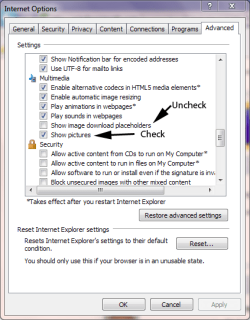
Also, check these settings as shown in this screenshot.

Place.PNG

You may also need Adobe Flash Player and Java for some web pages.
 

My Computer My Computer

At a glance

Windows 7 Ultimate SP1 64-BitIntel Core i7 870 @ 2.93GHz8Gb Dual-Channel DDR3 @ 664MHznVidia GeForce GTX 460 1024MB dedicated RAM
Computer Manufacturer/Model Number
HP Pavilion Elite 495UK
OS
Windows 7 Ultimate SP1 64-Bit
CPU
Intel Core i7 870 @ 2.93GHz
Motherboard
MSI 2A9C (CPU1)
Memory
8Gb Dual-Channel DDR3 @ 664MHz
Graphics Card(s)
nVidia GeForce GTX 460 1024MB dedicated RAM
Sound Card
Realtek HD Audio
Monitor(s) Displays
HP2310i
Screen Resolution
1920 x 1080
Hard Drives
1x1954GB Hitachi HDS22020ALA 330 (RAID), 1x1954GB Hitachi External for backup and storage
PSU
460W
Case
HP Elite
Cooling
Air cooled
Keyboard
Logitech K750 solar-powered keyboard
Mouse
Logitech Wireless M180 mouse
Internet Speed
2Mb
Other Info
Pure Avanti Flow Internet Radio with iPod Dock, 64Gb iPod, HP USB Speakers, Sony MDR-V500 Headphones, Sony Vaio F-Series Laptop
Thanks.
I looked, and Show Pictures is checked. Adobe Flash Player is up to date. Java probably is not. I'll look into that. IE9? too many horror stories.
 

My Computer My Computer

At a glance

Windows 7 Pro
Computer Manufacturer/Model Number
HP Touchsmart tm2
OS
Windows 7 Pro
The red X may indicate that your Java applets are not loading where the images should be. Here is an article from Java that describes the problem and the solution. This particular article is old, (and refers to IE6), but it describes the problem well, and once you've diagnosed the problem on your system, you can check for the most recent solution: " Red X image displayed where the applet should be, applets won't run":
http://www.java.com/en/download/help/redximage.xml (You can find a plethora of additional help on Google if you research the key words in quotes.)


Even though you have Java, it may not be up to date or working correctly on your system. The Java (Sun) website offers a lot of help and suggestions. Here are some links that you might explore to see if the Java download is the problem:

First, to see if you have a Java app currently working within your system, go to: Java + You. Under the big red /Free Java Download’ button in smaller print is a link to a Java scan called: "Do I have Java?" Let Java scan your machine and see what the results are. If the scan says your machine doesn't have Java installed click the option to install the latest Java version. If the scan says you already have a previous version of Java installed, you can go to Control Panel, Programs and Features and Uninstall it.

Then, to find out if Java is working properly on your system visit: Test your Java Virtual Machine (JVM), and you can go to the Java website for the most recent Java downloads.

To check which version of Java you have, go to: Verify Java Version and Java Help. There are several different Java apps, and you may not have downloaded the correct one for your system (and for your needs). One common problem is that if you use 32-bit and 64-bit browsers interchangeably, you will need to install both 32-bit and 64-bit Java in order to have the Java plug-in for both browsers.

Also, the last Java app you installed may have corrupted. If you need to remove your current Java app, you can run this tool called JavaRA (from Major Geeks – a very reliable forum) to remove old Java versions.

Here's a link to the Java downloads page: Java Downloads for All Operating Systems

After installing Java, restart your browser and verify Java has been installed correctly. You can verify that it has been installed correctly by clicking this link.
 

My Computer My Computer

At a glance

Vista 64 bit and 32 bit (SP2)Intel(R) Core(TM)2 Duo Processor T9400 (2.53 GHz4GB DDR2 System Memory (2 Dimm)512 MB NVIDIA GeForce 9600M GT
Computer Manufacturer/Model Number
HP Pavillion dv5t (generation 1)
OS
Vista 64 bit and 32 bit (SP2)
CPU
Intel(R) Core(TM)2 Duo Processor T9400 (2.53 GHz
Memory
4GB DDR2 System Memory (2 Dimm)
Graphics Card(s)
512 MB NVIDIA GeForce 9600M GT
Monitor(s) Displays
15.4" diagonal WSXGA+ High-Definition HP BrightView Widescre
Screen Resolution
1680 x 1050
Hard Drives
320GB 5400RPM SATA Hard Drive with HP ProtectSmart Hard Drive Protection
Keyboard
Built-in HP
Mouse
Built in - Synaptics TouchPad V6.5 on PS/2 Port
Internet Speed
Max
Other Info
~ Intel Next-Gen Wireless-N Mini-card w/Bluetooth ~ Blu-Ray ROM DVD+/-R/RW ~ Integ. HDTV Hybrid Tuner ~ 12 Cell Battery ~ MS Office (Home Premium) 2007 ~
Back
Top