Local Users and Groups Manager - Open

How to Open "Local Users and Groups" in Windows 7 and Windows 8

   Information
This will show you how to open Local Users and Groups so you can secure and manage user accounts and groups that are stored locally on your Windows 7 or Windows 8 computer.

By using Local Users and Groups, you can limit the ability of users and groups to perform certain actions by assigning rights and permissions to them. A right authorizes a user to perform certain actions on a computer, such as backing up files and folders or shutting down a computer. A permission is a rule that is associated with an object (usually a file, folder, or printer), and it regulates which users can have access to the object and in what manner.


   Note
Here is a brief explanation of what the Users and Groups folders are for. For more detailed information about Local Users and Groups, click on the blue ? on the toolbar in the Local Users and Groups window.
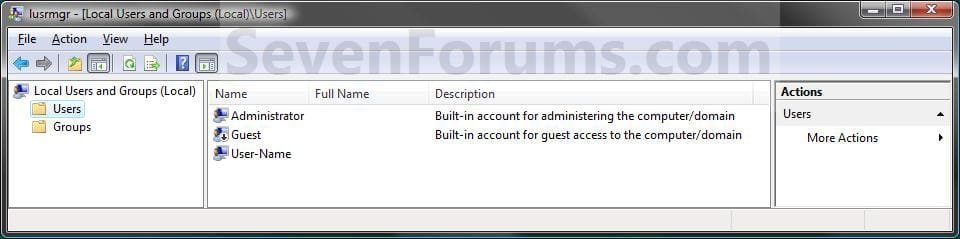
  • Users - The Users folder displays default user accounts as well as the user accounts that you create. These default user accounts are created automatically when you install the operating system. The following table describes each default user account that appears in Local Users and Groups.
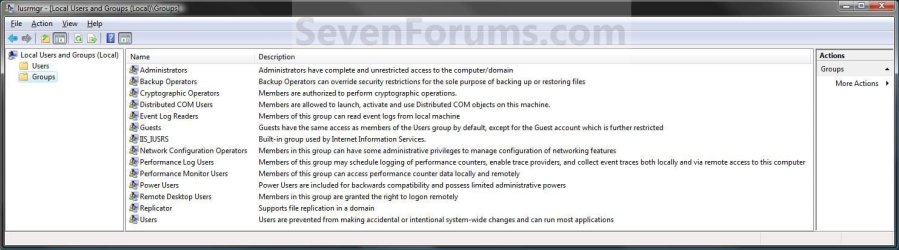
  • Groups - The Groups folder displays the default local groups as well as the local groups that you create. Default local groups are created automatically when you install the operating system. Belonging to a local group gives a user the rights and abilities to perform various tasks on the local computer.
   Warning

You will need to be an administrator to open Local Users and Groups.

In Windows 7, the Local Users and Groups will only be available in the Professional, Ultimate, and Enterpise editions.

In Windows RT, 8, and 8.1, the Local Users and Groups will only be available in the Pro and Enterprise editions.


EXAMPLE: Local Users and Groups Manager
Local_Users-1.jpg

Local_Users-2.jpg


OPTION ONE

Open "Local Users and Groups Manager" Directly


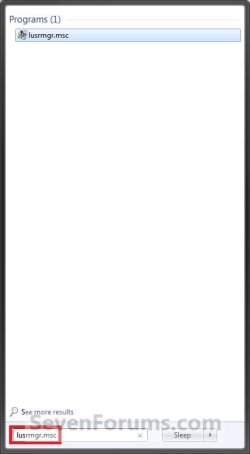
1. Press the Windows + R keys to open the Run dialog, type lusrmgr.msc, and press Enter.
NOTE: This file is located at C:\Windows\System32\lusrmgr.msc.

2. If prompted by UAC, click/tap on Yes.

3. You can now set and manage the Local Users and Groups settings on your computer to how you want them. (See example screenshots at the top of the tutorial)


OPTION TWO

Open "Local Users and Groups Manager" in Computer Management


1. Open the Control Panel (icons view), and click/tap on the Administrative Tools icon.

2. Close the Control Panel window.

3. In Administrative Tools, click/tap on the Computer Management icon.

4. If prompted by UAC, click/tap on Yes.

5. Close the Administrative Tools window.

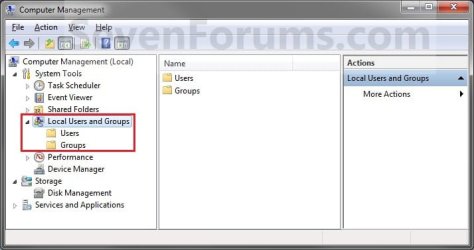
6. In the left pane of Computer Management, double click/tap on Local Users and Groups. (See screenshot below)
Local_Users-3.jpg
7. You can now set and manage the Local Users and Groups settings on your computer to how you want them. (See screenshot above)


OPTION THREE

Open "Local Users and Groups Manager" in Advanced User Accounts


1. Press the Windows + R keys to open the Run dialog, type netplwiz, and press Enter.

2. If prompted by UAC, click/tap on Yes.

3. Click/tap on the Advanced tab, and click/tap on the Advanced button. (See screenshot below)
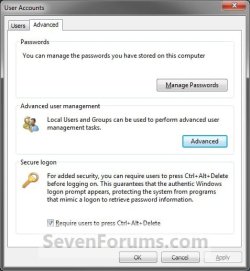
Adv_Users_Accounts.jpg
4. You can now set and manage the Local Users and Groups settings on your computer to how you want them. (See example screenshots at the top of the tutorial)
That's it,
Shawn


Attachments

  • Local_Users-A.jpg
    Local_Users-A.jpg
    45.1 KB · Views: 10,929
Last edited:
Too bad that I'm the current user running Windows 7 Home Premium. :what::(:cry:
 

My Computer

Computer Manufacturer/Model Number
Acer Aspire One 722 (AO722)
OS
Windows 7 Home Premium Service Pack 1 32-bit Build 7601
CPU
AMD C-50 Processor 1.0 Ghz
Memory
2 GB DDR3 RAM (1.73 usable in System Properties)
Graphics Card(s)
AMD Radeon HD 6200 series Graphics
Sound Card
High Definition Audio Device
Monitor(s) Displays
Generic PnP Monitor
Screen Resolution
1366 x 768 (recommended)
Hard Drives
320 GB HDD storage
298.09 GB in Disk Management (REAL)
Keyboard
Built-in on my laptop
Mouse
External mouse
Other Info
Installed Windows 7 Service Pack 1 by 9/9/2012
Local Users and Groups Manager

All tips are very useful.
Thanks and Regards,
 

My Computer

Computer Manufacturer/Model Number
Lenovo
OS
Windows 7 Ultimate x32
CPU
Core2Deo
Motherboard
Intel
Memory
4GBDDR2
Graphics Card(s)
Inbuilt
Sound Card
Inbuilt
You're welcome GunRock, and thank you. I'm glad they are able to help. :)
 

My Computer

Computer type
PC/Desktop
Computer Manufacturer/Model Number
Self built custom
OS
64-bit Windows 11 Pro for Workstations
CPU
Intel i7-8700K OC'd to 5 GHz
Motherboard
ASUS ROG Maximus XI Formula Z390
Memory
64 GB (4x16GB) G.SKILL TridentZ RGB DDR4 3600 MHz
Graphics Card(s)
ASUS ROG-STRIX-GTX1080TI-O11G-GAMING
Sound Card
Integrated
Monitor(s) Displays
2 x Samsung Odyssey G7 27"
Screen Resolution
2560x1440
Hard Drives
1TB Samsung 990 PRO M.2,
4TB Samsung 990 PRO PRO M.2,
TerraMaster F8 SSD Plus NAS
PSU
Seasonic Prime Titanium 850W
Case
Thermaltake Core P3
Cooling
Corsair Hydro H115i
Keyboard
Logitech wireless K800
Mouse
Logitech MX Master 4
Internet Speed
2 Gb/s Download and 100 Mb/s Upload
Antivirus
Malwarebyte Anti-Malware Premium
Browser
Google Chrome
Other Info
Logitech Z625 speaker system,
Logitech BRIO 4K Pro webcam,
HP Color LaserJet Pro MFP M477fdn,
APC SMART-UPS RT 1000 XL - SURT1000XLI,
Galaxy S23 Plus phone
Enabling Elevated Administrator Account

I wish to point out that jut about all of the suggestions made herein do not apply to the most common Windows 7 - Home Premium!
 

My Computer

Computer type
PC/Desktop
OS
Windos 7 Home premium

My Computer

Computer type
PC/Desktop
Computer Manufacturer/Model Number
Self built custom
OS
64-bit Windows 11 Pro for Workstations
CPU
Intel i7-8700K OC'd to 5 GHz
Motherboard
ASUS ROG Maximus XI Formula Z390
Memory
64 GB (4x16GB) G.SKILL TridentZ RGB DDR4 3600 MHz
Graphics Card(s)
ASUS ROG-STRIX-GTX1080TI-O11G-GAMING
Sound Card
Integrated
Monitor(s) Displays
2 x Samsung Odyssey G7 27"
Screen Resolution
2560x1440
Hard Drives
1TB Samsung 990 PRO M.2,
4TB Samsung 990 PRO PRO M.2,
TerraMaster F8 SSD Plus NAS
PSU
Seasonic Prime Titanium 850W
Case
Thermaltake Core P3
Cooling
Corsair Hydro H115i
Keyboard
Logitech wireless K800
Mouse
Logitech MX Master 4
Internet Speed
2 Gb/s Download and 100 Mb/s Upload
Antivirus
Malwarebyte Anti-Malware Premium
Browser
Google Chrome
Other Info
Logitech Z625 speaker system,
Logitech BRIO 4K Pro webcam,
HP Color LaserJet Pro MFP M477fdn,
APC SMART-UPS RT 1000 XL - SURT1000XLI,
Galaxy S23 Plus phone
How do I take control over my PC with Home Premium OS?

This post does not cover Home Premium that I can see.

For years I have struggled with Windows 7 crappy permissions policy for Home Premium.

I download (legally) JPG/AVI, etc that once downloaded or copied, it will then not let me move them, copy them, or touch them.
Regardless that when I setup OS Home Premium 64bit and it told me my account is as Administrator, it still will not allow me to change READ ONLY, COPY, MOVE......... OR DELETE them.

I think I need to be a REAL Administrator and not this terrible USER/ADMIN account that does nothing, but can not find how to make me one or how to get to it. YES, this is my machine and OS bought and paid for.

So, anyone know how to in Home Premium take control over the PC and OS we purchased instead of Microsoft telling us this is not your PC to control.

I am now dealing with some OLD JPG files that I can not delete, copy, cut, etc.
When I try to take OWNERSHIP, the permissions are forom an old UNIX user and it will NOT let me make any changes to the file.

What do I do? Pretty bad if Windows allows you to ADD to your file system but will not let you REMOVE them from you file system.

ANYONE have an answer? This has me really ticked off over the years.

Thanks in advance is you can help.
 

My Computer

Computer Manufacturer/Model Number
HP pavilion
OS
windows 7 ultimate
CPU
2 quads @ 2.4
Memory
3gb
Monitor(s) Displays
tv
Hard Drives
many vendors
This post does not cover Home Premium that I can see.

For years I have struggled with Windows 7 crappy permissions policy for Home Premium.

I download (legally) JPG/AVI, etc that once downloaded or copied, it will then not let me move them, copy them, or touch them.
Regardless that when I setup OS Home Premium 64bit and it told me my account is as Administrator, it still will not allow me to change READ ONLY, COPY, MOVE......... OR DELETE them.

I think I need to be a REAL Administrator and not this terrible USER/ADMIN account that does nothing, but can not find how to make me one or how to get to it. YES, this is my machine and OS bought and paid for.

So, anyone know how to in Home Premium take control over the PC and OS we purchased instead of Microsoft telling us this is not your PC to control.

I am now dealing with some OLD JPG files that I can not delete, copy, cut, etc.
When I try to take OWNERSHIP, the permissions are forom an old UNIX user and it will NOT let me make any changes to the file.

What do I do? Pretty bad if Windows allows you to ADD to your file system but will not let you REMOVE them from you file system.

ANYONE have an answer? This has me really ticked off over the years.

Thanks in advance is you can help.

Please see below. :)

Hello vlavalle, and welcome to Seven Forums.

Sorry, but it sure doesn't. Please see the red warning box at the top of the tutorial. :(

If you like, you could use one of the other options in the tutorial below to enable the built-in Administrator instead.

http://www.sevenforums.com/tutorials/507-built-administrator-account-enable-disable.html

:ditto:
 

My Computer

Computer type
PC/Desktop
Computer Manufacturer/Model Number
Self built custom
OS
64-bit Windows 11 Pro for Workstations
CPU
Intel i7-8700K OC'd to 5 GHz
Motherboard
ASUS ROG Maximus XI Formula Z390
Memory
64 GB (4x16GB) G.SKILL TridentZ RGB DDR4 3600 MHz
Graphics Card(s)
ASUS ROG-STRIX-GTX1080TI-O11G-GAMING
Sound Card
Integrated
Monitor(s) Displays
2 x Samsung Odyssey G7 27"
Screen Resolution
2560x1440
Hard Drives
1TB Samsung 990 PRO M.2,
4TB Samsung 990 PRO PRO M.2,
TerraMaster F8 SSD Plus NAS
PSU
Seasonic Prime Titanium 850W
Case
Thermaltake Core P3
Cooling
Corsair Hydro H115i
Keyboard
Logitech wireless K800
Mouse
Logitech MX Master 4
Internet Speed
2 Gb/s Download and 100 Mb/s Upload
Antivirus
Malwarebyte Anti-Malware Premium
Browser
Google Chrome
Other Info
Logitech Z625 speaker system,
Logitech BRIO 4K Pro webcam,
HP Color LaserJet Pro MFP M477fdn,
APC SMART-UPS RT 1000 XL - SURT1000XLI,
Galaxy S23 Plus phone
hello,
about Groups - The Groups folder displays the default local groups as well as the local groups that you create. Default local groups are created automatically when you install the operating system. Belonging to a local group gives a user the rights and abilities to perform various tasks on the local computer.

How many groups can be?
Which groups are most powerfull?
Do u place ur main local user/admin in all grups?
 

My Computers

System One System Two

  • Computer type
    PC/Desktop
    OS
    Windows 7 Ultimate 32bit
    Antivirus
    What is that? 👀
    Browser
    IE 9
  • Computer type
    PC/Desktop
    System Manufacturer/Model Number
    𝐖𝐈𝐍𝐃𝐎𝐖𝐒 𝟕 x86
    OS
    AlienOS
    Motherboard
    ALIENZ
    Internet Speed
    2FAST4U
    Antivirus
    What is that? 👀
Back
Top