Location of leftband in context menu and some other issue WSB?

nnq2603

New member
Local time
5:09 AM
Messages
20
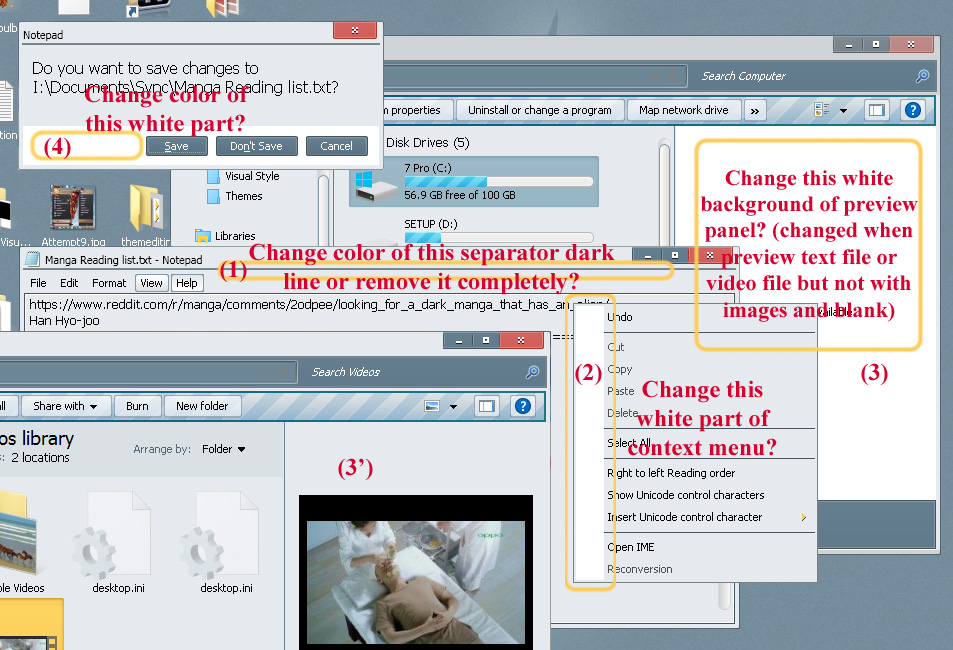
I want to ask about some location to edit in WSB. Thanks for reading.
UXJC5eC.jpg


(3) Changed color works when preview text files and videos files but not when blank (nothing selected) or images file. Doesn't work when select a folder either.
 
Last edited:

My Computer My Computer

At a glance

Windows 7 Ultimate x64Intel(R) Core(TM) i5-6402P Skylake (14nm) 115...8.00 GB single DDR4 @ 1066MHzIntel(R) HD Graphics 510 (rev6)
OS
Windows 7 Ultimate x64
CPU
Intel(R) Core(TM) i5-6402P Skylake (14nm) 1151 LGA
Motherboard
MSI B150M MORTAR (MS-7972) 2.0
Memory
8.00 GB single DDR4 @ 1066MHz
Graphics Card(s)
Intel(R) HD Graphics 510 (rev6)
Sound Card
High Definition Audio Device
Monitor(s) Displays
HP S2032 1600x900 (60Hz)
Hard Drives
Model ST1000DM 003-1SB10C SCSI Disk Device
OK, I find out (3). It was located at Explorer & Shell > Explorer > ReadingPane > Background (3 gradient colors).

Accidentally change something else and got rid of the white leftband of context menu (2).

(1) & (4) remain unsolved.
fd27a3f5b0.jpg


Another issue is menu bar color. When I open a new notepad window, menu bar looks glitched, maximized it and restore it down solve problem but I guess I wrong doing something. And there's a solid fix for the problem. Scrshot show below:
Open it and resize windows randomly (by mouse pointer dragging)
gbnw0on.jpg

Maximized and restore down:
SX817sZ.jpg


Menu bar glitch also appears in another applications, too. I did so much replace and change in image resource of msstyle and get lost. I can't remember what I did wrong at the 1st place.

*Edit: Found out (4).
Explorer & Shell > Shell > Taskdialog > SecondaryPanel

Still (1) and menu bar glitch remains unsolved
 
Last edited:

My Computer My Computer

At a glance

Windows 7 Ultimate x64Intel(R) Core(TM) i5-6402P Skylake (14nm) 115...8.00 GB single DDR4 @ 1066MHzIntel(R) HD Graphics 510 (rev6)
OS
Windows 7 Ultimate x64
CPU
Intel(R) Core(TM) i5-6402P Skylake (14nm) 1151 LGA
Motherboard
MSI B150M MORTAR (MS-7972) 2.0
Memory
8.00 GB single DDR4 @ 1066MHz
Graphics Card(s)
Intel(R) HD Graphics 510 (rev6)
Sound Card
High Definition Audio Device
Monitor(s) Displays
HP S2032 1600x900 (60Hz)
Hard Drives
Model ST1000DM 003-1SB10C SCSI Disk Device
For #1 look at the bottom of the images at
Windows and Caption Buttons > Aero > Dwm Window > Frames > Normal > Top > Active

Windows and Caption Buttons > Aero > Dwm Window > Frames > Normal > Top > Inactive
top.PNG

For menu bar make sure the image is the same at both
Explorer & Shell > Explorer > Menu Bar > Background

Toolbars, Headers and Rebar > Rebar > Rebar

You did very good finding the others.

Jerry
 

My Computer My Computer

At a glance

Win 7 Pro x64 / Win 10 ProIntel(R) Core(TM) i7-3630QM CPU @ 2.40GHz12 GB(1) Intel(R) HD Graphics 4000 (2) NVIDIA GeFo...
Computer type
Laptop
Computer Manufacturer/Model Number
Sager NP9170
OS
Win 7 Pro x64 / Win 10 Pro
CPU
Intel(R) Core(TM) i7-3630QM CPU @ 2.40GHz
Motherboard
CLEVO P170EM
Memory
12 GB
Graphics Card(s)
(1) Intel(R) HD Graphics 4000 (2) NVIDIA GeForce GTX 675M
Sound Card
(1) Realtek High Definition Audio (2) Intel(R) Display Aud
Monitor(s) Displays
17.3
Screen Resolution
1920x1080
Hard Drives
(1) Samsung 860 EVO 500GB(OS) (1) Samsung 860 EVO 500GB(Data)
Keyboard
Backlite
Antivirus
MSE, Malwarebytes Pro
Browser
Firefox
Other Info
DESKTOP: Custom-built.
OS: Win 10 Pro x64.
CASE: Rosewill R5.
CPU: Intel I5 4670K CPU @ 3.40GHz.
CPU COOLER: Cool Master Hyper 212 EVO.
MOTHERBOARD: Asus Z87-A.
MEMORY: Kingston HyperX 2x4 GB.
GPU: Nvidia Geforce 650 TI.
PSU: Corsair TX750.
DRIVES: (1) Samsung 840 120 GB SSD (2) Western Digital blue 500 GB 7200 RPM.
Thanks so much, when I comeback home I'll try out those images location (especially the stretch out frame image, usually it only come visible when full stretched, I clearly missed that). I'm unable to +rep to your answer 'coz system return msg "You must spread some Reputation around before giving it to Bongo again." Although, I just gave reputation to your account 2 or 3 times before... but now I can't.
 

My Computer My Computer

At a glance

Windows 7 Ultimate x64Intel(R) Core(TM) i5-6402P Skylake (14nm) 115...8.00 GB single DDR4 @ 1066MHzIntel(R) HD Graphics 510 (rev6)
OS
Windows 7 Ultimate x64
CPU
Intel(R) Core(TM) i5-6402P Skylake (14nm) 1151 LGA
Motherboard
MSI B150M MORTAR (MS-7972) 2.0
Memory
8.00 GB single DDR4 @ 1066MHz
Graphics Card(s)
Intel(R) HD Graphics 510 (rev6)
Sound Card
High Definition Audio Device
Monitor(s) Displays
HP S2032 1600x900 (60Hz)
Hard Drives
Model ST1000DM 003-1SB10C SCSI Disk Device
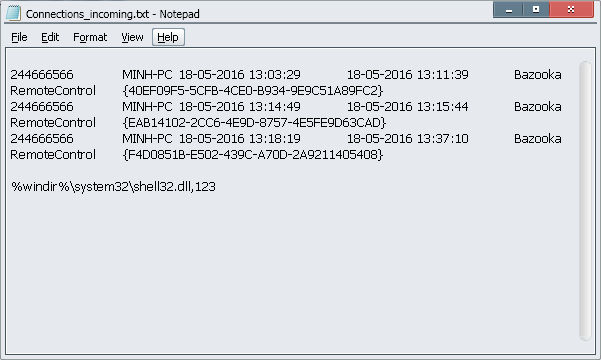
Windows and Caption Buttons > Aero > Dwm Window > Frames > Normal > Top > Active

Windows and Caption Buttons > Aero > Dwm Window > Frames > Normal > Top > Inactive
Can't figure this one out. I try flat out color anything inbetween but still get that separator line.
The image at Windows and Caption Buttons > Aero > Dwm Window > Frames > Normal > Top looks like this
2dd4bd7507.png
and after all kinf of attempts (fine turning sizingmargin make the separator line thinner but unable to dismiss it completely) I end-up with changing to flat color like this
2dd4d3eee6.png
, still not works. And I also try to replace it as 2 separated image active and inactive (one by one), doesn't work either. The separator line still there at the end.

It's getting worse with the second issue. The menu-bar glitchs. I triple checked both location
Explorer & Shell > Explorer > Menu Bar > Background
Toolbars, Headers and Rebar > Rebar > Rebar
And they're the same 1px x 1px with color of choice (sizingmargin 0,0,0,0 - sizingtype stretch). This image was used on different locations of this msstyle and nothing got wrong with it.

May I compressed the visualstyle and sent it to you?... You might give it a look if you have time.
 

My Computer My Computer

At a glance

Windows 7 Ultimate x64Intel(R) Core(TM) i5-6402P Skylake (14nm) 115...8.00 GB single DDR4 @ 1066MHzIntel(R) HD Graphics 510 (rev6)
OS
Windows 7 Ultimate x64
CPU
Intel(R) Core(TM) i5-6402P Skylake (14nm) 1151 LGA
Motherboard
MSI B150M MORTAR (MS-7972) 2.0
Memory
8.00 GB single DDR4 @ 1066MHz
Graphics Card(s)
Intel(R) HD Graphics 510 (rev6)
Sound Card
High Definition Audio Device
Monitor(s) Displays
HP S2032 1600x900 (60Hz)
Hard Drives
Model ST1000DM 003-1SB10C SCSI Disk Device
Go ahead and zip up the .msstyles and post it in your next post, and
i will look at it.

Jerry
 

My Computer My Computer

At a glance

Win 7 Pro x64 / Win 10 ProIntel(R) Core(TM) i7-3630QM CPU @ 2.40GHz12 GB(1) Intel(R) HD Graphics 4000 (2) NVIDIA GeFo...
Computer type
Laptop
Computer Manufacturer/Model Number
Sager NP9170
OS
Win 7 Pro x64 / Win 10 Pro
CPU
Intel(R) Core(TM) i7-3630QM CPU @ 2.40GHz
Motherboard
CLEVO P170EM
Memory
12 GB
Graphics Card(s)
(1) Intel(R) HD Graphics 4000 (2) NVIDIA GeForce GTX 675M
Sound Card
(1) Realtek High Definition Audio (2) Intel(R) Display Aud
Monitor(s) Displays
17.3
Screen Resolution
1920x1080
Hard Drives
(1) Samsung 860 EVO 500GB(OS) (1) Samsung 860 EVO 500GB(Data)
Keyboard
Backlite
Antivirus
MSE, Malwarebytes Pro
Browser
Firefox
Other Info
DESKTOP: Custom-built.
OS: Win 10 Pro x64.
CASE: Rosewill R5.
CPU: Intel I5 4670K CPU @ 3.40GHz.
CPU COOLER: Cool Master Hyper 212 EVO.
MOTHERBOARD: Asus Z87-A.
MEMORY: Kingston HyperX 2x4 GB.
GPU: Nvidia Geforce 650 TI.
PSU: Corsair TX750.
DRIVES: (1) Samsung 840 120 GB SSD (2) Western Digital blue 500 GB 7200 RPM.
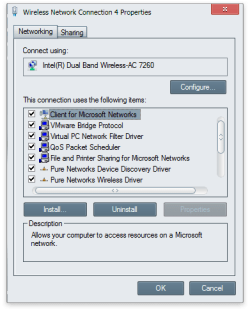
I looked at the .msstyles you PM me about and to get rid of that line I edited the images at
Windows and Caption Buttons > Aero > Dwm Window > Frames > Normal > Top > Active
&
Windows and Caption Buttons > Aero > Dwm Window > Frames > Normal > Top > Inactive
It is that dark color in the center of them images.
Wireless Network Connection 4 Properties.png


I could not replicate the problem you're having with the notepad menu, but the background image for that is at
Lists, Menus & Tabs > Menu > BarBackground

Are you using this theme and trying to edit it at the same time? If you are you cannot do it that way you need to switch to a different theme and then log off and then log back on and then you can edit this theme.

Jerry
 

My Computer My Computer

At a glance

Win 7 Pro x64 / Win 10 ProIntel(R) Core(TM) i7-3630QM CPU @ 2.40GHz12 GB(1) Intel(R) HD Graphics 4000 (2) NVIDIA GeFo...
Computer type
Laptop
Computer Manufacturer/Model Number
Sager NP9170
OS
Win 7 Pro x64 / Win 10 Pro
CPU
Intel(R) Core(TM) i7-3630QM CPU @ 2.40GHz
Motherboard
CLEVO P170EM
Memory
12 GB
Graphics Card(s)
(1) Intel(R) HD Graphics 4000 (2) NVIDIA GeForce GTX 675M
Sound Card
(1) Realtek High Definition Audio (2) Intel(R) Display Aud
Monitor(s) Displays
17.3
Screen Resolution
1920x1080
Hard Drives
(1) Samsung 860 EVO 500GB(OS) (1) Samsung 860 EVO 500GB(Data)
Keyboard
Backlite
Antivirus
MSE, Malwarebytes Pro
Browser
Firefox
Other Info
DESKTOP: Custom-built.
OS: Win 10 Pro x64.
CASE: Rosewill R5.
CPU: Intel I5 4670K CPU @ 3.40GHz.
CPU COOLER: Cool Master Hyper 212 EVO.
MOTHERBOARD: Asus Z87-A.
MEMORY: Kingston HyperX 2x4 GB.
GPU: Nvidia Geforce 650 TI.
PSU: Corsair TX750.
DRIVES: (1) Samsung 840 120 GB SSD (2) Western Digital blue 500 GB 7200 RPM.
I'm so busy this week, so I haven't check out forum. But if available could you post the image that you edited to see what does it look like? My previous modified image still have dark pixel in-between?? I honestly don't see that.
 

My Computer My Computer

At a glance

Windows 7 Ultimate x64Intel(R) Core(TM) i5-6402P Skylake (14nm) 115...8.00 GB single DDR4 @ 1066MHzIntel(R) HD Graphics 510 (rev6)
OS
Windows 7 Ultimate x64
CPU
Intel(R) Core(TM) i5-6402P Skylake (14nm) 1151 LGA
Motherboard
MSI B150M MORTAR (MS-7972) 2.0
Memory
8.00 GB single DDR4 @ 1066MHz
Graphics Card(s)
Intel(R) HD Graphics 510 (rev6)
Sound Card
High Definition Audio Device
Monitor(s) Displays
HP S2032 1600x900 (60Hz)
Hard Drives
Model ST1000DM 003-1SB10C SCSI Disk Device
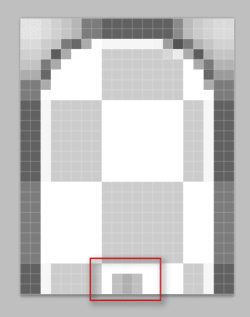
Here it is.
DWMWindow_FrameTopImage.png

Jerry
 

My Computer My Computer

At a glance

Win 7 Pro x64 / Win 10 ProIntel(R) Core(TM) i7-3630QM CPU @ 2.40GHz12 GB(1) Intel(R) HD Graphics 4000 (2) NVIDIA GeFo...
Computer type
Laptop
Computer Manufacturer/Model Number
Sager NP9170
OS
Win 7 Pro x64 / Win 10 Pro
CPU
Intel(R) Core(TM) i7-3630QM CPU @ 2.40GHz
Motherboard
CLEVO P170EM
Memory
12 GB
Graphics Card(s)
(1) Intel(R) HD Graphics 4000 (2) NVIDIA GeForce GTX 675M
Sound Card
(1) Realtek High Definition Audio (2) Intel(R) Display Aud
Monitor(s) Displays
17.3
Screen Resolution
1920x1080
Hard Drives
(1) Samsung 860 EVO 500GB(OS) (1) Samsung 860 EVO 500GB(Data)
Keyboard
Backlite
Antivirus
MSE, Malwarebytes Pro
Browser
Firefox
Other Info
DESKTOP: Custom-built.
OS: Win 10 Pro x64.
CASE: Rosewill R5.
CPU: Intel I5 4670K CPU @ 3.40GHz.
CPU COOLER: Cool Master Hyper 212 EVO.
MOTHERBOARD: Asus Z87-A.
MEMORY: Kingston HyperX 2x4 GB.
GPU: Nvidia Geforce 650 TI.
PSU: Corsair TX750.
DRIVES: (1) Samsung 840 120 GB SSD (2) Western Digital blue 500 GB 7200 RPM.
Thanks. I haven't seen notepad bar glitch after I replace the 1x1px with 1x2px same color as I see it has imagecount = 2 (Lists, Menus & Tabs > Menu > BarBackground). Not sure why previous times I see it may be the reason is what you said.
After check out this all over again, the locations I missing before is this ones:
Windows and Caption Buttons > Aero > Dwm Window > Frames > Shadowless Frames > Normal > Top
To ensure, I also replace in
Windows and Caption Buttons > Aero > Dwm Window > Frames > Fading > Top

Last time I only replace image in
Windows and Caption Buttons > Aero > Dwm Window > Frames > Normal > Top
And it didn't work. Another little problem about this one is this modification make the look of windows frame underneat band change. I mean 1st it looks like this (dark gray cyan)
gbnw0on.jpg

After modify those image it looks like this (light color):
1ViVEtw.jpg


Is there anyway to still keep darkcyan color for normal windows but remove thin separator line for properties windows? Some kind of tricky sizingmargin could do?
My previous edited image looks the same as yours. But I haven't replace images in all necessary locations.

Might be 2 last things about this visual style to ask. How to remove these stuffs.
qYRiSwd.jpg
 

My Computer My Computer

At a glance

Windows 7 Ultimate x64Intel(R) Core(TM) i5-6402P Skylake (14nm) 115...8.00 GB single DDR4 @ 1066MHzIntel(R) HD Graphics 510 (rev6)
OS
Windows 7 Ultimate x64
CPU
Intel(R) Core(TM) i5-6402P Skylake (14nm) 1151 LGA
Motherboard
MSI B150M MORTAR (MS-7972) 2.0
Memory
8.00 GB single DDR4 @ 1066MHz
Graphics Card(s)
Intel(R) HD Graphics 510 (rev6)
Sound Card
High Definition Audio Device
Monitor(s) Displays
HP S2032 1600x900 (60Hz)
Hard Drives
Model ST1000DM 003-1SB10C SCSI Disk Device
Is there anyway to still keep darkcyan color for normal windows but remove thin separator line for properties windows? Some kind of tricky sizingmargin could do?
I tried several ways, modifying the image and also trying different margins and I could.get rid of that line and still keep that color under the address bar.

As for the rest of it.

White line, Edit the top and bottom of this image.
Explorer & Shell > Explorer > PreviewPane > <1> > <1>


Bottom of search
Toolbars, Headers and Rebar > Toolbars & Headers > List View Pop-up

Jerry
 

My Computer My Computer

At a glance

Win 7 Pro x64 / Win 10 ProIntel(R) Core(TM) i7-3630QM CPU @ 2.40GHz12 GB(1) Intel(R) HD Graphics 4000 (2) NVIDIA GeFo...
Computer type
Laptop
Computer Manufacturer/Model Number
Sager NP9170
OS
Win 7 Pro x64 / Win 10 Pro
CPU
Intel(R) Core(TM) i7-3630QM CPU @ 2.40GHz
Motherboard
CLEVO P170EM
Memory
12 GB
Graphics Card(s)
(1) Intel(R) HD Graphics 4000 (2) NVIDIA GeForce GTX 675M
Sound Card
(1) Realtek High Definition Audio (2) Intel(R) Display Aud
Monitor(s) Displays
17.3
Screen Resolution
1920x1080
Hard Drives
(1) Samsung 860 EVO 500GB(OS) (1) Samsung 860 EVO 500GB(Data)
Keyboard
Backlite
Antivirus
MSE, Malwarebytes Pro
Browser
Firefox
Other Info
DESKTOP: Custom-built.
OS: Win 10 Pro x64.
CASE: Rosewill R5.
CPU: Intel I5 4670K CPU @ 3.40GHz.
CPU COOLER: Cool Master Hyper 212 EVO.
MOTHERBOARD: Asus Z87-A.
MEMORY: Kingston HyperX 2x4 GB.
GPU: Nvidia Geforce 650 TI.
PSU: Corsair TX750.
DRIVES: (1) Samsung 840 120 GB SSD (2) Western Digital blue 500 GB 7200 RPM.
Back
Top