
How to Add "Log Off" Computer to the Desktop Context Menu in Windows 7
Information
This will show you how to add or remove Log Off computer to the desktop context menu in Vista and Windows 7.
EXAMPLE: Log Off in Desktop Context Menu
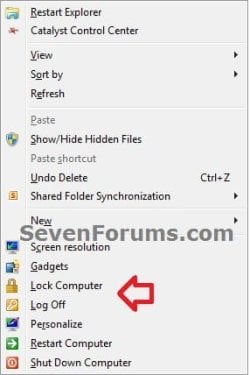
Here's How:
1. To Add "Log Off" to the Desktop Context Menu
A) Click on the Download button below to download the file below.
Add_Log_Off_to_Desktop_Context_Menu.reg
Download
B) Go to step 3.
2. To Remove "Log Off" from the Desktop Context Menu
A) Click on the Download button below to download the file below.
Remove_Log_Off_from_Desktop_Context_Menu.reg
Download
3. Click on Save, and save the REG file to the desktop.
4. Double click on the REG file to merge it, and click on Run, Yes (UAC-Windows 7) or Continue (UAC-Vista), Yes, and OK when prompted to approve the merge.
5. When done, you can delete the downloaded .reg file if you like.
6. Right click on your desktop to see the change.
That's it,
Shawn
Related Tutorials
- How to Add "Shut Down" Computer to the Desktop Context Menu in Windows 7
- How to Add "Restart" Computer to the Desktop Context Menu in Windows 7
- How to Add "Lock Computer" to the Desktop Context Menu in Windows 7
- How to Create a "Log Off" Shortcut in Windows
- How to Add or Remove Log Off from the CTRL+ALT+DEL Screen
- How to Enable or Disable "Log off" in the Start Menu of Windows 7
- How to Add "Lock Computer and Turn Off Monitor" to the Context Menu in Windows
- How to Add a "Power" Cascading Desktop Context Menu in Windows 7
Attachments
Last edited:


