Lost access to C: drive and admin features

Run in a evalated prompt the following command, to reset all permissions to default.
secedit /configure /cfg %windir%\inf\defltbase.inf /db defltbase.sdb /verbose


My Computer

Computer type
PC/Desktop
Computer Manufacturer/Model Number
Dell OP7010
OS
Windows 7 Enterprise (x64); Windows Server 2008 R2 (x64)
Memory
16GB
Monitor(s) Displays
4 Dell 24" LCD
Screen Resolution
1280x1024
Keyboard
Dell
Mouse
Dell Optical
Internet Speed
40meg
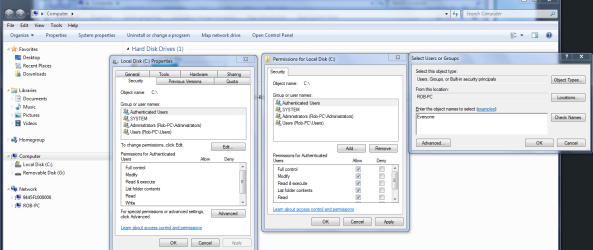
Have you tried going into the Security tab of the drive?

You can give everyone full access to the drive by adding "Everyone" where it shows in the picture below. Don't forget to hit "apply" and "ok".
 

Attachments

  • Sharing entire C drive authenticated users.PNG
    Sharing entire C drive authenticated users.PNG
    65.4 KB · Views: 224

My Computer

Computer type
PC/Desktop
Computer Manufacturer/Model Number
Home built
OS
Windows 7 Ult, Windows 8.1 Pro,
CPU
Q9650-4.275GHz, E8600 4.5GHz, E6750-3.8GHz
Motherboard
Evga 780i FTW
Memory
G.Skill PC2 9600 1200Mhz 5 5 5 15 2T
Graphics Card(s)
GTX480
Sound Card
Asus Xonar D2
Monitor(s) Displays
HannsG
Screen Resolution
1680X1050
Hard Drives
GSkill Phoenix Pro 120GB SSD
PSU
ThermalTake Toughpower 1000Watt modular
Case
ThermalTake XaserV
Cooling
Xigmatek S1283
Keyboard
Logitech G15
Mouse
Logitech G9
Internet Speed
T1
Any solution yet?

Hey Kyrios,

I have made the same mistake as you did but in Win 10. I got the same behavior as you did in Win 7. Nothing work to reestablish my privileges. Did you find any solution to restore your data? Thanks for any info!
 

My Computer

Computer type
PC/Desktop
OS
Win 10
Hi Gfdan,

Do you have access to an administrative account and are able to perform administrative actions? If not, you have truly made the same mistake as Kyrios, and it'll be a long recovery mission for you.
 

My Computer

Computer type
PC/Desktop
OS
Windows 10, Windows 8.1 Pro, Windows 7 Professional, OS X El Capitan
Back
Top