JavaScript is disabled. For a better experience, please enable JavaScript in your browser before proceeding.
You are using an out of date browser. It may not display this or other websites correctly.
You should upgrade or use an
alternative browser .
Lost my Startup folder while using Autoruns
I started to use Autoruns to speed up my boot - and must have unchecked something that made my Startup folder disappear from All Programs.
Computer Manufacturer/Model Number HP Pavilion KQ574AV OS Windows 7
System Restore to before you did this??
Computer type PC/Desktop Computer Manufacturer/Model Number Lenovo IdeaCenter 450 OS Windows 10 Pro X64 CPU Intel Quad Core i7-4770 @ 3.4Ghz Memory 16.0GB PC3-12800 DDR3 SDRAM 1600 MHz Graphics Card(s) Intel Integrated HD Graphics Sound Card Realtek HD Audio Monitor(s) Displays HP 22" LCD Screen Resolution 1680 x 1050 Hard Drives 250GB Samsung EVO SATA-3 SSD
2TB Seagate ST2000DM001 SATA-2
1.5TB Seagate ST3150041AS SATA Keyboard Dell USB Mouse Lenovo USB Internet Speed Cable via Road Runner 3MB Upload, 30MB Download Antivirus Windows Defender, MBAM Pro, MBAE Browser Seamonkey Other Info UEFI/GPT
PLDS DVD-RW DH16AERSH
New member
Member
VIP
Thread Starter
Absolutely - but, even after shutting down my Firewall and anti-virus, none of my System Restores will complete successfully.
Computer Manufacturer/Model Number HP Pavilion KQ574AV OS Windows 7
You've got available system restore points - correct? So just mount one and copy the folder back manually.
It should be here:
C:\Users\Username\AppData\Roaming\Microsoft\Windows\Start Menu\Programs\Startup
or
%AppData%\Microsoft\Windows\Start Menu\Programs\Startup
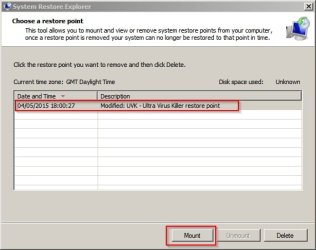
So if you mount a restore point using something like "System Restore Explorer" you can just copy the folder back.
Computer type Laptop Computer Manufacturer/Model Number ASUS OS Microsoft Windows 7 Home Premium 64-bit 7601 Multiprocessor Free Service Pack 1 CPU AMD C-60 APU with Radeon(tm) HD Graphics Motherboard ASUSTeK COMPUTER INC. X501U Memory 4.00 GB Graphics Card(s) AMD Radeon HD 6290 Graphics Sound Card (1) AMD High Definition Audio Device (2) Realtek High Defi Screen Resolution 1366 x 768 x 32 bits (4294967296 colors) @ 60 Hz Hard Drives Hitachi HTS545050A7E380 SATA Disk Device Antivirus Comodo CIS & FW, SecureAplus App Whitelisting, Threatfire Browser Cyberfox 64bit, Opera 64bit, Airfox Other Info Spy-The-Spy, HitmanPro.Alert, Norton Connect Safe, MJRegWatcher, BitDefender TrafficLight, Voodoo Shield, Zemana AntiMalware
Quick Guide
Quick Guide:
Mount restore point:
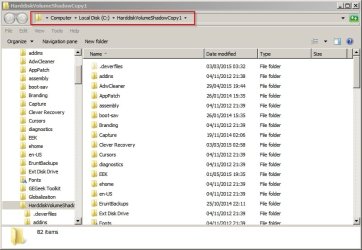
In the window that opens browse to:
"C:\HarddiskVolumeShadowCopy1\Users\Username\AppData\Roaming\Microsoft\Windows\Start Menu\Programs\Startup"
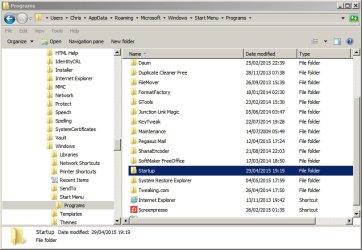
Highlight the Startup folder
Then copy it back to C:\Users\Username\AppData\Roaming\Microsoft\Windows\Start Menu\Programs\Startup
or
%AppData%\Microsoft\Windows\Start Menu\Programs\Startup
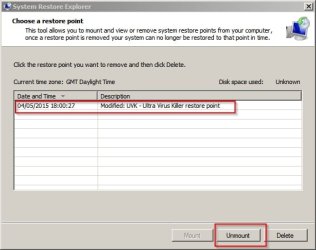
Then unmount the restore point:
Last edited: May 4, 2015
Computer type Laptop Computer Manufacturer/Model Number ASUS OS Microsoft Windows 7 Home Premium 64-bit 7601 Multiprocessor Free Service Pack 1 CPU AMD C-60 APU with Radeon(tm) HD Graphics Motherboard ASUSTeK COMPUTER INC. X501U Memory 4.00 GB Graphics Card(s) AMD Radeon HD 6290 Graphics Sound Card (1) AMD High Definition Audio Device (2) Realtek High Defi Screen Resolution 1366 x 768 x 32 bits (4294967296 colors) @ 60 Hz Hard Drives Hitachi HTS545050A7E380 SATA Disk Device Antivirus Comodo CIS & FW, SecureAplus App Whitelisting, Threatfire Browser Cyberfox 64bit, Opera 64bit, Airfox Other Info Spy-The-Spy, HitmanPro.Alert, Norton Connect Safe, MJRegWatcher, BitDefender TrafficLight, Voodoo Shield, Zemana AntiMalware
Absolutely - but, even after shutting down my Firewall and anti-virus, none of my System Restores will complete successfully.
Try system restore from Safe mode.
Computer type PC/Desktop Computer Manufacturer/Model Number Custom Built OS Windows 10 Pro x64, Windows 8.1 Pro x64, Windows 7 Ultimate x64 SP1, CPU INTEL i9-7920X LGA 2066 Motherboard Gigabyte X299-WU8 F3 Memory 64 GB (4 X 16 GB) G-Skill V Series DDR4 3200 Quad Channel Graphics Card(s) EVGA GTX 1060 SC 3 GB Sound Card Realtek Onboard ALC1220 Monitor(s) Displays 2 x Samsung S27E310 Screen Resolution 1920x1080 Hard Drives Samsung 2 x 970 EVO Plus 500 GB NVMe
1 x 6TB WD 6003FZBX SATA
1 x 6TB WD 60EFRX SATA
12 x 3TB WD 30EFRX SATA PSU Seasonic X-1050 Case Thermaltake Armor+ Cooling Corsair H80i V2 Liquid AOI Cooler Keyboard Logitech G510s Mouse Logitech MX Master 2S Internet Speed 200 Mb/s Antivirus ESET NOD32 13.1 Browser EDGE (Dev, Canary, Beta), Chrome Other Info ASUS RT-AC68U router
Malwarebytes 4.0.4
New member
Member
VIP
Thread Starter
Will do! If that doesn't work, I'll try mounting a Restore Point.
Computer Manufacturer/Model Number HP Pavilion KQ574AV OS Windows 7
New member
Member
VIP
Thread Starter
I ran System Restore in Safe Mode and none of my restore points would work. Thanks for the detailed instructions on how to mount a Restore Point and restore a single file. FYI: I resorted to an Image File for restoration and then saw your instructions on how to extract a file from System Restore. I'll be sure to keep those instructions for future use. Thanks again for the help!!!
Computer Manufacturer/Model Number HP Pavilion KQ574AV OS Windows 7