Solved Low resolution texture problem affecting multiple games

gamer dude

New member
Member
Local time
12:54 AM
Messages
47
Location
Wales, UK
Hey guys for some reason the textures in quite a few of my games have suddenly changed to a really bad resolution, I have changed none of the settings on the games all of them are set to High.
I honestly don't know what's happening...

Here's some screenshots:

Mirrors Edge - here's a comparison picture, the first one is from a 2 months ago and the second is today. As you can see on the second screenshot the textures on the clothes are really bad compared to the first one.

1: http://i.imgur.com/a3MuRSc.jpg
2: http://i.imgur.com/V4yC0fq.jpg

Next Car Game Tech Demo - This is the first game where I noticed the texture problem (a few days ago) as you can see the texture on the car is just turned really bad

1: http://i.imgur.com/t0xxCsg.jpg

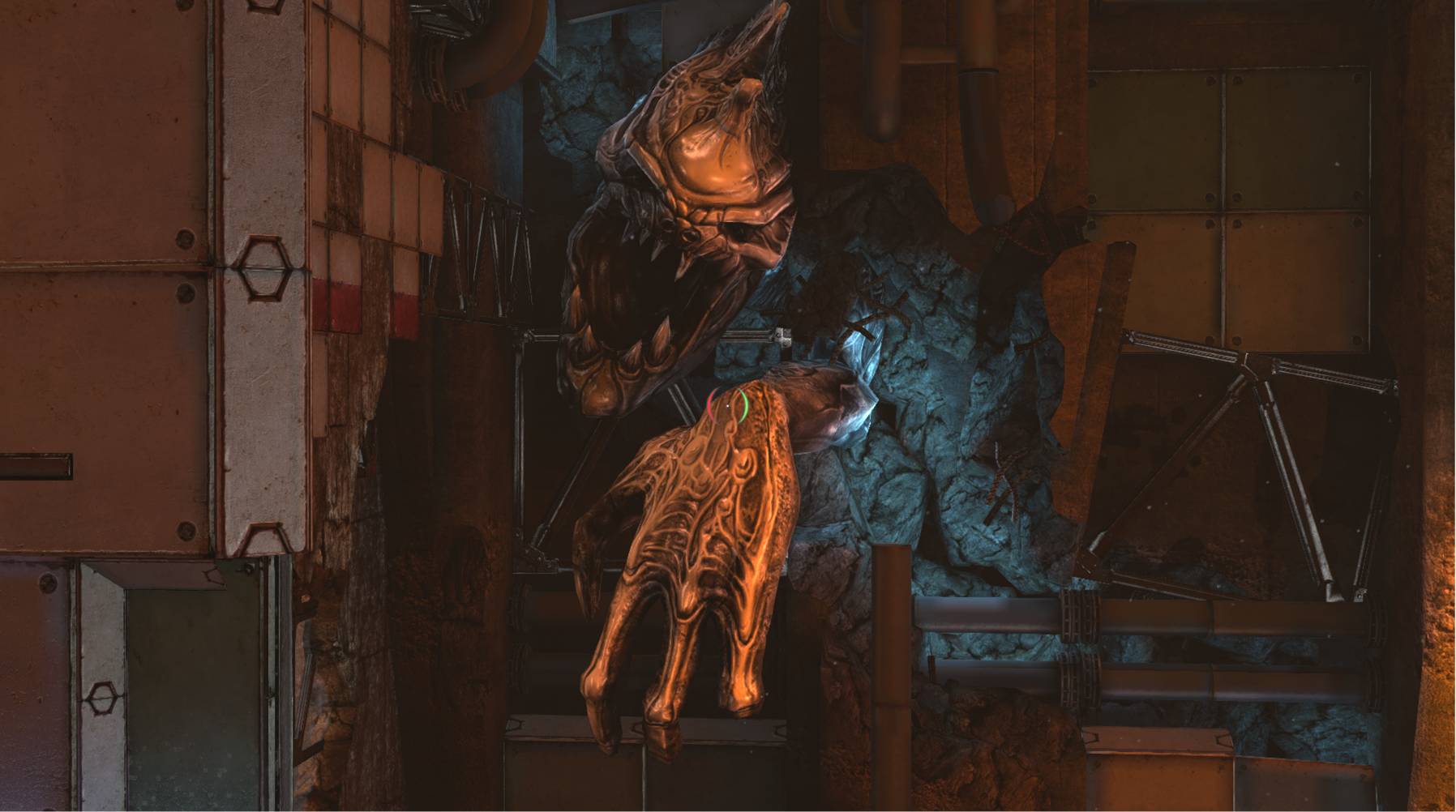
And I've also noticed it on the game Magrunner - Dark Pulse where the textures on the statues have gone bad. I've put it next to a screenshot from a youtube video to show the difference.

1: http://i.imgur.com/qS1d5VT.jpg

The textures never used to be like this and no settings have been changed :/
Is my graphics card slowly giving up on me?

I'll try re-downloading Mirrors Edge tomorrow to see if that fixes the textures for that game.

Any help would be greatly appreciated!
 

My Computer

Computer type
PC/Desktop
Computer Manufacturer/Model Number
Custom Build by me :D
OS
Windows 7 Home Premium 64bit
CPU
AMD Phenom II X6 Black Edition (6 core)
Motherboard
Asus M4A88TD-V EVO/USB3
Memory
16GB (2x8GB) Corsair DDR3 Vengeance Pro Series Gold (2400)
Graphics Card(s)
Sapphire Nitro+ Radeon RX480 8GB
Monitor(s) Displays
LG IPS LED 23EA63 HDMI (Primary), NEC 17inch (Secondary)
Screen Resolution
1920 X 1080 (Primary), 1280 X 1024 (Secondary)
Hard Drives
- Seagate ST500DM002 Barracuda (500GB) =System=
- Seagate ST3500418AS Barracuda (500GB) =Backup=
- Seagate ST2000DM001 Barracuda (2TB) =steam games=
PSU
MODXSTREAM-PRO 600W
Case
Novatech Galaxy III Case
Cooling
1xCPU FAN, 3xCASE FANS (1 side, 1 back, 1 front)
Keyboard
cyborg v7 gaming keyboard
Mouse
logitech M205 wireless
Browser
Google Chrome
It looks to me like anisotropic filtering has been turned way down, but usually it only affects distant objects and scenery, it is happening everywhere for you, it may be that your hard drive might be on it's way out, have you got a spare HDD to test this theory?

To test, simply try installing a game on a different hard drive and see if anything changes.
 

My Computer

Computer type
PC/Desktop
Computer Manufacturer/Model Number
Custom Build
OS
Windows 7 Ultimate x64 SP1
CPU
Intel Q6600 @ 2.6Ghz
Motherboard
Evga NF78-CK-132-A 3-Way SLI
Memory
4Gb DDR2 Corsair Dominator @ 800Mhz 5-5-5-15
Graphics Card(s)
EVGA 560 GTX SC FTW 1GB
Sound Card
Realtek HD 7.1 Audio, Plantronics GameCom780 7.1 Headset
Monitor(s) Displays
Dell S2409W
Screen Resolution
1920 x 1080
Hard Drives
SanDisk SDSSDHII-120G-G25 120GB SSD
Samsung 7200RPM 750Gb SATA
Samsung 850 EVO 120GB SSD
Western Digital Green 1TB 7200RPM
PSU
Xigmatek 750W Quad sli quad core 80% eff
Case
Antec 900 Gaming Case
Cooling
Zalman CNPS9700-NT NVIDIA Tritium
Keyboard
Logitech generic keyboard, MS wireless keyboard
Mouse
Razor Lachesis Banshee V2 Blue, 4000DPI, MS wireless mouse
Internet Speed
152Mb Virgin Media Fibre Optic
Antivirus
Microsoft Security Essentials
Browser
Google Chrome
Other Info
Wireless Gaming Receiver for Windows, Wireless Xbox 360 Pad
It looks to me like anisotropic filtering has been turned way down, but usually it only affects distant objects and scenery, it is happening everywhere for you, it may be that your hard drive might be on it's way out, have you got a spare HDD to test this theory?

To test, simply try installing a game on a different hard drive and see if anything changes.

Hi thanks for the quick reply :)

Here's my HDD setup

C: 500GB - System files and program files and a few games
F: 2TB - All my Steam, Origin, Uplay and GOG games
E: 1TB - My Documents, Pictures etc... (external)
G: 500GB - Backup (external)

My F drive (2TB) is only a few months old and not all of the games on there are affected :/ and "Next Car Game" is stored on my C drive.

I re-downloaded and installed the "Next Car Game - Free Tech Demo" but it was still the same.
I also copied the game files for "Magrunner" to my desktop (to run it off of the C drive) but it was also the same...

Im currently re-downloading "Mirrors Edge" so I will update as soon as that downloads.

Also about 2 weeks ago I moved my computer from on top of my desk to under it and I have noticed it running hotter than it used to do.
 

My Computer

Computer type
PC/Desktop
Computer Manufacturer/Model Number
Custom Build by me :D
OS
Windows 7 Home Premium 64bit
CPU
AMD Phenom II X6 Black Edition (6 core)
Motherboard
Asus M4A88TD-V EVO/USB3
Memory
16GB (2x8GB) Corsair DDR3 Vengeance Pro Series Gold (2400)
Graphics Card(s)
Sapphire Nitro+ Radeon RX480 8GB
Monitor(s) Displays
LG IPS LED 23EA63 HDMI (Primary), NEC 17inch (Secondary)
Screen Resolution
1920 X 1080 (Primary), 1280 X 1024 (Secondary)
Hard Drives
- Seagate ST500DM002 Barracuda (500GB) =System=
- Seagate ST3500418AS Barracuda (500GB) =Backup=
- Seagate ST2000DM001 Barracuda (2TB) =steam games=
PSU
MODXSTREAM-PRO 600W
Case
Novatech Galaxy III Case
Cooling
1xCPU FAN, 3xCASE FANS (1 side, 1 back, 1 front)
Keyboard
cyborg v7 gaming keyboard
Mouse
logitech M205 wireless
Browser
Google Chrome
It looks to me like anisotropic filtering has been turned way down, but usually it only affects distant objects and scenery, it is happening everywhere for you, it may be that your hard drive might be on it's way out, have you got a spare HDD to test this theory?

To test, simply try installing a game on a different hard drive and see if anything changes.

Hi thanks for the quick reply :)

Here's my HDD setup

C: 500GB - System files and program files and a few games
F: 2TB - All my Steam, Origin, Uplay and GOG games
E: 1TB - My Documents, Pictures etc... (external)
G: 500GB - Backup (external)

My F drive (2TB) is only a few months old and not all of the games on there are affected :/ and "Next Car Game" is stored on my C drive.

I re-downloaded and installed the "Next Car Game - Free Tech Demo" but it was still the same.
I also copied the game files for "Magrunner" to my desktop (to run it off of the C drive) but it was also the same...

Im currently re-downloading "Mirrors Edge" so I will update as soon as that downloads.

Also about 2 weeks ago I moved my computer from on top of my desk to under it and I have noticed it running hotter than it used to do.

I don't think it's an overheating issue, if it was overheating, it would cause artifacting(glitches) and throttle your computer(running slower), here's an example of what to expect when overheating
badgpu.jpg
 

My Computer

Computer type
PC/Desktop
Computer Manufacturer/Model Number
Custom Build
OS
Windows 7 Ultimate x64 SP1
CPU
Intel Q6600 @ 2.6Ghz
Motherboard
Evga NF78-CK-132-A 3-Way SLI
Memory
4Gb DDR2 Corsair Dominator @ 800Mhz 5-5-5-15
Graphics Card(s)
EVGA 560 GTX SC FTW 1GB
Sound Card
Realtek HD 7.1 Audio, Plantronics GameCom780 7.1 Headset
Monitor(s) Displays
Dell S2409W
Screen Resolution
1920 x 1080
Hard Drives
SanDisk SDSSDHII-120G-G25 120GB SSD
Samsung 7200RPM 750Gb SATA
Samsung 850 EVO 120GB SSD
Western Digital Green 1TB 7200RPM
PSU
Xigmatek 750W Quad sli quad core 80% eff
Case
Antec 900 Gaming Case
Cooling
Zalman CNPS9700-NT NVIDIA Tritium
Keyboard
Logitech generic keyboard, MS wireless keyboard
Mouse
Razor Lachesis Banshee V2 Blue, 4000DPI, MS wireless mouse
Internet Speed
152Mb Virgin Media Fibre Optic
Antivirus
Microsoft Security Essentials
Browser
Google Chrome
Other Info
Wireless Gaming Receiver for Windows, Wireless Xbox 360 Pad
I don't think it's an overheating issue, if it was overheating, it would cause artifacting(glitches) and throttle your computer(running slower), here's an example of what to expect when overheating
badgpu.jpg

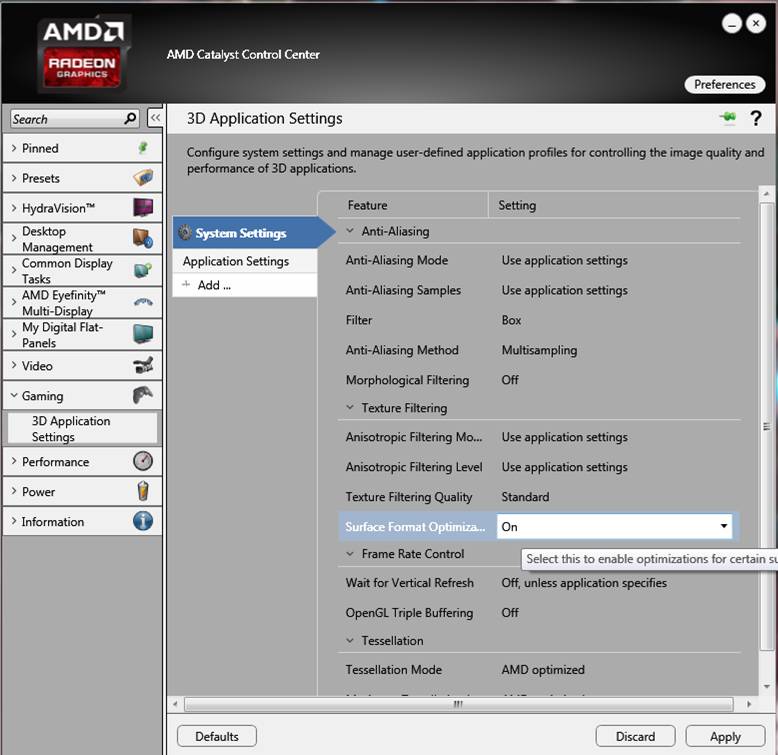
I just opened up AMD Catalyst Control Center to see if any of the setting shad been changed in there, and in the "3D Application Settings" tab i clicked the ' Defaults button and noticed that it turned on "Surface Format Optimization" so I applied those changes, loaded up Magrunner and bam it's fixed!

ep51bS3.jpg

X6aQReE.jpg


I have no idea why that setting got turned off but I'm gonna make sure it stays on from now on :D

Thanks for your help dude!
 

My Computer

Computer type
PC/Desktop
Computer Manufacturer/Model Number
Custom Build by me :D
OS
Windows 7 Home Premium 64bit
CPU
AMD Phenom II X6 Black Edition (6 core)
Motherboard
Asus M4A88TD-V EVO/USB3
Memory
16GB (2x8GB) Corsair DDR3 Vengeance Pro Series Gold (2400)
Graphics Card(s)
Sapphire Nitro+ Radeon RX480 8GB
Monitor(s) Displays
LG IPS LED 23EA63 HDMI (Primary), NEC 17inch (Secondary)
Screen Resolution
1920 X 1080 (Primary), 1280 X 1024 (Secondary)
Hard Drives
- Seagate ST500DM002 Barracuda (500GB) =System=
- Seagate ST3500418AS Barracuda (500GB) =Backup=
- Seagate ST2000DM001 Barracuda (2TB) =steam games=
PSU
MODXSTREAM-PRO 600W
Case
Novatech Galaxy III Case
Cooling
1xCPU FAN, 3xCASE FANS (1 side, 1 back, 1 front)
Keyboard
cyborg v7 gaming keyboard
Mouse
logitech M205 wireless
Browser
Google Chrome
I just opened up AMD Catalyst Control Center to see if any of the setting shad been changed in there, and in the "3D Application Settings" tab i clicked the ' Defaults button and noticed that it turned on "Surface Format Optimization" so I applied those changes, loaded up Magrunner and bam it's fixed!

I have no idea why that setting got turned off but I'm gonna make sure it stays on from now on :D

Thanks for your help dude!

no worries man, glad it's sorted, now we can use this if anybody else has the same issue, I think it may have been a driver update that would have changed it, hell, my Nvidia driver update keeps switching multiple display performance on adaptive rather than max performance, so frustrating.

Btw, whereabouts in wales are you?
 

My Computer

Computer type
PC/Desktop
Computer Manufacturer/Model Number
Custom Build
OS
Windows 7 Ultimate x64 SP1
CPU
Intel Q6600 @ 2.6Ghz
Motherboard
Evga NF78-CK-132-A 3-Way SLI
Memory
4Gb DDR2 Corsair Dominator @ 800Mhz 5-5-5-15
Graphics Card(s)
EVGA 560 GTX SC FTW 1GB
Sound Card
Realtek HD 7.1 Audio, Plantronics GameCom780 7.1 Headset
Monitor(s) Displays
Dell S2409W
Screen Resolution
1920 x 1080
Hard Drives
SanDisk SDSSDHII-120G-G25 120GB SSD
Samsung 7200RPM 750Gb SATA
Samsung 850 EVO 120GB SSD
Western Digital Green 1TB 7200RPM
PSU
Xigmatek 750W Quad sli quad core 80% eff
Case
Antec 900 Gaming Case
Cooling
Zalman CNPS9700-NT NVIDIA Tritium
Keyboard
Logitech generic keyboard, MS wireless keyboard
Mouse
Razor Lachesis Banshee V2 Blue, 4000DPI, MS wireless mouse
Internet Speed
152Mb Virgin Media Fibre Optic
Antivirus
Microsoft Security Essentials
Browser
Google Chrome
Other Info
Wireless Gaming Receiver for Windows, Wireless Xbox 360 Pad
no worries man, glad it's sorted, now we can use this if anybody else has the same issue, I think it may have been a driver update that would have changed it, hell, my Nvidia driver update keeps switching multiple display performance on adaptive rather than max performance, so frustrating.

Btw, whereabouts in wales are you?

Haha yea, I wish updates would leave settings alone.

Not far from Cardiff :)
 

My Computer

Computer type
PC/Desktop
Computer Manufacturer/Model Number
Custom Build by me :D
OS
Windows 7 Home Premium 64bit
CPU
AMD Phenom II X6 Black Edition (6 core)
Motherboard
Asus M4A88TD-V EVO/USB3
Memory
16GB (2x8GB) Corsair DDR3 Vengeance Pro Series Gold (2400)
Graphics Card(s)
Sapphire Nitro+ Radeon RX480 8GB
Monitor(s) Displays
LG IPS LED 23EA63 HDMI (Primary), NEC 17inch (Secondary)
Screen Resolution
1920 X 1080 (Primary), 1280 X 1024 (Secondary)
Hard Drives
- Seagate ST500DM002 Barracuda (500GB) =System=
- Seagate ST3500418AS Barracuda (500GB) =Backup=
- Seagate ST2000DM001 Barracuda (2TB) =steam games=
PSU
MODXSTREAM-PRO 600W
Case
Novatech Galaxy III Case
Cooling
1xCPU FAN, 3xCASE FANS (1 side, 1 back, 1 front)
Keyboard
cyborg v7 gaming keyboard
Mouse
logitech M205 wireless
Browser
Google Chrome
no worries man, glad it's sorted, now we can use this if anybody else has the same issue, I think it may have been a driver update that would have changed it, hell, my Nvidia driver update keeps switching multiple display performance on adaptive rather than max performance, so frustrating.

Btw, whereabouts in wales are you?

Haha yea, I wish updates would leave settings alone.

Not far from Cardiff :)

South Walean huh? My fianceé is a gog haha
 

My Computer

Computer type
PC/Desktop
Computer Manufacturer/Model Number
Custom Build
OS
Windows 7 Ultimate x64 SP1
CPU
Intel Q6600 @ 2.6Ghz
Motherboard
Evga NF78-CK-132-A 3-Way SLI
Memory
4Gb DDR2 Corsair Dominator @ 800Mhz 5-5-5-15
Graphics Card(s)
EVGA 560 GTX SC FTW 1GB
Sound Card
Realtek HD 7.1 Audio, Plantronics GameCom780 7.1 Headset
Monitor(s) Displays
Dell S2409W
Screen Resolution
1920 x 1080
Hard Drives
SanDisk SDSSDHII-120G-G25 120GB SSD
Samsung 7200RPM 750Gb SATA
Samsung 850 EVO 120GB SSD
Western Digital Green 1TB 7200RPM
PSU
Xigmatek 750W Quad sli quad core 80% eff
Case
Antec 900 Gaming Case
Cooling
Zalman CNPS9700-NT NVIDIA Tritium
Keyboard
Logitech generic keyboard, MS wireless keyboard
Mouse
Razor Lachesis Banshee V2 Blue, 4000DPI, MS wireless mouse
Internet Speed
152Mb Virgin Media Fibre Optic
Antivirus
Microsoft Security Essentials
Browser
Google Chrome
Other Info
Wireless Gaming Receiver for Windows, Wireless Xbox 360 Pad
no worries man, glad it's sorted, now we can use this if anybody else has the same issue, I think it may have been a driver update that would have changed it, hell, my Nvidia driver update keeps switching multiple display performance on adaptive rather than max performance, so frustrating.

Btw, whereabouts in wales are you?

Haha yea, I wish updates would leave settings alone.

Not far from Cardiff :)

South Walean huh? My fianceé is a gog haha

Haha awesome :P
 

My Computer

Computer type
PC/Desktop
Computer Manufacturer/Model Number
Custom Build by me :D
OS
Windows 7 Home Premium 64bit
CPU
AMD Phenom II X6 Black Edition (6 core)
Motherboard
Asus M4A88TD-V EVO/USB3
Memory
16GB (2x8GB) Corsair DDR3 Vengeance Pro Series Gold (2400)
Graphics Card(s)
Sapphire Nitro+ Radeon RX480 8GB
Monitor(s) Displays
LG IPS LED 23EA63 HDMI (Primary), NEC 17inch (Secondary)
Screen Resolution
1920 X 1080 (Primary), 1280 X 1024 (Secondary)
Hard Drives
- Seagate ST500DM002 Barracuda (500GB) =System=
- Seagate ST3500418AS Barracuda (500GB) =Backup=
- Seagate ST2000DM001 Barracuda (2TB) =steam games=
PSU
MODXSTREAM-PRO 600W
Case
Novatech Galaxy III Case
Cooling
1xCPU FAN, 3xCASE FANS (1 side, 1 back, 1 front)
Keyboard
cyborg v7 gaming keyboard
Mouse
logitech M205 wireless
Browser
Google Chrome
Back
Top