Mac dock style for windows 7 taskbar (theme)

SATVU3

New member
Local time
3:56 AM
Messages
2
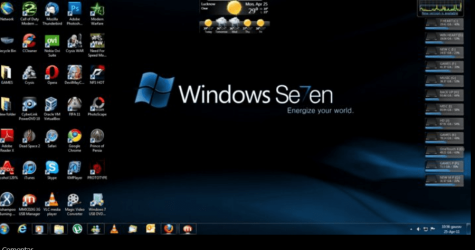
Hi, i was viewing the photos at windows facebook profile, and a user posted a photo at which he used a theme that changes the look of the taskbar to the Mac dock ("indicator lights" below the icons). Tried to get it by posting comments on the photo, but user didn´t respond. Anyone knows the name/ where to get it??
P.D. Everything else from the explorer was left the same; i use Tune Up styler to apply the visual styles.
 

Attachments

  • mac dock style.PNG
    mac dock style.PNG
    9.5 KB · Views: 302
  • mac style facebook.PNG
    mac style facebook.PNG
    106.1 KB · Views: 681

My Computer

Computer Manufacturer/Model Number
HP 6910p
OS
Windows 7 Ultimate 32 bits
CPU
Intel
Memory
3GB
Hi, i was viewing the photos at windows facebook profile, and a user posted a photo at which he used a theme that changes the look of the taskbar to the Mac dock ("indicator lights" below the icons). Tried to get it by posting comments on the photo, but user didn´t respond. Anyone knows the name/ where to get it??
P.D. Everything else from the explorer was left the same; i use Tune Up styler to apply the visual styles.
Welcome to the Seven Forums
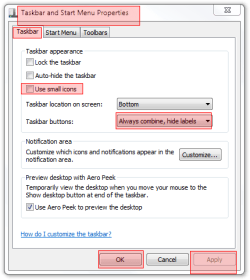
That's is the normal Windows 7 taskbar To get it that way right click on taskbar go to properties, go to the taskbar tab Uncheck "use small icons" then in the drop down menu choose "always combine high labels" then click apply and OK that should get you the same effect
Jerry
Taskbar and Start Menu Properties.png
taskbar.png
 

My Computer

Computer type
Laptop
Computer Manufacturer/Model Number
Sager NP9170
OS
Win 7 Pro x64 / Win 10 Pro
CPU
Intel(R) Core(TM) i7-3630QM CPU @ 2.40GHz
Motherboard
CLEVO P170EM
Memory
12 GB
Graphics Card(s)
(1) Intel(R) HD Graphics 4000 (2) NVIDIA GeForce GTX 675M
Sound Card
(1) Realtek High Definition Audio (2) Intel(R) Display Aud
Monitor(s) Displays
17.3
Screen Resolution
1920x1080
Hard Drives
(1) Samsung 860 EVO 500GB(OS) (1) Samsung 860 EVO 500GB(Data)
Keyboard
Backlite
Antivirus
MSE, Malwarebytes Pro
Browser
Firefox
Other Info
DESKTOP: Custom-built.
OS: Win 10 Pro x64.
CASE: Rosewill R5.
CPU: Intel I5 4670K CPU @ 3.40GHz.
CPU COOLER: Cool Master Hyper 212 EVO.
MOTHERBOARD: Asus Z87-A.
MEMORY: Kingston HyperX 2x4 GB.
GPU: Nvidia Geforce 650 TI.
PSU: Corsair TX750.
DRIVES: (1) Samsung 840 120 GB SSD (2) Western Digital blue 500 GB 7200 RPM.
But i dont get the same "square" around opened icons. Also, windows default doesnt have the little indicator lights below the icons from the running programs.
 

My Computer

Computer Manufacturer/Model Number
HP 6910p
OS
Windows 7 Ultimate 32 bits
CPU
Intel
Memory
3GB
But i dont get the same "square" around opened icons. Also, windows default doesnt have the little indicator lights below the icons from the running programs.
It may be a Custom Theme but it is not a dock
Jerry
 

My Computer

Computer type
Laptop
Computer Manufacturer/Model Number
Sager NP9170
OS
Win 7 Pro x64 / Win 10 Pro
CPU
Intel(R) Core(TM) i7-3630QM CPU @ 2.40GHz
Motherboard
CLEVO P170EM
Memory
12 GB
Graphics Card(s)
(1) Intel(R) HD Graphics 4000 (2) NVIDIA GeForce GTX 675M
Sound Card
(1) Realtek High Definition Audio (2) Intel(R) Display Aud
Monitor(s) Displays
17.3
Screen Resolution
1920x1080
Hard Drives
(1) Samsung 860 EVO 500GB(OS) (1) Samsung 860 EVO 500GB(Data)
Keyboard
Backlite
Antivirus
MSE, Malwarebytes Pro
Browser
Firefox
Other Info
DESKTOP: Custom-built.
OS: Win 10 Pro x64.
CASE: Rosewill R5.
CPU: Intel I5 4670K CPU @ 3.40GHz.
CPU COOLER: Cool Master Hyper 212 EVO.
MOTHERBOARD: Asus Z87-A.
MEMORY: Kingston HyperX 2x4 GB.
GPU: Nvidia Geforce 650 TI.
PSU: Corsair TX750.
DRIVES: (1) Samsung 840 120 GB SSD (2) Western Digital blue 500 GB 7200 RPM.
Back
Top