Macrium Recovery

seag33k

New member
Member
VIP
Local time
4:05 PM
Messages
101
I am trying to recover a system using the free version of Macrium. Using the recovery disk, there is an option for partition selection, but it only allows you to select one partition. Is there a way to select more than one? or even the whole disk? I am having a problem because the MBR is having problems finding the OS. My backup has a System Reserved and a C: partition. Does the full version allow you to recover a whole disc vs. individual partitions?

Thanks,
 

My Computer

Computer Manufacturer/Model Number
ASUS N61JQ-A1
OS
Win7
CPU
Intel Core i7
Memory
4 GB
Graphics Card(s)
ATI 5730
Internet Speed
http://www.speedtest.net/result/823059694.png

My Computer

Computer type
PC/Desktop
Computer Manufacturer/Model Number
Self Built
OS
Win 10 Pro x64
CPU
Intel I5-2500K @3.3GHz
Motherboard
Asrock P67 Extreme4
Memory
16GB G.Skill Ripjaws X (4x4GB)
Graphics Card(s)
EVGA GeForce 750 Ti SC 2GB
Sound Card
ASUS Xonar DG 5.1 Channels 24-bit 96KHz PCI Interface Sound
Monitor(s) Displays
auria eq2367
Screen Resolution
1920 x 1080
Hard Drives
250GB Samsung 850 EVO SSD
1TB WD Blue
1TB Hitachi
PSU
SeaSonic X 650W 80 Plus Gold
Case
Corsair Obsidian 750D
Cooling
Corsair H60, Three 140mm case fans
Keyboard
Logitech Wireless Keyboard K520
Mouse
Logitech Wireless Mouse M310
Internet Speed
Wave Broadband ~ 100 dn 5 up
Antivirus
Windows Defender, Malwarebytes Premium
Browser
Edge, IE11, Chrome
Other Info
Laptop specs: HP g7-1365dx /
CPU: AMD A6-3420M APU with Radeon(tm) HD Graphics /
RAM: Crucial 8Gb (2x4Gb) /
SSD: Crucial M4-CT128M4SSD2 ATA Device/ FW 000F /
GFX: AMD Radeon HD 6520G /
OS: Windows 10 Pro x64
Thanks, I've watched that and have tried a few of the options but still not able to boot. I use to use Acronis and its whole disc recovery always worked great, but its not free unfortunately.
 

My Computer

Computer Manufacturer/Model Number
ASUS N61JQ-A1
OS
Win7
CPU
Intel Core i7
Memory
4 GB
Graphics Card(s)
ATI 5730
Internet Speed
http://www.speedtest.net/result/823059694.png
Is the reason you are imaging because of your mbr being messed up?

If so the startup repair would help you out there.
 

My Computer

Computer type
PC/Desktop
Computer Manufacturer/Model Number
Self Built
OS
Win 10 Pro x64
CPU
Intel I5-2500K @3.3GHz
Motherboard
Asrock P67 Extreme4
Memory
16GB G.Skill Ripjaws X (4x4GB)
Graphics Card(s)
EVGA GeForce 750 Ti SC 2GB
Sound Card
ASUS Xonar DG 5.1 Channels 24-bit 96KHz PCI Interface Sound
Monitor(s) Displays
auria eq2367
Screen Resolution
1920 x 1080
Hard Drives
250GB Samsung 850 EVO SSD
1TB WD Blue
1TB Hitachi
PSU
SeaSonic X 650W 80 Plus Gold
Case
Corsair Obsidian 750D
Cooling
Corsair H60, Three 140mm case fans
Keyboard
Logitech Wireless Keyboard K520
Mouse
Logitech Wireless Mouse M310
Internet Speed
Wave Broadband ~ 100 dn 5 up
Antivirus
Windows Defender, Malwarebytes Premium
Browser
Edge, IE11, Chrome
Other Info
Laptop specs: HP g7-1365dx /
CPU: AMD A6-3420M APU with Radeon(tm) HD Graphics /
RAM: Crucial 8Gb (2x4Gb) /
SSD: Crucial M4-CT128M4SSD2 ATA Device/ FW 000F /
GFX: AMD Radeon HD 6520G /
OS: Windows 10 Pro x64
No, the system became unstable and not bootable. I suspect some software I was using possibly caused the problem, but the system is also over 3 years old so it could be a hard drive issue possibly.

Although it is a free product, I am somewhat disappointed you can't recover a whole disc vs. ind partitions. I may end up purchasing a full copy of Acronis again so I can have that option.
 

My Computer

Computer Manufacturer/Model Number
ASUS N61JQ-A1
OS
Win7
CPU
Intel Core i7
Memory
4 GB
Graphics Card(s)
ATI 5730
Internet Speed
http://www.speedtest.net/result/823059694.png
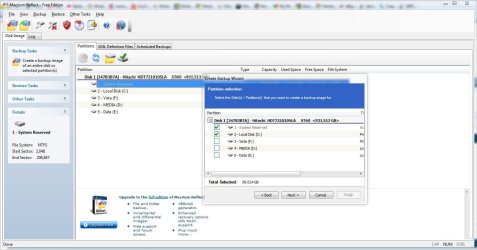
My first few images I made with macrium included the system reserved partition,

so I could just use the one image, if your image doesn't include that I don't see how

you could recover it. The option in creating the image allows multiple partitions.
 

Attachments

  • macrium.JPG
    macrium.JPG
    137.3 KB · Views: 14

My Computer

Computer type
PC/Desktop
Computer Manufacturer/Model Number
Self Built
OS
Win 10 Pro x64
CPU
Intel I5-2500K @3.3GHz
Motherboard
Asrock P67 Extreme4
Memory
16GB G.Skill Ripjaws X (4x4GB)
Graphics Card(s)
EVGA GeForce 750 Ti SC 2GB
Sound Card
ASUS Xonar DG 5.1 Channels 24-bit 96KHz PCI Interface Sound
Monitor(s) Displays
auria eq2367
Screen Resolution
1920 x 1080
Hard Drives
250GB Samsung 850 EVO SSD
1TB WD Blue
1TB Hitachi
PSU
SeaSonic X 650W 80 Plus Gold
Case
Corsair Obsidian 750D
Cooling
Corsair H60, Three 140mm case fans
Keyboard
Logitech Wireless Keyboard K520
Mouse
Logitech Wireless Mouse M310
Internet Speed
Wave Broadband ~ 100 dn 5 up
Antivirus
Windows Defender, Malwarebytes Premium
Browser
Edge, IE11, Chrome
Other Info
Laptop specs: HP g7-1365dx /
CPU: AMD A6-3420M APU with Radeon(tm) HD Graphics /
RAM: Crucial 8Gb (2x4Gb) /
SSD: Crucial M4-CT128M4SSD2 ATA Device/ FW 000F /
GFX: AMD Radeon HD 6520G /
OS: Windows 10 Pro x64
No, the system became unstable and not bootable. I suspect some software I was using possibly caused the problem, but the system is also over 3 years old so it could be a hard drive issue possibly.

Although it is a free product, I am somewhat disappointed you can't recover a whole disc vs. ind partitions. I may end up purchasing a full copy of Acronis again so I can have that option.

At the end of the restore with Macrium it should ask you "restore MBR from backup?" and you click yes or no. I used Paragon on my Vista64 machine and tried to make a backup capsule on the HD. It messed up my partition table. Since the Paragon boot CD did not support my Raid controller I tried Macrium paid version. Not only did it support my Raid controller but when I let it restore the MBR it fixed the partition table that Paragon messed up.

At that time the paid version had a newer boot CD than the free. But since then I'm told the free version Linux boot CD was updated. If you are using the Linux boot CD to restore it should give you the MBR option at the end. iow, choose either partition to restore, then at the end it should ask if you want to write the MBR from the saved backup. Click Yes or OK.
 

My Computer

Computer Manufacturer/Model Number
HP Media Center
OS
Windows 7 32 bit
CPU
AMD 5200+ dual core
Memory
2 GB
Graphics Card(s)
NVidia GeForce 6150SE 128 MB
Monitor(s) Displays
CRT
Screen Resolution
1280x1024
Hard Drives
500 GB Sata internal :

SIIG USB 3.0 docking stations w/WD Caviar Black 6 Gb/s drives
Keyboard
PS/2
Mouse
PS/2 Wheel Mouse
Other Info
SIIG USB 3.0 PCIexpress card.
Yes the interface works great to select which partitions you want to backup, but unfortunately the recovery disk only allows you to select one partition to recover vs. the whole disc which I think is part of the problem since the MBR is on the System Reserved partition.
 

My Computer

Computer Manufacturer/Model Number
ASUS N61JQ-A1
OS
Win7
CPU
Intel Core i7
Memory
4 GB
Graphics Card(s)
ATI 5730
Internet Speed
http://www.speedtest.net/result/823059694.png
Yes the interface works great to select which partitions you want to backup, but unfortunately the recovery disk only allows you to select one partition to recover vs. the whole disc which I think is part of the problem since the MBR is on the System Reserved partition.

Have you actually gone through with a restore?
And if so, were you or were you not given the option to restore the MBR from backup?
I can't guess what happened.
 

My Computer

Computer Manufacturer/Model Number
HP Media Center
OS
Windows 7 32 bit
CPU
AMD 5200+ dual core
Memory
2 GB
Graphics Card(s)
NVidia GeForce 6150SE 128 MB
Monitor(s) Displays
CRT
Screen Resolution
1280x1024
Hard Drives
500 GB Sata internal :

SIIG USB 3.0 docking stations w/WD Caviar Black 6 Gb/s drives
Keyboard
PS/2
Mouse
PS/2 Wheel Mouse
Other Info
SIIG USB 3.0 PCIexpress card.
Yes I tried both of the restore mbr options from the boot cd with no luck. I originally installed Windows 7 from scratch so it shouldn't be too complicated in terms of partitions and where the mbr is located.
 

My Computer

Computer Manufacturer/Model Number
ASUS N61JQ-A1
OS
Win7
CPU
Intel Core i7
Memory
4 GB
Graphics Card(s)
ATI 5730
Internet Speed
http://www.speedtest.net/result/823059694.png
There have been several updates since the last time I did a restore. Used to be there was no separate "restore MBR" option. They may have added it. The last time I restored the way it worked was you restored a partition, then at the end it asked you if you wanted to restore the MBR from backup.

It's been a feature request so perhaps they added it.

I would try Macrium Support forum search.

Macrium Reflect Disk Imaging and Backup - Support

edit: hmm, the only thing I found on it says something about Dell and system recovery partition, so it may not work with all setups. Also mentioned is bios may be a virus protection not letting the MBR be written. You may want to search for a dedicated MBR utility.

Anyway, I'm told other people can get on Bootland. Don't know why it hangs when I try to go there but for all things bootable try it:

http://www.boot-land.net/forums/
 

My Computer

Computer Manufacturer/Model Number
HP Media Center
OS
Windows 7 32 bit
CPU
AMD 5200+ dual core
Memory
2 GB
Graphics Card(s)
NVidia GeForce 6150SE 128 MB
Monitor(s) Displays
CRT
Screen Resolution
1280x1024
Hard Drives
500 GB Sata internal :

SIIG USB 3.0 docking stations w/WD Caviar Black 6 Gb/s drives
Keyboard
PS/2
Mouse
PS/2 Wheel Mouse
Other Info
SIIG USB 3.0 PCIexpress card.
Thanks for the additional info! I guess I am just use to Acronis where you can recover a full disc from the recovery disc. I am using the linux based recovery disc for Macrium and not the windows based version so that one might have additional options that I don't see.
 

My Computer

Computer Manufacturer/Model Number
ASUS N61JQ-A1
OS
Win7
CPU
Intel Core i7
Memory
4 GB
Graphics Card(s)
ATI 5730
Internet Speed
http://www.speedtest.net/result/823059694.png
I ended up putting in the Windows 7 Install disc and chose to repair the system and it looks like it rebuilt the MBR for my install. I'll have to play around with where things got messed up this weekend.

Thanks for all the help!!!
 

My Computer

Computer Manufacturer/Model Number
ASUS N61JQ-A1
OS
Win7
CPU
Intel Core i7
Memory
4 GB
Graphics Card(s)
ATI 5730
Internet Speed
http://www.speedtest.net/result/823059694.png
I ended up putting in the Windows 7 Install disc and chose to repair the system and it looks like it rebuilt the MBR for my install. I'll have to play around with where things got messed up this weekend.

Thanks for all the help!!!

It sounded like you were going to have to do that, thanks for posting back.
 

My Computer

Computer type
PC/Desktop
Computer Manufacturer/Model Number
Self Built
OS
Win 10 Pro x64
CPU
Intel I5-2500K @3.3GHz
Motherboard
Asrock P67 Extreme4
Memory
16GB G.Skill Ripjaws X (4x4GB)
Graphics Card(s)
EVGA GeForce 750 Ti SC 2GB
Sound Card
ASUS Xonar DG 5.1 Channels 24-bit 96KHz PCI Interface Sound
Monitor(s) Displays
auria eq2367
Screen Resolution
1920 x 1080
Hard Drives
250GB Samsung 850 EVO SSD
1TB WD Blue
1TB Hitachi
PSU
SeaSonic X 650W 80 Plus Gold
Case
Corsair Obsidian 750D
Cooling
Corsair H60, Three 140mm case fans
Keyboard
Logitech Wireless Keyboard K520
Mouse
Logitech Wireless Mouse M310
Internet Speed
Wave Broadband ~ 100 dn 5 up
Antivirus
Windows Defender, Malwarebytes Premium
Browser
Edge, IE11, Chrome
Other Info
Laptop specs: HP g7-1365dx /
CPU: AMD A6-3420M APU with Radeon(tm) HD Graphics /
RAM: Crucial 8Gb (2x4Gb) /
SSD: Crucial M4-CT128M4SSD2 ATA Device/ FW 000F /
GFX: AMD Radeon HD 6520G /
OS: Windows 10 Pro x64
I ended up putting in the Windows 7 Install disc and chose to repair the system and it looks like it rebuilt the MBR for my install. I'll have to play around with where things got messed up this weekend.

Thanks for all the help!!!

Yeah, those hidden system partitions can be a pita. They used to put the BIOS setup programs on those on some machines(maybe they still do.. I don't know) but lots of people went out and bought a new larger HD not knowing they can't just install the OS on it and it all comes up roses!! They didn't know you had to run an installer to put system setup stuff on the new HD. Mucho PCs no boot no more with new HD!! What an insane idea!!
 

My Computer

Computer Manufacturer/Model Number
HP Media Center
OS
Windows 7 32 bit
CPU
AMD 5200+ dual core
Memory
2 GB
Graphics Card(s)
NVidia GeForce 6150SE 128 MB
Monitor(s) Displays
CRT
Screen Resolution
1280x1024
Hard Drives
500 GB Sata internal :

SIIG USB 3.0 docking stations w/WD Caviar Black 6 Gb/s drives
Keyboard
PS/2
Mouse
PS/2 Wheel Mouse
Other Info
SIIG USB 3.0 PCIexpress card.
The regular Macrium lets you restore each partition individually.

There is no difference in the end result between restoring one partition and then the another, and selecting restore both together.

With Acronis and Paragon you can select several partitions to restore - they actually
restore one after the other, not simultaneously.


I don't think it had anything to do with the mbr executable code, which is very unlikely to be damaged and in any case you replaced it with the backup from macrium.

What error message were you getting ?

Or how far along the boot process did you get ?
 

My Computers

System One System Two

  • Computer type
    PC/Desktop
    OS
    7 X64
    CPU
    i5 8400
    Motherboard
    gigabyte b365m ds3h
    Memory
    2x8gb 3200mhz
    Hard Drives
    various
    PSU
    pure power 11 400w cm
    Case
    Coolermaster
    Cooling
    cryorig m9i
  • Computer type
    PC/Desktop
    OS
    7x64
    CPU
    g5400
    Motherboard
    ga b365m ds3h
    Memory
    8gb ddr4 2400
    PSU
    xfx pro 450w
I can't remember the exact error but basically it said it could not find the OS to boot. I think I screwed up the MBR when trying to do a restore with Macrium. Since you have to individually restore the partitions and I could not restore them all in one shot I may have marked one Active incorrectly and while troubleshooting restored the MBR incorrectly. It looks like the Windows 7 disc was able to restore the MBR and away I went!
 

My Computer

Computer Manufacturer/Model Number
ASUS N61JQ-A1
OS
Win7
CPU
Intel Core i7
Memory
4 GB
Graphics Card(s)
ATI 5730
Internet Speed
http://www.speedtest.net/result/823059694.png
Operating system not found?

Glad you fixed it.
 

My Computers

System One System Two

  • Computer type
    PC/Desktop
    OS
    7 X64
    CPU
    i5 8400
    Motherboard
    gigabyte b365m ds3h
    Memory
    2x8gb 3200mhz
    Hard Drives
    various
    PSU
    pure power 11 400w cm
    Case
    Coolermaster
    Cooling
    cryorig m9i
  • Computer type
    PC/Desktop
    OS
    7x64
    CPU
    g5400
    Motherboard
    ga b365m ds3h
    Memory
    8gb ddr4 2400
    PSU
    xfx pro 450w
I can't remember the exact error but basically it said it could not find the OS to boot. I think I screwed up the MBR when trying to do a restore with Macrium. Since you have to individually restore the partitions and I could not restore them all in one shot I may have marked one Active incorrectly and while troubleshooting restored the MBR incorrectly. It looks like the Windows 7 disc was able to restore the MBR and away I went!

The OS disc repair function is a double-edged sword. It doesn't touch the partition table part of the MBR. It worked to your benefit in this case since you have multiple partitions. But if your problem is a hosed partition table, it won't help you. That's why it's good to have a utility that actually makes a copy of the MBR and can restore it when you need it.

Used to be easier in the days of Dos boot diskettes. You could pick up a free one or even write it youself since it just reads and writes one sector. But large hard disks made them obsolete. That and the fact nobody has floppies anymore so you have to adapt the ones that will work to booting from a USB stick. If you look hard enough I think there are still a couple out there though.
 

My Computer

Computer Manufacturer/Model Number
HP Media Center
OS
Windows 7 32 bit
CPU
AMD 5200+ dual core
Memory
2 GB
Graphics Card(s)
NVidia GeForce 6150SE 128 MB
Monitor(s) Displays
CRT
Screen Resolution
1280x1024
Hard Drives
500 GB Sata internal :

SIIG USB 3.0 docking stations w/WD Caviar Black 6 Gb/s drives
Keyboard
PS/2
Mouse
PS/2 Wheel Mouse
Other Info
SIIG USB 3.0 PCIexpress card.
Back
Top