Solved Magnifier spyglass icon becomes useless blank white square

Whiznot

New member
Member
Local time
9:57 PM
Messages
21
Please help with a obscure problem. My system has been driving me batty.

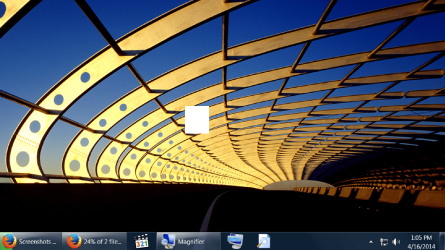
On my HTPC 10 feet interface I use the Win7 full screen magnifier frequently. When I click on the magnifier the Magnifier options rectangle opens for a short period then morphs into a spyglass but in a couple of seconds the spyglass morphs into a useless little white square blank area.

Before the problem the little spyglass icon stayed active and clicking it would bring up the Magnifier control rectangle allowing me to close the magnifier. Clicking the useless little white square blank area does nothing so I have to go down to my magnifier icon on the taskbar to close the application.

Rebuilding the icon cache didn't help.
 
Last edited:

My Computer My Computer

At a glance

windows
OS
windows

My Computer My Computer

At a glance

Windows 10 Home 64BitIntel Core i5 10400 @ 2.90GHz8.00GB Single-Channel Unknown @ 1329MHz (16-2...
Computer type
PC/Desktop
Computer Manufacturer/Model Number
Self assembled
OS
Windows 10 Home 64Bit
CPU
Intel Core i5 10400 @ 2.90GHz
Motherboard
Intel Corporation DG41WV (PROCESSOR)
Memory
8.00GB Single-Channel Unknown @ 1329MHz (16-20-20-38)
Sound Card
Realtek High Definition Audio
Monitor(s) Displays
DELL E170S
Screen Resolution
1280x1024 pixels
Hard Drives
931GB TOSHIBA DT01ACA100 (SATA)
238GB TEAM TM8PS7256G (SATA SSD)
Case
Nothing Fancy
Cooling
Fans
Keyboard
A4 Tech Co LTD
Mouse
A4 Tech Co Ltd/Logitech
Internet Speed
25 Mbps
The screenshot shows a useless blank white square where the transparent spyglass icon was briefly.
 

Attachments

  • Second Shot.png
    Second Shot.png
    771.7 KB · Views: 1

My Computer My Computer

At a glance

windows
OS
windows

My Computer My Computer

At a glance

Windows 10 Home 64BitIntel Core i5 10400 @ 2.90GHz8.00GB Single-Channel Unknown @ 1329MHz (16-2...
Computer type
PC/Desktop
Computer Manufacturer/Model Number
Self assembled
OS
Windows 10 Home 64Bit
CPU
Intel Core i5 10400 @ 2.90GHz
Motherboard
Intel Corporation DG41WV (PROCESSOR)
Memory
8.00GB Single-Channel Unknown @ 1329MHz (16-20-20-38)
Sound Card
Realtek High Definition Audio
Monitor(s) Displays
DELL E170S
Screen Resolution
1280x1024 pixels
Hard Drives
931GB TOSHIBA DT01ACA100 (SATA)
238GB TEAM TM8PS7256G (SATA SSD)
Case
Nothing Fancy
Cooling
Fans
Keyboard
A4 Tech Co LTD
Mouse
A4 Tech Co Ltd/Logitech
Internet Speed
25 Mbps
Thanks for all the help. I'm busy right now but later I'll do the scan and post back.
 

My Computer My Computer

At a glance

windows
OS
windows
Alright, take your time :)
 

My Computer My Computer

At a glance

Windows 10 Home 64BitIntel Core i5 10400 @ 2.90GHz8.00GB Single-Channel Unknown @ 1329MHz (16-2...
Computer type
PC/Desktop
Computer Manufacturer/Model Number
Self assembled
OS
Windows 10 Home 64Bit
CPU
Intel Core i5 10400 @ 2.90GHz
Motherboard
Intel Corporation DG41WV (PROCESSOR)
Memory
8.00GB Single-Channel Unknown @ 1329MHz (16-20-20-38)
Sound Card
Realtek High Definition Audio
Monitor(s) Displays
DELL E170S
Screen Resolution
1280x1024 pixels
Hard Drives
931GB TOSHIBA DT01ACA100 (SATA)
238GB TEAM TM8PS7256G (SATA SSD)
Case
Nothing Fancy
Cooling
Fans
Keyboard
A4 Tech Co LTD
Mouse
A4 Tech Co Ltd/Logitech
Internet Speed
25 Mbps
Thank you KoolKat77.

I booted into my flash drive with MSDN Win7 installation media and ran sfc /scannow offline. Not every corrupted file was fixed so I have some work to do with the log file but the magnifier problem is banished for good.

As an added benefit I gained a bit of knowledge.
 

My Computer My Computer

At a glance

windows
OS
windows
That's great news! Glad I could help :)
 

My Computer My Computer

At a glance

Windows 10 Home 64BitIntel Core i5 10400 @ 2.90GHz8.00GB Single-Channel Unknown @ 1329MHz (16-2...
Computer type
PC/Desktop
Computer Manufacturer/Model Number
Self assembled
OS
Windows 10 Home 64Bit
CPU
Intel Core i5 10400 @ 2.90GHz
Motherboard
Intel Corporation DG41WV (PROCESSOR)
Memory
8.00GB Single-Channel Unknown @ 1329MHz (16-20-20-38)
Sound Card
Realtek High Definition Audio
Monitor(s) Displays
DELL E170S
Screen Resolution
1280x1024 pixels
Hard Drives
931GB TOSHIBA DT01ACA100 (SATA)
238GB TEAM TM8PS7256G (SATA SSD)
Case
Nothing Fancy
Cooling
Fans
Keyboard
A4 Tech Co LTD
Mouse
A4 Tech Co Ltd/Logitech
Internet Speed
25 Mbps
I now know why Windows 7 magnifier lens icon might not work as intended.

I recently did a clean install of Win 7 x64 on a computer with an AMD 780G chipset. After installing any version of Logitech Setpoint the magnifier icon will morph into the blank white square.

Running SFC Scannow offboot multiple times does not always solve the problem but uninstalling setpoint does solve the problem.
 

My Computer My Computer

At a glance

windows
OS
windows
Back
Top