Hello Forum,
Thanks for all answers.
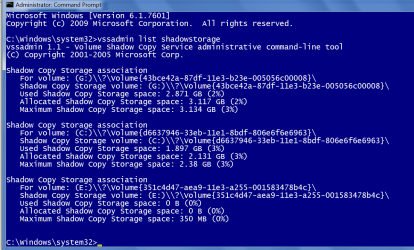
I my previous posts I mentioned that cannot delete ancient restore points using either windows disk cleanup tool or Ccleaner, and since there are the problems windows does not find its own created image and "run backup now" is not functioning also, I will start making all backups with Macrium, but first I would like to have some answers.
On my previous XP system, to get rid of old restore points, I turned off "System Protection" for all drives, this deleted all restore points, restarted and then turned it on and made a new restore point. So here are my questions:
1. Does Macrium image created some days ago contain those old restore points ? (so if I restore the
system from this image then I will get them back)
2. Since windows created image is not found by the system then its useless (and supposed to have those
restore points also), I intend to delete it, and in the future use only Macrium, you will, please, point links how to
make periodic backups of files and folders (have to do my homework).
3. If I succeed deleting those restore points, I intend to defrag the disk, make a new restore point and
start a new Macrium image.
I would like to have answers and your opinion about all of the above.
Please have patience with me (77 yo).
Thanks for answers,
Motim
PS, Shell I install "TreeSizeFreeSetup" to find "lost disk space" as answered on one of my posts ?
Thanks again
Thanks for all answers.
I my previous posts I mentioned that cannot delete ancient restore points using either windows disk cleanup tool or Ccleaner, and since there are the problems windows does not find its own created image and "run backup now" is not functioning also, I will start making all backups with Macrium, but first I would like to have some answers.
On my previous XP system, to get rid of old restore points, I turned off "System Protection" for all drives, this deleted all restore points, restarted and then turned it on and made a new restore point. So here are my questions:
1. Does Macrium image created some days ago contain those old restore points ? (so if I restore the
system from this image then I will get them back)
2. Since windows created image is not found by the system then its useless (and supposed to have those
restore points also), I intend to delete it, and in the future use only Macrium, you will, please, point links how to
make periodic backups of files and folders (have to do my homework).
3. If I succeed deleting those restore points, I intend to defrag the disk, make a new restore point and
start a new Macrium image.
I would like to have answers and your opinion about all of the above.
Please have patience with me (77 yo).
Thanks for answers,
Motim
PS, Shell I install "TreeSizeFreeSetup" to find "lost disk space" as answered on one of my posts ?
Thanks again
My Computer
- Computer type
- PC/Desktop
- Computer Manufacturer/Model Number
- custom built
- OS
- Windows 7 Pro 32 bit
- CPU
- intel celeron 2.66GH 2.56GH
- Memory
- 2.00 GB
- Graphics Card(s)
- Nvidia fx5500
- Hard Drives
- Western digital
- Antivirus
- AVG
- Browser
- firefox