Solved Make 3rd Partition

karank6195

Banned
Local time
9:03 AM
Messages
28
Location
Nagpur
Hello,
I have two drives,one(C) is of 191 GB & the other one(D) is of 100 GB.
My D drive is full,
& I want to make one more drive or increase the space of d drive if possible.
 

My Computer My Computer

At a glance

Windows 7 Ultimate x64DELL320 gbNot available
Computer Manufacturer/Model Number
DELL
OS
Windows 7 Ultimate x64
CPU
DELL
Motherboard
Intel
Memory
320 gb
Graphics Card(s)
Not available
Sound Card
Don't know
Monitor(s) Displays
Laptop
Mouse
USB i-ball

My Computer My Computer

At a glance

W 7 64-bit UltimateIntel Q9550 Yorkfield8GB Dominator 8500C5DATI : XFX 5870
Computer Manufacturer/Model Number
* BFK Customs *
OS
W 7 64-bit Ultimate
CPU
Intel Q9550 Yorkfield
Motherboard
ASUS P5Q Pro
Memory
8GB Dominator 8500C5D
Graphics Card(s)
ATI : XFX 5870
Sound Card
Realtek HD Audio 7-1
Monitor(s) Displays
1x 47" LCD HDMI & 3x 26" LCD HDMI
Screen Resolution
1920x1080P & 1920x1200
Hard Drives
1x 80GB Intel X25-M G2 SSD : 1x 500GB & 1x 640GB WD Caviar Black(s)
PSU
Corsair 620HX
Case
Cooler Master RC-690
Cooling
Tuniq Tower 120, 2x 140mm and 3x 120mm case fans
Keyboard
Microsoft 500
Mouse
Razer Diamondback 3G
Internet Speed
14 Mb/s
Other Info
1x Koutech 3Gb/s SATA HDD Hot Swap Rack
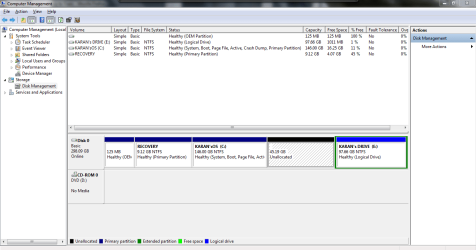
I shrink C drive and then there a new allocated space is formed.
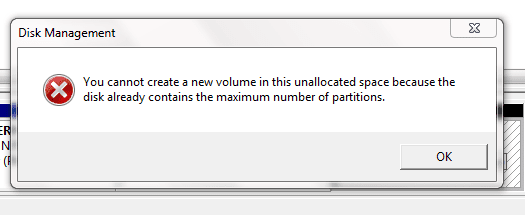
& then i right clicked and clicked on 'new simple volume' & the error is displayed in the 2nd attachment.
 

Attachments

  • Capture.PNG
    Capture.PNG
    31.4 KB · Views: 16
  • sdfg.PNG
    sdfg.PNG
    7.8 KB · Views: 9

My Computer My Computer

At a glance

Windows 7 Ultimate x64DELL320 gbNot available
Computer Manufacturer/Model Number
DELL
OS
Windows 7 Ultimate x64
CPU
DELL
Motherboard
Intel
Memory
320 gb
Graphics Card(s)
Not available
Sound Card
Don't know
Monitor(s) Displays
Laptop
Mouse
USB i-ball
Whatever you do, Do Not accept a Dynamic disk, that will make Windows not able to boot at all.

You will have to extend C: back into the unallocated space; there can only be a total of 4 partitions using the Windows Master Boot Record partition structure and you already have that limit.

It's late here now and I can't think straight, keep checking back, hopefully someone will have a suggestion for you.
 

My Computer My Computer

At a glance

W 7 64-bit UltimateIntel Q9550 Yorkfield8GB Dominator 8500C5DATI : XFX 5870
Computer Manufacturer/Model Number
* BFK Customs *
OS
W 7 64-bit Ultimate
CPU
Intel Q9550 Yorkfield
Motherboard
ASUS P5Q Pro
Memory
8GB Dominator 8500C5D
Graphics Card(s)
ATI : XFX 5870
Sound Card
Realtek HD Audio 7-1
Monitor(s) Displays
1x 47" LCD HDMI & 3x 26" LCD HDMI
Screen Resolution
1920x1080P & 1920x1200
Hard Drives
1x 80GB Intel X25-M G2 SSD : 1x 500GB & 1x 640GB WD Caviar Black(s)
PSU
Corsair 620HX
Case
Cooler Master RC-690
Cooling
Tuniq Tower 120, 2x 140mm and 3x 120mm case fans
Keyboard
Microsoft 500
Mouse
Razer Diamondback 3G
Internet Speed
14 Mb/s
Other Info
1x Koutech 3Gb/s SATA HDD Hot Swap Rack
ok thanks a lot for helping me
 

My Computer My Computer

At a glance

Windows 7 Ultimate x64DELL320 gbNot available
Computer Manufacturer/Model Number
DELL
OS
Windows 7 Ultimate x64
CPU
DELL
Motherboard
Intel
Memory
320 gb
Graphics Card(s)
Not available
Sound Card
Don't know
Monitor(s) Displays
Laptop
Mouse
USB i-ball
IMO, I would buy a Ext Drive for your Data.

If you have a desktop add a slave drive for Data.
 

My Computer My Computer

At a glance

ME/XP/Vista/Win7
OS
ME/XP/Vista/Win7
Hello again, I'm awake now. :shock:


Here's a solution that will work.

If you have extended C: into the unallocated space, shrink it again to (re)create the unallocated space, then use Option Three of this tutorial at the link below to Move/Resize the left side of the E: Extended partition into the unallocated space so it becomes one partition.
Then using Windows disk management to shrink the right side of E: to create Free Space that can then be created into another Logical drive within the Extended partition.

You will be able to use the Partition Wizard installed version for this and it's very reliable program to use for stuff like this, at this link below and be sure to post back with any further questions you may have and to keep us informed.


My Computer My Computer

At a glance

W 7 64-bit UltimateIntel Q9550 Yorkfield8GB Dominator 8500C5DATI : XFX 5870
Computer Manufacturer/Model Number
* BFK Customs *
OS
W 7 64-bit Ultimate
CPU
Intel Q9550 Yorkfield
Motherboard
ASUS P5Q Pro
Memory
8GB Dominator 8500C5D
Graphics Card(s)
ATI : XFX 5870
Sound Card
Realtek HD Audio 7-1
Monitor(s) Displays
1x 47" LCD HDMI & 3x 26" LCD HDMI
Screen Resolution
1920x1080P & 1920x1200
Hard Drives
1x 80GB Intel X25-M G2 SSD : 1x 500GB & 1x 640GB WD Caviar Black(s)
PSU
Corsair 620HX
Case
Cooler Master RC-690
Cooling
Tuniq Tower 120, 2x 140mm and 3x 120mm case fans
Keyboard
Microsoft 500
Mouse
Razer Diamondback 3G
Internet Speed
14 Mb/s
Other Info
1x Koutech 3Gb/s SATA HDD Hot Swap Rack
Thanks a lot bare for helping me;
i got it.
 

My Computer My Computer

At a glance

Windows 7 Ultimate x64DELL320 gbNot available
Computer Manufacturer/Model Number
DELL
OS
Windows 7 Ultimate x64
CPU
DELL
Motherboard
Intel
Memory
320 gb
Graphics Card(s)
Not available
Sound Card
Don't know
Monitor(s) Displays
Laptop
Mouse
USB i-ball
Back
Top