Solved Malware detected, clean now but comp still running poorly.

cottonball,
I have looked at doing a System Restore but there are no starting points before a week ago when my computer got infected. In fact there are only 2 available and they're dated today and that's even after I click on "Show more restore points". Is there any other way to fix these system/application errors or somehow find an earlier restore point?
 

My Computer My Computer

At a glance

Windows 7 Home Premium 64 bitIntel Pentium P6100 2.00 GHZ8GB RAMIntel HD Graphics
Computer type
Laptop
Computer Manufacturer/Model Number
Dell
OS
Windows 7 Home Premium 64 bit
CPU
Intel Pentium P6100 2.00 GHZ
Memory
8GB RAM
Graphics Card(s)
Intel HD Graphics
Sound Card
Realtek High Defintion Audio, AudioBox USB Audio
Screen Resolution
1600 x 900 x 59 hertz
Hard Drives
NTFS 283GB
Keyboard
Standard PS/2 Keyboard
Mouse
Synaptics PS/2 Port TouchPad, USB Input Device
Internet Speed
300Mbps
Antivirus
Microsoft Security Essentials
Browser
Mozilla, IExplorer

My Computer My Computer

At a glance

Windows 7 Home Premium
Computer type
PC/Desktop
Computer Manufacturer/Model Number
An ol' eMachines
OS
Windows 7 Home Premium
Internet Speed
Fine for me...I'm retired!
This is such a mess. I'm trying to do a Repair Install, but when I got to the Microsoft Recovery page and input my Product Key, it states:
"Unsupported Product
The product key you entered appears to be for software that was pre-installed on a device. Please contact the device manufacturer for software recovery options."


This computer is a Dell, and no Windows 7 Disk or even a Dell Recovery Disk came with it. When I go to Dell.com it refers me to do a Dell DataSafe Local Back up. I went out and bought a flash drive in order to do so. However, in reference to the Repair Install Tutorial, if running from Windows 7, there is no Setup.exe file to click on. If I Restart and boot from USB storage, it brings up the Dell DataSafe Local Back up, but the options are not what is listed in the Repair Install Tutorial. It's giving me the option to bring the computer back to the state it was in when I did the Back up (which is just right now), or completely wipe all the data and start a new partition. Since the comp is 4 years old, my warranty is expired and it'll cost me to talk to anyone at Dell. I'm going to look around and see if I can find some Dell message boards to help.
 

My Computer My Computer

At a glance

Windows 7 Home Premium 64 bitIntel Pentium P6100 2.00 GHZ8GB RAMIntel HD Graphics
Computer type
Laptop
Computer Manufacturer/Model Number
Dell
OS
Windows 7 Home Premium 64 bit
CPU
Intel Pentium P6100 2.00 GHZ
Memory
8GB RAM
Graphics Card(s)
Intel HD Graphics
Sound Card
Realtek High Defintion Audio, AudioBox USB Audio
Screen Resolution
1600 x 900 x 59 hertz
Hard Drives
NTFS 283GB
Keyboard
Standard PS/2 Keyboard
Mouse
Synaptics PS/2 Port TouchPad, USB Input Device
Internet Speed
300Mbps
Antivirus
Microsoft Security Essentials
Browser
Mozilla, IExplorer
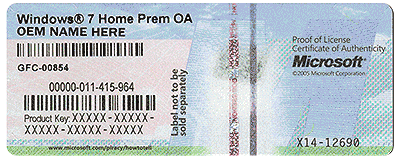
Do you have a Microsoft sticker on the bottom of the laptop or in the battery box?
Can you read it?
It looks something like this.

HardwareCOA.gif
 

My Computer My Computer

At a glance

Windows 10 Pro. 64/ version 1709 Windows 7 Pr...Intel i7-6800K @ 4.3Corsair Platinum 16 gig @2400EVGA GTX 1070 OC
Computer type
PC/Desktop
Computer Manufacturer/Model Number
Home made Desktop
OS
Windows 10 Pro. 64/ version 1709 Windows 7 Pro/64
CPU
Intel i7-6800K @ 4.3
Motherboard
ASUS X-99 Deluxe II
Memory
Corsair Platinum 16 gig @2400
Graphics Card(s)
EVGA GTX 1070 OC
Monitor(s) Displays
Asus 27" LED LCD/VE278Q
Screen Resolution
1920-1080 or 1280-720 HDMI
Hard Drives
INTEL SSD 730-240 Gb Sata 3.0/
PSU
EVGA Platium 1200W
Case
Phanteks Luxe Tempered Glass 8 fans/ one radiator
Cooling
XSPC/ Water Cooled CPU
Keyboard
Das 4 Professional
Mouse
Logitech M705/MX Anywhere 2-S
Internet Speed
100 mbits
Antivirus
Microsoft Security Essentials/ Malwarebytes Premium 3.0/ SAS
Browser
I.E. 11 default/Firefox/ ISP Time Warner Cable/Spectrum
Other Info
LG BluRay Burner/
Sound system-KLipsch-THX/
Icy Dock ssd Hot Swap bays.
Yes I have that. It's kinda smudgy in some parts but I think I can read everything.
 

My Computer My Computer

At a glance

Windows 7 Home Premium 64 bitIntel Pentium P6100 2.00 GHZ8GB RAMIntel HD Graphics
Computer type
Laptop
Computer Manufacturer/Model Number
Dell
OS
Windows 7 Home Premium 64 bit
CPU
Intel Pentium P6100 2.00 GHZ
Memory
8GB RAM
Graphics Card(s)
Intel HD Graphics
Sound Card
Realtek High Defintion Audio, AudioBox USB Audio
Screen Resolution
1600 x 900 x 59 hertz
Hard Drives
NTFS 283GB
Keyboard
Standard PS/2 Keyboard
Mouse
Synaptics PS/2 Port TouchPad, USB Input Device
Internet Speed
300Mbps
Antivirus
Microsoft Security Essentials
Browser
Mozilla, IExplorer
JstRelax,

Layback Bear's suggestion should work, if not, have contacted an Operating System installations expert, and hopefully, he will be able to help you.

What Model/number is your Dell? Example: Inspiron E123..
 

My Computer My Computer

At a glance

Windows 7 Home Premium
Computer type
PC/Desktop
Computer Manufacturer/Model Number
An ol' eMachines
OS
Windows 7 Home Premium
Internet Speed
Fine for me...I'm retired!
It's a Dell Inspiron N7010, and I'm sorry what was the suggestion I was supposed to do? I have the sticker and can read the numbers. Thank you
 

My Computer My Computer

At a glance

Windows 7 Home Premium 64 bitIntel Pentium P6100 2.00 GHZ8GB RAMIntel HD Graphics
Computer type
Laptop
Computer Manufacturer/Model Number
Dell
OS
Windows 7 Home Premium 64 bit
CPU
Intel Pentium P6100 2.00 GHZ
Memory
8GB RAM
Graphics Card(s)
Intel HD Graphics
Sound Card
Realtek High Defintion Audio, AudioBox USB Audio
Screen Resolution
1600 x 900 x 59 hertz
Hard Drives
NTFS 283GB
Keyboard
Standard PS/2 Keyboard
Mouse
Synaptics PS/2 Port TouchPad, USB Input Device
Internet Speed
300Mbps
Antivirus
Microsoft Security Essentials
Browser
Mozilla, IExplorer
If you can read the COA number the hard part is next.
Find a proper copy of Windows 7 that matches your COA key.

Here is a tutorial made by a expert for a Clean Install.

http://www.sevenforums.com/tutorials/219487-clean-reinstall-factory-oem-windows-7-a.html

If you are sure your system is no longer infected you could do a Repair Install. If your system is still infected it will just transfer the infection into the Repair install.
Another tutorial by a expert.

http://www.sevenforums.com/tutorials/3413-repair-install.html
 

My Computer My Computer

At a glance

Windows 10 Pro. 64/ version 1709 Windows 7 Pr...Intel i7-6800K @ 4.3Corsair Platinum 16 gig @2400EVGA GTX 1070 OC
Computer type
PC/Desktop
Computer Manufacturer/Model Number
Home made Desktop
OS
Windows 10 Pro. 64/ version 1709 Windows 7 Pro/64
CPU
Intel i7-6800K @ 4.3
Motherboard
ASUS X-99 Deluxe II
Memory
Corsair Platinum 16 gig @2400
Graphics Card(s)
EVGA GTX 1070 OC
Monitor(s) Displays
Asus 27" LED LCD/VE278Q
Screen Resolution
1920-1080 or 1280-720 HDMI
Hard Drives
INTEL SSD 730-240 Gb Sata 3.0/
PSU
EVGA Platium 1200W
Case
Phanteks Luxe Tempered Glass 8 fans/ one radiator
Cooling
XSPC/ Water Cooled CPU
Keyboard
Das 4 Professional
Mouse
Logitech M705/MX Anywhere 2-S
Internet Speed
100 mbits
Antivirus
Microsoft Security Essentials/ Malwarebytes Premium 3.0/ SAS
Browser
I.E. 11 default/Firefox/ ISP Time Warner Cable/Spectrum
Other Info
LG BluRay Burner/
Sound system-KLipsch-THX/
Icy Dock ssd Hot Swap bays.
Unfortunately MS Software Recovery doesn't accept Factory OEM keys to download the Win7 installation ISO needed to burn to disk or flash stick to perform a Repair Install or Clean Reinstall Windows 7.

It discusses in Clean Reinstall Windows 7 Step 1 how to obtain safe Win7 installation media. Dell will often mail you a Reinstallation DVD for free or shipping charge which is a clean copy of Win7 that can be used for either purpose. If you can't locate this I will loan you my download.

So read over the two tutorials to see which you want to do. Since you need the installation media anyway, I'd strongly suggest doing the Clean Reinstall Windows 7 since it is a vastly better install than the factory install which is throttled by bloatware and duplicate utilities which interfere with better versions built into Win7. The tutorial assures you'll have the best install which will stay that way as long as you stick with only the tools and methods given.
 
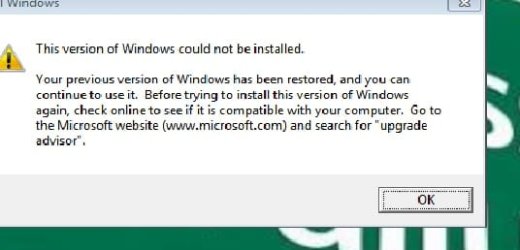
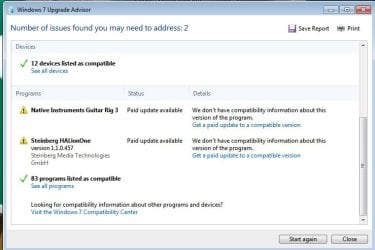
So after 4 hours or so the upgrade/repair install was unsuccessful. I followed the steps exactly. I uninstalled any programs that it said would have compatibility issues. Oddly even after I uninstalled Magic ISO Virtual DVD Manager it still showed up as possible compatibility issue when I restarted the Upgrade, but it went ahead with it anyways. Upon reboot it recommend I install Windows Update Advisor. I did that and it was mostly clean expect for a couple of music apps. I attached a couple of screenshots.
 

Attachments

  • UpgradeUnsuccessful.jpg
    UpgradeUnsuccessful.jpg
    17.8 KB · Views: 12
  • UpgradeAdvisorJpeg.jpg
    UpgradeAdvisorJpeg.jpg
    43.2 KB · Views: 0

My Computer My Computer

At a glance

Windows 7 Home Premium 64 bitIntel Pentium P6100 2.00 GHZ8GB RAMIntel HD Graphics
Computer type
Laptop
Computer Manufacturer/Model Number
Dell
OS
Windows 7 Home Premium 64 bit
CPU
Intel Pentium P6100 2.00 GHZ
Memory
8GB RAM
Graphics Card(s)
Intel HD Graphics
Sound Card
Realtek High Defintion Audio, AudioBox USB Audio
Screen Resolution
1600 x 900 x 59 hertz
Hard Drives
NTFS 283GB
Keyboard
Standard PS/2 Keyboard
Mouse
Synaptics PS/2 Port TouchPad, USB Input Device
Internet Speed
300Mbps
Antivirus
Microsoft Security Essentials
Browser
Mozilla, IExplorer
Is this the Dell Factory Install? It is often too much to ask for a Repair Install to sort out all the corruption that a grossly inferior Factory Install wreaks on the OS. Much better to invest in a perfect Clean Reinstall Windows 7
which will give the opportunity to experience native Win7 performance for the first time on that PC. You only need to do it once and then save the finished product as a backup image to use in place of reinstall.
 
Ok so to give an update. I tried once again to do a repair install and it worked the 2nd time. I believe I had forgotten to disable my Microsoft Security Essentials before I tried it the 1st time. The comp is now back to where it was before the virus. It appears to be clean now. Thank you to everyone that posted and helped out! I will go ahead and mark this as solved.
 

My Computer My Computer

At a glance

Windows 7 Home Premium 64 bitIntel Pentium P6100 2.00 GHZ8GB RAMIntel HD Graphics
Computer type
Laptop
Computer Manufacturer/Model Number
Dell
OS
Windows 7 Home Premium 64 bit
CPU
Intel Pentium P6100 2.00 GHZ
Memory
8GB RAM
Graphics Card(s)
Intel HD Graphics
Sound Card
Realtek High Defintion Audio, AudioBox USB Audio
Screen Resolution
1600 x 900 x 59 hertz
Hard Drives
NTFS 283GB
Keyboard
Standard PS/2 Keyboard
Mouse
Synaptics PS/2 Port TouchPad, USB Input Device
Internet Speed
300Mbps
Antivirus
Microsoft Security Essentials
Browser
Mozilla, IExplorer
It's great to hear you got things working again.

Happy computing
 

My Computer My Computer

At a glance

Windows 10 Pro. 64/ version 1709 Windows 7 Pr...Intel i7-6800K @ 4.3Corsair Platinum 16 gig @2400EVGA GTX 1070 OC
Computer type
PC/Desktop
Computer Manufacturer/Model Number
Home made Desktop
OS
Windows 10 Pro. 64/ version 1709 Windows 7 Pro/64
CPU
Intel i7-6800K @ 4.3
Motherboard
ASUS X-99 Deluxe II
Memory
Corsair Platinum 16 gig @2400
Graphics Card(s)
EVGA GTX 1070 OC
Monitor(s) Displays
Asus 27" LED LCD/VE278Q
Screen Resolution
1920-1080 or 1280-720 HDMI
Hard Drives
INTEL SSD 730-240 Gb Sata 3.0/
PSU
EVGA Platium 1200W
Case
Phanteks Luxe Tempered Glass 8 fans/ one radiator
Cooling
XSPC/ Water Cooled CPU
Keyboard
Das 4 Professional
Mouse
Logitech M705/MX Anywhere 2-S
Internet Speed
100 mbits
Antivirus
Microsoft Security Essentials/ Malwarebytes Premium 3.0/ SAS
Browser
I.E. 11 default/Firefox/ ISP Time Warner Cable/Spectrum
Other Info
LG BluRay Burner/
Sound system-KLipsch-THX/
Icy Dock ssd Hot Swap bays.
JstRelax,

Good job!

Make sure you create a Restore Point now that the machine is running OK.

Cheers!
 

My Computer My Computer

At a glance

Windows 7 Home Premium
Computer type
PC/Desktop
Computer Manufacturer/Model Number
An ol' eMachines
OS
Windows 7 Home Premium
Internet Speed
Fine for me...I'm retired!
Back
Top