Marvel Yukon 88E8040 - problem with internet

DeeJaYxxx

New member
Local time
4:09 AM
Messages
7
Hi!

I have a laptop dell xps 1530 (with Marvell Yukon 88E8040 PCI-E Fast Ethernet Controller inside). I use a router TP-Link (model: TL-WR340GD) to connect to the internet. I have DHCP turned on.
Earlier I use Windows Vista and I don't have problem with connect to internet, now I have Windows 7 (build 7600) and in the first 2 days of install this OS internet working correcly, but now I have "No internet access" and I don't now why :confused: I tried to install last Yukon drivers for win7 from producer site and I tried to set up a static IP and this doesn't help.

Please help me :(
 
Last edited:

My Computer My Computer

At a glance

Windows 7 (RTM, build 7600)Core2Duo T7500 2x2.20 GHz2 GBnVidia GeForce 8600M GT
OS
Windows 7 (RTM, build 7600)
CPU
Core2Duo T7500 2x2.20 GHz
Memory
2 GB
Graphics Card(s)
nVidia GeForce 8600M GT
Sound Card
integrated
Screen Resolution
1440x900
Hard Drives
320 GB sata HDD
Other Info
DELL XPS 1530
Please fill out your system specs.

And.. Did windows install the drivers automatically for the first "two days" of working?

Did you install any programs or change any settings? It just, stopped working?

Did you uninstall the previous drivers before installing the new ones?
 

My Computer My Computer

At a glance

Windows 8.1 PRO3rd Generation Intel Core i7‐3612QM CPU @ 2.1...8GB DDR3NVIDIA GeForce GT 525M (128 bit), 1GB Grpahics
Computer type
PC/Desktop
Computer Manufacturer/Model Number
DELL VOSTRO 3650
OS
Windows 8.1 PRO
CPU
3rd Generation Intel Core i7‐3612QM CPU @ 2.10GHZ
Memory
8GB DDR3
Graphics Card(s)
NVIDIA GeForce GT 525M (128 bit), 1GB Grpahics
Screen Resolution
1920X1080
Hard Drives
750GB 5400RPM
Core2Duo T7500 2x2.20 GHz
2GB RAM
nVidia GeForce 8600M GT
320 GB Sata HDD

and Windows 7 Home Premium 32-bit (build 7600)

Yes, system install the drivers automatically. I don't change any setting, internet it's just stop working. I installed new Yukon drivers after that, because I think, that help.

Now I have uninstalled downloaded drivers and windows installed his own drivers once again.
 

My Computer My Computer

At a glance

Windows 7 (RTM, build 7600)Core2Duo T7500 2x2.20 GHz2 GBnVidia GeForce 8600M GT
OS
Windows 7 (RTM, build 7600)
CPU
Core2Duo T7500 2x2.20 GHz
Memory
2 GB
Graphics Card(s)
nVidia GeForce 8600M GT
Sound Card
integrated
Screen Resolution
1440x900
Hard Drives
320 GB sata HDD
Other Info
DELL XPS 1530
And does it work?
 

My Computer My Computer

At a glance

Windows 8.1 PRO3rd Generation Intel Core i7‐3612QM CPU @ 2.1...8GB DDR3NVIDIA GeForce GT 525M (128 bit), 1GB Grpahics
Computer type
PC/Desktop
Computer Manufacturer/Model Number
DELL VOSTRO 3650
OS
Windows 8.1 PRO
CPU
3rd Generation Intel Core i7‐3612QM CPU @ 2.10GHZ
Memory
8GB DDR3
Graphics Card(s)
NVIDIA GeForce GT 525M (128 bit), 1GB Grpahics
Screen Resolution
1920X1080
Hard Drives
750GB 5400RPM
no, it's doesn't work
 

My Computer My Computer

At a glance

Windows 7 (RTM, build 7600)Core2Duo T7500 2x2.20 GHz2 GBnVidia GeForce 8600M GT
OS
Windows 7 (RTM, build 7600)
CPU
Core2Duo T7500 2x2.20 GHz
Memory
2 GB
Graphics Card(s)
nVidia GeForce 8600M GT
Sound Card
integrated
Screen Resolution
1440x900
Hard Drives
320 GB sata HDD
Other Info
DELL XPS 1530
no new ideas? :(
 

My Computer My Computer

At a glance

Windows 7 (RTM, build 7600)Core2Duo T7500 2x2.20 GHz2 GBnVidia GeForce 8600M GT
OS
Windows 7 (RTM, build 7600)
CPU
Core2Duo T7500 2x2.20 GHz
Memory
2 GB
Graphics Card(s)
nVidia GeForce 8600M GT
Sound Card
integrated
Screen Resolution
1440x900
Hard Drives
320 GB sata HDD
Other Info
DELL XPS 1530
Have you simply turned off the router for 3 minutes - that will reset it.
Can you restore your system back around the problem then try to work out whats causing the problem - check the connection after you install something or relevance.
 

My Computer My Computer

At a glance

XP, Vista, W7 64bit Home PremiumIntel Core Duo 6850 3.0 ghz @ 3.7 ghz4GB Corsair DDR 2 PC-6400Ati 4870 1ghz
OS
XP, Vista, W7 64bit Home Premium
CPU
Intel Core Duo 6850 3.0 ghz @ 3.7 ghz
Motherboard
Asus P5E
Memory
4GB Corsair DDR 2 PC-6400
Graphics Card(s)
Ati 4870 1ghz
Sound Card
Supreme FX 11
Monitor(s) Displays
View Sonic VX1962wm
Screen Resolution
1680 X1050
Hard Drives
3 Seagate Sata Drives 160gb 250gb 500gb
PSU
Thermaltake 600 watt
Case
NZXT Alpha
Cooling
3X120cm Fans
Keyboard
Microsoft Digital Media Pro Keyboard
Mouse
Microsoft Wheel Mouse Optical
Internet Speed
1.5Mb to 8Mb/384k
I tryed reset the router - and nothing.

I can't restore my system back, because I don't have any restore point.
And I upgrade Vista Home Premium x86 to Windows 7 Home Premium x86 (7600), so I don't install any new software
 

My Computer My Computer

At a glance

Windows 7 (RTM, build 7600)Core2Duo T7500 2x2.20 GHz2 GBnVidia GeForce 8600M GT
OS
Windows 7 (RTM, build 7600)
CPU
Core2Duo T7500 2x2.20 GHz
Memory
2 GB
Graphics Card(s)
nVidia GeForce 8600M GT
Sound Card
integrated
Screen Resolution
1440x900
Hard Drives
320 GB sata HDD
Other Info
DELL XPS 1530
Try updating your to the latest driver at Marvell Marvell: Download Drivers
Marvell: Download Drivers
Another solution I found - Go to Internet Options > Connections tab > LAN Settings > Click the box "Use a proxy Server for your LAN... and than hit apply and refreshed and all works now.
Have your checked the manufactures site of your laptop for a bios update?
Could try this - reset your ipconfig
Steps Open the Command Prompt (from the Start button, go to Programs > Accessories > Command Prompt).
In the command prompt window, type ipconfig to see current ip address
In the command prompt window, type ipconfig /release
In the command prompt window, type ipconfig /renew
Exit the Command Prompt by typing exit
 
Last edited:

My Computer My Computer

At a glance

XP, Vista, W7 64bit Home PremiumIntel Core Duo 6850 3.0 ghz @ 3.7 ghz4GB Corsair DDR 2 PC-6400Ati 4870 1ghz
OS
XP, Vista, W7 64bit Home Premium
CPU
Intel Core Duo 6850 3.0 ghz @ 3.7 ghz
Motherboard
Asus P5E
Memory
4GB Corsair DDR 2 PC-6400
Graphics Card(s)
Ati 4870 1ghz
Sound Card
Supreme FX 11
Monitor(s) Displays
View Sonic VX1962wm
Screen Resolution
1680 X1050
Hard Drives
3 Seagate Sata Drives 160gb 250gb 500gb
PSU
Thermaltake 600 watt
Case
NZXT Alpha
Cooling
3X120cm Fans
Keyboard
Microsoft Digital Media Pro Keyboard
Mouse
Microsoft Wheel Mouse Optical
Internet Speed
1.5Mb to 8Mb/384k
This methods not working ;/

so now, I saw this sytuation:

I can connect to FTP server (I tryed in Total Commander) but I can't open any site (I'm using Opera, Google Chrome & IE) ;/


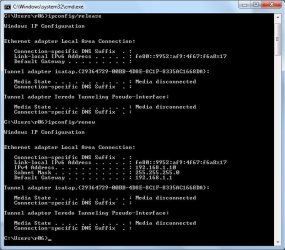
screenshot after renew my IP:
 

Attachments

  • iprenew.jpg
    iprenew.jpg
    56.2 KB · Views: 229
Last edited:

My Computer My Computer

At a glance

Windows 7 (RTM, build 7600)Core2Duo T7500 2x2.20 GHz2 GBnVidia GeForce 8600M GT
OS
Windows 7 (RTM, build 7600)
CPU
Core2Duo T7500 2x2.20 GHz
Memory
2 GB
Graphics Card(s)
nVidia GeForce 8600M GT
Sound Card
integrated
Screen Resolution
1440x900
Hard Drives
320 GB sata HDD
Other Info
DELL XPS 1530
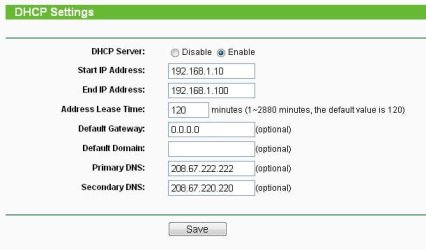
I have found real problem: DNS
When I type ex www.google.pl it says "... cannot display the webpage"
When I type 74.125.43.99 page works correctly.
My dns is configured propertly on router.
 

Attachments

  • dns.JPG
    dns.JPG
    21 KB · Views: 98

My Computer My Computer

At a glance

Windows 7 (RTM, build 7600)Core2Duo T7500 2x2.20 GHz2 GBnVidia GeForce 8600M GT
OS
Windows 7 (RTM, build 7600)
CPU
Core2Duo T7500 2x2.20 GHz
Memory
2 GB
Graphics Card(s)
nVidia GeForce 8600M GT
Sound Card
integrated
Screen Resolution
1440x900
Hard Drives
320 GB sata HDD
Other Info
DELL XPS 1530
I had the same problem. I also have an Intel Wi Fi link 1000 BGN, also "enabled". All I did was disable the Marvell adapter, and let the Intel one do the work. Took two days to figure out, but solved all my problems. I'm guessing that having the two wifi adapters running simultaneously was creating a conflict.
 

My Computer My Computer

At a glance

windows 7 home premium 64 bitintel
Computer Manufacturer/Model Number
samsung
OS
windows 7 home premium 64 bit
CPU
intel
Back
Top