Solved "Master File Table" error on new Samsung 850 EVO NAND SSD

Thank you very much @XweAponX

What is your next plan of action i'm out of ideas tell you true if i were you i will clean install Windows OS.
 

My Computer My Computer

At a glance

Windows 10 Pro x64Intel Core i5 6600Corsair Vengeance LPX 16GB 2666MHz DDR4AMD Radeon R9 380 Series
Computer type
PC/Desktop
Computer Manufacturer/Model Number
Custom Build
OS
Windows 10 Pro x64
CPU
Intel Core i5 6600
Motherboard
Gigabyte Technology Z170M-D3H-CF (U3E1)
Memory
Corsair Vengeance LPX 16GB 2666MHz DDR4
Graphics Card(s)
AMD Radeon R9 380 Series
Hard Drives
SSD
HDD
Antivirus
Eset Smart Security
Browser
Mozila Firefox
I've been following this thread, but as it isn't my knowledge area, I didn't post any suggestion.
Not detracting FreeBooter as he knows more than I do, I would like to advise that Jumanji is the disk Guru in this Forum, so the best XweAponX can do is to follow his instructions. My be there is no solution to recover the drive but you both are going to learn from the best.
 

My Computers My Computers

  • At a glance

    Windows 7 HP 64i5 6600K - 800MHz to 4200MHz4+4G GSkill DDR4 3000IG - Intel 530
    Computer type
    PC/Desktop
    Computer Manufacturer/Model Number
    custom build
    OS
    Windows 7 HP 64
    CPU
    i5 6600K - 800MHz to 4200MHz
    Motherboard
    GA-Z170-HD3P
    Memory
    4+4G GSkill DDR4 3000
    Graphics Card(s)
    IG - Intel 530
    Monitor(s) Displays
    Samsung 226BW
    Screen Resolution
    1680x1050
    Hard Drives
    (1) -1 SM951 – 128GB M.2 AHCI PCIe SSD drive for Windows 7 and Lubuntu
    (2) -1 WD SATA 3 - 1T for Data
    (3) -1 WD SATA 3 - 1T for backup
    PSU
    Thermaltake 450W TR2 gold
    Keyboard
    Old and good Chicony mechanical keyboard
    Mouse
    Logitech mX performance - 9 buttons (had to disable some)
    Internet Speed
    500Mb/s
    Browser
    Firefox 64
    Other Info
    TinyWall firewall
  • At a glance

    Windows 7 Proi7-4500U 800MHz to 3.0GHz(4+4)G DDR3 1600IG intel 4400 + NVIDIA GeForce GT 745M
    Computer type
    Laptop
    System Manufacturer/Model Number
    Asus Q550LF
    OS
    Windows 7 Pro
    CPU
    i7-4500U 800MHz to 3.0GHz
    Motherboard
    Asus Q550LF
    Memory
    (4+4)G DDR3 1600
    Graphics Card(s)
    IG intel 4400 + NVIDIA GeForce GT 745M
    Sound Card
    Realtek
    Monitor(s) Displays
    LG Display LP156WF4-SPH1
    Screen Resolution
    1920 x 1080
    Hard Drives
    BX500 120G SSD for Windows and programs +
    1T HDD for data
    Internet Speed
    500 Mb/s
    Browser
    Firefox
    Other Info
    TinyWall firewall
Megahertz07, FreeBooter has done everything right in my absence and I am really happy about it. Thank you FreeBooter for carrying the mantle on. Continue the good work and God bless.
XweAponX, I see that you have used the beta version 7.1. As far as possible avoid using beta version and use the stable version. When Christophe Grenier decides Beta testing is over and moves 7.1 as a stable version, you can start using 7.1

Christophe Grenier: "If both MFT and MFTMirr are damaged and thus cannot be repaired using TestDisk, you might want to try commercial software like Zero Assumption Recovery, GetDataBack for NTFS or Restorer 2000."

Try the Demo version of Active @ File Recovery Erased file recovery tool - Active@ File Recovery and check if you can recover the files. At USD 29 it is cheaper than GetDataBback Simple and others and many users here had successfully used it to recover the data when TestDisk failed to repair the MFT ( Thanks to SIW2 who suggested it)

After you recover the data you may wipe the disk clean (diskpart cleanall or HDD LLF Low Level Format Tool http://hddguru.com/software/HDD-LLF-Low-Level-Format-Tool/ if you want GUI ( recommended) and then do a clean install of Windows.

Thanks again to FreeBooter - the rising star.
 

My Computer My Computer

At a glance

Windows 7 Home Premium 32 bit
OS
Windows 7 Home Premium 32 bit
Megahertz07, FreeBooter has done everything right in my absence and I am really happy about it. Thank you FreeBooter for carrying the mantle on. Continue the good work and God bless.

XweAponX, I see that you have used the beta version 7.1. As far as possible avoid using beta version and use the stable version. When Christophe Grenier decides Beta testing is over and moves 7.1 as a stable version, you can start using 7.1

I have the 7.0 version too, I'll try that.

Christophe Grenier: "If both MFT and MFTMirr are damaged and thus cannot be repaired using TestDisk, you might want to try commercial software like Zero Assumption Recovery, GetDataBack for NTFS or Restorer 2000."

Try the Demo version of Active @ File Recovery Erased file recovery tool - Active@ File Recovery and check if you can recover the files. At USD 29 it is cheaper than GetDataBback Simple and others and many users here had successfully used it to recover the data when TestDisk failed to repair the MFT ( Thanks to SIW2 who suggested it)

I have already recovered what I needed from it, I still have the drive info saved from EaseUS so I can open that and grab more, if I want.

After you recover the data you may wipe the disk clean (diskpart cleanall or HDD LLF Low Level Format Tool http://hddguru.com/software/HDD-LLF-Low-Level-Format-Tool/ if you want GUI ( recommended) and then do a clean install of Windows.

Thanks again to FreeBooter - the rising star.


Well, the problem is worse than I thought. I did some research on MFT corruption this morning, and it always appears to be associated with drive failure. This is a brand new Samsung SSD. I installed the Samsung Magician software for this drive and today I ran it. IT FAILS TO LOCATE THE DRIVE AS A SAMSUNG DRIVE. Therefore, all of the tools in Magician are Locked Out.

In my reading this am, I read about someone who tried to reformat an MFT damaged drive, and it could not be formatted. So I don't know what to do at this point.

Could I use DISKPART and clean it? I can't post the image of Samsung Magician FAILING to read a Samsung drive.

I have connected the drive to my Laptop via the SATA cable and the magician software DETECTED the drive. I have authenticated it, and there is a SECURE ERASE feature. So, I am going to run that, seeing as I cannot recover this MFT.
 
Last edited:

My Computer My Computer

At a glance

Windows 10/Windows 7 (My Idea- Virtual PC)Intel(R) Core(TM) i5-3470 CPU @ 3.20GHz16 GBnVidia GeForce GTX 750 Ti (2GB)
Computer type
PC/Desktop
Computer Manufacturer/Model Number
Lenovo Thinkcenter M92p
OS
Windows 10/Windows 7 (My Idea- Virtual PC)
CPU
Intel(R) Core(TM) i5-3470 CPU @ 3.20GHz
Motherboard
Lenovo MahoBay
Memory
16 GB
Graphics Card(s)
nVidia GeForce GTX 750 Ti (2GB)
Sound Card
nVidia HD Audio
Monitor(s) Displays
RCA 4KTV 50"
Screen Resolution
3840p x 2160p
Hard Drives
Onboard:
Seagate ST500DM009-2F110A 500GB
WDC WD4000FYYZ-01UL1B1 (WD-WCC131910831) [3726 GB]

USB 3.0
My Book 1140 (WCAZAD122454) [1862 GB]
Apple MDT MD10EAVS-00D7B0 (0000AB123473) [931 GB]

External:
WD Blue Innostar/Matsunichi (465 GB)
WD
PSU
Stock Thinkcenter M92p
Case
Stock Thinkcenter M92p
Cooling
Active
Keyboard
BYTEC BY-GA-KT-100-AC
Mouse
BYTEC
Internet Speed
1 GHz Down, 40 Mbps Up
Antivirus
Windows Defender
Browser
EDGE
Other Info
Old Other Info:
I finally have an Intel machine that has more than 8GB of Ram.
My ASUS M2N-SE AMD Windows 7 machine is back to Windows 7. Replaced the AMD 4400+ CPU and maxed out the RAM (4GB).
My Core Duo machine is only 2GB of Ram and it is locked to Windows XP in order to run Pro Tools 6.4, which I have been using since 2004.
I have one other Dell OptiPlex 980 tower, Identical to this one,
Secure Erase fixed the "frozen" state. Used DISKPART to re init for MBR. It's Windows 7, maybe I should use GPT.

I won't mark "Solved" cos the OS on the drive was irrecoverable.

I had not installed the Magician software into the system, this time I will. Because it appears that there are protections built in with that software that could have prevented this. I don't know why I didn't install it right away, I wasn't expecting the drive to FAIL within one month of installing a fresh OS.

And this whole incident changes my opinion of Samsung SSDs back to original, I had thought they were CRAP, but I gave this one a try due to a friend expounding on their greatness. But I have had issues with Samsung HDDs and SSDs before, so I should have listened to myself.

That's it, just have to reinstall Windows again and restore the files I saved.
 

My Computer My Computer

At a glance

Windows 10/Windows 7 (My Idea- Virtual PC)Intel(R) Core(TM) i5-3470 CPU @ 3.20GHz16 GBnVidia GeForce GTX 750 Ti (2GB)
Computer type
PC/Desktop
Computer Manufacturer/Model Number
Lenovo Thinkcenter M92p
OS
Windows 10/Windows 7 (My Idea- Virtual PC)
CPU
Intel(R) Core(TM) i5-3470 CPU @ 3.20GHz
Motherboard
Lenovo MahoBay
Memory
16 GB
Graphics Card(s)
nVidia GeForce GTX 750 Ti (2GB)
Sound Card
nVidia HD Audio
Monitor(s) Displays
RCA 4KTV 50"
Screen Resolution
3840p x 2160p
Hard Drives
Onboard:
Seagate ST500DM009-2F110A 500GB
WDC WD4000FYYZ-01UL1B1 (WD-WCC131910831) [3726 GB]

USB 3.0
My Book 1140 (WCAZAD122454) [1862 GB]
Apple MDT MD10EAVS-00D7B0 (0000AB123473) [931 GB]

External:
WD Blue Innostar/Matsunichi (465 GB)
WD
PSU
Stock Thinkcenter M92p
Case
Stock Thinkcenter M92p
Cooling
Active
Keyboard
BYTEC BY-GA-KT-100-AC
Mouse
BYTEC
Internet Speed
1 GHz Down, 40 Mbps Up
Antivirus
Windows Defender
Browser
EDGE
Other Info
Old Other Info:
I finally have an Intel machine that has more than 8GB of Ram.
My ASUS M2N-SE AMD Windows 7 machine is back to Windows 7. Replaced the AMD 4400+ CPU and maxed out the RAM (4GB).
My Core Duo machine is only 2GB of Ram and it is locked to Windows XP in order to run Pro Tools 6.4, which I have been using since 2004.
I have one other Dell OptiPlex 980 tower, Identical to this one,
Earlier on you had said using your old Easeus you were able to recover some important files. Did you try the demo version of active@file recovery?

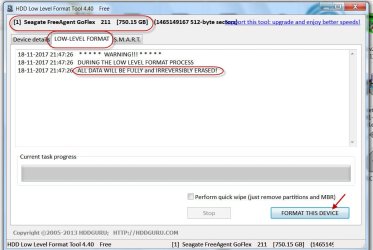
If you want to do a cleanall, I would recommend that you to use HDD LLF Low Level Format Tool I had already mentioned. It can clean SSDs also.

It has a graphical User interface and one can ensure that the correct drive is selected and also watch the progress as it wipes ( provided it sees your SSD)

18-11-2017 21-49-52.jpg
 

My Computer My Computer

At a glance

Windows 7 Home Premium 32 bit
OS
Windows 7 Home Premium 32 bit
You may ignore the above post since you had already done secure erase.

Unlike HDDs data recovery from SSDs had always been a pain which necessitates a backup absolutely essential.
 

My Computer My Computer

At a glance

Windows 7 Home Premium 32 bit
OS
Windows 7 Home Premium 32 bit
You may ignore the above post since you had already done secure erase.

Unlike HDDs data recovery from SSDs had always been a pain which necessitates a backup absolutely essential.


I had never had a problem with any of the systems where I installed a solid-state hard drive, until this one. But I had told those people to buy either western digital or Intel SSDs.

Samsung's to me have been the worst, they are overpriced and performance wise I'm not too enthused. I bought an 80 GB Samsung back in the early 2000's not only was it $80 compared to $50 for western digital is of the same size, but it failed within a year and they didn't even have an RMA system at that time.

I told the customer to retrieve his receipt, I may just have him return this drive and buy a regular one terabyte HDD.

You see I have a friend who loves Samsung for some reason, he was telling me that he's had more western digital drives go out than Samsung, and he was raving about the EVO series.

So I thought I would have this guy buy one of them expecting that it would run well for years and not have any issues, which was a mistake.
 

My Computer My Computer

At a glance

Windows 10/Windows 7 (My Idea- Virtual PC)Intel(R) Core(TM) i5-3470 CPU @ 3.20GHz16 GBnVidia GeForce GTX 750 Ti (2GB)
Computer type
PC/Desktop
Computer Manufacturer/Model Number
Lenovo Thinkcenter M92p
OS
Windows 10/Windows 7 (My Idea- Virtual PC)
CPU
Intel(R) Core(TM) i5-3470 CPU @ 3.20GHz
Motherboard
Lenovo MahoBay
Memory
16 GB
Graphics Card(s)
nVidia GeForce GTX 750 Ti (2GB)
Sound Card
nVidia HD Audio
Monitor(s) Displays
RCA 4KTV 50"
Screen Resolution
3840p x 2160p
Hard Drives
Onboard:
Seagate ST500DM009-2F110A 500GB
WDC WD4000FYYZ-01UL1B1 (WD-WCC131910831) [3726 GB]

USB 3.0
My Book 1140 (WCAZAD122454) [1862 GB]
Apple MDT MD10EAVS-00D7B0 (0000AB123473) [931 GB]

External:
WD Blue Innostar/Matsunichi (465 GB)
WD
PSU
Stock Thinkcenter M92p
Case
Stock Thinkcenter M92p
Cooling
Active
Keyboard
BYTEC BY-GA-KT-100-AC
Mouse
BYTEC
Internet Speed
1 GHz Down, 40 Mbps Up
Antivirus
Windows Defender
Browser
EDGE
Other Info
Old Other Info:
I finally have an Intel machine that has more than 8GB of Ram.
My ASUS M2N-SE AMD Windows 7 machine is back to Windows 7. Replaced the AMD 4400+ CPU and maxed out the RAM (4GB).
My Core Duo machine is only 2GB of Ram and it is locked to Windows XP in order to run Pro Tools 6.4, which I have been using since 2004.
I have one other Dell OptiPlex 980 tower, Identical to this one,
Earlier on you had said using your old Easeus you were able to recover some important files. Did you try the demo version of active@file recovery?

If you want to do a cleanall, I would recommend that you to use HDD LLF Low Level Format Tool I had already mentioned. It can clean SSDs also.

It has a graphical User interface and one can ensure that the correct drive is selected and also watch the progress as it wipes ( provided it sees your SSD)

View attachment 401781

Looks like a good tool, Ironically, my customer also has a GoFlex haha. The 500 GB drive inside of it went bad, and we put a 3 TB Drive in there. Unfortunately, it was Mac Formatted and GPT! Which was impossible to deal with on Windows XP!

Is there a good Stress Test for SSDs, I want to make sure this does not happen again. I think this was caused by a Power Surge sent by SDG&E, They even sent a warning letter that they were going to surge the system, but they left all of their computers ON anyway. One of the other systems got a blown out power supply. It's an industrial area, so surges are not minor there. And I kept telling him to buy UPS's with surge protection.

I lost a TV, Refrigerator, two PCs and one Mac, and an old antique Emerson FAN due to a power surge at my house, and my outlets are all 15A.
 

My Computer My Computer

At a glance

Windows 10/Windows 7 (My Idea- Virtual PC)Intel(R) Core(TM) i5-3470 CPU @ 3.20GHz16 GBnVidia GeForce GTX 750 Ti (2GB)
Computer type
PC/Desktop
Computer Manufacturer/Model Number
Lenovo Thinkcenter M92p
OS
Windows 10/Windows 7 (My Idea- Virtual PC)
CPU
Intel(R) Core(TM) i5-3470 CPU @ 3.20GHz
Motherboard
Lenovo MahoBay
Memory
16 GB
Graphics Card(s)
nVidia GeForce GTX 750 Ti (2GB)
Sound Card
nVidia HD Audio
Monitor(s) Displays
RCA 4KTV 50"
Screen Resolution
3840p x 2160p
Hard Drives
Onboard:
Seagate ST500DM009-2F110A 500GB
WDC WD4000FYYZ-01UL1B1 (WD-WCC131910831) [3726 GB]

USB 3.0
My Book 1140 (WCAZAD122454) [1862 GB]
Apple MDT MD10EAVS-00D7B0 (0000AB123473) [931 GB]

External:
WD Blue Innostar/Matsunichi (465 GB)
WD
PSU
Stock Thinkcenter M92p
Case
Stock Thinkcenter M92p
Cooling
Active
Keyboard
BYTEC BY-GA-KT-100-AC
Mouse
BYTEC
Internet Speed
1 GHz Down, 40 Mbps Up
Antivirus
Windows Defender
Browser
EDGE
Other Info
Old Other Info:
I finally have an Intel machine that has more than 8GB of Ram.
My ASUS M2N-SE AMD Windows 7 machine is back to Windows 7. Replaced the AMD 4400+ CPU and maxed out the RAM (4GB).
My Core Duo machine is only 2GB of Ram and it is locked to Windows XP in order to run Pro Tools 6.4, which I have been using since 2004.
I have one other Dell OptiPlex 980 tower, Identical to this one,
Bah! I'll mark it Solved, it is kind of solved.

Thanks everyone who helped me find the right tools to deal with this rare issue. When I was initially checking out this system In Situ, I ran Partition Wizard and rebuilt the MBR. I had also gotten "Master File Table" mixed up with MBR, I had never seen it happen. So THAT is what probably fuxed up the backup MFT, I had read about something similar happening on another board where I was researching this.

I thought I knew about all of the issues hard drives could have, and I thought I was prepared for it. But SSDs are a new tech. Where I can fix an HDD that most people will toss in the garbage, it appears I can't fix an SSD. SSDs are not so user friendly - Or technician friendly! So I suppose I have to buy a few SSDs so I can get used to the problems they have.

Once I get Win 7 re-installed (and now the OPTICAL drive is refusing to read my Windows 7 installer!), I'm installing the Samsung Magician software IMMEDIATELY. It has many tools for maintaining the drive.

Once again, thanks to all. I rarely come in here, I love that I can still come here and find out that I *DON'T* know everything about Windows 7!

Ghod (or whatever) Bless,

xWx
 

My Computer My Computer

At a glance

Windows 10/Windows 7 (My Idea- Virtual PC)Intel(R) Core(TM) i5-3470 CPU @ 3.20GHz16 GBnVidia GeForce GTX 750 Ti (2GB)
Computer type
PC/Desktop
Computer Manufacturer/Model Number
Lenovo Thinkcenter M92p
OS
Windows 10/Windows 7 (My Idea- Virtual PC)
CPU
Intel(R) Core(TM) i5-3470 CPU @ 3.20GHz
Motherboard
Lenovo MahoBay
Memory
16 GB
Graphics Card(s)
nVidia GeForce GTX 750 Ti (2GB)
Sound Card
nVidia HD Audio
Monitor(s) Displays
RCA 4KTV 50"
Screen Resolution
3840p x 2160p
Hard Drives
Onboard:
Seagate ST500DM009-2F110A 500GB
WDC WD4000FYYZ-01UL1B1 (WD-WCC131910831) [3726 GB]

USB 3.0
My Book 1140 (WCAZAD122454) [1862 GB]
Apple MDT MD10EAVS-00D7B0 (0000AB123473) [931 GB]

External:
WD Blue Innostar/Matsunichi (465 GB)
WD
PSU
Stock Thinkcenter M92p
Case
Stock Thinkcenter M92p
Cooling
Active
Keyboard
BYTEC BY-GA-KT-100-AC
Mouse
BYTEC
Internet Speed
1 GHz Down, 40 Mbps Up
Antivirus
Windows Defender
Browser
EDGE
Other Info
Old Other Info:
I finally have an Intel machine that has more than 8GB of Ram.
My ASUS M2N-SE AMD Windows 7 machine is back to Windows 7. Replaced the AMD 4400+ CPU and maxed out the RAM (4GB).
My Core Duo machine is only 2GB of Ram and it is locked to Windows XP in order to run Pro Tools 6.4, which I have been using since 2004.
I have one other Dell OptiPlex 980 tower, Identical to this one,
@Megahertz07, FreeBooter has done everything right in my absence and I am really happy about it. Thank you FreeBooter for carrying the mantle on. Continue the good work and God bless.

@XweAponX, I see that you have used the beta version 7.1. As far as possible avoid using beta version and use the stable version. When Christophe Grenier decides Beta testing is over and moves 7.1 as a stable version, you can start using 7.1

Christophe Grenier: "If both MFT and MFTMirr are damaged and thus cannot be repaired using TestDisk, you might want to try commercial software like Zero Assumption Recovery, GetDataBack for NTFS or Restorer 2000."

Try the Demo version of Active @ File Recovery Erased file recovery tool - Active@ File Recovery and check if you can recover the files. At USD 29 it is cheaper than GetDataBback Simple and others and many users here had successfully used it to recover the data when TestDisk failed to repair the MFT ( Thanks to SIW2 who suggested it)

After you recover the data you may wipe the disk clean (diskpart cleanall or HDD LLF Low Level Format Tool http://hddguru.com/software/HDD-LLF-Low-Level-Format-Tool/ if you want GUI ( recommended) and then do a clean install of Windows.

Thanks again to FreeBooter - the rising star.
Thank you very much @jumanji!
 

My Computer My Computer

At a glance

Windows 10 Pro x64Intel Core i5 6600Corsair Vengeance LPX 16GB 2666MHz DDR4AMD Radeon R9 380 Series
Computer type
PC/Desktop
Computer Manufacturer/Model Number
Custom Build
OS
Windows 10 Pro x64
CPU
Intel Core i5 6600
Motherboard
Gigabyte Technology Z170M-D3H-CF (U3E1)
Memory
Corsair Vengeance LPX 16GB 2666MHz DDR4
Graphics Card(s)
AMD Radeon R9 380 Series
Hard Drives
SSD
HDD
Antivirus
Eset Smart Security
Browser
Mozila Firefox

My Computer My Computer

At a glance

Windows 10 Pro x64Intel Core i5 6600Corsair Vengeance LPX 16GB 2666MHz DDR4AMD Radeon R9 380 Series
Computer type
PC/Desktop
Computer Manufacturer/Model Number
Custom Build
OS
Windows 10 Pro x64
CPU
Intel Core i5 6600
Motherboard
Gigabyte Technology Z170M-D3H-CF (U3E1)
Memory
Corsair Vengeance LPX 16GB 2666MHz DDR4
Graphics Card(s)
AMD Radeon R9 380 Series
Hard Drives
SSD
HDD
Antivirus
Eset Smart Security
Browser
Mozila Firefox
You are very welcome @XweAponX!


Once I installed the Magician software into the machine, I discovered all kinds of things I neglected. the AHCI was shut off, turning it on sped it up considerable. Then it had something called "Rapid Mode" which makes the machine boot up in about 5 secs, and run with hardly any lag. And a few more settings that shut off things SSD's don't use like Pre/Superfetch. And the software monitors the health of the drive, optimitses it automatically, so no more Raxco Perfect Disk. Works great for HDDs, but I think PD is what killed the original OS.

I guess it's the era of the NAND!
 

My Computer My Computer

At a glance

Windows 10/Windows 7 (My Idea- Virtual PC)Intel(R) Core(TM) i5-3470 CPU @ 3.20GHz16 GBnVidia GeForce GTX 750 Ti (2GB)
Computer type
PC/Desktop
Computer Manufacturer/Model Number
Lenovo Thinkcenter M92p
OS
Windows 10/Windows 7 (My Idea- Virtual PC)
CPU
Intel(R) Core(TM) i5-3470 CPU @ 3.20GHz
Motherboard
Lenovo MahoBay
Memory
16 GB
Graphics Card(s)
nVidia GeForce GTX 750 Ti (2GB)
Sound Card
nVidia HD Audio
Monitor(s) Displays
RCA 4KTV 50"
Screen Resolution
3840p x 2160p
Hard Drives
Onboard:
Seagate ST500DM009-2F110A 500GB
WDC WD4000FYYZ-01UL1B1 (WD-WCC131910831) [3726 GB]

USB 3.0
My Book 1140 (WCAZAD122454) [1862 GB]
Apple MDT MD10EAVS-00D7B0 (0000AB123473) [931 GB]

External:
WD Blue Innostar/Matsunichi (465 GB)
WD
PSU
Stock Thinkcenter M92p
Case
Stock Thinkcenter M92p
Cooling
Active
Keyboard
BYTEC BY-GA-KT-100-AC
Mouse
BYTEC
Internet Speed
1 GHz Down, 40 Mbps Up
Antivirus
Windows Defender
Browser
EDGE
Other Info
Old Other Info:
I finally have an Intel machine that has more than 8GB of Ram.
My ASUS M2N-SE AMD Windows 7 machine is back to Windows 7. Replaced the AMD 4400+ CPU and maxed out the RAM (4GB).
My Core Duo machine is only 2GB of Ram and it is locked to Windows XP in order to run Pro Tools 6.4, which I have been using since 2004.
I have one other Dell OptiPlex 980 tower, Identical to this one,
Don't forget you don't want to defragment SDD drives which will reduce the lifespan of the SSD drive.

The latest version of the Raxco Perfect Disk claims free space consolidation can improve SSD write performance. The SSD Optimize defrag method is a special defrag method for SSD drives that focuses on free space consolidation without defragmentation of files. As such, it will leave files in a fragmented state while consolidating free space into large pieces.


I have a Raxco Perfect Disk installed i have disabled free space consolidation for SSD drive i have not notice any slow down of the write performance.
 

My Computer My Computer

At a glance

Windows 10 Pro x64Intel Core i5 6600Corsair Vengeance LPX 16GB 2666MHz DDR4AMD Radeon R9 380 Series
Computer type
PC/Desktop
Computer Manufacturer/Model Number
Custom Build
OS
Windows 10 Pro x64
CPU
Intel Core i5 6600
Motherboard
Gigabyte Technology Z170M-D3H-CF (U3E1)
Memory
Corsair Vengeance LPX 16GB 2666MHz DDR4
Graphics Card(s)
AMD Radeon R9 380 Series
Hard Drives
SSD
HDD
Antivirus
Eset Smart Security
Browser
Mozila Firefox
Back
Top