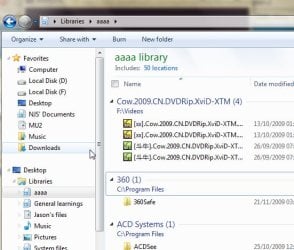
Maximum number of LOCATIONS in a windows LIBRARY 50?

njs333

New member
Local time
4:04 AM
Messages
6
I tried to include more than 50 folders in a windows library, but it does not work by whatever means.

Is this trure for everyone that the maximum locations in a windows LIBRARY is 50?
How can I include more folders in a library then?
 

Attachments

  • Snap2.jpg
    Snap2.jpg
    42.8 KB · Views: 55

My Computer My Computer

At a glance

windows 7T72004GNVIDIA 8600GS(M)
Computer Manufacturer/Model Number
ASUS F3SV LAPTOP
OS
windows 7
CPU
T7200
Memory
4G
Graphics Card(s)
NVIDIA 8600GS(M)
A library can only have 50 parent folders.
So you'll have to make a couple of parent folders, and then copy everything into the parent folders.

For example, you'd put a Photo folder and a Video folder in the aaaa Library.
Then you'd copy all your stuff into the 2 folders and that'd hold all of the folders.
More info on this here: Andy Rathbone What’s this “50 Folder” limit to Windows 7’s libraries?
 

My Computer My Computer

At a glance

Win7 x64 + x86Intel i7 920, other Intel chips, and the Atom...12 gB; 4 gB Lenovo; 1 gB Samsung netbookATI 4870
Computer Manufacturer/Model Number
Home built (x64), Lenovo x61s Tablet, Samsung Netbook
OS
Win7 x64 + x86
CPU
Intel i7 920, other Intel chips, and the Atom in the netbook
Motherboard
Asus P6T Deluxe
Memory
12 gB; 4 gB Lenovo; 1 gB Samsung netbook
Graphics Card(s)
ATI 4870
Sound Card
Yes, I have one of these
Monitor(s) Displays
32" Sharp Aquos TV
Screen Resolution
800x600 - I have vision issues
Hard Drives
4 - 150 gB Velociraptors in RAID 5
Promise controller
PSU
1000 watt (can't recall the brand)
Case
Antec 300
Cooling
Big honking cooler that was rated highly at Toms Hardware
Keyboard
Microsoft Natural
Mouse
Logitech Trackman
Internet Speed
Cable
Other Info
GeekSquad UPS
CyberPower UPS
DLink DNS-323 NAS (2 tB)
Netgear wireless router as an access point
Netgear wired router FSV-318
Home network consists of
4 desktop computers (2 Vista, 2 Win7)
1 netbook (Win7)
4 laptop computers (XP, 2-Vista, Win7)
Wii and XBox 360
Thx for your reply!! but is there any way to break through the limit? for example, change the registry key or the group policy... i would really prefer having more than 50 folders in a library.
 

My Computer My Computer

At a glance

windows 7T72004GNVIDIA 8600GS(M)
Computer Manufacturer/Model Number
ASUS F3SV LAPTOP
OS
windows 7
CPU
T7200
Memory
4G
Graphics Card(s)
NVIDIA 8600GS(M)
Here is more information about customizing your library: Working with libraries. You may have to organize your library to fit your needs without increasing the folder capacity.

Cheers,
Tara
Windows Outreach Team
 

My Computer My Computer

At a glance

Windows 7
OS
Windows 7
Thx for your reply!! but is there any way to break through the limit? for example, change the registry key or the group policy... i would really prefer having more than 50 folders in a library.

Why would you think there is a way to go beyond the limit?
Having a need for more then 50 locations seems awfully overkill.
 

My Computer My Computer

At a glance

Windows 10 Pro (x64)Intel Core i7-3930K (3.2GHz - 4.5GHz)4x Samsung 4GB PC3-12800 DDR3 (16GB 1600MHz)Nvidia Geforce GTX 690
Computer type
PC/Desktop
Computer Manufacturer/Model Number
Alienware Aurora ALX R4
OS
Windows 10 Pro (x64)
CPU
Intel Core i7-3930K (3.2GHz - 4.5GHz)
Motherboard
Alienware Aurora-R4 x79
Memory
4x Samsung 4GB PC3-12800 DDR3 (16GB 1600MHz)
Graphics Card(s)
Nvidia Geforce GTX 690
Sound Card
SteelSeries Siberia Elite
Monitor(s) Displays
Dell UltraSharp U3011
Screen Resolution
2560x1600
Hard Drives
Samsung 850 Pro 256 GB, Seagate 1TB Desktop Hybrid HDD, 2x Western Digital 4TB Green HDD
PSU
875W Some Dell PSU <.<
Case
Alienware Aurora ALX
Cooling
Custom Liquid Cooling (EK CPU & GPU blocks) dual EK 480RAD
Keyboard
Logitech G710+ Mechanical
Mouse
Logitech G700s
Internet Speed
Verizon Fios (50 mbps average)
Other Info
Server: Intel NUC D54250WYK: i5-4250U, 16GB, 256 GB mSATA, Windows Server 2012 R2
Thx for your reply!! but is there any way to break through the limit? for example, change the registry key or the group policy... i would really prefer having more than 50 folders in a library.

I have to agree with logicearth - 50 folders is overkill. I think you've re-definied the term "granular"!
 

My Computer My Computer

At a glance

Windows 7 Ultimate x64 SP1Core i7-2670QM8GB DDR3 PC3-10600Intel HD Graphics 3000 + GeForce GT 540M
Computer Manufacturer/Model Number
Dell XPS 15 L502x
OS
Windows 7 Ultimate x64 SP1
CPU
Core i7-2670QM
Memory
8GB DDR3 PC3-10600
Graphics Card(s)
Intel HD Graphics 3000 + GeForce GT 540M
Screen Resolution
1920x1080
Hard Drives
1TB 5400RPM Seagate
Somehow I think you may not be using the library function properly...can you explain what you're trying to do?
 

My Computer My Computer

At a glance

Windows 7 Ultimate RTM (Technet)3.00 gigahertz Intel Core2 Duo E84004GBATI Radeon X1950 Pro
Computer Manufacturer/Model Number
Custom
OS
Windows 7 Ultimate RTM (Technet)
CPU
3.00 gigahertz Intel Core2 Duo E8400
Motherboard
ASUSTeK Computer INC. P5K/EPU Rev 1.xx
Memory
4GB
Graphics Card(s)
ATI Radeon X1950 Pro
Sound Card
Built in HD Audio
Monitor(s) Displays
22" Gateway LCD
Screen Resolution
1920 x 1200
Hard Drives
ST3160023A [Hard drive] (160.04 GB) -- drive 0, rev 8.01, ST3500630AS [Hard drive] (500.11 GB) -- drive 2, rev 3.AAK
ST3500630AS [Hard drive] (500.11 GB) -- drive 1, rev 3.AAK
Keyboard
Logitech G11
Mouse
Microsoft Wireless Laser Mouse 5000
Internet Speed
13.44 Mbps
Why do people always think that since they don't use as much as x, then its overkill and person x is doing it wrong. I think if you can't help him don't reply, don't lecture him what he is doing "wrong".
/rant

Also, I don't know how to at over 50 folders.
 

My Computer My Computer

At a glance

Windows 7
OS
Windows 7
Why do people always think that since they don't use as much as x, then its overkill and person x is doing it wrong. I think if you can't help him don't reply, don't lecture him what he is doing "wrong".
/rant

Also, I don't know how to at over 50 folders.

Because obviously it is overkill. Why purpose is it to have 50 parent directories to one library? And maybe you should take your own advice? "... if you can't help him don't reply"
 

My Computer My Computer

At a glance

Windows 10 Pro (x64)Intel Core i7-3930K (3.2GHz - 4.5GHz)4x Samsung 4GB PC3-12800 DDR3 (16GB 1600MHz)Nvidia Geforce GTX 690
Computer type
PC/Desktop
Computer Manufacturer/Model Number
Alienware Aurora ALX R4
OS
Windows 10 Pro (x64)
CPU
Intel Core i7-3930K (3.2GHz - 4.5GHz)
Motherboard
Alienware Aurora-R4 x79
Memory
4x Samsung 4GB PC3-12800 DDR3 (16GB 1600MHz)
Graphics Card(s)
Nvidia Geforce GTX 690
Sound Card
SteelSeries Siberia Elite
Monitor(s) Displays
Dell UltraSharp U3011
Screen Resolution
2560x1600
Hard Drives
Samsung 850 Pro 256 GB, Seagate 1TB Desktop Hybrid HDD, 2x Western Digital 4TB Green HDD
PSU
875W Some Dell PSU <.<
Case
Alienware Aurora ALX
Cooling
Custom Liquid Cooling (EK CPU & GPU blocks) dual EK 480RAD
Keyboard
Logitech G710+ Mechanical
Mouse
Logitech G700s
Internet Speed
Verizon Fios (50 mbps average)
Other Info
Server: Intel NUC D54250WYK: i5-4250U, 16GB, 256 GB mSATA, Windows Server 2012 R2
Why do people always think that since they don't use as much as x, then its overkill and person x is doing it wrong. I think if you can't help him don't reply, don't lecture him what he is doing "wrong".
/rant

Also, I don't know how to at over 50 folders.

Because obviously it is overkill. Why purpose is it to have 50 parent directories to one library? And maybe you should take your own advice? "... if you can't help him don't reply"


Seriously, whatever the reason, he wants more than 50 parent directories. No one can tell him that's wrong, he can use it however he wants to. I doubt he lacks the ability to make sub-folders, and if he can't, he's beyond helping. You telling him its overkill is an opinion, of which I share, but what if he has a completely valid and logical reason for having more than 50 parent directories? It's a pet peeve of mine when someone asks a question then someone goes "why would you need that, its obvioulsy the wrong way," when its completely opinionated.
 

My Computer My Computer

At a glance

Windows 7
OS
Windows 7
Thanks for everyone's attention on my case! Maybe I should explain my situation more specifically.
Here's the reason why I need to add more than 50 folders in a library. It is because I want to clearly list all my music files in a library and group them by singer's name. I do hc realized it can be done by simply right click in the library -> group by -> contributing artist. In my case, most of my music files are of ".ape" format whose information (contributing artists, album, track No.), unlike "mp3" or "wma", cannot be recognized by the system automatically. So, I have always to manually create folders named after singers or album's name to gather all their songs. However, the number of singers and albums is much more than 50 that I cannot put them in a single library. Please see my attached photo for better understanding!
 

Attachments

  • Untitled-1.jpg
    Untitled-1.jpg
    134.6 KB · Views: 57

My Computer My Computer

At a glance

windows 7T72004GNVIDIA 8600GS(M)
Computer Manufacturer/Model Number
ASUS F3SV LAPTOP
OS
windows 7
CPU
T7200
Memory
4G
Graphics Card(s)
NVIDIA 8600GS(M)
Why do people always think that since they don't use as much as x, then its overkill and person x is doing it wrong. I think if you can't help him don't reply, don't lecture him what he is doing "wrong".
/rant

Also, I don't know how to at over 50 folders.

Because obviously it is overkill. Why purpose is it to have 50 parent directories to one library? And maybe you should take your own advice? "... if you can't help him don't reply"


Seriously, whatever the reason, he wants more than 50 parent directories. No one can tell him that's wrong, he can use it however he wants to. I doubt he lacks the ability to make sub-folders, and if he can't, he's beyond helping. You telling him its overkill is an opinion, of which I share, but what if he has a completely valid and logical reason for having more than 50 parent directories? It's a pet peeve of mine when someone asks a question then someone goes "why would you need that, its obvioulsy the wrong way," when its completely opinionated.

Thx for your understanding! Actually it would be ridiculous, if I know how to properly use a library without knowing how to make a subfolder. It's just sometimes the subfolder is no longer noticable or convenient when wishing to see the files inside using a library. And I believe, in the future, 50 locations in a library will be far less enough for many many advanced users.
 

My Computer My Computer

At a glance

windows 7T72004GNVIDIA 8600GS(M)
Computer Manufacturer/Model Number
ASUS F3SV LAPTOP
OS
windows 7
CPU
T7200
Memory
4G
Graphics Card(s)
NVIDIA 8600GS(M)
I think the libraries feature was never intended to be used in this fashion.

Perhaps you can organize your music with a third-party player/organizer?
 

My Computer My Computer

At a glance

Windows 7 Home Premium 64Core i7 870 2.93 GHz16 GB G-Skills DDR3 1333ASUS GTX 680 DirectCu-II Top
Computer Manufacturer/Model Number
Custom
OS
Windows 7 Home Premium 64
CPU
Core i7 870 2.93 GHz
Motherboard
Gigabyte P55A-UD3
Memory
16 GB G-Skills DDR3 1333
Graphics Card(s)
ASUS GTX 680 DirectCu-II Top
Sound Card
Realtek 5.1 audio
Monitor(s) Displays
Samsung 23" widescreen
Screen Resolution
2048x1152
Hard Drives
OCZ Vertex III 128 GB (primary)
OCZ Vertex II 128 GB (data)
PSU
Corsair 650W
Case
CoolerMaster HAF 920
Cooling
Arctic Cooling Freezer 7 Pro
Keyboard
DAS Model S Ultimate keyboard
Mouse
Logitech G5 gaming mouse
Internet Speed
Cable
Browser
Chrome
Other Info
Built in December 2010
Thanks for everyone's attention on my case! Maybe I should explain my situation more specifically.
Here's the reason why I need to add more than 50 folders in a library. It is because I want to clearly list all my music files in a library and group them by singer's name. I do hc realized it can be done by simply right click in the library -> group by -> contributing artist. In my case, most of my music files are of ".ape" format whose information (contributing artists, album, track No.), unlike "mp3" or "wma", cannot be recognized by the system automatically. So, I have always to manually create folders named after singers or album's name to gather all their songs. However, the number of singers and albums is much more than 50 that I cannot put them in a single library. Please see my attached photo for better understanding!

Why not put all the music as a subfolder of a folder named "Music" and put the "Music" folder in the Music library? Yes, it's one extra click, but the end result should be the same.
 

My Computer My Computer

At a glance

Windows 7 Ultimate RTM (Technet)3.00 gigahertz Intel Core2 Duo E84004GBATI Radeon X1950 Pro
Computer Manufacturer/Model Number
Custom
OS
Windows 7 Ultimate RTM (Technet)
CPU
3.00 gigahertz Intel Core2 Duo E8400
Motherboard
ASUSTeK Computer INC. P5K/EPU Rev 1.xx
Memory
4GB
Graphics Card(s)
ATI Radeon X1950 Pro
Sound Card
Built in HD Audio
Monitor(s) Displays
22" Gateway LCD
Screen Resolution
1920 x 1200
Hard Drives
ST3160023A [Hard drive] (160.04 GB) -- drive 0, rev 8.01, ST3500630AS [Hard drive] (500.11 GB) -- drive 2, rev 3.AAK
ST3500630AS [Hard drive] (500.11 GB) -- drive 1, rev 3.AAK
Keyboard
Logitech G11
Mouse
Microsoft Wireless Laser Mouse 5000
Internet Speed
13.44 Mbps
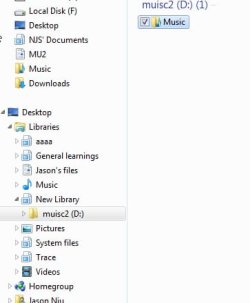
Great idea! However, it's not worked out... I think the problem is the library could only provide a whole schematic view just one step inside of the original folder. If I create a folder out of my music folder, I won't see the whole list of songs grouped by folders any more when opening the sub folders. Actually I'm a chinese speaker, excuse my english if not clear. Please take a look at those screen shots.
 

Attachments

  • Snap2.jpg
    Snap2.jpg
    15.5 KB · Views: 14
  • Untitled-2.jpg
    Untitled-2.jpg
    140.6 KB · Views: 35
  • e3.jpg
    e3.jpg
    28.1 KB · Views: 17

My Computer My Computer

At a glance

windows 7T72004GNVIDIA 8600GS(M)
Computer Manufacturer/Model Number
ASUS F3SV LAPTOP
OS
windows 7
CPU
T7200
Memory
4G
Graphics Card(s)
NVIDIA 8600GS(M)
I think the libraries feature was never intended to be used in this fashion.

Perhaps you can organize your music with a third-party player/organizer?

loooool, I just realized the library can be extensively expolited by means of mine...
 

My Computer My Computer

At a glance

windows 7T72004GNVIDIA 8600GS(M)
Computer Manufacturer/Model Number
ASUS F3SV LAPTOP
OS
windows 7
CPU
T7200
Memory
4G
Graphics Card(s)
NVIDIA 8600GS(M)
I too wish for more than 50. Though it is because of a shortcomming in Windows itself that I want this.

Perhaps someone can propose an alternative.

I have a lot of folders with pictures I have taken. I sort my photos into directories based on date taken.

I want to use these pictures as a Windows Desktop Slideshow on my background.

The Windows Desktop Slideshow directory selector does not include a "use subdirectories" option.

The next official way I found was to use a Library.

I have more than 50 directories with these pictures in them. So if using a Library I need to include more than 50.

Otherwise, I need the Windows 7 Desktop Background option to have a "include subdirectory" option.

Any advice?
 

My Computer My Computer

At a glance

Windows 7 Pro 64bit
OS
Windows 7 Pro 64bit
Calm down ...people ...
Just say yes u can and ..."how"...or No u can not ...or ..sit out and wait for the ones who knows ...
No need to argue here ..:D
 

My Computer My Computer

At a glance

Wds 7 32.bit UltimateIntel T7100 Core2Duo 1.8Ghz3GB.Mobile Intel 965 chipset.
Computer Manufacturer/Model Number
Sony fz model .
OS
Wds 7 32.bit Ultimate
CPU
Intel T7100 Core2Duo 1.8Ghz
Motherboard
Sony
Memory
3GB.
Graphics Card(s)
Mobile Intel 965 chipset.
Sound Card
SigmaTel HD
Screen Resolution
1280x800
Hard Drives
320GB Hitachi 7200Rpm
Calm down ...people ...
Just say yes u can and ..."how"...or No u can not ...or ..sit out and wait for the ones who knows ...
No need to argue here ..:D

You are replying to a thread that is several months old.
 

My Computer My Computer

At a glance

Windows 10 Pro (x64)Intel Core i7-3930K (3.2GHz - 4.5GHz)4x Samsung 4GB PC3-12800 DDR3 (16GB 1600MHz)Nvidia Geforce GTX 690
Computer type
PC/Desktop
Computer Manufacturer/Model Number
Alienware Aurora ALX R4
OS
Windows 10 Pro (x64)
CPU
Intel Core i7-3930K (3.2GHz - 4.5GHz)
Motherboard
Alienware Aurora-R4 x79
Memory
4x Samsung 4GB PC3-12800 DDR3 (16GB 1600MHz)
Graphics Card(s)
Nvidia Geforce GTX 690
Sound Card
SteelSeries Siberia Elite
Monitor(s) Displays
Dell UltraSharp U3011
Screen Resolution
2560x1600
Hard Drives
Samsung 850 Pro 256 GB, Seagate 1TB Desktop Hybrid HDD, 2x Western Digital 4TB Green HDD
PSU
875W Some Dell PSU <.<
Case
Alienware Aurora ALX
Cooling
Custom Liquid Cooling (EK CPU & GPU blocks) dual EK 480RAD
Keyboard
Logitech G710+ Mechanical
Mouse
Logitech G700s
Internet Speed
Verizon Fios (50 mbps average)
Other Info
Server: Intel NUC D54250WYK: i5-4250U, 16GB, 256 GB mSATA, Windows Server 2012 R2
Back
Top