
You are using an out of date browser. It may not display this or other websites correctly.
You should upgrade or use an alternative browser.
You should upgrade or use an alternative browser.
Media Player is offline
- Thread starter guitarjam
- Start date

Grimmjow
7 Форум Member
This could be caused by your computer's firewall or Windows Media Player may be set to work offline.
To see if the Player is set to work offline, click the File menu in the Player to verify if a check mark is displayed next to the Work Offline command. If it is,clear the check mark to enable the Player to connect to the network.
You tried streaming from other websites and it wasn't working right?'couse, if it worked, napster is the problem
Also, check stream>turn on media streaming
To see if the Player is set to work offline, click the File menu in the Player to verify if a check mark is displayed next to the Work Offline command. If it is,clear the check mark to enable the Player to connect to the network.
You tried streaming from other websites and it wasn't working right?'couse, if it worked, napster is the problem
Also, check stream>turn on media streaming
My Computer
- Computer Manufacturer/Model Number
- Micro-Star International/MS-7529
- OS
- Windows 7 Ultimate x32
- CPU
- DualCore Intel Pentium E2200, 2218 MHz (11 x 202)
- Motherboard
- MSI G31M3 V2 (MS-7529) (2 PCI, 1 PCI-E x16,2 DDR2 DIMM)
- Memory
- 2 GB DDR2-800 DDR2 SDRAM
- Graphics Card(s)
- nVIDIA GeForce 9500GT 1GB
- Sound Card
- Realtek ALC888/1200 @ Intel 82801GB ICH7
- Monitor(s) Displays
- Samsung SyncMaster 2253BW (Digital) 22'' LCD
- Screen Resolution
- 1680x1050
- Hard Drives
- SAMSUNG HD322IJ ATA Device (298 GB , IDE)
Media player still won't stream
Thanks. It's back online, but................
I tried your steps - no change.
I then tried to browse online stores through WMP.
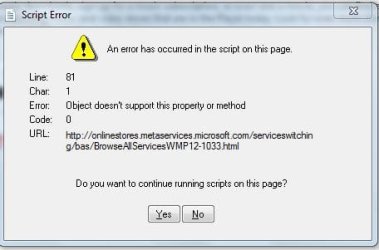
No matter which store I try to access, I get "An error occurred on the scripts on this page" - attached.
In short, I can't stream anything.
??>>>>>>>>>>>>>>>Thanks
Thanks. It's back online, but................
I tried your steps - no change.
I then tried to browse online stores through WMP.
No matter which store I try to access, I get "An error occurred on the scripts on this page" - attached.
In short, I can't stream anything.
??>>>>>>>>>>>>>>>Thanks
Attachments
My Computer
- OS
- Windows 7 pro

kucing13
New member
wmp use internet explorer to connect to internet. So might be the problem comes from IE itself
Try Go into IE's Tools>Internet Options>Advanced menu dialog and enable Active Scripting for the Internet security zone. reboot and see if any changes
Try Go into IE's Tools>Internet Options>Advanced menu dialog and enable Active Scripting for the Internet security zone. reboot and see if any changes
My Computer
- OS
- window's 7
- CPU
- core 2 quad
- Motherboard
- gigabyte
- Memory
- 2gb corsair
- Graphics Card(s)
- ati hd4850
- Monitor(s) Displays
- lg
- Screen Resolution
- 1600 X 900
- Case
- power logic
- Other Info
- none of the spec above is accurate
Solved my problem
I was having the same problem.
Internet was on. Working offline option on WMP wasn't checked. Could browse online with IE and other browsers... but Windows Media player woldn't connect.
I opened my Windows Explorer and typed on its address bar a website address with the www (www.sevenforums.com), even though it open IE to get to the site...this action somehow connected my WMP online, after that "charan! " I could update my albuns and connect to online stores just fine.
Hope this works for you too. :huh:
I was having the same problem.
Internet was on. Working offline option on WMP wasn't checked. Could browse online with IE and other browsers... but Windows Media player woldn't connect.
I opened my Windows Explorer and typed on its address bar a website address with the www (www.sevenforums.com), even though it open IE to get to the site...this action somehow connected my WMP online, after that "charan!
" I could update my albuns and connect to online stores just fine.Hope this works for you too. :huh:
My Computer
- OS
- windows 7