Memory leak

shinoda

New member
Hi,

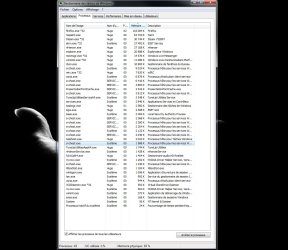
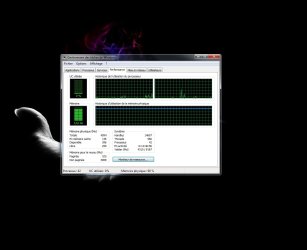
I was just downloading somes big files with jdownloader while watching a movie, but the system was slowy getting laggy, so I checked the memory usage and i was almost full (90% of physical memory in use) and perfmon could not show me anything.

Right now, about ten minutes later, the memory usage is still the same, I killed jdownloader, java and kmplayer , but it still the same. I cant find who is guilty. I post some screens.

My cfg :

Core2Duo E8400 3GHZ
4GB DDR2 PC6400
Win 7 x64 Ultimate


Notes : I use nod32 AV (not smart security). Superfetch is off.
 

Attachments
  • Sans titre.jpg
    Sans titre.jpg
    159.4 KB · Views: 194
  • Sans titre2.jpg
    Sans titre2.jpg
    292 KB · Views: 270

My Computer

OS
Windows 7
Try uninstalling your antivirus for the time being. Usually when you are downloading something or working with large files, there realtime scanners are a pain.
 

My Computer

Computer type
PC/Desktop
Computer Manufacturer/Model Number
Alienware Aurora ALX R4
OS
Windows 10 Pro (x64)
CPU
Intel Core i7-3930K (3.2GHz - 4.5GHz)
Motherboard
Alienware Aurora-R4 x79
Memory
4x Samsung 4GB PC3-12800 DDR3 (16GB 1600MHz)
Graphics Card(s)
Nvidia Geforce GTX 690
Sound Card
SteelSeries Siberia Elite
Monitor(s) Displays
Dell UltraSharp U3011
Screen Resolution
2560x1600
Hard Drives
Samsung 850 Pro 256 GB, Seagate 1TB Desktop Hybrid HDD, 2x Western Digital 4TB Green HDD
PSU
875W Some Dell PSU <.<
Case
Alienware Aurora ALX
Cooling
Custom Liquid Cooling (EK CPU & GPU blocks) dual EK 480RAD
Keyboard
Logitech G710+ Mechanical
Mouse
Logitech G700s
Internet Speed
Verizon Fios (50 mbps average)
Other Info
Server: Intel NUC D54250WYK: i5-4250U, 16GB, 256 GB mSATA, Windows Server 2012 R2
I'd update the chipset and BIOS - java may have been sucking up memory. Can you update all your drivers, reboot and see if this comes back? Use the guide in my sig. What programs do you have installed? Can you post a shot of your installed programs?. Search for snip in the start menu.
 

My Computer

Computer Manufacturer/Model Number
Sony Vaio Z46GDU
OS
Windows 7 Ultimate x86-64
CPU
[email protected] 1066MHz FSB
Motherboard
Sony branded
Memory
6GB DDR3 1066MHz
Graphics Card(s)
9300M GS 256MB Dedicated (Speed) + Intel4500MHD (Stamina)
Sound Card
Realtek HD Audio
Monitor(s) Displays
13.1' WXGA
Screen Resolution
1600x900
Hard Drives
320GB 7200RPM w/ 16MB cache
Internet Speed
1MB/s
EVERYTHING IS UP TO DATE : drivers, bios, windows updates.

I'm using steam, nhancer, virtual clone drive and irc. But i never had a problem until now. I'll try uninstalling my AV and redownload somes files with jdownloader, i get back to you.
 

My Computer

OS
Windows 7
I have a similar problem, only my RAM's constantly at 50%.
Plus, I received a message that a process names "gfqhsl.exe" cannot run. I have no idea what that process is and google didn't, either. Maybe it has something to do with it, maybe it doesn't.
I have 3 GB of RAM (well, four, actually, but I use 32 bit windows).
 

Attachments

  • TM.png
    TM.png
    88.9 KB · Views: 95

My Computer

OS
Windows 7
CPU
Quad 2.50 GHz
Memory
3GB
Graphics Card(s)
nVidia GeForce 295GTX
Monitor(s) Displays
acer X223w
Hard Drives
a 240GB disk (Partitioned into 80GB and 160 GB), two 500GB disks and a 1TB disk.

My Computer

Computer type
PC/Desktop
Computer Manufacturer/Model Number
Home built
OS
Windows 7 Ult, Windows 8.1 Pro,
CPU
Q9650-4.275GHz, E8600 4.5GHz, E6750-3.8GHz
Motherboard
Evga 780i FTW
Memory
G.Skill PC2 9600 1200Mhz 5 5 5 15 2T
Graphics Card(s)
GTX480
Sound Card
Asus Xonar D2
Monitor(s) Displays
HannsG
Screen Resolution
1680X1050
Hard Drives
GSkill Phoenix Pro 120GB SSD
PSU
ThermalTake Toughpower 1000Watt modular
Case
ThermalTake XaserV
Cooling
Xigmatek S1283
Keyboard
Logitech G15
Mouse
Logitech G9
Internet Speed
T1
Back
Top