
Merging C and D drive left with unallocated space! How to merge this ?

schwarzennegger

New member
Member
Local time
9:54 PM
Messages
67
Hello Guys,

Just got a new SSD(240gb) and installed windows on it, while installation i selected two partition ,thinking 100gb is more than enough for OS, after installation i found 25gb has taken by Asus restore data and other nearly 85gb taken by Windows 7 ultimate OS(why so much space it takes!is this normal)?..so i thought to merge the d drive with C drive, when i used Easeus partition manager to merge the two drive , i have left with 6.25gb unallocated space which i couldn't merge at all!!

*How to merge this un allocated space?
*If i have just only C drive and started saving other data files in the same drive will it slow down the computer? I do have another bay in my laptop , i can save data files there, leaving just OS in the SSD (C) drive.
*Nearly 5.2 gb free in the Primary partition (25gb) where factory restore data are saved, can i use this free space without any problem?
 

Attachments
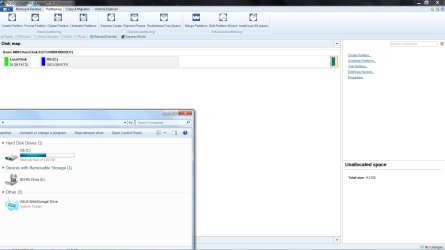
  • SSD.jpg
    SSD.jpg
    105.2 KB · Views: 5

My Computer My Computer

At a glance

windows 7 ultimate x642nd gen intel i716gbnvidia 560m
Computer Manufacturer/Model Number
Asus G74sx-91234z
OS
windows 7 ultimate x64
CPU
2nd gen intel i7
Memory
16gb
Graphics Card(s)
nvidia 560m
Monitor(s) Displays
full hd
Hard Drives
2x 750gb
Hi schwarzennegger,
*How to merge this un allocated space?
I would give AOMEI Partition Assistant a go, it is very easy to use.
I don't understand why the Windows 7 Ultimate OS has taken up so much HD space. It shouldn't be any where near that, it should be in the region of 10 to 15 GB's of disk space on average with a clean install.
Did you do a CLEAN install?

I hope this helps!

EDIT:
Have you done a disk cleanup to see if that makes a difference.
I bet there are loads of restore points that you don't need!
Is there a Windows.old folder (it will show up in the disk cleanup)?
 

My Computer My Computer

At a glance

Win 7 HP SP1 64-bit Vista HB SP2 32-bit Linux...Intel(R) Pentium(R) CPU P6200 @ 2.13GHz4.00 GBIntel(R) Graphics Media Accelerator HD
Computer type
Laptop
Computer Manufacturer/Model Number
Fujitsu LIFEBOOK
OS
Win 7 HP SP1 64-bit Vista HB SP2 32-bit Linux Mint 18.3
CPU
Intel(R) Pentium(R) CPU P6200 @ 2.13GHz
Motherboard
FUJITSU FJNBB06
Memory
4.00 GB
Graphics Card(s)
Intel(R) Graphics Media Accelerator HD
Sound Card
[1] Realtek High Definition Audio [2] Intel(R) Display Audio
Screen Resolution
1366 x 768 x 32 bits (4294967296 colors) @ 59 Hz
Hard Drives
TOSHIBA MK5076GSX
Antivirus
AVG FREE
Hi schwarzennegger,

I would give AOMEI Partition Assistant a go, it is very easy to use.
I don't understand why the Windows 7 Ultimate OS has taken up so much HD space. It shouldn't be any where near that, it should be in the region of 8 to 10 GBs of disk space on a clean install.
Did you do a CLEAN install?

I hope this helps!

Thank you Paul, no! i didn't, read few threads regarding that in Asus forum, looks like i have to be ready for some after trouble, will do that in some point.
 

My Computer My Computer

At a glance

windows 7 ultimate x642nd gen intel i716gbnvidia 560m
Computer Manufacturer/Model Number
Asus G74sx-91234z
OS
windows 7 ultimate x64
CPU
2nd gen intel i7
Memory
16gb
Graphics Card(s)
nvidia 560m
Monitor(s) Displays
full hd
Hard Drives
2x 750gb
Hi schwarzennegger,
...No! i didn't...
Perhaps it is not too late to backup all your data files and do a clean install.
It might save you a lot of time and grief in the future.
I would definately run disk cleanup first though and see what it says.
I edited my previous post by the way, did you see that?

I hope this helps!
 

My Computer My Computer

At a glance

Win 7 HP SP1 64-bit Vista HB SP2 32-bit Linux...Intel(R) Pentium(R) CPU P6200 @ 2.13GHz4.00 GBIntel(R) Graphics Media Accelerator HD
Computer type
Laptop
Computer Manufacturer/Model Number
Fujitsu LIFEBOOK
OS
Win 7 HP SP1 64-bit Vista HB SP2 32-bit Linux Mint 18.3
CPU
Intel(R) Pentium(R) CPU P6200 @ 2.13GHz
Motherboard
FUJITSU FJNBB06
Memory
4.00 GB
Graphics Card(s)
Intel(R) Graphics Media Accelerator HD
Sound Card
[1] Realtek High Definition Audio [2] Intel(R) Display Audio
Screen Resolution
1366 x 768 x 32 bits (4294967296 colors) @ 59 Hz
Hard Drives
TOSHIBA MK5076GSX
Antivirus
AVG FREE

My Computer My Computer

At a glance

Win 7 HP SP1 64-bit Vista HB SP2 32-bit Linux...Intel(R) Pentium(R) CPU P6200 @ 2.13GHz4.00 GBIntel(R) Graphics Media Accelerator HD
Computer type
Laptop
Computer Manufacturer/Model Number
Fujitsu LIFEBOOK
OS
Win 7 HP SP1 64-bit Vista HB SP2 32-bit Linux Mint 18.3
CPU
Intel(R) Pentium(R) CPU P6200 @ 2.13GHz
Motherboard
FUJITSU FJNBB06
Memory
4.00 GB
Graphics Card(s)
Intel(R) Graphics Media Accelerator HD
Sound Card
[1] Realtek High Definition Audio [2] Intel(R) Display Audio
Screen Resolution
1366 x 768 x 32 bits (4294967296 colors) @ 59 Hz
Hard Drives
TOSHIBA MK5076GSX
Antivirus
AVG FREE

My Computer My Computer

At a glance

windows 7 ultimate x642nd gen intel i716gbnvidia 560m
Computer Manufacturer/Model Number
Asus G74sx-91234z
OS
windows 7 ultimate x64
CPU
2nd gen intel i7
Memory
16gb
Graphics Card(s)
nvidia 560m
Monitor(s) Displays
full hd
Hard Drives
2x 750gb
Back
Top