

- Local time
- 11:48 PM
- Messages
- 525
Hey all,
Let me just start of by saying, this may be old news but it is still highly relevant in today's market. But there is a large bug in Office's suite all of them in fact (2000 - 2014), concerning the way it handles time / dates.
History
A brief bit of history for you all, MS decided that they wanted to base all their software solutions with the assumption that 1900 (which is the baseline date for MS) was a leap year. To keep their software compatible, they left it that way, so that other systems such as Lotus and later versions would continue to work with other calculative programs.
Excel 2000 incorrectly assumes that the year 1900 is a leap year
The Problem
Now this is not necessarily an issue, I mean sure, it thinks that 1900 is a leap year, MS started the calendar on 01/01/1900, where is the problem?
Well, MS set the date to 01/01/1900, knowing and setting it so that it isn't a leap year.
The outcome?
Excel actually works one day in the past, because there is supposed to be an extra day in a leap year, right?
Here let me show you,
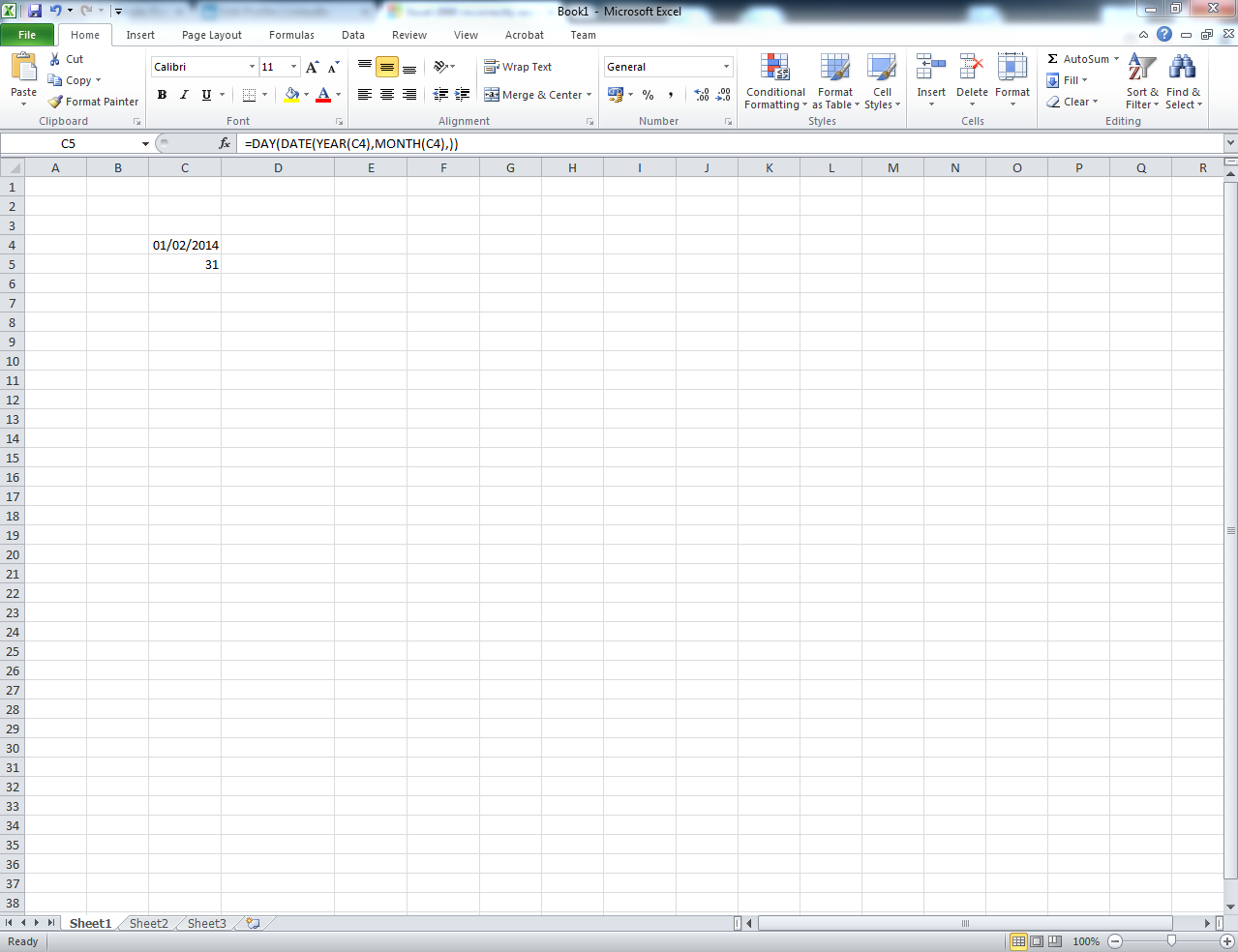
So this image shows a base formula, which is used to determine the number of days in a month. The month specified happens to be february... Now i am almost 100% sure that there is 28.25 days in February..
Why would this be used? Well for daily figures, average daily income over a month, finding out how many days in a month there actually are....
A lot of things could potentially use this, here try it yourself,
=DAY(DATE(YEAR(C4),MONTH(C4),))
Set C4 to any date in Feb, then March..
It calculates this by going to the start of the month, minusing the amount of days it believes there are, but wait, there is that extra day, this means that the Excel start date is actually 00/01/1900...
Here is another way to check this is actually working.
Say we use a static date, 01/02/2014. I want to find the month's start date, but in it's serial number form ( Excel reads the number as a serial and converts it into the friendly date we understand). Which we can then convert straight back into a friendly date.
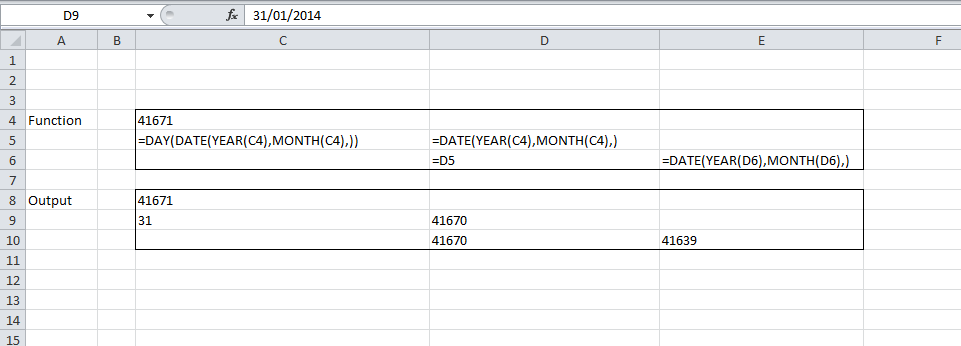
Again, what?
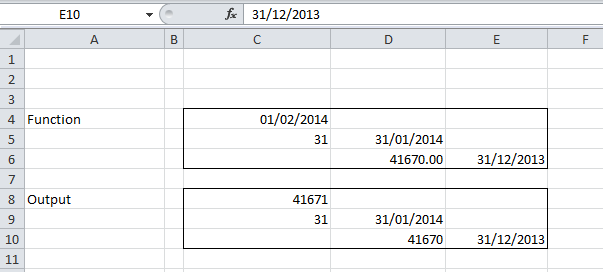
Apparently each time we do this formula, we will go to the last day of the previous month!
(Below just shows the pretty formatting)
So, just to finally show exactly what happens with the whole start of the calendar business.
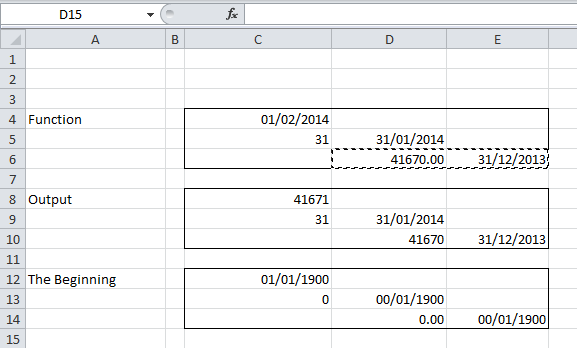
As you can see, there were apparently no days in January in the year 1900, it also shows that 0, as the baseline, is the start of the calendar, not 1. Which means that the first date that can actually be read by excel is 00/01/1900. This then starts a chain of issues, which need to be fixed but apparently won't be because it would make it incompatible!
How did i come by this bug?
So i work for a company, a rather large one at that. It was my responsibility to create a reporting tool that would show the average amount of processed exchanges per day, grouped by month.
This is all good and well, except that I used the above formula to determine the number of days in the month automatically, and then continue with the formula.
When i created this in January, I did a quick formula check and everything checked out (31 days in December remember). So everything was good and well until the end of March came around, and the numbers seemed very off.
After a quick check, I realised this huge error, however the damage was done, with the miscalculation of Feb/Mar I had created over 9 Million errors in exchanges. When a client is charged by number of processed exchanges per day, this is a substantial amount.
After a couple of hours pulling my hair out, I finally found this issue, and the ensuing pandemonium was awful.
The end
So there it is, MS has managed to create a system which doesn't believe itself, and cannot interact with it's own date system.
I apologise for taking your time to read this post, and it could probably be rewritten into something more legible, however i told MS about this about a month ago, and nothing has be declared. So i am telling you all now.
Be careful when crafting dates in MS Excel, it believes that you are working one day in the future.
Oh and as a side note, if you're ever billed by someone using excel to generate the dates, you may want to check when you were actually charged...
Thanks for taking the time to read guys, I encourage you to check any and all calculations within Excel manually. It may save money and your job!
Let me just start of by saying, this may be old news but it is still highly relevant in today's market. But there is a large bug in Office's suite all of them in fact (2000 - 2014), concerning the way it handles time / dates.
History
A brief bit of history for you all, MS decided that they wanted to base all their software solutions with the assumption that 1900 (which is the baseline date for MS) was a leap year. To keep their software compatible, they left it that way, so that other systems such as Lotus and later versions would continue to work with other calculative programs.
Excel 2000 incorrectly assumes that the year 1900 is a leap year
The Problem
Now this is not necessarily an issue, I mean sure, it thinks that 1900 is a leap year, MS started the calendar on 01/01/1900, where is the problem?
Well, MS set the date to 01/01/1900, knowing and setting it so that it isn't a leap year.
The outcome?
Excel actually works one day in the past, because there is supposed to be an extra day in a leap year, right?
Here let me show you,
So this image shows a base formula, which is used to determine the number of days in a month. The month specified happens to be february... Now i am almost 100% sure that there is 28.25 days in February..
Why would this be used? Well for daily figures, average daily income over a month, finding out how many days in a month there actually are....
A lot of things could potentially use this, here try it yourself,
=DAY(DATE(YEAR(C4),MONTH(C4),))
Set C4 to any date in Feb, then March..
It calculates this by going to the start of the month, minusing the amount of days it believes there are, but wait, there is that extra day, this means that the Excel start date is actually 00/01/1900...
Here is another way to check this is actually working.
Say we use a static date, 01/02/2014. I want to find the month's start date, but in it's serial number form ( Excel reads the number as a serial and converts it into the friendly date we understand). Which we can then convert straight back into a friendly date.
Again, what?
Apparently each time we do this formula, we will go to the last day of the previous month!
(Below just shows the pretty formatting)
So, just to finally show exactly what happens with the whole start of the calendar business.
As you can see, there were apparently no days in January in the year 1900, it also shows that 0, as the baseline, is the start of the calendar, not 1. Which means that the first date that can actually be read by excel is 00/01/1900. This then starts a chain of issues, which need to be fixed but apparently won't be because it would make it incompatible!
How did i come by this bug?
So i work for a company, a rather large one at that. It was my responsibility to create a reporting tool that would show the average amount of processed exchanges per day, grouped by month.
This is all good and well, except that I used the above formula to determine the number of days in the month automatically, and then continue with the formula.
When i created this in January, I did a quick formula check and everything checked out (31 days in December remember). So everything was good and well until the end of March came around, and the numbers seemed very off.
After a quick check, I realised this huge error, however the damage was done, with the miscalculation of Feb/Mar I had created over 9 Million errors in exchanges. When a client is charged by number of processed exchanges per day, this is a substantial amount.
After a couple of hours pulling my hair out, I finally found this issue, and the ensuing pandemonium was awful.
The end
So there it is, MS has managed to create a system which doesn't believe itself, and cannot interact with it's own date system.
I apologise for taking your time to read this post, and it could probably be rewritten into something more legible, however i told MS about this about a month ago, and nothing has be declared. So i am telling you all now.
Be careful when crafting dates in MS Excel, it believes that you are working one day in the future.
Oh and as a side note, if you're ever billed by someone using excel to generate the dates, you may want to check when you were actually charged...
Thanks for taking the time to read guys, I encourage you to check any and all calculations within Excel manually. It may save money and your job!
Last edited:
My Computer
- Computer type
- PC/Desktop
- Computer Manufacturer/Model Number
- Custom Build
- OS
- Windows 8.1
- CPU
- Intel i5 3750k OC'd 4.0Ghz
- Motherboard
- P8Z77-V LX3
- Memory
- 16GB Vengence Corsair
- Graphics Card(s)
- GTX 770 OC 2GB Windforce
- Sound Card
- C-Media 7.1 Surround Card
- Monitor(s) Displays
- Asus 3D 23" & BenQ 24" & LG 19"
- Screen Resolution
- 1920*1080, 1920*1080, 1440*900
- Hard Drives
- Crucial 512GB SSD
WD 1.5 TB
WD 500Gb
- PSU
- 850MW Silverstone
- Case
- inWin DragonRider
- Cooling
- 4 * 140mm LED Akasa, One 140mm Fan Akasa
- Keyboard
- Corsair k95
- Mouse
- R.A.T 7 Contagion
- Internet Speed
- 152 Mb Fiber Optic
- Antivirus
- ESET Nod32
- Browser
- Waterfox x64 / Chrome x64
- Other Info
- Freenas / Plex Media server
Q6600
6Gb DDR3
6TB ZFS Raid
500W PSu
2 x Intel NIC's
