
You are using an out of date browser. It may not display this or other websites correctly.
You should upgrade or use an alternative browser.
You should upgrade or use an alternative browser.
Microsoft office 2007 problem
- Thread starter Tadas695lt
- Start date
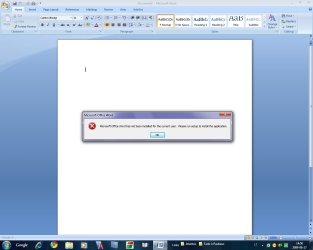

its hard to read the error message.
I would try to uninstall Office and then install again to see if it come up again.
I would try to uninstall Office and then install again to see if it come up again.
My Computer
- Computer Manufacturer/Model Number
- Custom Build
- OS
- Windows 7 Ultimate x64 SP1
- CPU
- AMD Phenom II 1090 3.2 six core
- Motherboard
- MSI 890FXA-GD65
- Memory
- 16 gig DDR3
- Graphics Card(s)
- MSI R6950 2gig
- Sound Card
- on board
- Monitor(s) Displays
- Acer 23inch led
- Screen Resolution
- 1900x1080 widescreen
- Hard Drives
- Seagate 1tb SATA6
2x 1tb HITACHI Deskstar
- PSU
- CORSAIR Enthusiast Series TX750 V2 750W
- Case
- CoolMaster HAF 922
- Cooling
- Box AMD Heatsink/Fan
- Internet Speed
- Cable 12Mbps/3Mbps

Says its not installed for the current user. Must have been a boo-boo in the original install.
Maybe try going to the users profile wherein Office was installed. Uninstalling. Then reinstalling in the user profile where it it will be used.
Maybe try going to the users profile wherein Office was installed. Uninstalling. Then reinstalling in the user profile where it it will be used.
My Computer
- Computer Manufacturer/Model Number
- AMD Athlon 64 3200+, Lenovo G560 i3
- OS
- Windows 7 Ultimate, Ubuntu
- Motherboard
- Gigabyte K8T8000
- Memory
- DDR 2Gb (!)
- Graphics Card(s)
- 6600GT
- Monitor(s) Displays
- MultiMonitor (2) LCD
- Hard Drives
- Old Seagate 75
Big Western Digital
Samsung 500Gb pulled out of an external drive and installed
Ext: Maxtor (Firewire), 1Gb Lacie (Samsung)
- Mouse
- Logitech MX620 Cordless
but i have one user
I would try to reinstall Office and see if that fixes it.
Do it in these steps
Uninstall office then reboot the machine
Run Defrag, reboot
Install Office
see how that works out for you.
My Computer
- Computer Manufacturer/Model Number
- Custom Build
- OS
- Windows 7 Ultimate x64 SP1
- CPU
- AMD Phenom II 1090 3.2 six core
- Motherboard
- MSI 890FXA-GD65
- Memory
- 16 gig DDR3
- Graphics Card(s)
- MSI R6950 2gig
- Sound Card
- on board
- Monitor(s) Displays
- Acer 23inch led
- Screen Resolution
- 1900x1080 widescreen
- Hard Drives
- Seagate 1tb SATA6
2x 1tb HITACHI Deskstar
- PSU
- CORSAIR Enthusiast Series TX750 V2 750W
- Case
- CoolMaster HAF 922
- Cooling
- Box AMD Heatsink/Fan
- Internet Speed
- Cable 12Mbps/3Mbps
I would try to reinstall Office and see if that fixes it.
Do it in these steps
Uninstall office then reboot the machine
Run Defrag, reboot
Install Office
see how that works out for you.
How i can defrag???
Can you tell me about defrag???
What happened when i defrag???
My Computer
- OS
- Windows 7
How i can defrag???
Can you tell me about defrag???
What happened when i defrag???
How to Defrag
Not quite sure how this will help, but it certainly won't hurt. It reorganises the files on your drive so they are contiguous (next to each other).
To check your user accounts go to
Control Panel > User Accounts
Good luck.
My Computer
- Computer Manufacturer/Model Number
- AMD Athlon 64 3200+, Lenovo G560 i3
- OS
- Windows 7 Ultimate, Ubuntu
- Motherboard
- Gigabyte K8T8000
- Memory
- DDR 2Gb (!)
- Graphics Card(s)
- 6600GT
- Monitor(s) Displays
- MultiMonitor (2) LCD
- Hard Drives
- Old Seagate 75
Big Western Digital
Samsung 500Gb pulled out of an external drive and installed
Ext: Maxtor (Firewire), 1Gb Lacie (Samsung)
- Mouse
- Logitech MX620 Cordless
Thanks, but it isn't helppingHow to Defrag
Not quite sure how this will help, but it certainly won't hurt. It reorganises the files on your drive so they are contiguous (next to each other).
To check your user accounts go to
Control Panel > User Accounts
Good luck.
My Computer
- OS
- Windows 7
By that I presume you mean that you have uninstalled, defragged, restarted, reinstalled, and still get the same message.Thanks, but it isn't helpping
If that is so, navigate to Winword.exe in explorer (probably C:\Program Files\Microsoft Office\Office12 and right click. Then select "run as administrator" - see what happens.
Report back.
Attachments

My Computer
- Computer Manufacturer/Model Number
- AMD Athlon 64 3200+, Lenovo G560 i3
- OS
- Windows 7 Ultimate, Ubuntu
- Motherboard
- Gigabyte K8T8000
- Memory
- DDR 2Gb (!)
- Graphics Card(s)
- 6600GT
- Monitor(s) Displays
- MultiMonitor (2) LCD
- Hard Drives
- Old Seagate 75
Big Western Digital
Samsung 500Gb pulled out of an external drive and installed
Ext: Maxtor (Firewire), 1Gb Lacie (Samsung)
- Mouse
- Logitech MX620 Cordless
rerun the installer when
after you enter your cd key you get the next screen
that says
install and below it is custom install
go into there and at the top with the drop down boxxes pick run all from computer
let it reinstall
see if that fixxed the problem
works on all of the company computers where im at

if not i dont know what to say but let me know if that worked
after you enter your cd key you get the next screen
that says
install and below it is custom install
go into there and at the top with the drop down boxxes pick run all from computer
let it reinstall
see if that fixxed the problem
works on all of the company computers where im at
if not i dont know what to say but let me know if that worked
My Computer
- Computer Manufacturer/Model Number
- Gateway P-7811 FX
- OS
- Vista Business X64 / Win 7 RC X64 / Win t X64 RTM no activation
- CPU
- Intel 2.26GHz Core 2 Duo Mobile P8400
- Motherboard
- Intel PM45
- Memory
- 4GB DDR3/1066
- Graphics Card(s)
- NVIDIA® GeForce® 9800M GTS With 512 MB of GDDR3
- Sound Card
- Conexant High Definition SmartAudio 221
- Monitor(s) Displays
- 17-inch WUXGA TFT (1920 × 1200)
- Screen Resolution
- 1920 × 1200
- Hard Drives
- 200GB Seagate Momentus (7,200 rpm)
- Case
- 1.3 to 1.7-inches (H) × 15.75-inches (W) × 11.75-inches (D)
- Internet Speed
- FIOS

Hello Tadas695lt,
Welcome to Seven Forums.
If none of the above works, try reinstalling by right clicking setup.exe on the DVD and selecting run as administrator.
Please keep us posted.
Gary
Welcome to Seven Forums.
If none of the above works, try reinstalling by right clicking setup.exe on the DVD and selecting run as administrator.
Please keep us posted.
Gary
My Computer
- Computer Manufacturer/Model Number
- Dell XPS420
- OS
- Vista Ult 64 bit Seven Ult RTM x64
- CPU
- Intel Core2 Quad Q6600 2.40 gigahertz
- Memory
- Crucial Ballistix 4x2GB PC2 6400
- Graphics Card(s)
- NVIDIA GeForce 8600 GTS 256 MB
- Sound Card
- Creative SB X-Fi audio
- Monitor(s) Displays
- HP w2207 + HPvs15
- Screen Resolution
- 1680x1050 + 1024x768
- Hard Drives
- 2-WD5000AAKS-500 GB
WD5000AAV-500 GB external
- Keyboard
- Microsoft Comfort Curve
- Mouse
- MX Revolution
- Other Info
- Wacom Intuos 2 Graphics Tablet
Experience Index=5.5
Might want to use RevoUninstaller to remove registry remnants for the next uninstall and here's a free well regarded word substitute in the meantime - Abi
My Computer
- Computer Manufacturer/Model Number
- AMD Athlon 64 3200+, Lenovo G560 i3
- OS
- Windows 7 Ultimate, Ubuntu
- Motherboard
- Gigabyte K8T8000
- Memory
- DDR 2Gb (!)
- Graphics Card(s)
- 6600GT
- Monitor(s) Displays
- MultiMonitor (2) LCD
- Hard Drives
- Old Seagate 75
Big Western Digital
Samsung 500Gb pulled out of an external drive and installed
Ext: Maxtor (Firewire), 1Gb Lacie (Samsung)
- Mouse
- Logitech MX620 Cordless
It isn't working too
I sounds like you may have a corrupt user profile.
I would try to create a second account and see if works in the new one.
My Computer
- Computer Manufacturer/Model Number
- Custom Build
- OS
- Windows 7 Ultimate x64 SP1
- CPU
- AMD Phenom II 1090 3.2 six core
- Motherboard
- MSI 890FXA-GD65
- Memory
- 16 gig DDR3
- Graphics Card(s)
- MSI R6950 2gig
- Sound Card
- on board
- Monitor(s) Displays
- Acer 23inch led
- Screen Resolution
- 1900x1080 widescreen
- Hard Drives
- Seagate 1tb SATA6
2x 1tb HITACHI Deskstar
- PSU
- CORSAIR Enthusiast Series TX750 V2 750W
- Case
- CoolMaster HAF 922
- Cooling
- Box AMD Heatsink/Fan
- Internet Speed
- Cable 12Mbps/3Mbps