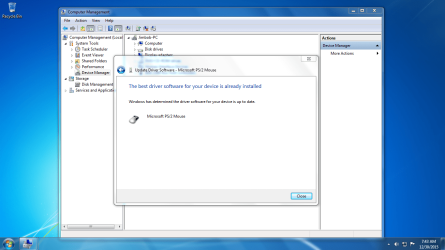
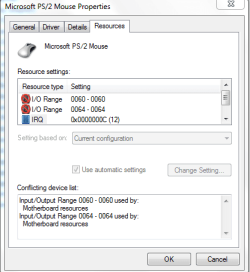
Microsoft PS/2 always show exclamation mark eventhough tried many ways

Sam Jackson

New member
Local time
8:57 AM
Messages
26
Location
Sarawak, Malaysia.
When I checked my Driver Manager for maintenance this morning, I saw an exclamation mark next to Microsoft PS/2 mouse driver. Then I tried to uninstall, restart the computer but it still persists. Besides that, I checked for the latest update, and my computer said that it is the latest driver update. Apart from that, I had bought new mouse yesterday, AVF Gaming Freak II AGM X-7 yet the issue seems cannot be solved.
 

Attachments

  • Microsoft ps 2 mouse.PNG
    Microsoft ps 2 mouse.PNG
    116.6 KB · Views: 2
  • Installed.PNG
    Installed.PNG
    122.2 KB · Views: 1
  • I O.PNG
    I O.PNG
    12.3 KB · Views: 13

My Computer My Computer

At a glance

Windows 7 Home Premium 32 bitIntel Core 2 Duo processor E75003GB DDR3Nvidia GeForce G210 512MB
Computer type
PC/Desktop
Computer Manufacturer/Model Number
Acer
OS
Windows 7 Home Premium 32 bit
CPU
Intel Core 2 Duo processor E7500
Memory
3GB DDR3
Graphics Card(s)
Nvidia GeForce G210 512MB
Antivirus
360 Internet Security 2015
Browser
Google Chrome
Bios

Hi Sam,
Go to your bios and see if you have anything set for Legacy mode, (keyboard/mouse).
Try changing it to the opposite >> REBOOT.
see if that works.

Roy
 

My Computer My Computer

At a glance

W7 home premium 32bit/W7HP 64bit/w10 tp insid...E5300 dual core3gbNvidia Geforce 7100 Nforce 630i
Computer type
PC/Desktop
Computer Manufacturer/Model Number
medionl/Aspire 6930G/acer x55a
OS
W7 home premium 32bit/W7HP 64bit/w10 tp insider ring
CPU
E5300 dual core
Motherboard
medion MS7366
Memory
3gb
Graphics Card(s)
Nvidia Geforce 7100 Nforce 630i
Monitor(s) Displays
avixc
Internet Speed
n (isp resticted to 72)
Antivirus
mse/pands
Browser
palemoon
Other Info
Belkin Fd7050 n USB using Railink RT2870 drivers, more upto date
Hi Sam,
Go to your bios and see if you have anything set for Legacy mode, (keyboard/mouse).
Try changing it to the opposite >> REBOOT.
see if that works.

Roy

Sorry sir, I don't understand what was you saying. Could you please show to me also the screenshots of steps for better understanding?
 

My Computer My Computer

At a glance

Windows 7 Home Premium 32 bitIntel Core 2 Duo processor E75003GB DDR3Nvidia GeForce G210 512MB
Computer type
PC/Desktop
Computer Manufacturer/Model Number
Acer
OS
Windows 7 Home Premium 32 bit
CPU
Intel Core 2 Duo processor E7500
Memory
3GB DDR3
Graphics Card(s)
Nvidia GeForce G210 512MB
Antivirus
360 Internet Security 2015
Browser
Google Chrome
Back
Top