
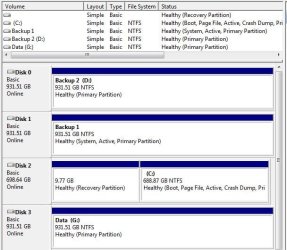
I have 4 internal hard drives on my computer. The computer became unstable with a black screen problem which I hope I have isolated to a Video Board/driver problem. I rebuilt my system, Windows 7 Ultimate 64 bit, and one of the hard drives no longer shows up except in the Disk Management window. The object name shown via the Security tab seems to be the problem, but I do not know how to change it. For a good drive C (Disk 2), it shows "Object name: C:\", but for the missing drive (Disk 1), it shows
"Object name: \\?\Volume{0587F7A2-29A8-11E0-BAED-806E6F6E6963}\"
I noticed that "sythe13" had a Missing Hard Drive problem, but not of this type. "Anthony" was prepared to try to help him. I would appreciate any help that Anthony or anyone else might offer.
"Object name: \\?\Volume{0587F7A2-29A8-11E0-BAED-806E6F6E6963}\"
I noticed that "sythe13" had a Missing Hard Drive problem, but not of this type. "Anthony" was prepared to try to help him. I would appreciate any help that Anthony or anyone else might offer.
Attachments
My Computer
- Computer Manufacturer/Model Number
- Gateway FX6800-01e
- OS
- Windows 7 Ultimate x64
- CPU
- Intel Core i7, [email protected]
- Motherboard
- Intel
- Memory
- 9 GB
- Graphics Card(s)
- ATI Radeon HD 4850
- Hard Drives
- 2 - WD1001FALS-00J7BO
2 - ST31000333AS

 --Thanks again!!