Solved Missing operating system after merging two parttions

stergios

New member
Local time
3:26 PM
Messages
14
Hello sevenforums!Sorry for posting same post in BSOD HELP ANd SUPPORT category thought it was generally for help.I searched for an answer but with no luck.I have an ASUS laptop with i5 windows 7 service pack1 and hdd 574gb as it says.When i went to disk management i saw a partition or volume (do not know the exact difference) with 21,49gb free(unallocated i think) and thought to merge it with c: where windows 7 were loaded.The partition with windows were at the right from the other partition with 21,49gb and could not extend volume.So i downloaded AOMEI and merged them, as i did one day before in another pc successfully.But now when starting pc says missing operating system.I did bootrec /fixmbr and bootrec /fixboot (without the command bootrec /rebuildbcd be aware something goes wrong as it did) with the windows cd but nothing.If set with diskpart command partition active or primary will fix the problem?I burned gparted live but what should be my next step?Do i have to make two partitions again?Move unallocated partition to the right if there are two?Or what to do without losing my data and not reinstalling windows?PLEASE HELP.Its laptop for my work.Thanks in advance!
 

My Computer

Computer type
PC/Desktop
OS
7 64bit home
Welcome to the forum. Can you get a screenshot of the disk partitions so we can see? Is your system MBR or gpt disk and do you have a small boot partition?
 

My Computer

Computer type
PC/Desktop
OS
win 8 32 bit
Its mbr.Tomorrow i will tell you when i go to work.I think it's one partition.What do you mean small boot partition?
 

My Computer

Computer type
PC/Desktop
OS
7 64bit home
Welcome to the forum. Can you get a screenshot of the disk partitions so we can see? Is your system MBR or gpt disk and do you have a small boot partition?

Its mbr.Tomorrow i will tell you when i go to work.I think it's one partition.What do you mean small boot partition?
 

My Computer

Computer type
PC/Desktop
OS
7 64bit home
Normally windows boots from a 100 meg partition not drive c all the boot files are one that small parition
 

My Computer

Computer type
PC/Desktop
OS
win 8 32 bit
Today when i opened laptop mbr is missing do not why.With installation disc opened cmd and here the results:

command list volume : volume 1 letter c system file raw size 574gb

command list partition : *partition 1 size 574gb relocation 21gb

command list disk : *disk 0 size 596gb free space 21gb

I do not know how converted to raw system file but i guess i have to convert it back to ntfs...Can not upload pics
 

My Computer

Computer type
PC/Desktop
OS
7 64bit home
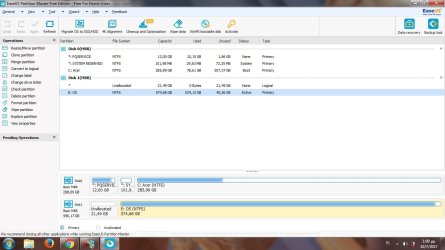
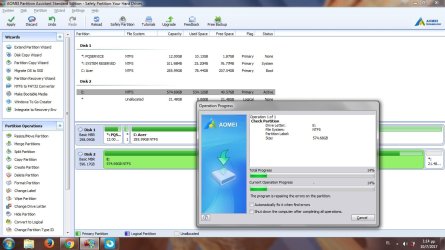
As i opened aomei and easeus saw this:
partitions.jpg
That means the merge never completed dont know wasnt in front of the pc.
But what about raw, is the system file for unallocated space?The partition i care about is NTFS AND active why is unbootable?I am moving with AOMEI THE unallocated space to the right will it have some result or no?But it seems to be stucked 14%
partition1.jpg
Desperate...
 

My Computer

Computer type
PC/Desktop
OS
7 64bit home
Not my area but i can tell you this.

Looks like your trying to boot from disk 2, its first partition is marked as Logical, W7 CANNOT boot from this type of partition.

Check your BIOS select disc 1 as primary option.


Roy
 

My Computer

Computer type
PC/Desktop
Computer Manufacturer/Model Number
medionl/Aspire 6930G/acer x55a
OS
W7 home premium 32bit/W7HP 64bit/w10 tp insider ring
CPU
E5300 dual core
Motherboard
medion MS7366
Memory
3gb
Graphics Card(s)
Nvidia Geforce 7100 Nforce 630i
Monitor(s) Displays
avixc
Internet Speed
n (isp resticted to 72)
Antivirus
mse/pands
Browser
palemoon
Other Info
Belkin Fd7050 n USB using Railink RT2870 drivers, more upto date
Not my area but i can tell you this.

Looks like your trying to boot from disk 2, its first partition is marked as Logical, W7 CANNOT boot from this type of partition.

Check your BIOS select disc 1 as primary option.


Roy

Hello Roy i have connected with an external USB sata bridge the hdd to another laptop.Disk 1 is for the testing laptop disk 2 is the one who needs fix.Why cant boot?If convert logical to primary will it be ok?
 
Last edited:

My Computer

Computer type
PC/Desktop
OS
7 64bit home
I am not a phone so I can't see photo very well. Disk 0 has a recovery partition and a system reserve which as explained is were Windows boots from not drive c so it should be active. Drive 1 had a small unallocated partition which would have been were Windows boots from. So without that Windows can't boot.
If you want to boot disk 0 unplug disk 1 so it doesn't confuse the issue
 

My Computer

Computer type
PC/Desktop
OS
win 8 32 bit
I am not a phone so I can't see photo very well. Disk 0 has a recovery partition and a system reserve which as explained is were Windows boots from not drive c so it should be active. Drive 1 had a small unallocated partition which would have been were Windows boots from. So without that Windows can't boot.
If you want to boot disk 0 unplug disk 1 so it doesn't confuse the issue

I want to boot from disk 1 when reattach it to the ASUS laptop.Disk 0 stays inside acer laptop.How will it be?
 

My Computer

Computer type
PC/Desktop
OS
7 64bit home
I am not a phone so I can't see photo very well. Disk 0 has a recovery partition and a system reserve which as explained is were Windows boots from not drive c so it should be active. Drive 1 had a small unallocated partition which would have been were Windows boots from. So without that Windows can't boot.
If you want to boot disk 0 unplug disk 1 so it doesn't confuse the issue


I want to boot disk 1 when reattach it to ASUS laptop.Disk 0 will stay inside acer laptop.How will it be to boot from disk 1 when its inside ASUS?
 

My Computer

Computer type
PC/Desktop
OS
7 64bit home
And as torchwood suggested converted the unallocated space from logical to primary(made new partition) with no luck.The problem is not the unallocated space.Run again the fix mbr bootrec rebuildbcd with no luck.Still can't boot when attached to ASUS and can't open to view files when attached to ACER the partition with 574gb.
 

My Computer

Computer type
PC/Desktop
OS
7 64bit home
The small free space you moved would have been the system reserved partition which contained the boot files. It's faster to just wipe the drive and reinstall
 

My Computer

Computer type
PC/Desktop
OS
win 8 32 bit
I reinstalled windows and problem gone.
 

My Computer

Computer type
PC/Desktop
OS
7 64bit home
Back
Top