Solved Monitor blinks randomly - I don't game

MLT

New member
Don't know if it is a monitor issue or video card. Sometimes it seems like I can associate it with what I am doing (when watching video or sometimes I will have Adobe apps or Bejeweled up) but then it happens when there is no apparent stress on the card at all.

Doesn't matter if the monitor has been on for minutes or days, same with PC. Sometimes it's constant (anything from 1 to 5 sec of black with seconds in between) and sometimes it has longer intervals.

Card is Radeon 5750 PCIe
Monitor is LG LED 22" (E2250V)
Connection is HDMI (tried two different cables no change)
Win 7 pro SP1
64bit
i7 2.8ghz
6gb ram

Res is set to 1920x1080 (32b) (which by the way doesn't fill my monitor for some reason, which is annoying as hell)

Anyone have any thoughts? My appreciation in advance. (let me know what other info you need that isn't here or listed in my profile)

Mike
 
Last edited:

My Computer

Computer Manufacturer/Model Number
MLT
OS
Windows 7 Pro (x64)
CPU
Intel Core i7 CPU 930 2.8Ghz
Motherboard
Gigabyte X58A-UD3R
Memory
6GB DDR3 1600 Mhz Tri-Channel
Graphics Card(s)
ATI Diamond Radeon HD6770 PCIe (x2)
Sound Card
RealTek High Definition OnBoard Audio
Monitor(s) Displays
Samsung S27A950D 27" 3D LED 120hz & LG E2770 27" LED Display
Screen Resolution
1920x1080 32bit
Hard Drives
Hitachi 1 TB SATA
PSU
CM eXtreme 800w PS
Case
Antec P183
Cooling
It blows
Hi.

Hardware check first,

You can connect and check with any other monitor.

Check if graphic card is sitting tight in the pcie slot.


Software\hardware check,

[FONT=&quot]Download and install the new version of [/FONT][FONT=&quot]Driver Sweeper.[/FONT][FONT=&quot]

Download the most recent software\driver for your ati
[/FONT][FONT=&quot]AMD Graphics Drivers & Software[/FONT][FONT=&quot].

Uninstall ati software\driver,restart in safe mode,run driver sweeper,choose only AMD-Display and clean,restart in normal mode.


Install the new ati software\driver,restart.

Update
[/FONT][FONT=&quot] DirectX.[/FONT][FONT=&quot]


Read carefully the instructions and run
[/FONT][FONT=&quot]http://www.sevenforums.com/tutorials/160729-nvidia-amd-video-card-test-occt.html[/FONT][FONT=&quot] post here the results.

[/FONT]
 

My Computer

Computer Manufacturer/Model Number
Custom Built by me.
OS
Windows 7 Ultimate 64bit SP1
CPU
Intel Core 2 Quad Q6600
Motherboard
Gigabyte GA-X38-DS4
Memory
2X2GB DDR2 PC6400 800MHZ DUAL CHANNEL
Graphics Card(s)
XFX RADEON HD 6850 1GB GDDR5
Sound Card
2/4/5.1/7.1-channel Realtek High Definition
Monitor(s) Displays
Samsung LE40A656F1 1080p 100Hz LCD HD TV 50,000:1
Screen Resolution
1366x768 in Desktop,1920x1080p in gaming and video
Hard Drives
C:\WD VelociRaptor 150 GB,10,000 RPM
E:\WESTERN DIGITAL WD15EADS 1.5TB CAVIAR GREEN SATA2 F:\WESTERN DIGITAL WD15EADS 1.5TB CAVIAR GREEN SATA2
PSU
THERMALTAKE W0229 TOUGHPOWER XT 750W
Case
A-Case Twin Engine BB
Cooling
3 x thermaltake smart case fan II + 1 arctic cooling fan
Keyboard
Wireless Logitech LX710
Mouse
Logitech Wireless Gaming Mouse G700
Internet Speed
ADSL 12000 plus
Other Info
Mouse Logitech G700,with 13 buttons who needs keyboard in RPG?

D:\Sony high speed sata Dvd Rewriter
Logitech Cordless Rumblepad 2
Thank you so much for taking the time to respond. I apologize for my late reply, I had forgotten I posted here. I checked with two other monitors now. Card is tight, drivers and software up to date, as is directx. I even replaced the video card and monitor with the Radeon 6770 and an LG 27" LED. Connected to monitor with HDMI and still happened. Connected to a different 27" using displayport and so far it is world's better but it still shutters at times. Doesn't blink and i don't lose picture altogether anymore but every once in a while it shutters if that makes sense.

Installed OCCT 3.1.0 and ran CPU: OCCT and CPU: LINPACK for an hour each and showed no errors. The GPU: MEMTEST is unavailable due to no 'cuddy' or whatever (which, by the writeup you linked to I thought this version wouldn't be subject to..?) but I will run the GPU: OCCT and POWERSUPPLY tests and see what that comes up with.

Any additional insight is appreciated, thank you.
 

My Computer

Computer Manufacturer/Model Number
MLT
OS
Windows 7 Pro (x64)
CPU
Intel Core i7 CPU 930 2.8Ghz
Motherboard
Gigabyte X58A-UD3R
Memory
6GB DDR3 1600 Mhz Tri-Channel
Graphics Card(s)
ATI Diamond Radeon HD6770 PCIe (x2)
Sound Card
RealTek High Definition OnBoard Audio
Monitor(s) Displays
Samsung S27A950D 27" 3D LED 120hz & LG E2770 27" LED Display
Screen Resolution
1920x1080 32bit
Hard Drives
Hitachi 1 TB SATA
PSU
CM eXtreme 800w PS
Case
Antec P183
Cooling
It blows
Monitor flickers and can't run 2 screens - OCCT results attached

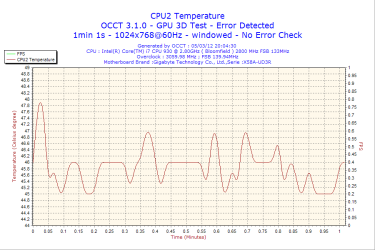
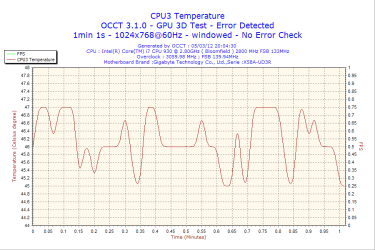
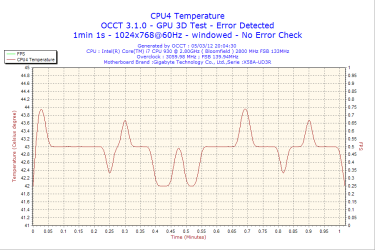
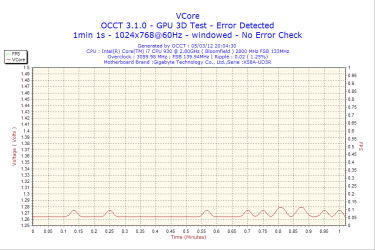
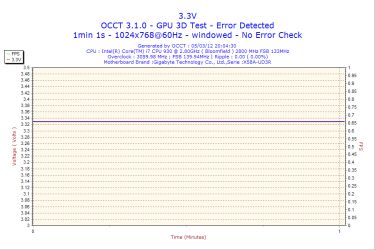
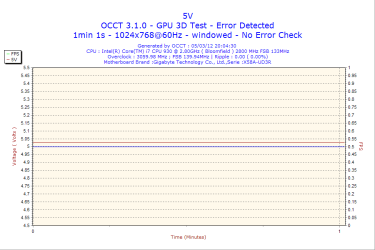
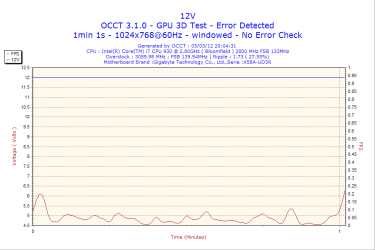
I was hoping someone could help me understand these OCCT results. (CPU Test runs w/out errors every time, GPU gets errors but I don't know how to read these)

Screen flickers randomly. I don't game, I play full screen bejeweled or zuma's revenge occasionally but the flickering is not limited to those times at all.

2012-03-05-20h04-CPU1.png

2012-03-05-20h04-CPU2.png

2012-03-05-20h04-CPU3.png

2012-03-05-20h04-CPU4.png

2012-03-05-20h04-VCore.png

2012-03-05-20h04-Volt3.png

2012-03-05-20h04-Volt5.png

2012-03-05-20h04-Volt12.png

I've had real unstable performance for while now. Started while running Radeon 5750 and a 23" LED via HDMI @ 1080p. I've replaced the card for a 6770, replaced the monitor for a 27" LED, replaced connection for display port and still couldn't get rid of the flicker. It did improve from completely blacking out for a second or two at a time, to just vertical flickers for the most part. Currently I have two 6770 cards, running 1920x1080 @120hz via dp.

Tried to hook up another 27" via HDMI but picture on both (but especially the second) gets really unstable and I lose one or both of them quickly.

Specs should be in profile but just in case:

OS: Windows 7 Pro 64bit
Motherboard: Gigabyte GA-X58A-UD3R
Processor: i7 930 2.8gig (modestly overclocked)
Memory: 6g ram
Graphics: Radeon HD 6770 (x2) pcie
Power: 800w
Temperature: b/w 37-43 C
Outlook: defeated

I've upgraded drivers and replaced everything spare the mother board itself. I would really appreciate any help I can get here.

thanks
 

My Computer

Computer Manufacturer/Model Number
MLT
OS
Windows 7 Pro (x64)
CPU
Intel Core i7 CPU 930 2.8Ghz
Motherboard
Gigabyte X58A-UD3R
Memory
6GB DDR3 1600 Mhz Tri-Channel
Graphics Card(s)
ATI Diamond Radeon HD6770 PCIe (x2)
Sound Card
RealTek High Definition OnBoard Audio
Monitor(s) Displays
Samsung S27A950D 27" 3D LED 120hz & LG E2770 27" LED Display
Screen Resolution
1920x1080 32bit
Hard Drives
Hitachi 1 TB SATA
PSU
CM eXtreme 800w PS
Case
Antec P183
Cooling
It blows
Last edited:

My Computer

Computer Manufacturer/Model Number
MLT
OS
Windows 7 Pro (x64)
CPU
Intel Core i7 CPU 930 2.8Ghz
Motherboard
Gigabyte X58A-UD3R
Memory
6GB DDR3 1600 Mhz Tri-Channel
Graphics Card(s)
ATI Diamond Radeon HD6770 PCIe (x2)
Sound Card
RealTek High Definition OnBoard Audio
Monitor(s) Displays
Samsung S27A950D 27" 3D LED 120hz & LG E2770 27" LED Display
Screen Resolution
1920x1080 32bit
Hard Drives
Hitachi 1 TB SATA
PSU
CM eXtreme 800w PS
Case
Antec P183
Cooling
It blows
No reply in 3 days and 300 views? Please help!

Not sure if I am doing something wrong or if people just truly don't have any input but with roughly 300 views and 3 days I haven't gotten anyone to touch my post. Looking around, even the most redundant posts seem to get a few replies, some even equally redundant.

Anything I could do differently to get a reply?

Thanks

This was my post:
http://www.sevenforums.com/graphic-...cant-run-2-screens-occt-results-attached.html
 

My Computer

Computer Manufacturer/Model Number
MLT
OS
Windows 7 Pro (x64)
CPU
Intel Core i7 CPU 930 2.8Ghz
Motherboard
Gigabyte X58A-UD3R
Memory
6GB DDR3 1600 Mhz Tri-Channel
Graphics Card(s)
ATI Diamond Radeon HD6770 PCIe (x2)
Sound Card
RealTek High Definition OnBoard Audio
Monitor(s) Displays
Samsung S27A950D 27" 3D LED 120hz & LG E2770 27" LED Display
Screen Resolution
1920x1080 32bit
Hard Drives
Hitachi 1 TB SATA
PSU
CM eXtreme 800w PS
Case
Antec P183
Cooling
It blows
The third one won't be needed, it just adds more confusion to your thread,
First of all i will ask you to undo any overclocking.

It says your running 2 gfx card at once for testing purposes can you use one at a time for now.
I will be able to assist for another 30 minutes after that i go bed. Someone else will hopefully take a look and reply
 
Last edited:

My Computer

Computer type
PC/Desktop
Computer Manufacturer/Model Number
Gateway / Slight Modifications
OS
Windows 8 64 bit PRO
CPU
AMD Phenom X4 9100e
Motherboard
Gateway RS780
Memory
2GB X2 DDR2
Graphics Card(s)
Sapphire HD 6850
Sound Card
Integrated
Monitor(s) Displays
Gateway 19" + Dell 19"
Screen Resolution
1440X900 sometimes 2880 by 900
Hard Drives
WD 80GB
WD 640GB
WD 1,000GB
PSU
Antec BP 550watts
Case
Antec 300
Cooling
Stock Cooling
Keyboard
Saitek Eclipse II
Mouse
Gigabyte GM-M6800
Internet Speed
D: 30Mbps U:4Mbps
Antivirus
Avast version 8
Browser
Internet Explorer ver 10 64 bit
Other Info
This is my work computer.
I have another laptop running Windows 7 64 bit.
Another PC running Windows 8 64 bit pro.
Total of 3
have you installed the latest ccc from AMD? Automatically Detect and Install >>> AMD Driver Autodetect
 

My Computer

Computer Manufacturer/Model Number
packard bell IXTREME M5722
OS
Operating System : Windows 7 Home Premium Edition 6.01.7600 SP1 (x64)
CPU
Processor : Intel Core 2 Quad Q8300 @ 2500 MHz
Motherboard
Mainboard : Packard Bell (Acer EG43M )
Memory
Physical Memory :8GB Corsair4x 2GB 800MHz C5 DDR2
Graphics Card(s)
Video Card : XFX 6700 AMD
Monitor(s) Displays
Maestro 234DL - BenQ V2220 - BenQ VW2420H
Screen Resolution
Current Display :1920x1080p pixels at 60 Hz in HD LED
Hard Drives
Hard Disks : WDC (1000 GB)
Drive C: (Hard Disk) : 428 GB available on 491 GB
Drive D: (Hard Disk) : 426 GB available on 492 GB
SAMSUNG spinpoint HD103SJ 1000.2 GB
(X 2) KINGSTON SSD NOW V 30GB
PSU
XFX ProSeries 550W PSU
Case
PACKARD BELL IXTREME
Cooling
System Blower Current: 150mA Air Flow16CFM ;Akasa 90mm rear
Keyboard
Gigabyte Aivia K8100
Mouse
TRUST-Wireless Laser Mouse - Carbon edition MI-7770C
Internet Speed
TP-LINK > TL-WN951N / AV500 Gigabit Powerline Adapters
Browser
chrome dev
Other Info
EXTRA COOLING>(FAN CONTROLLER) PC Bay Cooler 3 x 40mm fans; Akasa AK-HD-BL Blue hard drive cooler 2 x 40 mm fan 4500 rpm 29.7 dBA
Bios> American Megatrends Inc.
Version : P01-A1
Date : 08/31/2009
i am using a xfx HD 6770 card with no issues running 3 monitors using the display port and 2 dvi-d outputs, what outputs are you using?
 

My Computer

Computer Manufacturer/Model Number
packard bell IXTREME M5722
OS
Operating System : Windows 7 Home Premium Edition 6.01.7600 SP1 (x64)
CPU
Processor : Intel Core 2 Quad Q8300 @ 2500 MHz
Motherboard
Mainboard : Packard Bell (Acer EG43M )
Memory
Physical Memory :8GB Corsair4x 2GB 800MHz C5 DDR2
Graphics Card(s)
Video Card : XFX 6700 AMD
Monitor(s) Displays
Maestro 234DL - BenQ V2220 - BenQ VW2420H
Screen Resolution
Current Display :1920x1080p pixels at 60 Hz in HD LED
Hard Drives
Hard Disks : WDC (1000 GB)
Drive C: (Hard Disk) : 428 GB available on 491 GB
Drive D: (Hard Disk) : 426 GB available on 492 GB
SAMSUNG spinpoint HD103SJ 1000.2 GB
(X 2) KINGSTON SSD NOW V 30GB
PSU
XFX ProSeries 550W PSU
Case
PACKARD BELL IXTREME
Cooling
System Blower Current: 150mA Air Flow16CFM ;Akasa 90mm rear
Keyboard
Gigabyte Aivia K8100
Mouse
TRUST-Wireless Laser Mouse - Carbon edition MI-7770C
Internet Speed
TP-LINK > TL-WN951N / AV500 Gigabit Powerline Adapters
Browser
chrome dev
Other Info
EXTRA COOLING>(FAN CONTROLLER) PC Bay Cooler 3 x 40mm fans; Akasa AK-HD-BL Blue hard drive cooler 2 x 40 mm fan 4500 rpm 29.7 dBA
Bios> American Megatrends Inc.
Version : P01-A1
Date : 08/31/2009
how many and what monitors are you using? what inputs are supported? if you are using just two monitors one card would be fine to run them as there are so many HD 6770 models listed on amd could you tell me what outputs you have please.
 

My Computer

Computer Manufacturer/Model Number
packard bell IXTREME M5722
OS
Operating System : Windows 7 Home Premium Edition 6.01.7600 SP1 (x64)
CPU
Processor : Intel Core 2 Quad Q8300 @ 2500 MHz
Motherboard
Mainboard : Packard Bell (Acer EG43M )
Memory
Physical Memory :8GB Corsair4x 2GB 800MHz C5 DDR2
Graphics Card(s)
Video Card : XFX 6700 AMD
Monitor(s) Displays
Maestro 234DL - BenQ V2220 - BenQ VW2420H
Screen Resolution
Current Display :1920x1080p pixels at 60 Hz in HD LED
Hard Drives
Hard Disks : WDC (1000 GB)
Drive C: (Hard Disk) : 428 GB available on 491 GB
Drive D: (Hard Disk) : 426 GB available on 492 GB
SAMSUNG spinpoint HD103SJ 1000.2 GB
(X 2) KINGSTON SSD NOW V 30GB
PSU
XFX ProSeries 550W PSU
Case
PACKARD BELL IXTREME
Cooling
System Blower Current: 150mA Air Flow16CFM ;Akasa 90mm rear
Keyboard
Gigabyte Aivia K8100
Mouse
TRUST-Wireless Laser Mouse - Carbon edition MI-7770C
Internet Speed
TP-LINK > TL-WN951N / AV500 Gigabit Powerline Adapters
Browser
chrome dev
Other Info
EXTRA COOLING>(FAN CONTROLLER) PC Bay Cooler 3 x 40mm fans; Akasa AK-HD-BL Blue hard drive cooler 2 x 40 mm fan 4500 rpm 29.7 dBA
Bios> American Megatrends Inc.
Version : P01-A1
Date : 08/31/2009
Thank you for your replies. The cards are both eyefinity edition (ATI) ? And the monitors are 27" LED one samsung one LG the samsung by display port and the LG by HDMI. No adapters. I installed the newest driver tat was released on Tuesday and it worked fine for a day then came back. I disabled AMD's overdrive and it hasn't flickered yet. (5min so far)
 

My Computer

Computer Manufacturer/Model Number
MLT
OS
Windows 7 Pro (x64)
CPU
Intel Core i7 CPU 930 2.8Ghz
Motherboard
Gigabyte X58A-UD3R
Memory
6GB DDR3 1600 Mhz Tri-Channel
Graphics Card(s)
ATI Diamond Radeon HD6770 PCIe (x2)
Sound Card
RealTek High Definition OnBoard Audio
Monitor(s) Displays
Samsung S27A950D 27" 3D LED 120hz & LG E2770 27" LED Display
Screen Resolution
1920x1080 32bit
Hard Drives
Hitachi 1 TB SATA
PSU
CM eXtreme 800w PS
Case
Antec P183
Cooling
It blows
oh and the ports are two dvi 1 hdmi and 1 full size dp
 

My Computer

Computer Manufacturer/Model Number
MLT
OS
Windows 7 Pro (x64)
CPU
Intel Core i7 CPU 930 2.8Ghz
Motherboard
Gigabyte X58A-UD3R
Memory
6GB DDR3 1600 Mhz Tri-Channel
Graphics Card(s)
ATI Diamond Radeon HD6770 PCIe (x2)
Sound Card
RealTek High Definition OnBoard Audio
Monitor(s) Displays
Samsung S27A950D 27" 3D LED 120hz & LG E2770 27" LED Display
Screen Resolution
1920x1080 32bit
Hard Drives
Hitachi 1 TB SATA
PSU
CM eXtreme 800w PS
Case
Antec P183
Cooling
It blows
check the refresh rate to i found using the same connectors for two monitors dvi- d was the best for me
 

My Computer

Computer Manufacturer/Model Number
packard bell IXTREME M5722
OS
Operating System : Windows 7 Home Premium Edition 6.01.7600 SP1 (x64)
CPU
Processor : Intel Core 2 Quad Q8300 @ 2500 MHz
Motherboard
Mainboard : Packard Bell (Acer EG43M )
Memory
Physical Memory :8GB Corsair4x 2GB 800MHz C5 DDR2
Graphics Card(s)
Video Card : XFX 6700 AMD
Monitor(s) Displays
Maestro 234DL - BenQ V2220 - BenQ VW2420H
Screen Resolution
Current Display :1920x1080p pixels at 60 Hz in HD LED
Hard Drives
Hard Disks : WDC (1000 GB)
Drive C: (Hard Disk) : 428 GB available on 491 GB
Drive D: (Hard Disk) : 426 GB available on 492 GB
SAMSUNG spinpoint HD103SJ 1000.2 GB
(X 2) KINGSTON SSD NOW V 30GB
PSU
XFX ProSeries 550W PSU
Case
PACKARD BELL IXTREME
Cooling
System Blower Current: 150mA Air Flow16CFM ;Akasa 90mm rear
Keyboard
Gigabyte Aivia K8100
Mouse
TRUST-Wireless Laser Mouse - Carbon edition MI-7770C
Internet Speed
TP-LINK > TL-WN951N / AV500 Gigabit Powerline Adapters
Browser
chrome dev
Other Info
EXTRA COOLING>(FAN CONTROLLER) PC Bay Cooler 3 x 40mm fans; Akasa AK-HD-BL Blue hard drive cooler 2 x 40 mm fan 4500 rpm 29.7 dBA
Bios> American Megatrends Inc.
Version : P01-A1
Date : 08/31/2009
i think one card would be enough to run two monitors you use two cards for crossfire in gaming etc.the chip in the HD 6770 is more than capable of running two monitors this may seem like a silly question but do you have the card powered up from the psu plug for the graphics ?
 

My Computer

Computer Manufacturer/Model Number
packard bell IXTREME M5722
OS
Operating System : Windows 7 Home Premium Edition 6.01.7600 SP1 (x64)
CPU
Processor : Intel Core 2 Quad Q8300 @ 2500 MHz
Motherboard
Mainboard : Packard Bell (Acer EG43M )
Memory
Physical Memory :8GB Corsair4x 2GB 800MHz C5 DDR2
Graphics Card(s)
Video Card : XFX 6700 AMD
Monitor(s) Displays
Maestro 234DL - BenQ V2220 - BenQ VW2420H
Screen Resolution
Current Display :1920x1080p pixels at 60 Hz in HD LED
Hard Drives
Hard Disks : WDC (1000 GB)
Drive C: (Hard Disk) : 428 GB available on 491 GB
Drive D: (Hard Disk) : 426 GB available on 492 GB
SAMSUNG spinpoint HD103SJ 1000.2 GB
(X 2) KINGSTON SSD NOW V 30GB
PSU
XFX ProSeries 550W PSU
Case
PACKARD BELL IXTREME
Cooling
System Blower Current: 150mA Air Flow16CFM ;Akasa 90mm rear
Keyboard
Gigabyte Aivia K8100
Mouse
TRUST-Wireless Laser Mouse - Carbon edition MI-7770C
Internet Speed
TP-LINK > TL-WN951N / AV500 Gigabit Powerline Adapters
Browser
chrome dev
Other Info
EXTRA COOLING>(FAN CONTROLLER) PC Bay Cooler 3 x 40mm fans; Akasa AK-HD-BL Blue hard drive cooler 2 x 40 mm fan 4500 rpm 29.7 dBA
Bios> American Megatrends Inc.
Version : P01-A1
Date : 08/31/2009
Yes both cards are plugged to power. After trying three different monitors with three different connections (23" LED via HDMI and DVI, 27" LED via HDMI, and 27" LED via DP & HDMI) and upgrading the card I didn't know what it would take to run the two monitors. Seems stable though. It was that ATI Catalyst default is to enable overdrive, once disabled it was resolved.

Knowing that now, I am sure I could get away with the single card. Without intense gaming do you think I will ever see a noticeable improvement for the extra card or am I better off not subjecting the card(s) to the added heat for no real benefit? Thanks so much for all replies.
 

My Computer

Computer Manufacturer/Model Number
MLT
OS
Windows 7 Pro (x64)
CPU
Intel Core i7 CPU 930 2.8Ghz
Motherboard
Gigabyte X58A-UD3R
Memory
6GB DDR3 1600 Mhz Tri-Channel
Graphics Card(s)
ATI Diamond Radeon HD6770 PCIe (x2)
Sound Card
RealTek High Definition OnBoard Audio
Monitor(s) Displays
Samsung S27A950D 27" 3D LED 120hz & LG E2770 27" LED Display
Screen Resolution
1920x1080 32bit
Hard Drives
Hitachi 1 TB SATA
PSU
CM eXtreme 800w PS
Case
Antec P183
Cooling
It blows
no you don't really need two cards if you are not gaming/crossfire etc the HD6770 gpu is very good at controlling the monitors as i think i said mine runs great with 2x dvi and 1x displayport i can watch streaming tv on one monitor surf internet on one other and use other for well anything like file viewing its down to having a good ram bank and psu and cpu really. and looking at your spec you will have no problems :)
 
Last edited:

My Computer

Computer Manufacturer/Model Number
packard bell IXTREME M5722
OS
Operating System : Windows 7 Home Premium Edition 6.01.7600 SP1 (x64)
CPU
Processor : Intel Core 2 Quad Q8300 @ 2500 MHz
Motherboard
Mainboard : Packard Bell (Acer EG43M )
Memory
Physical Memory :8GB Corsair4x 2GB 800MHz C5 DDR2
Graphics Card(s)
Video Card : XFX 6700 AMD
Monitor(s) Displays
Maestro 234DL - BenQ V2220 - BenQ VW2420H
Screen Resolution
Current Display :1920x1080p pixels at 60 Hz in HD LED
Hard Drives
Hard Disks : WDC (1000 GB)
Drive C: (Hard Disk) : 428 GB available on 491 GB
Drive D: (Hard Disk) : 426 GB available on 492 GB
SAMSUNG spinpoint HD103SJ 1000.2 GB
(X 2) KINGSTON SSD NOW V 30GB
PSU
XFX ProSeries 550W PSU
Case
PACKARD BELL IXTREME
Cooling
System Blower Current: 150mA Air Flow16CFM ;Akasa 90mm rear
Keyboard
Gigabyte Aivia K8100
Mouse
TRUST-Wireless Laser Mouse - Carbon edition MI-7770C
Internet Speed
TP-LINK > TL-WN951N / AV500 Gigabit Powerline Adapters
Browser
chrome dev
Other Info
EXTRA COOLING>(FAN CONTROLLER) PC Bay Cooler 3 x 40mm fans; Akasa AK-HD-BL Blue hard drive cooler 2 x 40 mm fan 4500 rpm 29.7 dBA
Bios> American Megatrends Inc.
Version : P01-A1
Date : 08/31/2009
Good to see you solved your problem.
Overclocking can sometimes cause weird problems. Especially graphics overclocking can sometimes display weird things onto your monitor.
 

My Computer

Computer type
PC/Desktop
Computer Manufacturer/Model Number
Gateway / Slight Modifications
OS
Windows 8 64 bit PRO
CPU
AMD Phenom X4 9100e
Motherboard
Gateway RS780
Memory
2GB X2 DDR2
Graphics Card(s)
Sapphire HD 6850
Sound Card
Integrated
Monitor(s) Displays
Gateway 19" + Dell 19"
Screen Resolution
1440X900 sometimes 2880 by 900
Hard Drives
WD 80GB
WD 640GB
WD 1,000GB
PSU
Antec BP 550watts
Case
Antec 300
Cooling
Stock Cooling
Keyboard
Saitek Eclipse II
Mouse
Gigabyte GM-M6800
Internet Speed
D: 30Mbps U:4Mbps
Antivirus
Avast version 8
Browser
Internet Explorer ver 10 64 bit
Other Info
This is my work computer.
I have another laptop running Windows 7 64 bit.
Another PC running Windows 8 64 bit pro.
Total of 3
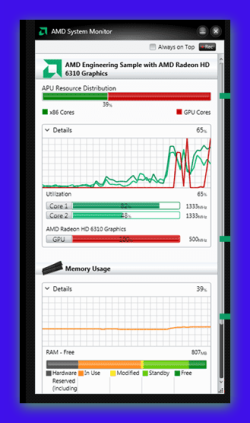
if you want to see whats going on with the card and processor etc download this AMD System Monitor >>> AMD System Monitor


Attachments

  • Brys Snap 02  ?13 ?March ?2012 .png
    Brys Snap 02 ?13 ?March ?2012 .png
    76.2 KB · Views: 30

My Computer

Computer Manufacturer/Model Number
packard bell IXTREME M5722
OS
Operating System : Windows 7 Home Premium Edition 6.01.7600 SP1 (x64)
CPU
Processor : Intel Core 2 Quad Q8300 @ 2500 MHz
Motherboard
Mainboard : Packard Bell (Acer EG43M )
Memory
Physical Memory :8GB Corsair4x 2GB 800MHz C5 DDR2
Graphics Card(s)
Video Card : XFX 6700 AMD
Monitor(s) Displays
Maestro 234DL - BenQ V2220 - BenQ VW2420H
Screen Resolution
Current Display :1920x1080p pixels at 60 Hz in HD LED
Hard Drives
Hard Disks : WDC (1000 GB)
Drive C: (Hard Disk) : 428 GB available on 491 GB
Drive D: (Hard Disk) : 426 GB available on 492 GB
SAMSUNG spinpoint HD103SJ 1000.2 GB
(X 2) KINGSTON SSD NOW V 30GB
PSU
XFX ProSeries 550W PSU
Case
PACKARD BELL IXTREME
Cooling
System Blower Current: 150mA Air Flow16CFM ;Akasa 90mm rear
Keyboard
Gigabyte Aivia K8100
Mouse
TRUST-Wireless Laser Mouse - Carbon edition MI-7770C
Internet Speed
TP-LINK > TL-WN951N / AV500 Gigabit Powerline Adapters
Browser
chrome dev
Other Info
EXTRA COOLING>(FAN CONTROLLER) PC Bay Cooler 3 x 40mm fans; Akasa AK-HD-BL Blue hard drive cooler 2 x 40 mm fan 4500 rpm 29.7 dBA
Bios> American Megatrends Inc.
Version : P01-A1
Date : 08/31/2009
Thank you very much, I will definitely check out the monitor you mentioned. I have been looking for something like this. I may pull the second card now actually (as it is starting to blink a little bit again) you don't think there will be any issue with the two on one card when I am using DP and HDMI (no DVI)?

Thanks for checking out my specs too, only thing I'm slightly worried about is psu - specs say 800 but noticed while in there last it is actually 700w
 

My Computer

Computer Manufacturer/Model Number
MLT
OS
Windows 7 Pro (x64)
CPU
Intel Core i7 CPU 930 2.8Ghz
Motherboard
Gigabyte X58A-UD3R
Memory
6GB DDR3 1600 Mhz Tri-Channel
Graphics Card(s)
ATI Diamond Radeon HD6770 PCIe (x2)
Sound Card
RealTek High Definition OnBoard Audio
Monitor(s) Displays
Samsung S27A950D 27" 3D LED 120hz & LG E2770 27" LED Display
Screen Resolution
1920x1080 32bit
Hard Drives
Hitachi 1 TB SATA
PSU
CM eXtreme 800w PS
Case
Antec P183
Cooling
It blows
no you should be ok using one card for your monitors with using your desired ports,( i find it best for dvi myself) your psu should be fine to im using a 500w coolermaster Elite and i have no problems :)
 

My Computer

Computer Manufacturer/Model Number
packard bell IXTREME M5722
OS
Operating System : Windows 7 Home Premium Edition 6.01.7600 SP1 (x64)
CPU
Processor : Intel Core 2 Quad Q8300 @ 2500 MHz
Motherboard
Mainboard : Packard Bell (Acer EG43M )
Memory
Physical Memory :8GB Corsair4x 2GB 800MHz C5 DDR2
Graphics Card(s)
Video Card : XFX 6700 AMD
Monitor(s) Displays
Maestro 234DL - BenQ V2220 - BenQ VW2420H
Screen Resolution
Current Display :1920x1080p pixels at 60 Hz in HD LED
Hard Drives
Hard Disks : WDC (1000 GB)
Drive C: (Hard Disk) : 428 GB available on 491 GB
Drive D: (Hard Disk) : 426 GB available on 492 GB
SAMSUNG spinpoint HD103SJ 1000.2 GB
(X 2) KINGSTON SSD NOW V 30GB
PSU
XFX ProSeries 550W PSU
Case
PACKARD BELL IXTREME
Cooling
System Blower Current: 150mA Air Flow16CFM ;Akasa 90mm rear
Keyboard
Gigabyte Aivia K8100
Mouse
TRUST-Wireless Laser Mouse - Carbon edition MI-7770C
Internet Speed
TP-LINK > TL-WN951N / AV500 Gigabit Powerline Adapters
Browser
chrome dev
Other Info
EXTRA COOLING>(FAN CONTROLLER) PC Bay Cooler 3 x 40mm fans; Akasa AK-HD-BL Blue hard drive cooler 2 x 40 mm fan 4500 rpm 29.7 dBA
Bios> American Megatrends Inc.
Version : P01-A1
Date : 08/31/2009
Back
Top