Solved Motherboard and Intel Processor Recommendations Please

IanG

New member
Local time
8:27 PM
Messages
24
Hi Everyone,
I've decided to treat myself to a new desktop, but having difficulty determining the best "marriage" of m'board and processor to use. (I'm not over-techy, but am able to build)

Most of my work/hobbies are graphical (image processing, desktop publishing, but no CAD) combined with loads of number-crunching spreadsheet work. Obviously Internet and email too.

I do NOT play, or have any interest in, games.

I have always used Intel processors, so would prefer staying with them, and have always found ASUS M'boards reliable.

I currently run Windows 7 SP1 Ultimate.

Any help or suggestions would be very welcome.

Thanks.
Ian
 

My Computer

Computer type
PC/Desktop
Computer Manufacturer/Model Number
Asus
OS
Win7 Ultimate SP1 64bit
CPU
Intel i5
Motherboard
H170M-PLUS
Memory
32gb
Graphics Card(s)
Radeon 550
Hard Drives
Mainly Toshiba 5Tb's but three Samsung SSD's too. Total capacity of around 60Tb.
Mainly External in Orico 4-Bay enclosures.
Antivirus
Zone Alarm Extreme Security
Browser
FireFox
What is the upper limit you can spend for a new desktop?
Knowing that will help with advice you should get from the system builders here.
 
Last edited:

My Computer

Computer type
PC/Desktop
Computer Manufacturer/Model Number
Dell OptiPlex 9020
OS
Windows 7 Professional SP1 64-bit
CPU
Intel Core i7-4790 3.60 GHz
Memory
32 GB DDR3-1600 MHz
Graphics Card(s)
Integrated Intel HD Graphics 4600
Monitor(s) Displays
Viewsonic 32" LCD
Hard Drives
Kingston SATA 3 240 GB SSD
Internet Speed
Spectrum Internet 1000 Mbps
No Limit

Hi flavallee,

So far as M'board & processor go, I have no set budget, but would never limit a sensible specification on cost.

I simply want something with the required capability.
 

My Computer

Computer type
PC/Desktop
Computer Manufacturer/Model Number
Asus
OS
Win7 Ultimate SP1 64bit
CPU
Intel i5
Motherboard
H170M-PLUS
Memory
32gb
Graphics Card(s)
Radeon 550
Hard Drives
Mainly Toshiba 5Tb's but three Samsung SSD's too. Total capacity of around 60Tb.
Mainly External in Orico 4-Bay enclosures.
Antivirus
Zone Alarm Extreme Security
Browser
FireFox
Do you want to keep Win 7 or it may be a Win 11?

Win 7 is only compatible with 7th generation down, so you must look for a used computers / parts (there are some people that has installed on newer generations computers but with many workarounds).

If it is OK to use Win 11
- Intel i5
- 32G DDR5
- Asus MB
- M.2 NVMe SSD
- 600W PS

Please note that I suggest to use internal graphics. If you choose to use a graphics, a power supply must be chosen accordingly.
Case, monitor, CPU heat sink and fan, etc must also be chosen.
 
Last edited:

My Computers

System One System Two

  • Computer type
    PC/Desktop
    Computer Manufacturer/Model Number
    custom build
    OS
    Windows 7 HP 64
    CPU
    i5 6600K - 800MHz to 4200MHz
    Motherboard
    GA-Z170-HD3P
    Memory
    4+4G GSkill DDR4 3000
    Graphics Card(s)
    IG - Intel 530
    Monitor(s) Displays
    Samsung 226BW
    Screen Resolution
    1680x1050
    Hard Drives
    (1) -1 SM951 – 128GB M.2 AHCI PCIe SSD drive for Windows 7 and Lubuntu
    (2) -1 WD SATA 3 - 1T for Data
    (3) -1 WD SATA 3 - 1T for backup
    PSU
    Thermaltake 450W TR2 gold
    Keyboard
    Old and good Chicony mechanical keyboard
    Mouse
    Logitech mX performance - 9 buttons (had to disable some)
    Internet Speed
    500Mb/s
    Browser
    Firefox 64
    Other Info
    TinyWall firewall
  • Computer type
    Laptop
    System Manufacturer/Model Number
    Asus Q550LF
    OS
    Windows 7 Pro
    CPU
    i7-4500U 800MHz to 3.0GHz
    Motherboard
    Asus Q550LF
    Memory
    (4+4)G DDR3 1600
    Graphics Card(s)
    IG intel 4400 + NVIDIA GeForce GT 745M
    Sound Card
    Realtek
    Monitor(s) Displays
    LG Display LP156WF4-SPH1
    Screen Resolution
    1920 x 1080
    Hard Drives
    BX500 120G SSD for Windows and programs +
    1T HDD for data
    Internet Speed
    500 Mb/s
    Browser
    Firefox
    Other Info
    TinyWall firewall
Hi Megahertz07,

I DO wish to remain on Win 7.

The spec you suggest - Intel i5, 32GB RAM, Asus Mb etc., is virtually the same as I am running now, except I use a graphics adapter, which is why I want to go higher, but staying with the same OS.
 

My Computer

Computer type
PC/Desktop
Computer Manufacturer/Model Number
Asus
OS
Win7 Ultimate SP1 64bit
CPU
Intel i5
Motherboard
H170M-PLUS
Memory
32gb
Graphics Card(s)
Radeon 550
Hard Drives
Mainly Toshiba 5Tb's but three Samsung SSD's too. Total capacity of around 60Tb.
Mainly External in Orico 4-Bay enclosures.
Antivirus
Zone Alarm Extreme Security
Browser
FireFox
Your current computer is basically what I have.

As I wrote, if you want to install Win 7 on a non compatible hardware you must use third part drivers develop by enthusiastic.
SIW2 can guide you.
 

My Computers

System One System Two

  • Computer type
    PC/Desktop
    Computer Manufacturer/Model Number
    custom build
    OS
    Windows 7 HP 64
    CPU
    i5 6600K - 800MHz to 4200MHz
    Motherboard
    GA-Z170-HD3P
    Memory
    4+4G GSkill DDR4 3000
    Graphics Card(s)
    IG - Intel 530
    Monitor(s) Displays
    Samsung 226BW
    Screen Resolution
    1680x1050
    Hard Drives
    (1) -1 SM951 – 128GB M.2 AHCI PCIe SSD drive for Windows 7 and Lubuntu
    (2) -1 WD SATA 3 - 1T for Data
    (3) -1 WD SATA 3 - 1T for backup
    PSU
    Thermaltake 450W TR2 gold
    Keyboard
    Old and good Chicony mechanical keyboard
    Mouse
    Logitech mX performance - 9 buttons (had to disable some)
    Internet Speed
    500Mb/s
    Browser
    Firefox 64
    Other Info
    TinyWall firewall
  • Computer type
    Laptop
    System Manufacturer/Model Number
    Asus Q550LF
    OS
    Windows 7 Pro
    CPU
    i7-4500U 800MHz to 3.0GHz
    Motherboard
    Asus Q550LF
    Memory
    (4+4)G DDR3 1600
    Graphics Card(s)
    IG intel 4400 + NVIDIA GeForce GT 745M
    Sound Card
    Realtek
    Monitor(s) Displays
    LG Display LP156WF4-SPH1
    Screen Resolution
    1920 x 1080
    Hard Drives
    BX500 120G SSD for Windows and programs +
    1T HDD for data
    Internet Speed
    500 Mb/s
    Browser
    Firefox
    Other Info
    TinyWall firewall
Hi Megahertz07,

I think you have possibly not understood my original question - or I am failing to understand your responses.

Perhaps best we discontinue, certainly along these lines.

Thanks anyway.
 

My Computer

Computer type
PC/Desktop
Computer Manufacturer/Model Number
Asus
OS
Win7 Ultimate SP1 64bit
CPU
Intel i5
Motherboard
H170M-PLUS
Memory
32gb
Graphics Card(s)
Radeon 550
Hard Drives
Mainly Toshiba 5Tb's but three Samsung SSD's too. Total capacity of around 60Tb.
Mainly External in Orico 4-Bay enclosures.
Antivirus
Zone Alarm Extreme Security
Browser
FireFox
If you can, read my signature below. Do you see how I list the highest chipset and socket for Windows 7?

I buy my CPUs on eBay. It's a little bit of a risk, but usually the CPU is good and that type of computer component is not likely to be a dud. It can, but not likely. Motherboards on the other hand can be and that's why I kinda refrain from buying used motherboards if I can help it. Problem with using Windows 7 though is that you're stuck with an older motherboard which means buying used on a place like eBay or what ever unless you can find new from some retailer that still has the older motherboards in stock.

Other than that, yeah, it's third-party drivers and if you end up with issues down the road who knows if it's the third-party driver.

- - - Updated - - -

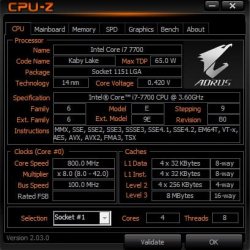
Your computer now should be more than adequate quite frankly. Consider just maxing out the CPU to an i7 7700. You don't need the K SKU of the 7700K. That's for overclocking and you will probably find no real performance gain with overclocking. What you will get however is more wear and tear on the computer, more power consumption, and a lame bragging right that CPU overclockers are interested in.

I maxed out my CPU to the 7700 myself and it's more than capable for what I do. It's a quad core 8 thread CPU.

fgdhbnfdgt.jpg

- - - Updated - - -

It looks like your motherboard supports an NVMe drive. I'd get one of those and the i7 7700 CPU.

According to your manual, the m.2 connector shares with SATA Express. So if you use SATA Express and want to use m.2, then it's either one or the other. I doubt you're using SATA Express though...
 

My Computer

Computer type
PC/Desktop
OS
Windows 7 Ultimate x64
Thanks for your inout F22 Simpilot,

I only ever purchase new equipment, so Ebay is out, just as I prefer to use processors in their "standard state", rather than messing them about.

I'm going to pass my enquiry to a few long established online resellers, and be guided by them.
 

My Computer

Computer type
PC/Desktop
Computer Manufacturer/Model Number
Asus
OS
Win7 Ultimate SP1 64bit
CPU
Intel i5
Motherboard
H170M-PLUS
Memory
32gb
Graphics Card(s)
Radeon 550
Hard Drives
Mainly Toshiba 5Tb's but three Samsung SSD's too. Total capacity of around 60Tb.
Mainly External in Orico 4-Bay enclosures.
Antivirus
Zone Alarm Extreme Security
Browser
FireFox
Back
Top