JavaScript is disabled. For a better experience, please enable JavaScript in your browser before proceeding.
You are using an out of date browser. It may not display this or other websites correctly.
You should upgrade or use an
alternative browser .
motherboard won`t read video card in second pci slot
Hello,
California intel I5 ripjaws Gforce 760 PC/Desktop California intel I5 asus p8z77-V ripjaws Gforce 760
New member
Guru
Gold Member
VIP
There may be an option in BIOS to set the preferred port for gpu. Try to find it.
Windows 7 Ultimate x64 SP1 AMD Phenom 2 1090T 2x8GB Kingston HyperX Fury Black 1600Mhz Unga... MSI GTX 970 Gaming 4G PC/Desktop Custom Build Windows 7 Ultimate x64 SP1 AMD Phenom 2 1090T Gigabyte GA-890FXA-UD5 2x8GB Kingston HyperX Fury Black 1600Mhz Unganged MSI GTX 970 Gaming 4G Realtek On-Board HD 7.1 Audio / Logitech G35 3xAcer GD245HQ 1920x1080 Samsung 850 Pro 512GB SSD - OS / HighPower 1000W Cooler Master HAF 932 Noctua NH-D14 Logitech G19 Logitech G500 100/4 Mbit Cable (100GB quota) ZoneAlarm Extreme Security / MBAM Pro / MBAE Free / SAS Free IE 11 - Firefox - Chrome Logitech F710/ G27/ G940/ Z5500 // TrackIR 5 // Nvidia 3D Surround Vision
New member
Thread Starter
I will be looking for it the mext time it does boot
California intel I5 ripjaws Gforce 760 PC/Desktop California intel I5 asus p8z77-V ripjaws Gforce 760
Better Call Saul
VIP
SF Team
Which slot do you have it in? Have you tried slot 5?
W7 Pro x64 SP1 | W10 Pro IP x64 | W8.1 Pro x6... i7-4790k @ 4GHz (4.4GHz Boost) 16GB DDR3 Kingston HyperX Fury @ 1600MHz CL 9... EVGA GTX 980 Classified PC/Desktop Custom Build W7 Pro x64 SP1 | W10 Pro IP x64 | W8.1 Pro x64 VM | Linux Mint VM i7-4790k @ 4GHz (4.4GHz Boost) ASUS Sabertooth Z87 (BIOS Rev 2004) 16GB DDR3 Kingston HyperX Fury @ 1600MHz CL 9-9-9-27 EVGA GTX 980 Classified Realtek Onboard Samsung S27D390 1920 x 1080 240GB Intel 520 Series SSD | Corsair HX850-80 Gold Modular Cooler Master Silencio 650 Corsair H80i w/2 x Corsair SP120 | 2 x 120mm Noctua NF-S12B Microsoft Sidewinder X4 Gigabyte M6900 optical 152mb F-Secure Firefox 38.0 Backup Rig: Win 7 Pro 64-bit | AMD A10-5800k | ASUS F2A85-V Pro | 8GB Samsung DDR3 @1600MHz | 120GB Toshiba SDD | 2TB Seagate HDD | Cooler Master Silencio 550
New member
Thread Starter
Yes, it is in slot 5 right now. But when i boot the led for slot one turns on and the computer sits there looking at that slot.
Last edited: May 29, 2015
California intel I5 ripjaws Gforce 760 PC/Desktop California intel I5 asus p8z77-V ripjaws Gforce 760
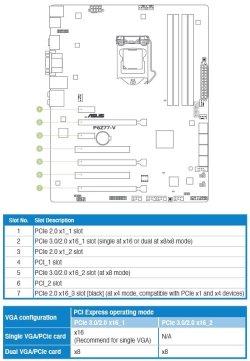
Boozad's picture showing VGA configuration indicates "N/A" - Not Available - on Slot 5 for a single video card. The manual says that Slot 2 is "recommended" for single boards. After looking through the manual thoroughly, I see no provision for setting a single card on Slot 5. It appears to be reserved for a second video card in Crossfire or SLI mode.
Win10 Pro 64-bit AMD Ryzen 7 3800X 32 GB Kingston DDR4-2666 MSI nVidia GT 710 (2GB) PC/Desktop Self-Built Win10 Pro 64-bit AMD Ryzen 7 3800X Gigabyte X570 UD 32 GB Kingston DDR4-2666 MSI nVidia GT 710 (2GB) Creative Audigy FX 5.1 ViewSonic VG2439Smh 24" 1920x1080 3xWD1TB; 1xSeagate 1TB... all spinning rust EVGA 100-W1-0500-KR (500w) SilverStone PS10 (modified) CPU:AMD Wraith Prism. Case:3x Noctua 120mm Compaq Professional PS/2 Microsoft Basic Optical Mouse 2.0 Fiber 1Gbit/sec down/up Avast Free FF, Chrome 2x LG GH24NSC0 DVD burners, Mackie CR3 monitor speakers
New member
Thread Starter
Thank you OvenMaster. Is there any reason that it would boot with the card in slot 5 only sometimes? I would try slot 7 however my power supply is in the way :/.
California intel I5 ripjaws Gforce 760 PC/Desktop California intel I5 asus p8z77-V ripjaws Gforce 760
Ah, crap. A PSU mounted on the case floor. Yeah, that'll get in yer way.
Why would your rig boot up only sometimes with your card in Slot 5? My semi-educated guess is that the mobo couldn't find a card in Slot 2 during bootup so it moved on to Slot 5. Why this does not happen consistently is beyond me.
Win10 Pro 64-bit AMD Ryzen 7 3800X 32 GB Kingston DDR4-2666 MSI nVidia GT 710 (2GB) PC/Desktop Self-Built Win10 Pro 64-bit AMD Ryzen 7 3800X Gigabyte X570 UD 32 GB Kingston DDR4-2666 MSI nVidia GT 710 (2GB) Creative Audigy FX 5.1 ViewSonic VG2439Smh 24" 1920x1080 3xWD1TB; 1xSeagate 1TB... all spinning rust EVGA 100-W1-0500-KR (500w) SilverStone PS10 (modified) CPU:AMD Wraith Prism. Case:3x Noctua 120mm Compaq Professional PS/2 Microsoft Basic Optical Mouse 2.0 Fiber 1Gbit/sec down/up Avast Free FF, Chrome 2x LG GH24NSC0 DVD burners, Mackie CR3 monitor speakers
Electron Wrangler
Guru
Gold Member
VIP
If slot #2 has dies, there may be damage to the PCIe system itself. This might cause intermittent operation on the other slots, or cause them to not work altogether.
Win 7 Pro x64/Win 10 Pro x64 dual boot AMD FX 8350 Vishera @ 4200 16 GB Mushkin Blackline DDR3-2400 @ 1866 (9-1... XFX Radeon R9 280 Double D Black Edition PC/Desktop Mellon Labs (custom build) Win 7 Pro x64/Win 10 Pro x64 dual boot AMD FX 8350 Vishera @ 4200 ASUS M5A97 R2.0 16 GB Mushkin Blackline DDR3-2400 @ 1866 (9-10-10-10-31) XFX Radeon R9 280 Double D Black Edition Realtek HD Audio on MB. Sounds great. Acer 24", Acer 22" 3840 x 1080 1 x Mushkin Chronos 120 GB SSD (Win 10) Corsair TX-750 CoolerMaster HAF 912+ Coolermaster Seidon 240M Liquid AIO. 6 case fans Logitech G710+ Logitech G500s Much better since I got fiber, but still way overpriced. MSE, Malware Bytes for scanning Firefox Corsair VOID USB headphones.