Mouse constantly disconnecting/reconnecting, already tried many fixes

BennyloYol

New member
Local time
1:26 PM
Messages
3
My Steelseries Diablo 3 mouse is constantly disconnecting and reconnecting from my computer for ~3-30 seconds at a time and occasionally becomes unresponsive until I restart the computer (unplugging and reconnecting mouse won't even bring it back online). When this happens, the computer makes the same noise as if I were to physically unplug the mouse from the computer and then plug it back in. It seems to happen more often while gaming then normal internet browsing (though it may just seem like it happens more often because gaming requires more constant mouse movement then browsing the internet).

So far I have already tried...

  • updating drivers (this includes for all my Universal Serial Bus controlers and all my Human Interface Devices)
  • Uninstalling & reinstalling all Steelseries software
  • making it so that Windows cannot turn power off to all usb Root Hubs
  • performing a clean boot
  • Running scans with Avira antivirus, Spybot & Malwarebytes Anti-Malware
  • changing mouse to a brand new Razor Naga(which also disconnects & reconnects but FAR less often)
  • using several different usb ports to plug mice into
There may be a 1 or 2 more things I've also tried but just cannot recall them ATM. All my other devices seem to work fine(except for possibly my logitech webcam/Mic, occasionally i will try to use it on Teamspeak and the Mic will not work until I reset the computer, However, I use this far less frequently and do not know if it related to my mice problems).

I would really like to avoid either of the 2 options that i feel i am being driven towards; either taking the computer in to a shop for possibly expensive repairs or just wiping the computer & putting it back to factory settings. If anyone has any other ideas please let me know

Computer Specs

OS Name Microsoft Windows 7 Home Premium
Version 6.1.7601 Service Pack 1 Build 7601
System Manufacturer MSI
System Model MS-7622
System Type x64-based PC
Processor AMD Phenom(tm) II X4 955 Processor, 3200 Mhz, 4 Core(s), 4 Logical Processor(s)
 

My Computer My Computer

At a glance

Windows 7 x64bitAMD Phenom(tm) II X4 955 Processor 3.20 GHz12.0 GBAMD Radeon HD 5700 series
Computer type
PC/Desktop
Computer Manufacturer/Model Number
custom
OS
Windows 7 x64bit
CPU
AMD Phenom(tm) II X4 955 Processor 3.20 GHz
Motherboard
MSI MS-7622
Memory
12.0 GB
Graphics Card(s)
AMD Radeon HD 5700 series
Antivirus
Avira
Browser
Crome or Firefox
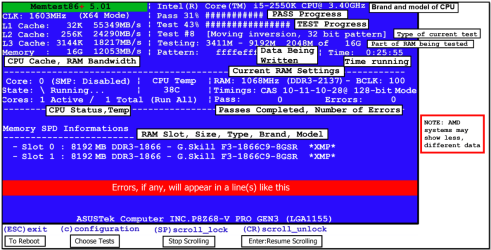
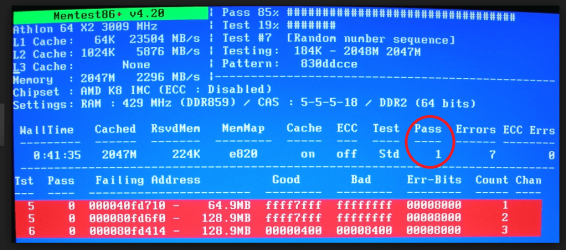
Hello and welcome Benny now one thing I didn't see amongst the tries was a memtest - a long shot but seeing that a lot of different devices are not working seems to me to be due to a common causation spot.
MEMTEST
http://www.sevenforums.com/tutorials/105647-ram-test-memtest86.html this one you will need to make a bootable disk set the BIOS to optical (or USB if preferred) boot the machine and let it run for at LEAST 8 passes unless the errors come up straight away. Takes fair time to complete and some leave it running overnight.
 

Attachments

  • MEMTEST INFO.PNG
    MEMTEST INFO.PNG
    108.1 KB · Views: 0
  • MEMTEST-ERROR.PNG
    MEMTEST-ERROR.PNG
    237.1 KB · Views: 0

My Computer My Computer

At a glance

Desk1 7 Home Prem / Desk2 10 Pro / Main lap A...Desk1 i5 3750K / Laptop i7 GTX 860M / Desk2 i...Desk1 8GB (1866) / Desk2 16GB (1333) / Laptop...Desk 1& 2NVidia GTX 650 & Laptops on board Intel
Computer type
PC/Desktop
Computer Manufacturer/Model Number
Own build (new) Desk1 / Asus ROG Win 7 / Desk2 1st build
OS
Desk1 7 Home Prem / Desk2 10 Pro / Main lap Asus ROG 10 Pro 2 laptop Toshiba 7 Pro Asus P2520 7 & 10
CPU
Desk1 i5 3750K / Laptop i7 GTX 860M / Desk2 i5 2500
Motherboard
Desk1 Asus P877-V / Desk2 Gigabyte H67 UD3H / Laptop ?
Memory
Desk1 8GB (1866) / Desk2 16GB (1333) / Laptop 8Gb DDR3
Graphics Card(s)
Desk 1& 2NVidia GTX 650 & Laptops on board Intel
Sound Card
Desk 1 & 2 -XONAR DG Realtek High Def audio Laptop
Monitor(s) Displays
Desk 1 Benq HD 2450 / Desk2 Philips 24" / Laptop 17.5"
Screen Resolution
1920x1080 D1 & D2 & Laptop 1
Hard Drives
Desk1 Samsung 120GB 830 SSD
Asus ROG 256GB 850 Pro SSD
Desk2 Samsung 840 256 SSD
Toshiba 120GB EVO
PSU
Desk 1 Corsair HX 1050/ Laptop ? / Desk 2 Corsair HX 650
Case
Desk 1 Cooler HAF XM ? Toshiba laptop / Desk2 Coolermaster
Cooling
Fans on all Desk1 -2 Desk2 - all Coolermasters 5 Laptop ?
Keyboard
Desk 1 MS Sidewinder X6 Desk 2 MS Sidewinder X 4
Mouse
Desk 1&2 - Gigabyte MS 900 gamer - laptop - Logitec wireless
Internet Speed
ADSL2+
Other Info
One other Desktop (tester) and spare Toshba laptop both with SSD's
Running Kaspersky 2016 ISS on all machines config'd identically
Logitec audio stereo systems on each machine (x3)
Canon MG5250MFC
Router/modem TP-Link running WPA2SK
Hi welcome to 7F

do other usb devices disconnect when plugged in? can you try just a cheap mouse even though you tryied a new mouse try a basic mouse.
 

My Computer My Computer

At a glance

win 10
Computer type
PC/Desktop
Computer Manufacturer/Model Number
dell xps 9000
OS
win 10
Yep as Oscer says mate only I see you have tried another mouse it could even be worth trying a wifi mouse too. But I would really like to see if anything comes of the memtest because as I said it seems to have a common "denominator" as the cause of the problem and this will eliminate the RAM at least because just about everything goes through or into it.
 

My Computer My Computer

At a glance

Desk1 7 Home Prem / Desk2 10 Pro / Main lap A...Desk1 i5 3750K / Laptop i7 GTX 860M / Desk2 i...Desk1 8GB (1866) / Desk2 16GB (1333) / Laptop...Desk 1& 2NVidia GTX 650 & Laptops on board Intel
Computer type
PC/Desktop
Computer Manufacturer/Model Number
Own build (new) Desk1 / Asus ROG Win 7 / Desk2 1st build
OS
Desk1 7 Home Prem / Desk2 10 Pro / Main lap Asus ROG 10 Pro 2 laptop Toshiba 7 Pro Asus P2520 7 & 10
CPU
Desk1 i5 3750K / Laptop i7 GTX 860M / Desk2 i5 2500
Motherboard
Desk1 Asus P877-V / Desk2 Gigabyte H67 UD3H / Laptop ?
Memory
Desk1 8GB (1866) / Desk2 16GB (1333) / Laptop 8Gb DDR3
Graphics Card(s)
Desk 1& 2NVidia GTX 650 & Laptops on board Intel
Sound Card
Desk 1 & 2 -XONAR DG Realtek High Def audio Laptop
Monitor(s) Displays
Desk 1 Benq HD 2450 / Desk2 Philips 24" / Laptop 17.5"
Screen Resolution
1920x1080 D1 & D2 & Laptop 1
Hard Drives
Desk1 Samsung 120GB 830 SSD
Asus ROG 256GB 850 Pro SSD
Desk2 Samsung 840 256 SSD
Toshiba 120GB EVO
PSU
Desk 1 Corsair HX 1050/ Laptop ? / Desk 2 Corsair HX 650
Case
Desk 1 Cooler HAF XM ? Toshiba laptop / Desk2 Coolermaster
Cooling
Fans on all Desk1 -2 Desk2 - all Coolermasters 5 Laptop ?
Keyboard
Desk 1 MS Sidewinder X6 Desk 2 MS Sidewinder X 4
Mouse
Desk 1&2 - Gigabyte MS 900 gamer - laptop - Logitec wireless
Internet Speed
ADSL2+
Other Info
One other Desktop (tester) and spare Toshba laptop both with SSD's
Running Kaspersky 2016 ISS on all machines config'd identically
Logitec audio stereo systems on each machine (x3)
Canon MG5250MFC
Router/modem TP-Link running WPA2SK
An update before I try this MEMTEST

I do have one more bit of information that I've come across since posting my original thread. Both mice were going in & out but since then I have unplugged the SteelSeries mouse, mostly out of annoyance/frustration, and the Razor Naga mouse has not disconnected/reconnected since then and it has been well over a week (while both mice were plugged in the Razor mouse would only be unresponsive ~once a day). This makes me think now that the problem somehow was with the original SteelSeries mouse all along but if that is the case then how could the hardware issues of one mouse affect another mouse with no problems? Will a MEMTEST still tell me what the issue is if I plug both mice back in and the SteelSeries starts causing the same issues?
 

My Computer My Computer

At a glance

Windows 7 x64bitAMD Phenom(tm) II X4 955 Processor 3.20 GHz12.0 GBAMD Radeon HD 5700 series
Computer type
PC/Desktop
Computer Manufacturer/Model Number
custom
OS
Windows 7 x64bit
CPU
AMD Phenom(tm) II X4 955 Processor 3.20 GHz
Motherboard
MSI MS-7622
Memory
12.0 GB
Graphics Card(s)
AMD Radeon HD 5700 series
Antivirus
Avira
Browser
Crome or Firefox
Are you saying your had both mice plugged in at the same time when you had the problems?
 

My Computer My Computer

At a glance

Windows 10 Pro. 64/ version 1709 Windows 7 Pr...Intel i7-6800K @ 4.3Corsair Platinum 16 gig @2400EVGA GTX 1070 OC
Computer type
PC/Desktop
Computer Manufacturer/Model Number
Home made Desktop
OS
Windows 10 Pro. 64/ version 1709 Windows 7 Pro/64
CPU
Intel i7-6800K @ 4.3
Motherboard
ASUS X-99 Deluxe II
Memory
Corsair Platinum 16 gig @2400
Graphics Card(s)
EVGA GTX 1070 OC
Monitor(s) Displays
Asus 27" LED LCD/VE278Q
Screen Resolution
1920-1080 or 1280-720 HDMI
Hard Drives
INTEL SSD 730-240 Gb Sata 3.0/
PSU
EVGA Platium 1200W
Case
Phanteks Luxe Tempered Glass 8 fans/ one radiator
Cooling
XSPC/ Water Cooled CPU
Keyboard
Das 4 Professional
Mouse
Logitech M705/MX Anywhere 2-S
Internet Speed
100 mbits
Antivirus
Microsoft Security Essentials/ Malwarebytes Premium 3.0/ SAS
Browser
I.E. 11 default/Firefox/ ISP Time Warner Cable/Spectrum
Other Info
LG BluRay Burner/
Sound system-KLipsch-THX/
Icy Dock ssd Hot Swap bays.
Yes & no, The SteelSeries mouse started disconnecting/reconnecting when it was plugged in by itself. I was tired of the SteelSeries mouse going out while gaming so i was using the Razor Naga as a sort of back up mouse that I could switch to quickly so i could still move my in game character. While both mice were plugged in at the same time(different usb ports obviously) I was experiencing the SteelSeries mouse go in & out often (~ once every 30 min) where the Razor Naga would only be unresponsive ~every few hours.
 

My Computer My Computer

At a glance

Windows 7 x64bitAMD Phenom(tm) II X4 955 Processor 3.20 GHz12.0 GBAMD Radeon HD 5700 series
Computer type
PC/Desktop
Computer Manufacturer/Model Number
custom
OS
Windows 7 x64bit
CPU
AMD Phenom(tm) II X4 955 Processor 3.20 GHz
Motherboard
MSI MS-7622
Memory
12.0 GB
Graphics Card(s)
AMD Radeon HD 5700 series
Antivirus
Avira
Browser
Crome or Firefox
Benny now you have tried drivers you say but just where did you update then from? I a not a fan of the Windows feature and prefer to download from the manufacturers (board) site. If that is what you did here are the driver s for the chipset etc
MSI USA - Computer, Laptop, Notebook, Desktop, Mainboard, Graphics and more 64 it is quite a recent update and might be worth a try.

I know I keep on about the RAM but it is worth at least eliminating that source of a problem.
 

My Computer My Computer

At a glance

Desk1 7 Home Prem / Desk2 10 Pro / Main lap A...Desk1 i5 3750K / Laptop i7 GTX 860M / Desk2 i...Desk1 8GB (1866) / Desk2 16GB (1333) / Laptop...Desk 1& 2NVidia GTX 650 & Laptops on board Intel
Computer type
PC/Desktop
Computer Manufacturer/Model Number
Own build (new) Desk1 / Asus ROG Win 7 / Desk2 1st build
OS
Desk1 7 Home Prem / Desk2 10 Pro / Main lap Asus ROG 10 Pro 2 laptop Toshiba 7 Pro Asus P2520 7 & 10
CPU
Desk1 i5 3750K / Laptop i7 GTX 860M / Desk2 i5 2500
Motherboard
Desk1 Asus P877-V / Desk2 Gigabyte H67 UD3H / Laptop ?
Memory
Desk1 8GB (1866) / Desk2 16GB (1333) / Laptop 8Gb DDR3
Graphics Card(s)
Desk 1& 2NVidia GTX 650 & Laptops on board Intel
Sound Card
Desk 1 & 2 -XONAR DG Realtek High Def audio Laptop
Monitor(s) Displays
Desk 1 Benq HD 2450 / Desk2 Philips 24" / Laptop 17.5"
Screen Resolution
1920x1080 D1 & D2 & Laptop 1
Hard Drives
Desk1 Samsung 120GB 830 SSD
Asus ROG 256GB 850 Pro SSD
Desk2 Samsung 840 256 SSD
Toshiba 120GB EVO
PSU
Desk 1 Corsair HX 1050/ Laptop ? / Desk 2 Corsair HX 650
Case
Desk 1 Cooler HAF XM ? Toshiba laptop / Desk2 Coolermaster
Cooling
Fans on all Desk1 -2 Desk2 - all Coolermasters 5 Laptop ?
Keyboard
Desk 1 MS Sidewinder X6 Desk 2 MS Sidewinder X 4
Mouse
Desk 1&2 - Gigabyte MS 900 gamer - laptop - Logitec wireless
Internet Speed
ADSL2+
Other Info
One other Desktop (tester) and spare Toshba laptop both with SSD's
Running Kaspersky 2016 ISS on all machines config'd identically
Logitec audio stereo systems on each machine (x3)
Canon MG5250MFC
Router/modem TP-Link running WPA2SK
Back
Top