Moved "new" computer to my room, sound isn't working anymore

acelegacy

New member
Local time
6:53 PM
Messages
30
Hey guys whats up so a couple of months back my brother sold me his pc and traveled to Europe and from then on I stayed in his room using it and now that hes coming back i had to move the pc to my room finally. So after moving it everything was working pretty swell except no audio was coming out of the headphones, the same I had been using for 2 months.

When I moved the pc to my room I connected the headphones to the second entrance (not the one in the back of the pc, thats the one i was using first) and no sound was coming out. The sound symbol also had a little red x on it I think. So I changed the headphones back to the initial entrance, the one in the back, but still no sound coming out. There's no red x anymore.

There's also this, which is weird: Imgur: The most awesome images on the Internet

Alto-falantes means speakers.

So, as you can see, there's this weird Java Handler Updater. If I try to move its knob all the way up it just automatically goes down again. So maybe this is the issue?


I am hoping that there's no problem with my sound card... Really am
 

My Computer My Computer

At a glance

Windows 7 Ultimate 64bitIntel® Core™ i7-3770KCorsair Vengeance 16GB (2x8GB) DDR3EVGA GeForce GTX760 2GB DDR5
Computer type
PC/Desktop
Computer Manufacturer/Model Number
Custom Build
OS
Windows 7 Ultimate 64bit
CPU
Intel® Core™ i7-3770K
Motherboard
Asus P8Z77-V PRO
Memory
Corsair Vengeance 16GB (2x8GB) DDR3
Graphics Card(s)
EVGA GeForce GTX760 2GB DDR5
Hard Drives
Seagate SATA III Barracuda 7200 1TB
Antivirus
Avast (premium, free 60 day trial)
Browser
Google Chrome
Go to the Device Manager, RIGHT click on the entry for your sound device (e.g. Realtek or whatever you have) and then LEFT click "Uninstall". DO NOT uninstall the drivers. Restart the PC and when Windows starts it will detect and reinstall the sound.
Check that sound is now working.

Here is how to post screenshots on this forum. You don't need to host them somewhere else.
http://www.sevenforums.com/tutorials/9733-screenshots-files-upload-post-seven-forums.html
 

My Computer My Computer

At a glance

Windows 10 64 bitIntel i7 6700K16GB Corsair DominatorIntel CPU Graphics
Computer type
PC/Desktop
Computer Manufacturer/Model Number
My Own Build
OS
Windows 10 64 bit
CPU
Intel i7 6700K
Motherboard
ASUS ROG Maximus VIII Hero
Memory
16GB Corsair Dominator
Graphics Card(s)
Intel CPU Graphics
Sound Card
RealTek
Monitor(s) Displays
27" Dell S2719dgf
Screen Resolution
2560X1440
Hard Drives
1 TB Samsung 850 EVO SSD for Win 10 Pro
500GB Samsung 850 EVO SSD for Win 10 Insider
2 TB drive for backup
PSU
EVGA Supernova 750G2
Case
BeQuiet Silent Base 600
Cooling
Deepcool Captain 120EX
Keyboard
Microsoft Wireless 2000
Mouse
Microsoft wireless
Internet Speed
100 MB/sec (Cable)
Antivirus
Microsoft Defender and Malwarebytes
Browser
Edge/Firefox
Other Info
Cakewalk (Sonar) by BandLab and Studio One 4.1 Pro recording studio software. MOTU 896Mk3 Hybrid recording interface, Frontier Tranzport wireless control unit, Behringer X-Touch Control Surface.
Five USB connected optical drives for CD Audio production using Nero BurningROM
Go to the Device Manager, RIGHT click on the entry for your sound device (e.g. Realtek or whatever you have) and then LEFT click "Uninstall". DO NOT uninstall the drivers. Restart the PC and when Windows starts it will detect and reinstall the sound.
Check that sound is now working.

Here is how to post screenshots on this forum. You don't need to host them somewhere else.
http://www.sevenforums.com/tutorials/9733-screenshots-files-upload-post-seven-forums.html


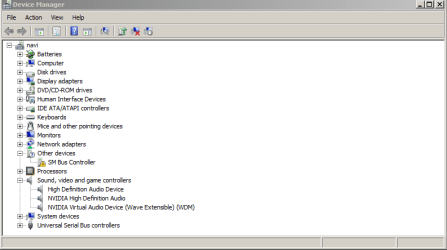
In here, where should I right click and uninstall? On sound, video and game? Just making sure because I don't see anything about Realtek or anything (sorry, computer noob). Also it says game and video so I'm just making sure.
 

Attachments

  • rc.png
    rc.png
    11.8 KB · Views: 1

My Computer My Computer

At a glance

Windows 7 Ultimate 64bitIntel® Core™ i7-3770KCorsair Vengeance 16GB (2x8GB) DDR3EVGA GeForce GTX760 2GB DDR5
Computer type
PC/Desktop
Computer Manufacturer/Model Number
Custom Build
OS
Windows 7 Ultimate 64bit
CPU
Intel® Core™ i7-3770K
Motherboard
Asus P8Z77-V PRO
Memory
Corsair Vengeance 16GB (2x8GB) DDR3
Graphics Card(s)
EVGA GeForce GTX760 2GB DDR5
Hard Drives
Seagate SATA III Barracuda 7200 1TB
Antivirus
Avast (premium, free 60 day trial)
Browser
Google Chrome
Ok so there's this. Am I supposed to click on any of these?
 

Attachments

  • Screenshot_1.png
    Screenshot_1.png
    13.1 KB · Views: 0

My Computer My Computer

At a glance

Windows 7 Ultimate 64bitIntel® Core™ i7-3770KCorsair Vengeance 16GB (2x8GB) DDR3EVGA GeForce GTX760 2GB DDR5
Computer type
PC/Desktop
Computer Manufacturer/Model Number
Custom Build
OS
Windows 7 Ultimate 64bit
CPU
Intel® Core™ i7-3770K
Motherboard
Asus P8Z77-V PRO
Memory
Corsair Vengeance 16GB (2x8GB) DDR3
Graphics Card(s)
EVGA GeForce GTX760 2GB DDR5
Hard Drives
Seagate SATA III Barracuda 7200 1TB
Antivirus
Avast (premium, free 60 day trial)
Browser
Google Chrome
First thing I see, you do not have the correct sound driver for your sound hardware. All you have is the generic, basic function, Windows installed High Definition Audio Device.

The correct sound driver, according to ASUS, is Realtek. Download and install the Realtek driver from ASUS.
https://www.asus.com/us/Motherboards/P8Z77V_PRO/HelpDesk_Download/
 

My Computer My Computer

At a glance

Windows 10 64 bitIntel i7 6700K16GB Corsair DominatorIntel CPU Graphics
Computer type
PC/Desktop
Computer Manufacturer/Model Number
My Own Build
OS
Windows 10 64 bit
CPU
Intel i7 6700K
Motherboard
ASUS ROG Maximus VIII Hero
Memory
16GB Corsair Dominator
Graphics Card(s)
Intel CPU Graphics
Sound Card
RealTek
Monitor(s) Displays
27" Dell S2719dgf
Screen Resolution
2560X1440
Hard Drives
1 TB Samsung 850 EVO SSD for Win 10 Pro
500GB Samsung 850 EVO SSD for Win 10 Insider
2 TB drive for backup
PSU
EVGA Supernova 750G2
Case
BeQuiet Silent Base 600
Cooling
Deepcool Captain 120EX
Keyboard
Microsoft Wireless 2000
Mouse
Microsoft wireless
Internet Speed
100 MB/sec (Cable)
Antivirus
Microsoft Defender and Malwarebytes
Browser
Edge/Firefox
Other Info
Cakewalk (Sonar) by BandLab and Studio One 4.1 Pro recording studio software. MOTU 896Mk3 Hybrid recording interface, Frontier Tranzport wireless control unit, Behringer X-Touch Control Surface.
Five USB connected optical drives for CD Audio production using Nero BurningROM
Back
Top