MRU list missing from Run

Duchess

New member
Member
Local time
9:53 AM
Messages
70
Location
New Jersey
I recently ran Power Tools Lite and afterwards noticed that all commands that were listed in Run are gone. I don't think they can be recovred but I would like to make new entries hold and be available for furture use. Needless to say Power Tools Lite is gone from my computer. :shock:

Is there a registry setting or something that can accomplish that task?

My OS is Windows 7 Home Edition 64-bit.

All help will be appreciated. :D

Gloria
 

My Computer

Computer Manufacturer/Model Number
Dell Inspiron 400
OS
Windows 7 Home Premium 64-bit
CPU
AMD Athlon
Motherboard
Dell 03D1TV
Memory
3.00 GB
Graphics Card(s)
ATI Radeon HD3200
Sound Card
ATI High Definition
Monitor(s) Displays
Samsung SyncMaster
Hard Drives
527 GB
PSU
unknown
Case
unknown
Cooling
unknown
They will accumulate again as you enter them and as long as you don't run another program that wipes them out :D

The list itself is kept in the registry, same as it was for XP and Vista.

HKEY_CURRENT_USER\Software\Microsoft\Windows\CurrentVersion\Explorer\RunMRU

Open a Command Prompt then copy and paste the following there and press Enter:

reg query "HKEY_CURRENT_USER\Software\Microsoft\Windows\CurrentVersion\Explorer\RunMRU"

You could use regedit to export that key and save it in case it ever gets wiped out again, then you could merge the exported key back into your registry to restore them.

Looks like you can have up to 26 entries (a through z) and that's it.
 

My Computer

Computer type
PC/Desktop
Computer Manufacturer/Model Number
Lenovo IdeaCenter 450
OS
Windows 10 Pro X64
CPU
Intel Quad Core i7-4770 @ 3.4Ghz
Memory
16.0GB PC3-12800 DDR3 SDRAM 1600 MHz
Graphics Card(s)
Intel Integrated HD Graphics
Sound Card
Realtek HD Audio
Monitor(s) Displays
HP 22" LCD
Screen Resolution
1680 x 1050
Hard Drives
250GB Samsung EVO SATA-3 SSD
2TB Seagate ST2000DM001 SATA-2
1.5TB Seagate ST3150041AS SATA
Keyboard
Dell USB
Mouse
Lenovo USB
Internet Speed
Cable via Road Runner 3MB Upload, 30MB Download
Antivirus
Windows Defender, MBAM Pro, MBAE
Browser
Seamonkey
Other Info
UEFI/GPT
PLDS DVD-RW DH16AERSH
They will accumulate again as you enter them and as long as you don't run another program that wipes them out :D

The list itself is kept in the registry, same as it was for XP and Vista.

HKEY_CURRENT_USER\Software\Microsoft\Windows\CurrentVersion\Explorer\RunMRU

Open a Command Prompt then copy and paste the following there and press Enter:

reg query "HKEY_CURRENT_USER\Software\Microsoft\Windows\CurrentVersion\Explorer\RunMRU"

You could use regedit to export that key and save it in case it ever gets wiped out again, then you could merge the exported key back into your registry to restore them.

Looks like you can have up to 26 entries (a through z) and that's it.

I used the command prompt and copied and pasted your link, a message appeared that said "The system cannot find the path specified."

Do you have another suggestion?
 

My Computer

Computer Manufacturer/Model Number
Dell Inspiron 400
OS
Windows 7 Home Premium 64-bit
CPU
AMD Athlon
Motherboard
Dell 03D1TV
Memory
3.00 GB
Graphics Card(s)
ATI Radeon HD3200
Sound Card
ATI High Definition
Monitor(s) Displays
Samsung SyncMaster
Hard Drives
527 GB
PSU
unknown
Case
unknown
Cooling
unknown
Try this then:

reg query "HKEY_CURRENT_USER\Software\Microsoft\Windows\CurrentVersion\Explorer"

That has to be there. It should give you a list of 20 or 30 sub-keys, one of which is RunMru (at least on my Win 7 Pro X64 system).

If you're missing the RunMru key, that means something deleted it.
 

My Computer

Computer type
PC/Desktop
Computer Manufacturer/Model Number
Lenovo IdeaCenter 450
OS
Windows 10 Pro X64
CPU
Intel Quad Core i7-4770 @ 3.4Ghz
Memory
16.0GB PC3-12800 DDR3 SDRAM 1600 MHz
Graphics Card(s)
Intel Integrated HD Graphics
Sound Card
Realtek HD Audio
Monitor(s) Displays
HP 22" LCD
Screen Resolution
1680 x 1050
Hard Drives
250GB Samsung EVO SATA-3 SSD
2TB Seagate ST2000DM001 SATA-2
1.5TB Seagate ST3150041AS SATA
Keyboard
Dell USB
Mouse
Lenovo USB
Internet Speed
Cable via Road Runner 3MB Upload, 30MB Download
Antivirus
Windows Defender, MBAM Pro, MBAE
Browser
Seamonkey
Other Info
UEFI/GPT
PLDS DVD-RW DH16AERSH
MRU list missing from

Try this then:

reg query "HKEY_CURRENT_USER\Software\Microsoft\Windows\CurrentVersion\Explorer"

That has to be there. It should give you a list of 20 or 30 sub-keys, one of which is RunMru (at least on my Win 7 Pro X64 system).

If you're missing the RunMru key, that means something deleted it.

I'm so sorry to be replying so very late, but I lost this post and just discovered it today in a folder I don't use often.

RunMru was found where you said it should be. All I saw was:

Default
Type: REG_SZ
Data: (value not set)

What do you suggest I do next?
 

My Computer

Computer Manufacturer/Model Number
Dell Inspiron 400
OS
Windows 7 Home Premium 64-bit
CPU
AMD Athlon
Motherboard
Dell 03D1TV
Memory
3.00 GB
Graphics Card(s)
ATI Radeon HD3200
Sound Card
ATI High Definition
Monitor(s) Displays
Samsung SyncMaster
Hard Drives
527 GB
PSU
unknown
Case
unknown
Cooling
unknown
Try this then:

reg query "HKEY_CURRENT_USER\Software\Microsoft\Windows\CurrentVersion\Explorer"

That has to be there. It should give you a list of 20 or 30 sub-keys, one of which is RunMru (at least on my Win 7 Pro X64 system).

If you're missing the RunMru key, that means something deleted it.

I'm so sorry to be replying so very late, but I lost this post and just discovered it today in a folder I don't use often.

RunMru was found where you said it should be. All I saw was:

Default
Type: REG_SZ
Data: (value not set)

What do you suggest I do next?
 

My Computer

Computer Manufacturer/Model Number
Dell Inspiron 400
OS
Windows 7 Home Premium 64-bit
CPU
AMD Athlon
Motherboard
Dell 03D1TV
Memory
3.00 GB
Graphics Card(s)
ATI Radeon HD3200
Sound Card
ATI High Definition
Monitor(s) Displays
Samsung SyncMaster
Hard Drives
527 GB
PSU
unknown
Case
unknown
Cooling
unknown
AS I said before, they will accumulate again as you enter them and as long as you don't run another program that wipes them out.

You can export the key: HKEY_CURRENT_USER\Software\Microsoft\Windows\CurrentVersion\Explorer\RunMru

if you want to save what is there.When I query RunMRU key, I get this:
reg query "HKEY_CURRENT_USER\Software\Microsoft\Windows\CurrentVersion\Explorer\runmru"

HKEY_CURRENT_USER\Software\Microsoft\Windows\CurrentVersion\Explorer\runmru
a REG_SZ E:\sources\Desktop-enhancers\Dexpot Multiple Desktops\1
MRUList REG_SZ uwphgxbodfclvqenmkizsajrty
b REG_SZ services.msc\1
c REG_SZ control sysadm.cpl\1
d REG_SZ devmgmt.msc\1
e REG_SZ diskmgmt.msc\1
f REG_SZ control userpasswords2\1
g REG_SZ C:\Users\rrkurtz\AppData\Local\1
h REG_SZ C:\ProgramData\Microsoft\Microsoft Antimalware\Support\1
i REG_SZ C:\Users\1
j REG_SZ C:\Program Files (x86)\SeaMonkey\1
k REG_SZ findstr /c:"[SR]" %windir%\logs\cbs\cbs.log >sfcdetails.txt & notepad sfcdetails.txt & del sfcdetails.txt\1
l REG_SZ explorer\1
m REG_SZ %SystemRoot%\System32\Config\1
n REG_SZ eventvwr.msc\1
o REG_SZ msconfig\1
p REG_SZ Cmd\1
q REG_SZ msinfo32\1
r REG_SZ C:\Program Files (x86)\SeaMonkey\omni.jar\1
s REG_SZ dxdiag\1
t REG_SZ c:\windows\1
u REG_SZ regedit\1
v REG_SZ C:\Users\rrkurtz\AppData\Roaming\Microsoft\Internet Explorer\Quick Launch\User Pinned\TaskBar\1
w REG_SZ "C:\Program Files (x86)\Acronis\TrueImageHome\"\1
x REG_SZ C:\Program Files (x86)\Belarc\Advisor\System\tmp\1
y REG_SZ "C:\Program Files (x86)\SeaMonkey\seamonkey.exe" -profileManager\1
z REG_SZ C:\Windows\Minidump\1
 

My Computer

Computer type
PC/Desktop
Computer Manufacturer/Model Number
Lenovo IdeaCenter 450
OS
Windows 10 Pro X64
CPU
Intel Quad Core i7-4770 @ 3.4Ghz
Memory
16.0GB PC3-12800 DDR3 SDRAM 1600 MHz
Graphics Card(s)
Intel Integrated HD Graphics
Sound Card
Realtek HD Audio
Monitor(s) Displays
HP 22" LCD
Screen Resolution
1680 x 1050
Hard Drives
250GB Samsung EVO SATA-3 SSD
2TB Seagate ST2000DM001 SATA-2
1.5TB Seagate ST3150041AS SATA
Keyboard
Dell USB
Mouse
Lenovo USB
Internet Speed
Cable via Road Runner 3MB Upload, 30MB Download
Antivirus
Windows Defender, MBAM Pro, MBAE
Browser
Seamonkey
Other Info
UEFI/GPT
PLDS DVD-RW DH16AERSH
AS I said before, they will accumulate again as you enter them and as long as you don't run another program that wipes them out.

You can export the key: HKEY_CURRENT_USER\Software\Microsoft\Windows\CurrentVersion\Explorer\RunMru

if you want to save what is there.When I query RunMRU key, I get this:
reg query "HKEY_CURRENT_USER\Software\Microsoft\Windows\CurrentVersion\Explorer\runmru"

HKEY_CURRENT_USER\Software\Microsoft\Windows\CurrentVersion\Explorer\runmru
a REG_SZ E:\sources\Desktop-enhancers\Dexpot Multiple Desktops\1
MRUList REG_SZ uwphgxbodfclvqenmkizsajrty
b REG_SZ services.msc\1
c REG_SZ control sysadm.cpl\1
d REG_SZ devmgmt.msc\1
e REG_SZ diskmgmt.msc\1
f REG_SZ control userpasswords2\1
g REG_SZ C:\Users\rrkurtz\AppData\Local\1
h REG_SZ C:\ProgramData\Microsoft\Microsoft Antimalware\Support\1
i REG_SZ C:\Users\1
j REG_SZ C:\Program Files (x86)\SeaMonkey\1
k REG_SZ findstr /c:"[SR]" %windir%\logs\cbs\cbs.log >sfcdetails.txt & notepad sfcdetails.txt & del sfcdetails.txt\1
l REG_SZ explorer\1
m REG_SZ %SystemRoot%\System32\Config\1
n REG_SZ eventvwr.msc\1
o REG_SZ msconfig\1
p REG_SZ Cmd\1
q REG_SZ msinfo32\1
r REG_SZ C:\Program Files (x86)\SeaMonkey\omni.jar\1
s REG_SZ dxdiag\1
t REG_SZ c:\windows\1
u REG_SZ regedit\1
v REG_SZ C:\Users\rrkurtz\AppData\Roaming\Microsoft\Internet Explorer\Quick Launch\User Pinned\TaskBar\1
w REG_SZ "C:\Program Files (x86)\Acronis\TrueImageHome\"\1
x REG_SZ C:\Program Files (x86)\Belarc\Advisor\System\tmp\1
y REG_SZ "C:\Program Files (x86)\SeaMonkey\seamonkey.exe" -profileManager\1
z REG_SZ C:\Windows\Minidump\1

As I said before, I don't see the list. What I type in Run is NOT holding and that's my original problem which has not been fixed as yet.
 

My Computer

Computer Manufacturer/Model Number
Dell Inspiron 400
OS
Windows 7 Home Premium 64-bit
CPU
AMD Athlon
Motherboard
Dell 03D1TV
Memory
3.00 GB
Graphics Card(s)
ATI Radeon HD3200
Sound Card
ATI High Definition
Monitor(s) Displays
Samsung SyncMaster
Hard Drives
527 GB
PSU
unknown
Case
unknown
Cooling
unknown
Are you running any other software that can be clearing the RunMru history? I know in XP TweakUI had this capability.

What happens it you use the run box to enter a few commands. Are they remembered until you reboot then they disappear?
 

My Computer

Computer type
PC/Desktop
Computer Manufacturer/Model Number
Lenovo IdeaCenter 450
OS
Windows 10 Pro X64
CPU
Intel Quad Core i7-4770 @ 3.4Ghz
Memory
16.0GB PC3-12800 DDR3 SDRAM 1600 MHz
Graphics Card(s)
Intel Integrated HD Graphics
Sound Card
Realtek HD Audio
Monitor(s) Displays
HP 22" LCD
Screen Resolution
1680 x 1050
Hard Drives
250GB Samsung EVO SATA-3 SSD
2TB Seagate ST2000DM001 SATA-2
1.5TB Seagate ST3150041AS SATA
Keyboard
Dell USB
Mouse
Lenovo USB
Internet Speed
Cable via Road Runner 3MB Upload, 30MB Download
Antivirus
Windows Defender, MBAM Pro, MBAE
Browser
Seamonkey
Other Info
UEFI/GPT
PLDS DVD-RW DH16AERSH
Are you running any other software that can be clearing the RunMru history? I know in XP TweakUI had this capability.

What happens it you use the run box to enter a few commands. Are they remembered until you reboot then they disappear?

No, I'm not running any software that could be doing that.

I've tried that, but each time I go to Run the windows is blank and I have to type a command for anything I want to do or anywhere I want to go.
 

My Computer

Computer Manufacturer/Model Number
Dell Inspiron 400
OS
Windows 7 Home Premium 64-bit
CPU
AMD Athlon
Motherboard
Dell 03D1TV
Memory
3.00 GB
Graphics Card(s)
ATI Radeon HD3200
Sound Card
ATI High Definition
Monitor(s) Displays
Samsung SyncMaster
Hard Drives
527 GB
PSU
unknown
Case
unknown
Cooling
unknown
I'm stumped at the moment. Hopefully one of the other folks here has some ideas. I'll keep looking though as this has to be a simple fix, most likely a registry change.

What happens if you delete the RunMru key then create a new one?

Export the existing one first.

You could also try creating a RunMru.reg file from the following red text then right click on it and select Merge to add it to your registry. See if after that the Run box has any data in it. Again, make sure you export the existing one first.

Windows Registry Editor Version 5.00

[HKEY_CURRENT_USER\Software\Microsoft\Windows\CurrentVersion\Explorer\RunMRU]
"a"="eventvwr.msc\\1"
"b"="services.msc\\1"
"c"="control sysadm.cpl\\1"
"d"="devmgmt.msc\\1"
"e"="diskmgmt.msc\\1"
"f"="control userpasswords2\\1"
 

My Computer

Computer type
PC/Desktop
Computer Manufacturer/Model Number
Lenovo IdeaCenter 450
OS
Windows 10 Pro X64
CPU
Intel Quad Core i7-4770 @ 3.4Ghz
Memory
16.0GB PC3-12800 DDR3 SDRAM 1600 MHz
Graphics Card(s)
Intel Integrated HD Graphics
Sound Card
Realtek HD Audio
Monitor(s) Displays
HP 22" LCD
Screen Resolution
1680 x 1050
Hard Drives
250GB Samsung EVO SATA-3 SSD
2TB Seagate ST2000DM001 SATA-2
1.5TB Seagate ST3150041AS SATA
Keyboard
Dell USB
Mouse
Lenovo USB
Internet Speed
Cable via Road Runner 3MB Upload, 30MB Download
Antivirus
Windows Defender, MBAM Pro, MBAE
Browser
Seamonkey
Other Info
UEFI/GPT
PLDS DVD-RW DH16AERSH
I'm stumped at the moment. Hopefully one of the other folks here has some ideas. I'll keep looking though as this has to be a simple fix, most likely a registry change.

What happens if you delete the RunMru key then create a new one?

Export the existing one first.

You could also try creating a RunMru.reg file from the following red text then right click on it and select Merge to add it to your registry. See if after that the Run box has any data in it. Again, make sure you export the existing one first.

Windows Registry Editor Version 5.00

[HKEY_CURRENT_USER\Software\Microsoft\Windows\CurrentVersion\Explorer\RunMRU]
"a"="eventvwr.msc\\1"
"b"="services.msc\\1"
"c"="control sysadm.cpl\\1"
"d"="devmgmt.msc\\1"
"e"="diskmgmt.msc\\1"
"f"="control userpasswords2\\1"

I'm sorry Ztruker, but I don't know how to do the things you suggest using the registry. I'm not very computer wise when it comes to messing around in there. There must be another way, in the meantime I'll struggle along making entries in Run one program/command at a time.

Thank you for your post.
 

My Computer

Computer Manufacturer/Model Number
Dell Inspiron 400
OS
Windows 7 Home Premium 64-bit
CPU
AMD Athlon
Motherboard
Dell 03D1TV
Memory
3.00 GB
Graphics Card(s)
ATI Radeon HD3200
Sound Card
ATI High Definition
Monitor(s) Displays
Samsung SyncMaster
Hard Drives
527 GB
PSU
unknown
Case
unknown
Cooling
unknown
Select the red text then right click and Copy.
Open Notepad.
Paste the copied text into notepad.
Click File / Save as.
Make the Filename RunMru.reg.
Set the Save as type to All Files.
Save the file where you can easily find it, preferably Desktop.
Close Notepad.

Right click on RunMru.reg and select Merge.
That will add/replace the data in your registry with the data in red.

Now check the Run box and see if there is anything in it.
 

My Computer

Computer type
PC/Desktop
Computer Manufacturer/Model Number
Lenovo IdeaCenter 450
OS
Windows 10 Pro X64
CPU
Intel Quad Core i7-4770 @ 3.4Ghz
Memory
16.0GB PC3-12800 DDR3 SDRAM 1600 MHz
Graphics Card(s)
Intel Integrated HD Graphics
Sound Card
Realtek HD Audio
Monitor(s) Displays
HP 22" LCD
Screen Resolution
1680 x 1050
Hard Drives
250GB Samsung EVO SATA-3 SSD
2TB Seagate ST2000DM001 SATA-2
1.5TB Seagate ST3150041AS SATA
Keyboard
Dell USB
Mouse
Lenovo USB
Internet Speed
Cable via Road Runner 3MB Upload, 30MB Download
Antivirus
Windows Defender, MBAM Pro, MBAE
Browser
Seamonkey
Other Info
UEFI/GPT
PLDS DVD-RW DH16AERSH
Select the red text then right click and Copy.
Open Notepad.
Paste the copied text into notepad.
Click File / Save as.
Make the Filename RunMru.reg.
Set the Save as type to All Files.
Save the file where you can easily find it, preferably Desktop.
Close Notepad.

Right click on RunMru.reg and select Merge.
That will add/replace the data in your registry with the data in red.

Now check the Run box and see if there is anything in it.

Ztriler. I don't see any text in the color Red.
 

My Computer

Computer Manufacturer/Model Number
Dell Inspiron 400
OS
Windows 7 Home Premium 64-bit
CPU
AMD Athlon
Motherboard
Dell 03D1TV
Memory
3.00 GB
Graphics Card(s)
ATI Radeon HD3200
Sound Card
ATI High Definition
Monitor(s) Displays
Samsung SyncMaster
Hard Drives
527 GB
PSU
unknown
Case
unknown
Cooling
unknown

My Computer

Computer type
PC/Desktop
Computer Manufacturer/Model Number
Lenovo IdeaCenter 450
OS
Windows 10 Pro X64
CPU
Intel Quad Core i7-4770 @ 3.4Ghz
Memory
16.0GB PC3-12800 DDR3 SDRAM 1600 MHz
Graphics Card(s)
Intel Integrated HD Graphics
Sound Card
Realtek HD Audio
Monitor(s) Displays
HP 22" LCD
Screen Resolution
1680 x 1050
Hard Drives
250GB Samsung EVO SATA-3 SSD
2TB Seagate ST2000DM001 SATA-2
1.5TB Seagate ST3150041AS SATA
Keyboard
Dell USB
Mouse
Lenovo USB
Internet Speed
Cable via Road Runner 3MB Upload, 30MB Download
Antivirus
Windows Defender, MBAM Pro, MBAE
Browser
Seamonkey
Other Info
UEFI/GPT
PLDS DVD-RW DH16AERSH
Select the red text then right click and Copy.
Open Notepad.
Paste the copied text into notepad.
Click File / Save as.
Make the Filename RunMru.reg.
Set the Save as type to All Files.
Save the file where you can easily find it, preferably Desktop.
Close Notepad.

Right click on RunMru.reg and select Merge.
That will add/replace the data in your registry with the data in red.

Now check the Run box and see if there is anything in it.

One more thing before I copy & paste. Do I copy all that I see in red (all read text)? Or just the line between the quotes?
 

My Computer

Computer Manufacturer/Model Number
Dell Inspiron 400
OS
Windows 7 Home Premium 64-bit
CPU
AMD Athlon
Motherboard
Dell 03D1TV
Memory
3.00 GB
Graphics Card(s)
ATI Radeon HD3200
Sound Card
ATI High Definition
Monitor(s) Displays
Samsung SyncMaster
Hard Drives
527 GB
PSU
unknown
Case
unknown
Cooling
unknown
All the red text.

Start with Windows Registry Editor Version 5.00 and end with "f"="control userpasswords2\\1"
 

My Computer

Computer type
PC/Desktop
Computer Manufacturer/Model Number
Lenovo IdeaCenter 450
OS
Windows 10 Pro X64
CPU
Intel Quad Core i7-4770 @ 3.4Ghz
Memory
16.0GB PC3-12800 DDR3 SDRAM 1600 MHz
Graphics Card(s)
Intel Integrated HD Graphics
Sound Card
Realtek HD Audio
Monitor(s) Displays
HP 22" LCD
Screen Resolution
1680 x 1050
Hard Drives
250GB Samsung EVO SATA-3 SSD
2TB Seagate ST2000DM001 SATA-2
1.5TB Seagate ST3150041AS SATA
Keyboard
Dell USB
Mouse
Lenovo USB
Internet Speed
Cable via Road Runner 3MB Upload, 30MB Download
Antivirus
Windows Defender, MBAM Pro, MBAE
Browser
Seamonkey
Other Info
UEFI/GPT
PLDS DVD-RW DH16AERSH
So, if you type "services.msc" in the Run box and hit enter, close it out, then type "msconfig" in the Run box and hit enter, close it out, and go back to type one of them again, they still don't show up?
 

My Computer

OS
XP / Win7 x64 Pro
CPU
Intel Quad-Core Q9450 @ 3.2GHz
Motherboard
Asus P5-E
Memory
2x2GB GSkill DDR2
Graphics Card(s)
NVIDIA GeForce 8600 GTS (EVGA)
Monitor(s) Displays
Dell 2408WFP
Screen Resolution
1920x1200
I'm out of ideas.

If this is important enough to you I would make sure you have a good backup of your data (or an image backup) then start over by restoring your computer to it's factory installed state via the Recovery partition on the hard drive, manufacturers Recovery discs or Win 7 install DVD. Install SP1 then all updates. The restore your data.
 

My Computer

Computer type
PC/Desktop
Computer Manufacturer/Model Number
Lenovo IdeaCenter 450
OS
Windows 10 Pro X64
CPU
Intel Quad Core i7-4770 @ 3.4Ghz
Memory
16.0GB PC3-12800 DDR3 SDRAM 1600 MHz
Graphics Card(s)
Intel Integrated HD Graphics
Sound Card
Realtek HD Audio
Monitor(s) Displays
HP 22" LCD
Screen Resolution
1680 x 1050
Hard Drives
250GB Samsung EVO SATA-3 SSD
2TB Seagate ST2000DM001 SATA-2
1.5TB Seagate ST3150041AS SATA
Keyboard
Dell USB
Mouse
Lenovo USB
Internet Speed
Cable via Road Runner 3MB Upload, 30MB Download
Antivirus
Windows Defender, MBAM Pro, MBAE
Browser
Seamonkey
Other Info
UEFI/GPT
PLDS DVD-RW DH16AERSH
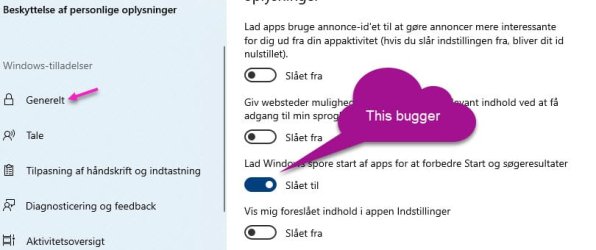
Found it!

I had the same problem after cleaning out some privacy settings - I found a setting, but didn't look for the registry entry.

See attached picture, it's in Danish but something like Settings-Privacy-General, should send you in the right direction.


Claus/
 

Attachments

  • Privacy.jpg
    Privacy.jpg
    53.5 KB · Views: 0

My Computers

System One System Two

  • Computer type
    Laptop
    OS
    WIN 10
  • Computer type
    PC/Desktop
Back
Top