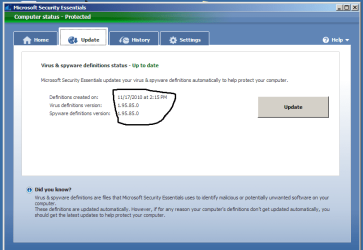
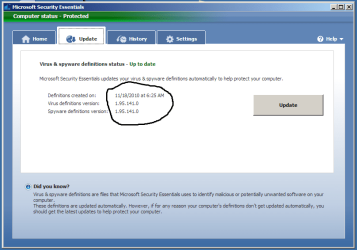
I captured the first picture a few minutes before MSE was set to update automatically (9 a.m. every day). It's reporting it's up to date. I captured the second picture after MSE updated. Now it is up to date. Why does it report it's up to date when it isn't? Thanks.
Attachments
mse1.png
53.6 KB
· Views: 25
mse2.png
46.1 KB
· Views: 20
My Computer
Computer type
PC/Desktop
Computer Manufacturer/Model Number
Dell Studio XPS 8100, Dell XPS 15 laptop
OS
Windows 10 Home, 64 bit
CPU
Intel Core i7 860 @ 2.8 GHz
Motherboard
Dell 0T568R (CPU1)
Memory
8.0 GB Dual Channel DDR3 @ 664 MHz (9-9-9-24)
Graphics Card(s)
nVidia GeForce GTS 240
Sound Card
M-Audio Delta Audiophile 2496
Monitor(s) Displays
Dell 2407WFP
Screen Resolution
1920x1200
Hard Drives
977 GB Western Digital WDC WD1001FAES-75W7A0 (SCSI)
Antivirus
Windows Defender, MalwareBytes Anti-Malware, AdwCleaner
Browser
Firefox, occasionally IE and Edge
Other Info
Mozilla Firefox, Mozilla Thunderbird. Western Digital Passport 250 GB external HD, two Mushkin Enhanced Mulholland 32GB USB flash drives, AKG K240 Studio headphones, Asus AC-1900 dual band wireless router.
MSE will show itself up to date until it checks in to see if it's still up to date. Since you have MSE set to automatically download and update itself, it will still show as up to date when it reaches the check time since it updated itself. That's all.
My Computer
Computer type
PC/Desktop
Computer Manufacturer/Model Number
Self built custom
OS
64-bit Windows 11 Pro for Workstations
CPU
Intel i7-8700K OC'd to 5 GHz
Motherboard
ASUS ROG Maximus XI Formula Z390
Memory
64 GB (4x16GB) G.SKILL TridentZ RGB DDR4 3600 MHz
Graphics Card(s)
ASUS ROG-STRIX-GTX1080TI-O11G-GAMING
Sound Card
Integrated
Monitor(s) Displays
2 x Samsung Odyssey G7 27"
Screen Resolution
2560x1440
Hard Drives
1TB Samsung 990 PRO M.2,
4TB Samsung 990 PRO PRO M.2,
TerraMaster F8 SSD Plus NAS
PSU
Seasonic Prime Titanium 850W
Case
Thermaltake Core P3
Cooling
Corsair Hydro H115i
Keyboard
Logitech wireless K800
Mouse
Logitech MX Master 4
Internet Speed
2 Gb/s Download and 100 Mb/s Upload
Antivirus
Malwarebyte Anti-Malware Premium
Browser
Google Chrome
Other Info
Logitech Z625 speaker system,
Logitech BRIO 4K Pro webcam,
HP Color LaserJet Pro MFP M477fdn,
APC SMART-UPS RT 1000 XL - SURT1000XLI,
Galaxy S23 Plus phone
Hi Shawn. OK, but that seems a bit lame on MS's part. If it's not up to date, it should show that for security's sake.
It's not really a problem for me, I suppose, since I do update every day. But still (wrinkling my nose)...
Thanks.
My Computer
Computer type
PC/Desktop
Computer Manufacturer/Model Number
Dell Studio XPS 8100, Dell XPS 15 laptop
OS
Windows 10 Home, 64 bit
CPU
Intel Core i7 860 @ 2.8 GHz
Motherboard
Dell 0T568R (CPU1)
Memory
8.0 GB Dual Channel DDR3 @ 664 MHz (9-9-9-24)
Graphics Card(s)
nVidia GeForce GTS 240
Sound Card
M-Audio Delta Audiophile 2496
Monitor(s) Displays
Dell 2407WFP
Screen Resolution
1920x1200
Hard Drives
977 GB Western Digital WDC WD1001FAES-75W7A0 (SCSI)
Antivirus
Windows Defender, MalwareBytes Anti-Malware, AdwCleaner
Browser
Firefox, occasionally IE and Edge
Other Info
Mozilla Firefox, Mozilla Thunderbird. Western Digital Passport 250 GB external HD, two Mushkin Enhanced Mulholland 32GB USB flash drives, AKG K240 Studio headphones, Asus AC-1900 dual band wireless router.
Well, technically it is up to date at the last time it checked in.
If you had MSE set to not automatically update itself when it checked in, then you would see it as not up to update afterwards if an update was available.
My Computer
Computer type
PC/Desktop
Computer Manufacturer/Model Number
Self built custom
OS
64-bit Windows 11 Pro for Workstations
CPU
Intel i7-8700K OC'd to 5 GHz
Motherboard
ASUS ROG Maximus XI Formula Z390
Memory
64 GB (4x16GB) G.SKILL TridentZ RGB DDR4 3600 MHz
Graphics Card(s)
ASUS ROG-STRIX-GTX1080TI-O11G-GAMING
Sound Card
Integrated
Monitor(s) Displays
2 x Samsung Odyssey G7 27"
Screen Resolution
2560x1440
Hard Drives
1TB Samsung 990 PRO M.2,
4TB Samsung 990 PRO PRO M.2,
TerraMaster F8 SSD Plus NAS
PSU
Seasonic Prime Titanium 850W
Case
Thermaltake Core P3
Cooling
Corsair Hydro H115i
Keyboard
Logitech wireless K800
Mouse
Logitech MX Master 4
Internet Speed
2 Gb/s Download and 100 Mb/s Upload
Antivirus
Malwarebyte Anti-Malware Premium
Browser
Google Chrome
Other Info
Logitech Z625 speaker system,
Logitech BRIO 4K Pro webcam,
HP Color LaserJet Pro MFP M477fdn,
APC SMART-UPS RT 1000 XL - SURT1000XLI,
Galaxy S23 Plus phone
Shawn and 1Bowtie: In an ideal world, when a new update is created at MS, it should communicate to my MSE that it longer is up to date. But since it doesn't work like that...Oh well. As I said, not a big deal. Thanks.
My Computer
Computer type
PC/Desktop
Computer Manufacturer/Model Number
Dell Studio XPS 8100, Dell XPS 15 laptop
OS
Windows 10 Home, 64 bit
CPU
Intel Core i7 860 @ 2.8 GHz
Motherboard
Dell 0T568R (CPU1)
Memory
8.0 GB Dual Channel DDR3 @ 664 MHz (9-9-9-24)
Graphics Card(s)
nVidia GeForce GTS 240
Sound Card
M-Audio Delta Audiophile 2496
Monitor(s) Displays
Dell 2407WFP
Screen Resolution
1920x1200
Hard Drives
977 GB Western Digital WDC WD1001FAES-75W7A0 (SCSI)
Antivirus
Windows Defender, MalwareBytes Anti-Malware, AdwCleaner
Browser
Firefox, occasionally IE and Edge
Other Info
Mozilla Firefox, Mozilla Thunderbird. Western Digital Passport 250 GB external HD, two Mushkin Enhanced Mulholland 32GB USB flash drives, AKG K240 Studio headphones, Asus AC-1900 dual band wireless router.
Ideally yes, but MSE only checks in at the time you have Windows Update set to check for updates and right before MSE does a scheduled scan (if checked in MSE settings).
My Computer
Computer type
PC/Desktop
Computer Manufacturer/Model Number
Self built custom
OS
64-bit Windows 11 Pro for Workstations
CPU
Intel i7-8700K OC'd to 5 GHz
Motherboard
ASUS ROG Maximus XI Formula Z390
Memory
64 GB (4x16GB) G.SKILL TridentZ RGB DDR4 3600 MHz
Graphics Card(s)
ASUS ROG-STRIX-GTX1080TI-O11G-GAMING
Sound Card
Integrated
Monitor(s) Displays
2 x Samsung Odyssey G7 27"
Screen Resolution
2560x1440
Hard Drives
1TB Samsung 990 PRO M.2,
4TB Samsung 990 PRO PRO M.2,
TerraMaster F8 SSD Plus NAS
PSU
Seasonic Prime Titanium 850W
Case
Thermaltake Core P3
Cooling
Corsair Hydro H115i
Keyboard
Logitech wireless K800
Mouse
Logitech MX Master 4
Internet Speed
2 Gb/s Download and 100 Mb/s Upload
Antivirus
Malwarebyte Anti-Malware Premium
Browser
Google Chrome
Other Info
Logitech Z625 speaker system,
Logitech BRIO 4K Pro webcam,
HP Color LaserJet Pro MFP M477fdn,
APC SMART-UPS RT 1000 XL - SURT1000XLI,
Galaxy S23 Plus phone
977 GB Western Digital WDC WD1001FAES-75W7A0 (SCSI)
Antivirus
Windows Defender, MalwareBytes Anti-Malware, AdwCleaner
Browser
Firefox, occasionally IE and Edge
Other Info
Mozilla Firefox, Mozilla Thunderbird. Western Digital Passport 250 GB external HD, two Mushkin Enhanced Mulholland 32GB USB flash drives, AKG K240 Studio headphones, Asus AC-1900 dual band wireless router.