Multiple random BSOD/Freezes

Fatar

New member
Local time
11:01 PM
Messages
6
Hello,
The issue I'm having right now is that when I try to startup my pc, it restarts multiple time, the screen doesn't activate or I get a blue screen. I'm not using the system restore thing on windows because I know it's useless and because sometimes it just BSOD while doing it. If the pc succeeds in booting, then either it bsod 2-5 minutes later, or it works for a longer time period, before freezing(the screen looks torn or something) and not responding. The error code is different almost everytime. This happened before, around 2-3 months, but it became less frequent suddenly so I ignored it, but now it's back and it's really, really annoying. Anyway, here is the dm log collector report.
Ps: My graphic cards driver is up to date(well, amd gaming says it is), and I recently used malwarebytes to remove 5-6 malwares which were present, no rootkits found.
Thanks for taking the time to read this.
Sorry if I'm not clear on certains details, english isn't my native language.
 
Last edited:

My Computer My Computer

At a glance

windows 7 64 bit or 32 bit, but I think it's 643072mb RamAMD Radeon HD 7700 series
Computer type
PC/Desktop
Computer Manufacturer/Model Number
Asus
OS
windows 7 64 bit or 32 bit, but I think it's 64
Motherboard
I think it's pentium R dual core,or maybe that's the cpu idk
Memory
3072mb Ram
Graphics Card(s)
AMD Radeon HD 7700 series
Hard Drives
C: with 200 mb, NTFS
D: with 900mb, NTFS is that even useful?
Antivirus
Avast Free edition
Browser
Really? Firefox
You are having memory corruption errors.
I recommend running memtest86 for at least 8 passes.
Follow these instructions.

http://www.sevenforums.com/tutorials/105647-ram-test-memtest86.html

Code:
*******************************************************************************
*                                                                             *
*                        Bugcheck Analysis                                    *
*                                                                             *
*******************************************************************************

Use !analyze -v to get detailed debugging information.

BugCheck 4E, {99, 6c002, 1, 6bd02}

Probably caused by : [COLOR="Red"]memory_corruption[/COLOR] ( nt!MiBadShareCount+4c )

Followup: MachineOwner

To me it looks like something has tried to access a page which it shouldn't, a zeroed page I believe.

Code:
fffff880`0afbef78 fffff800`02cdb738 : 00000000`0000001e ffffffff`c0000005 fffff800`02ca0925 00000000`00000000 : nt!KeBugCheckEx
fffff880`0afbef80 fffff800`02c90242 : fffff880`0afbf758 80000000`0f61f867 fffff880`0afbf800 fffffa80`027b6818 : nt! ?? ::FNODOBFM::`string'+0x487ed
fffff880`0afbf620 fffff800`02c8eb4a : 00000000`00000000 00000000`00000000 00000000`00000000 00000000`00000000 : nt!KiExceptionDispatch+0xc2
fffff880`0afbf800 fffff800`02ca0925 : fffff680`000012f8 fffff880`0afbfa00 00000000`00000000 fffffa80`027b6818 : nt!KiGeneralProtectionFault+0x10a (TrapFrame @ fffff880`0afbf800)
fffff880`0afbf990 fffff800`02c9d3fe : 00000000`00000001 00000000`0025fff8 fffff880`0afbfbe0 fffff680`000012f8 : [COLOR="red"]nt!MiResolveDemandZeroFault+0x395[/COLOR]
fffff880`0afbfa80 fffff800`02c8ecee : 00000000`00000001 00000000`0025fff8 00000000`00259d01 00000000`00210000 : [COLOR="red"]nt!MmAccessFault+0x5de[/COLOR]
fffff880`0afbfbe0 00000000`76f01708 : 00000000`00000000 00000000`00000000 00000000`00000000 00000000`00000000 : [COLOR="red"]nt!KiPageFault+0x16e[/COLOR] (TrapFrame @ fffff880`0afbfbe0)
00000000`00d6e980 00000000`00000000 : 00000000`00000000 00000000`00000000 00000000`00000000 00000000`00000000 : 0x76f01708
 

My Computer My Computer

Computer type
PC/Desktop
Thanks for the reply thedoctor.
After running memtest86 for 11 passes, it said there were no errors, which is bad right? Since you said it was a memory corruption problem. I couldn't take a screenshot but I was sure it said no errors. What should I do now?
Thanks again for the answer
 

My Computer My Computer

At a glance

windows 7 64 bit or 32 bit, but I think it's 643072mb RamAMD Radeon HD 7700 series
Computer type
PC/Desktop
Computer Manufacturer/Model Number
Asus
OS
windows 7 64 bit or 32 bit, but I think it's 64
Motherboard
I think it's pentium R dual core,or maybe that's the cpu idk
Memory
3072mb Ram
Graphics Card(s)
AMD Radeon HD 7700 series
Hard Drives
C: with 200 mb, NTFS
D: with 900mb, NTFS is that even useful?
Antivirus
Avast Free edition
Browser
Really? Firefox
No it's not bad, if there were errors sit would indicate your RAM or motherboard DIMM slots were faulty which would cost money to replace.
Errors will should up red so if you saw no red lines on memtest86 there should be no errors.

Can you please enable Driver Verifier by following these instructions as I'm positive a driver is at fault.

http://www.sevenforums.com/tutorials/101379-driver-verifier-enable-disable.html
 

My Computer My Computer

Computer type
PC/Desktop
Strange, I've been using verifier for around 6-7 hours and still no blue screens, it was just hard to boot. Windows also verified my disk, found some errors but looks like it did nothing. The random blue screen when playing seems to have ended, strange.
 

My Computer My Computer

At a glance

windows 7 64 bit or 32 bit, but I think it's 643072mb RamAMD Radeon HD 7700 series
Computer type
PC/Desktop
Computer Manufacturer/Model Number
Asus
OS
windows 7 64 bit or 32 bit, but I think it's 64
Motherboard
I think it's pentium R dual core,or maybe that's the cpu idk
Memory
3072mb Ram
Graphics Card(s)
AMD Radeon HD 7700 series
Hard Drives
C: with 200 mb, NTFS
D: with 900mb, NTFS is that even useful?
Antivirus
Avast Free edition
Browser
Really? Firefox
When you say windows verified your disk do you mean sfc /scannow ? If so it will have fixed errors.
 

My Computer My Computer

Computer type
PC/Desktop
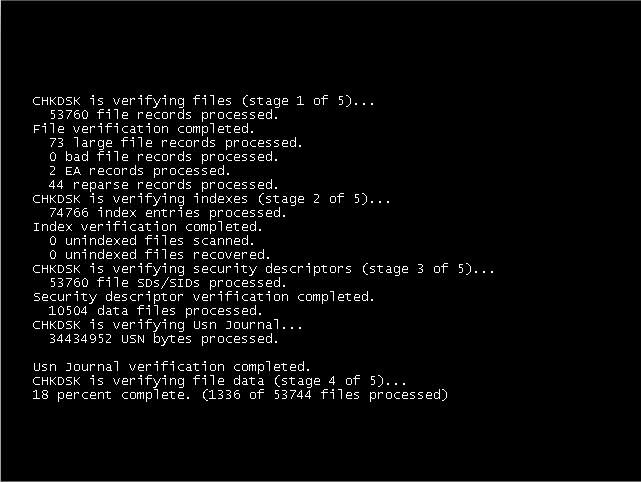
When I mean verify disk, I mean this thing, I can't seem to be able to enter a spoiler so sorry:
Disk-Check.png

Of course it's not exactly the same since I took that picture from internet, but that's what happened, and it corrected many errors. It did it automatically when it had trouble booting once. So with your driver verifier software(I did exactly what was told in the tutorial), I also upgraded my drivers thanks to the software inside, I didn't have any single BSOD during the day, but this morning my computer is still not booting correctly, so I guess it's a windows error then? Should I do the sfc /scannow you told me?
 

My Computer My Computer

At a glance

windows 7 64 bit or 32 bit, but I think it's 643072mb RamAMD Radeon HD 7700 series
Computer type
PC/Desktop
Computer Manufacturer/Model Number
Asus
OS
windows 7 64 bit or 32 bit, but I think it's 64
Motherboard
I think it's pentium R dual core,or maybe that's the cpu idk
Memory
3072mb Ram
Graphics Card(s)
AMD Radeon HD 7700 series
Hard Drives
C: with 200 mb, NTFS
D: with 900mb, NTFS is that even useful?
Antivirus
Avast Free edition
Browser
Really? Firefox
Yes that would be a good idea.

Post back the results.
 

My Computer My Computer

Computer type
PC/Desktop
Well I tried to do sfc/ scannow you told me, a black window pop in(like the one of cmd) and then instantly close, so I can't post the results, seems like it does nothing throught. My computer restarted blue screening while "working", saying irql not less or equal (or something like that) 2 times. So yeah I'm kinda lost at this point. Oh and windows also verified my disk again for some reason, but I think it bluescreened before it could end it. Seems like windows is trying to fix the wrong problem?
 

My Computer My Computer

At a glance

windows 7 64 bit or 32 bit, but I think it's 643072mb RamAMD Radeon HD 7700 series
Computer type
PC/Desktop
Computer Manufacturer/Model Number
Asus
OS
windows 7 64 bit or 32 bit, but I think it's 64
Motherboard
I think it's pentium R dual core,or maybe that's the cpu idk
Memory
3072mb Ram
Graphics Card(s)
AMD Radeon HD 7700 series
Hard Drives
C: with 200 mb, NTFS
D: with 900mb, NTFS is that even useful?
Antivirus
Avast Free edition
Browser
Really? Firefox
I ran Seatools, did a quick repair on my stm drive or something(the golden one) and it was a success, couldn't test the other drive. Also I discovered that if I let my system on some time(around 15 minutes) when booting(which means I let it on even if there's a bluescreen), it will start booting correctly, without crashing. Maybe it's related to my computer temperature? Anyway thank you for keeping helping me, it's really nice of you.
 

My Computer My Computer

At a glance

windows 7 64 bit or 32 bit, but I think it's 643072mb RamAMD Radeon HD 7700 series
Computer type
PC/Desktop
Computer Manufacturer/Model Number
Asus
OS
windows 7 64 bit or 32 bit, but I think it's 64
Motherboard
I think it's pentium R dual core,or maybe that's the cpu idk
Memory
3072mb Ram
Graphics Card(s)
AMD Radeon HD 7700 series
Hard Drives
C: with 200 mb, NTFS
D: with 900mb, NTFS is that even useful?
Antivirus
Avast Free edition
Browser
Really? Firefox
Did you follow the instructions regarding changing the SATA operation?
What's the situation now? I'm having trouble understanding, are there any more blue screens?
If so please upload the dump files.
 

My Computer My Computer

Computer type
PC/Desktop
Back
Top