My audio driver won't install b/c it's not signed -_-

Bryce

New member
Local time
5:43 PM
Messages
168
Location
Raleigh, NC
My audio driver won't install b/c it's not signed. Anyway around this? I can't use the Vista driver b/c that didn't work for my surround sound on my mobo. ASUS has Win7 x64 drivers, but their not signed :(
 

My Computer My Computer

At a glance

Vista Ultimate x64, Windows 7 RC 7100Intel C2D E8400 @ 3.8ghz4x 2gb G.Skill DDR2 1600nVidia GTX260 896mb
OS
Vista Ultimate x64, Windows 7 RC 7100
CPU
Intel C2D E8400 @ 3.8ghz
Motherboard
ASUS P5Q SE PLUS
Memory
4x 2gb G.Skill DDR2 1600
Graphics Card(s)
nVidia GTX260 896mb
Sound Card
Onboard 5.1 Surround Sound
Monitor(s) Displays
22" Acer LCD and 19" Westinghouse LCD
Screen Resolution
1680x1050 and 1280x1024
Hard Drives
Seagate Barracuda 7200rpm 750gb
Western Digital 500gb
PSU
Corsair H520X 520w
Case
Antec 300
Keyboard
Old G15
Mouse
Logitech G5
Internet Speed
15mbps down .34mbps up
Anyone know how I can get this installed?
 

My Computer My Computer

At a glance

Vista Ultimate x64, Windows 7 RC 7100Intel C2D E8400 @ 3.8ghz4x 2gb G.Skill DDR2 1600nVidia GTX260 896mb
OS
Vista Ultimate x64, Windows 7 RC 7100
CPU
Intel C2D E8400 @ 3.8ghz
Motherboard
ASUS P5Q SE PLUS
Memory
4x 2gb G.Skill DDR2 1600
Graphics Card(s)
nVidia GTX260 896mb
Sound Card
Onboard 5.1 Surround Sound
Monitor(s) Displays
22" Acer LCD and 19" Westinghouse LCD
Screen Resolution
1680x1050 and 1280x1024
Hard Drives
Seagate Barracuda 7200rpm 750gb
Western Digital 500gb
PSU
Corsair H520X 520w
Case
Antec 300
Keyboard
Old G15
Mouse
Logitech G5
Internet Speed
15mbps down .34mbps up
Two options you can try.

First (easiest) is to run install it as Admin in Compatibility Mode Vista SP1.

Second, disable driver signing. To do this, run a console as Admin and enter the following;

Bcdedit.exe /set nointegritychecks ON

This will allow you to bypass signed driver checks. Let us know how it works for you!
 

My Computer My Computer

At a glance

Windows 7 Home Premium x64Intel QX9650 Extreme 4.0 GHz8GB (4x2) Corsair Dominator DDR32x Radeon R390X [8GB]
Computer type
PC/Desktop
Computer Manufacturer/Model Number
Custom Build/Mod
OS
Windows 7 Home Premium x64
CPU
Intel QX9650 Extreme 4.0 GHz
Motherboard
ASUS Rampage Extreme Rev2
Memory
8GB (4x2) Corsair Dominator DDR3
Graphics Card(s)
2x Radeon R390X [8GB]
Sound Card
SupremeFX X-Fi
Monitor(s) Displays
Dell 2408WFP 26" Panel
Screen Resolution
1920x1200
Hard Drives
4x WD 2TB (8TB+ Total)
2x Crucial SSD 128GB (RAID-0)
1x LG Blu-ray read/write
1x Phillips LightScribe DVD read/write
PSU
Corsair HX1000
Case
CoolerMaster - Cosmos S
Cooling
Custom Liquid - 320mm rad w/ 3x 80mm fans, CPU/NB/SB Blocks
Keyboard
Logitech Illuminater Pro
Mouse
Logitech
Internet Speed
Fractional T1 - 125Mbps
Antivirus
ESET Security Suite / Microsoft Security Essentials
Browser
Cyberfox Intel x64
Other Info
OC'd to 5.0GHz @ 44c under full load
I did that and it installed fine, but the 5.1 sound still doesn't work. I at least get sound, but what's the point of having 5.1 surround sound when only two speakers play? I don't know how I got it working in Linux or Vista (once, but then on another install it didn't work).
 

My Computer My Computer

At a glance

Vista Ultimate x64, Windows 7 RC 7100Intel C2D E8400 @ 3.8ghz4x 2gb G.Skill DDR2 1600nVidia GTX260 896mb
OS
Vista Ultimate x64, Windows 7 RC 7100
CPU
Intel C2D E8400 @ 3.8ghz
Motherboard
ASUS P5Q SE PLUS
Memory
4x 2gb G.Skill DDR2 1600
Graphics Card(s)
nVidia GTX260 896mb
Sound Card
Onboard 5.1 Surround Sound
Monitor(s) Displays
22" Acer LCD and 19" Westinghouse LCD
Screen Resolution
1680x1050 and 1280x1024
Hard Drives
Seagate Barracuda 7200rpm 750gb
Western Digital 500gb
PSU
Corsair H520X 520w
Case
Antec 300
Keyboard
Old G15
Mouse
Logitech G5
Internet Speed
15mbps down .34mbps up
That can be tricky on ANY version of Windows. For whatever reason, it is not an uncommon problem. Assuming you've tried to manually configure the audio settings in the control panel, the best suggestion I can offer is to try a different media player, ensuring the settings are properly set in it, as well.
 

My Computer My Computer

At a glance

Windows 7 Home Premium x64Intel QX9650 Extreme 4.0 GHz8GB (4x2) Corsair Dominator DDR32x Radeon R390X [8GB]
Computer type
PC/Desktop
Computer Manufacturer/Model Number
Custom Build/Mod
OS
Windows 7 Home Premium x64
CPU
Intel QX9650 Extreme 4.0 GHz
Motherboard
ASUS Rampage Extreme Rev2
Memory
8GB (4x2) Corsair Dominator DDR3
Graphics Card(s)
2x Radeon R390X [8GB]
Sound Card
SupremeFX X-Fi
Monitor(s) Displays
Dell 2408WFP 26" Panel
Screen Resolution
1920x1200
Hard Drives
4x WD 2TB (8TB+ Total)
2x Crucial SSD 128GB (RAID-0)
1x LG Blu-ray read/write
1x Phillips LightScribe DVD read/write
PSU
Corsair HX1000
Case
CoolerMaster - Cosmos S
Cooling
Custom Liquid - 320mm rad w/ 3x 80mm fans, CPU/NB/SB Blocks
Keyboard
Logitech Illuminater Pro
Mouse
Logitech
Internet Speed
Fractional T1 - 125Mbps
Antivirus
ESET Security Suite / Microsoft Security Essentials
Browser
Cyberfox Intel x64
Other Info
OC'd to 5.0GHz @ 44c under full load
I've set it up right in the Control Panel. And the software it comes with that enables (at least how it was enabled on Vista) the 5.1 sound will not open at all. It's VIA HDvDeck. The driver installed without any kind of errors what so ever. So, I'm at a lost :( I must have my surround sound :(
 

My Computer My Computer

At a glance

Vista Ultimate x64, Windows 7 RC 7100Intel C2D E8400 @ 3.8ghz4x 2gb G.Skill DDR2 1600nVidia GTX260 896mb
OS
Vista Ultimate x64, Windows 7 RC 7100
CPU
Intel C2D E8400 @ 3.8ghz
Motherboard
ASUS P5Q SE PLUS
Memory
4x 2gb G.Skill DDR2 1600
Graphics Card(s)
nVidia GTX260 896mb
Sound Card
Onboard 5.1 Surround Sound
Monitor(s) Displays
22" Acer LCD and 19" Westinghouse LCD
Screen Resolution
1680x1050 and 1280x1024
Hard Drives
Seagate Barracuda 7200rpm 750gb
Western Digital 500gb
PSU
Corsair H520X 520w
Case
Antec 300
Keyboard
Old G15
Mouse
Logitech G5
Internet Speed
15mbps down .34mbps up
Did you try the drivers that come with W7?
 

My Computer My Computer

At a glance

Windows 7 Home Premium x64Intel QX9650 Extreme 4.0 GHz8GB (4x2) Corsair Dominator DDR32x Radeon R390X [8GB]
Computer type
PC/Desktop
Computer Manufacturer/Model Number
Custom Build/Mod
OS
Windows 7 Home Premium x64
CPU
Intel QX9650 Extreme 4.0 GHz
Motherboard
ASUS Rampage Extreme Rev2
Memory
8GB (4x2) Corsair Dominator DDR3
Graphics Card(s)
2x Radeon R390X [8GB]
Sound Card
SupremeFX X-Fi
Monitor(s) Displays
Dell 2408WFP 26" Panel
Screen Resolution
1920x1200
Hard Drives
4x WD 2TB (8TB+ Total)
2x Crucial SSD 128GB (RAID-0)
1x LG Blu-ray read/write
1x Phillips LightScribe DVD read/write
PSU
Corsair HX1000
Case
CoolerMaster - Cosmos S
Cooling
Custom Liquid - 320mm rad w/ 3x 80mm fans, CPU/NB/SB Blocks
Keyboard
Logitech Illuminater Pro
Mouse
Logitech
Internet Speed
Fractional T1 - 125Mbps
Antivirus
ESET Security Suite / Microsoft Security Essentials
Browser
Cyberfox Intel x64
Other Info
OC'd to 5.0GHz @ 44c under full load
Yea I did. Just the two front speakers had audio. Then I installed the Asus W7 x64 driver and did the unsigned workaround and got it working right. But still only the two front speakers. I've tried it with iTunes, WMP, and Winamp and no surround sound.

I did the test in the control panel for 5.1, and I hear sound from all 5 speakers and subwoofer. Windows sounds come from only the two front ones as well.
 

My Computer My Computer

At a glance

Vista Ultimate x64, Windows 7 RC 7100Intel C2D E8400 @ 3.8ghz4x 2gb G.Skill DDR2 1600nVidia GTX260 896mb
OS
Vista Ultimate x64, Windows 7 RC 7100
CPU
Intel C2D E8400 @ 3.8ghz
Motherboard
ASUS P5Q SE PLUS
Memory
4x 2gb G.Skill DDR2 1600
Graphics Card(s)
nVidia GTX260 896mb
Sound Card
Onboard 5.1 Surround Sound
Monitor(s) Displays
22" Acer LCD and 19" Westinghouse LCD
Screen Resolution
1680x1050 and 1280x1024
Hard Drives
Seagate Barracuda 7200rpm 750gb
Western Digital 500gb
PSU
Corsair H520X 520w
Case
Antec 300
Keyboard
Old G15
Mouse
Logitech G5
Internet Speed
15mbps down .34mbps up
I've set it up right in the Control Panel. And the software it comes with that enables (at least how it was enabled on Vista) the 5.1 sound will not open at all. It's VIA HDvDeck. The driver installed without any kind of errors what so ever. So, I'm at a lost :( I must have my surround sound :(

You're sure your sources have surround channel programming? Or are you wanting to open that proprietary control panel to get at some setting that fakes center, sub, RR, and LR sounds by processing stereo?
 

My Computer My Computer

At a glance

El Capitan / Windows 10i7-4980HQ16GBIris 5200
Computer type
Laptop
Computer Manufacturer/Model Number
Apple
OS
El Capitan / Windows 10
CPU
i7-4980HQ
Memory
16GB
Graphics Card(s)
Iris 5200
I'm sure it has it otherwise why would it of worked in the past on Vista x64 and Linux? I don't care if it's fake or not, but it sure did work before.
 

My Computer My Computer

At a glance

Vista Ultimate x64, Windows 7 RC 7100Intel C2D E8400 @ 3.8ghz4x 2gb G.Skill DDR2 1600nVidia GTX260 896mb
OS
Vista Ultimate x64, Windows 7 RC 7100
CPU
Intel C2D E8400 @ 3.8ghz
Motherboard
ASUS P5Q SE PLUS
Memory
4x 2gb G.Skill DDR2 1600
Graphics Card(s)
nVidia GTX260 896mb
Sound Card
Onboard 5.1 Surround Sound
Monitor(s) Displays
22" Acer LCD and 19" Westinghouse LCD
Screen Resolution
1680x1050 and 1280x1024
Hard Drives
Seagate Barracuda 7200rpm 750gb
Western Digital 500gb
PSU
Corsair H520X 520w
Case
Antec 300
Keyboard
Old G15
Mouse
Logitech G5
Internet Speed
15mbps down .34mbps up
I'm sure it has it otherwise why would it of worked in the past on Vista x64 and Linux? I don't care if it's fake or not, but it sure did work before.

It's "manufactured" from the existing channels by that proprietary control panel application. Have you tried running it in compatibility mode?
 

My Computer My Computer

At a glance

El Capitan / Windows 10i7-4980HQ16GBIris 5200
Computer type
Laptop
Computer Manufacturer/Model Number
Apple
OS
El Capitan / Windows 10
CPU
i7-4980HQ
Memory
16GB
Graphics Card(s)
Iris 5200
unless your audio is encoded in 5.1 all your audio is stereo...
confirming that all your speakers work is more than enough...
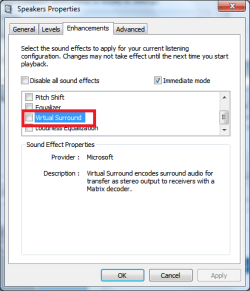
hello.PNG
this is in the sound options
right click your sound device and click properties...
do you have this option and if so can you turn it on and test?
most os and apps have an option like this and can give sound through all your speakers..
 

My Computer My Computer

At a glance

Windows 7 Ult x64(x2), HomePrem x32(x4), Serv...Turion X2 ultra (oh well came with laptop)/P4...OCZ Dual Channel 4GB kit/ 1gb Dual ChannelHD 3200 graphics /GMA x3100 (yay for intergra...
Computer Manufacturer/Model Number
Tx2500z Tablet Pc/Homemade Server
OS
Windows 7 Ult x64(x2), HomePrem x32(x4), Server 08 (+VM), 08 R2 (VM) , SuSe 11.2 (VM), XP 32 (VM)
CPU
Turion X2 ultra (oh well came with laptop)/P4 @3.2 (yes P4)
Motherboard
IDK HP Motherboard / Intel DG965SS
Memory
OCZ Dual Channel 4GB kit/ 1gb Dual Channel
Graphics Card(s)
HD 3200 graphics /GMA x3100 (yay for intergrated!!)
Sound Card
Realtek HD Audio(mic working, well sort of)/Siig IC-70012
Monitor(s) Displays
built-in Hp 12" laptop screen/ Acer 19"
Screen Resolution
1280x800 /1440x900
Cooling
All Air Cooled
Mouse
Logi MX Rev. /MS Wheel Optical 1.1A /Logitech Optical Mouse
Internet Speed
College baby but its still routed through vpn to 1536k...
Other Info
love my wacom pen and pressure sensitivity...
wished it worked in 7, SUSE for that matter though
Back
Top