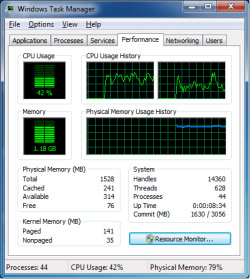
Hey. I'm a frequent reinstaller of Windows 7 (out of boredom ) and there are several problems here. First its impossible to download and install any new updates because I hit "Shut down" to let things update and it just hangs at some point. I think I also did a pretty dumb thing by uninstalling my AV software. Somehow my excess RAM usage is bogging my computer. I used my 2GB memory with no problem before, but since I reinstalled Windows it looks as if my computers going to die.
My Computer
At a glance
Windows 7 Home Premium 64-bitAMD E-3502GB DDR3Radeon HD 6310
Somehow, the physical RAM always has very high usage during at least the first 10 minutes of computer uptime. It's 15 minutes though, and RAM usage is still peaked.
My Computer
At a glance
Windows 7 Home Premium 64-bitAMD E-3502GB DDR3Radeon HD 6310
I'd love to see what those 44 processes are using CPU wise and what the resource monitor shows. I'm guessing this thing is paging it's brains out.
My Computer
At a glance
Windows 7 Home Premium 64 bit SP1i5-2320 @3.00 GHz6GBNVIDIA GeForce 7300 LE
Computer type
PC/Desktop
Computer Manufacturer/Model Number
ASUS
OS
Windows 7 Home Premium 64 bit SP1
CPU
i5-2320 @3.00 GHz
Memory
6GB
Graphics Card(s)
NVIDIA GeForce 7300 LE
Monitor(s) Displays
Acer S200HQL 19.5 LED
Screen Resolution
1280 x 800 (1900 x 900 max)
Hard Drives
Drive 1: 1 TB SATA internal: C drive
Drive 2: 250 GB SATA internal: User Data Backup
Drive 3: 500 GB SATA USB: Full System Backup 1, Father
Drive 4: 500 GB SATA USB: Full System Backup 2, Son
Drive 5: 40 GB IDE USB: Kindle, ASUS Tabl
Keyboard
ASUS KB34211
Mouse
Logitech m325 cordless
Internet Speed
27Mb down, 3 Mb up cable modem w/Netgear R6400 WiFi
One can check all the processes, look at a bunch of charts and graphs. In my opinion it's a waste of time. More ram is needed. 4 gig or more will work quite well.
Not knowing what motherboard is being used I can't give any more suggestions.
44 is not a lot of processes.
Nonpaged at 35 is very good also.
With the information given things look good to me. It just need more ram.
My Computer
At a glance
Windows 10 Pro. 64/ version 1709 Windows 7 Pr...Intel i7-6800K @ 4.3Corsair Platinum 16 gig @2400EVGA GTX 1070 OC
Computer type
PC/Desktop
Computer Manufacturer/Model Number
Home made Desktop
OS
Windows 10 Pro. 64/ version 1709 Windows 7 Pro/64
CPU
Intel i7-6800K @ 4.3
Motherboard
ASUS X-99 Deluxe II
Memory
Corsair Platinum 16 gig @2400
Graphics Card(s)
EVGA GTX 1070 OC
Monitor(s) Displays
Asus 27" LED LCD/VE278Q
Screen Resolution
1920-1080 or 1280-720 HDMI
Hard Drives
INTEL SSD 730-240 Gb Sata 3.0/
PSU
EVGA Platium 1200W
Case
Phanteks Luxe Tempered Glass 8 fans/ one radiator
Cooling
XSPC/ Water Cooled CPU
Keyboard
Das 4 Professional
Mouse
Logitech M705/MX Anywhere 2-S
Internet Speed
100 mbits
Antivirus
Microsoft Security Essentials/ Malwarebytes Premium 3.0/ SAS
Browser
I.E. 11 default/Firefox/ ISP Time Warner Cable/Spectrum
Other Info
LG BluRay Burner/
Sound system-KLipsch-THX/
Icy Dock ssd Hot Swap bays.