N Router with G adapter how much you would lose?

smiths22

New member
Power User
VIP
Local time
11:27 AM
Messages
310
Hi guys, that is the question if you have a N router and connect a G device your speed drops down to G but which are the numbers in mbs?
 

My Computer My Computer

At a glance

Microsoft Windows 7 Ultimate 64 bits 7601 Mul...Intel(R) Core(TM) i7-3770K CPU @ 3.50GHz8.00 GBNVIDIA GeForce GTX 670
Computer type
PC/Desktop
Computer Manufacturer/Model Number
Custom Build
OS
Microsoft Windows 7 Ultimate 64 bits 7601 Multiprocessor Free Service Pack 1
CPU
Intel(R) Core(TM) i7-3770K CPU @ 3.50GHz
Motherboard
ASUSTeK Computer INC. P8Z68-V PRO GEN3
Memory
8.00 GB
Graphics Card(s)
NVIDIA GeForce GTX 670
Sound Card
Omega Striker
Monitor(s) Displays
Viewsonic vx2250wm
Screen Resolution
1920 x 1080 x 32 bits (4294967296 colors) @ 60 Hz
Hard Drives
V9CPETXT
Seagate 1TB.
PSU
Corsair Gold Series AX850
Case
nvidia 690 advanced II
Cooling
Air
Unless you have fiber optic internet you shouldn't really notice a difference in normal use.
Internal network is more affected though.
There you may actually notice a difference.
As it stands most average web interaction is limited by hubs and site servers, generally they won't pass 5 MBps regardless of whether your connection can handle more or not.
With the internal network, you are dealing with 54mbps vs 300mbps.
Now I never finished college but I'm pretty sure that 300 is bigger than 54.
Though honestly most wireless n I've used is limited to about half of that either because of signal strength or some internal issue of some sort.

anyhow, I guess what I'm saying is what is lost is situational. It could be nothing it could be a noticeable difference, it mostly depends on the connection to the net/network and what you are doing at the time.
 

My Computer My Computer

At a glance

Windows 7 x64Intel i7 2600kG.skill Ripjaw 16gigs @ 1866Nvidia gtx580 (evga)
Computer Manufacturer/Model Number
Insane hobo technologies. ;-)
OS
Windows 7 x64
CPU
Intel i7 2600k
Motherboard
Asrock z68 extreme 4 gen 3
Memory
G.skill Ripjaw 16gigs @ 1866
Graphics Card(s)
Nvidia gtx580 (evga)
Sound Card
Integrated HD audio + hdmi
Monitor(s) Displays
24" ASUS widescreen + 42" insignia
Screen Resolution
1080p (1920x1080)
Hard Drives
128 Samsung 830
256 Samsung 840
3 x 1tb storage drive (various)
1 western digital 1tb (eSATA)
1 Seagate 1tb (eSATA)
PSU
1 kilowatt SLI/Crossfire rated Silverstone modular
Case
NZXT Phantom + additional 220 fan
Cooling
Zalmann
Keyboard
Microsoft wireless 3000 (v2)
Mouse
MS - wireless 5000 (bluetrack)
Internet Speed
depends on if you ask me or my provider.
Other Info
The above information is provided as is, and the author assumes no responsibility for issues it may cause with your sanity or fanboyism.
Unless you have fiber optic internet you shouldn't really notice a difference in normal use.
Internal network is more affected though.
There you may actually notice a difference.
As it stands most average web interaction is limited by hubs and site servers, generally they won't pass 5 MBps regardless of whether your connection can handle more or not.
With the internal network, you are dealing with 54mbps vs 300mbps.
Now I never finished college but I'm pretty sure that 300 is bigger than 54.
Though honestly most wireless n I've used is limited to about half of that either because of signal strength or some internal issue of some sort.

anyhow, I guess what I'm saying is what is lost is situational. It could be nothing it could be a noticeable difference, it mostly depends on the connection to the net/network and what you are doing at the time.

yes im using internet fiber optic why?

Though honestly most wireless n I've used is limited to about half of that either because of signal strength or some internal issue of some sort.
So can i conclude that 20mb in G speeds is normal right?
For N should i get at least 150mb?

G = 54mbps
N = 300 mbps

Nop in the practice.
http://www.pcworld.com/article/145098/new_80211n_routers_the_best_wifi_yet.html
 

My Computer My Computer

At a glance

Microsoft Windows 7 Ultimate 64 bits 7601 Mul...Intel(R) Core(TM) i7-3770K CPU @ 3.50GHz8.00 GBNVIDIA GeForce GTX 670
Computer type
PC/Desktop
Computer Manufacturer/Model Number
Custom Build
OS
Microsoft Windows 7 Ultimate 64 bits 7601 Multiprocessor Free Service Pack 1
CPU
Intel(R) Core(TM) i7-3770K CPU @ 3.50GHz
Motherboard
ASUSTeK Computer INC. P8Z68-V PRO GEN3
Memory
8.00 GB
Graphics Card(s)
NVIDIA GeForce GTX 670
Sound Card
Omega Striker
Monitor(s) Displays
Viewsonic vx2250wm
Screen Resolution
1920 x 1080 x 32 bits (4294967296 colors) @ 60 Hz
Hard Drives
V9CPETXT
Seagate 1TB.
PSU
Corsair Gold Series AX850
Case
nvidia 690 advanced II
Cooling
Air
You should have a 150mb connection (maybe more maybe less) when using full wireless N yes. It loves to adjust speed for some reason... a lot more than G did anyhow.

The reason I mentioned fiber optic is it's about the only internet that would be fast enough to push past the 54mbps wireless g limit to begin with.
 

My Computer My Computer

At a glance

Windows 7 x64Intel i7 2600kG.skill Ripjaw 16gigs @ 1866Nvidia gtx580 (evga)
Computer Manufacturer/Model Number
Insane hobo technologies. ;-)
OS
Windows 7 x64
CPU
Intel i7 2600k
Motherboard
Asrock z68 extreme 4 gen 3
Memory
G.skill Ripjaw 16gigs @ 1866
Graphics Card(s)
Nvidia gtx580 (evga)
Sound Card
Integrated HD audio + hdmi
Monitor(s) Displays
24" ASUS widescreen + 42" insignia
Screen Resolution
1080p (1920x1080)
Hard Drives
128 Samsung 830
256 Samsung 840
3 x 1tb storage drive (various)
1 western digital 1tb (eSATA)
1 Seagate 1tb (eSATA)
PSU
1 kilowatt SLI/Crossfire rated Silverstone modular
Case
NZXT Phantom + additional 220 fan
Cooling
Zalmann
Keyboard
Microsoft wireless 3000 (v2)
Mouse
MS - wireless 5000 (bluetrack)
Internet Speed
depends on if you ask me or my provider.
Other Info
The above information is provided as is, and the author assumes no responsibility for issues it may cause with your sanity or fanboyism.
The reason I mentioned fiber optic is it's about the only internet that would be fast enough to push past the 54mbps wireless g limit to begin with.

mmm, i don't think so, you even said it too, when using wireless you lose speed....even if you have a 100mb ISP package you will only get less than 54mb when using G....
My question was how much you should lose wirelessly? what's the normal? the half? How much a G device affects a N router? how fast it will go?
 

My Computer My Computer

At a glance

Microsoft Windows 7 Ultimate 64 bits 7601 Mul...Intel(R) Core(TM) i7-3770K CPU @ 3.50GHz8.00 GBNVIDIA GeForce GTX 670
Computer type
PC/Desktop
Computer Manufacturer/Model Number
Custom Build
OS
Microsoft Windows 7 Ultimate 64 bits 7601 Multiprocessor Free Service Pack 1
CPU
Intel(R) Core(TM) i7-3770K CPU @ 3.50GHz
Motherboard
ASUSTeK Computer INC. P8Z68-V PRO GEN3
Memory
8.00 GB
Graphics Card(s)
NVIDIA GeForce GTX 670
Sound Card
Omega Striker
Monitor(s) Displays
Viewsonic vx2250wm
Screen Resolution
1920 x 1080 x 32 bits (4294967296 colors) @ 60 Hz
Hard Drives
V9CPETXT
Seagate 1TB.
PSU
Corsair Gold Series AX850
Case
nvidia 690 advanced II
Cooling
Air
I've honestly never noticed any real difference in my internal network (though I only stream lower grade video I usually just run HD stuff locally from the machine in the main room, and since my internet rarely sustains a speed above 2 MB/s It doesn't really come up there. I would say on average the n is about 100kbs faster than the g in that scenario. ...that could just be signal strength though.

In my experience where wireless really fails is with downloads where a lot of connections are in play, like with a torrent or p2p download scenario. I've had results from both N and G that include, loss of connection, loss of connection data resulting in no connection, significant choking when many connections are active at once regardless of signal strength, high number of failed hashes, and other such annoyances when using wireless for p2p. Though it does not seem to suffer the same problems in a usenet scenario or normal download/stream where there is only one to four or so sources.
 

My Computer My Computer

At a glance

Windows 7 x64Intel i7 2600kG.skill Ripjaw 16gigs @ 1866Nvidia gtx580 (evga)
Computer Manufacturer/Model Number
Insane hobo technologies. ;-)
OS
Windows 7 x64
CPU
Intel i7 2600k
Motherboard
Asrock z68 extreme 4 gen 3
Memory
G.skill Ripjaw 16gigs @ 1866
Graphics Card(s)
Nvidia gtx580 (evga)
Sound Card
Integrated HD audio + hdmi
Monitor(s) Displays
24" ASUS widescreen + 42" insignia
Screen Resolution
1080p (1920x1080)
Hard Drives
128 Samsung 830
256 Samsung 840
3 x 1tb storage drive (various)
1 western digital 1tb (eSATA)
1 Seagate 1tb (eSATA)
PSU
1 kilowatt SLI/Crossfire rated Silverstone modular
Case
NZXT Phantom + additional 220 fan
Cooling
Zalmann
Keyboard
Microsoft wireless 3000 (v2)
Mouse
MS - wireless 5000 (bluetrack)
Internet Speed
depends on if you ask me or my provider.
Other Info
The above information is provided as is, and the author assumes no responsibility for issues it may cause with your sanity or fanboyism.
Well, thanks anyway, maybe some who has lived that panorama could share his experiences with us.
 

My Computer My Computer

At a glance

Microsoft Windows 7 Ultimate 64 bits 7601 Mul...Intel(R) Core(TM) i7-3770K CPU @ 3.50GHz8.00 GBNVIDIA GeForce GTX 670
Computer type
PC/Desktop
Computer Manufacturer/Model Number
Custom Build
OS
Microsoft Windows 7 Ultimate 64 bits 7601 Multiprocessor Free Service Pack 1
CPU
Intel(R) Core(TM) i7-3770K CPU @ 3.50GHz
Motherboard
ASUSTeK Computer INC. P8Z68-V PRO GEN3
Memory
8.00 GB
Graphics Card(s)
NVIDIA GeForce GTX 670
Sound Card
Omega Striker
Monitor(s) Displays
Viewsonic vx2250wm
Screen Resolution
1920 x 1080 x 32 bits (4294967296 colors) @ 60 Hz
Hard Drives
V9CPETXT
Seagate 1TB.
PSU
Corsair Gold Series AX850
Case
nvidia 690 advanced II
Cooling
Air
Is there really a "normal"? It depends a lot on the server that is sending/receiving your data. I noticed that uploads to some sites are nearly at the rated speed whilst other sites are super slow. And downloads are a similar problem. I remember Vista SP1 which took an awfully long time to download. Then MS had installed some fast servers (after a lot of people complained) and I downloaded the whole SP1 in 12 minutes on a DSL 6000 line. If I remember right it was about 460MBs.
 

My Computer My Computer

At a glance

Vista, Windows7, Mint Mate, Zorin, Windows 8from 1.6GHz Duo to i7
Computer Manufacturer/Model Number
HP, Dell, Gateway, Toshiba - 4 laptops and 2 desktops
OS
Vista, Windows7, Mint Mate, Zorin, Windows 8
CPU
from 1.6GHz Duo to i7
Monitor(s) Displays
2x HP w2207
Hard Drives
5x HDD, 7x SSD, 12x Externals
Keyboard
with trackball - no mices
Mouse
Trackball mice
Internet Speed
DSL 6000
Is there really a "normal"? It depends a lot on the server that is sending/receiving your data. I noticed that uploads to some sites are nearly at the rated speed whilst other sites are super slow. And downloads are a similar problem. I remember Vista SP1 which took an awfully long time to download. Then MS had installed some fast servers (after a lot of people complained) and I downloaded the whole SP1 in 12 minutes on a DSL 6000 line. If I remember right it was about 460MBs.

All right not normal but max speed?
 

My Computer My Computer

At a glance

Microsoft Windows 7 Ultimate 64 bits 7601 Mul...Intel(R) Core(TM) i7-3770K CPU @ 3.50GHz8.00 GBNVIDIA GeForce GTX 670
Computer type
PC/Desktop
Computer Manufacturer/Model Number
Custom Build
OS
Microsoft Windows 7 Ultimate 64 bits 7601 Multiprocessor Free Service Pack 1
CPU
Intel(R) Core(TM) i7-3770K CPU @ 3.50GHz
Motherboard
ASUSTeK Computer INC. P8Z68-V PRO GEN3
Memory
8.00 GB
Graphics Card(s)
NVIDIA GeForce GTX 670
Sound Card
Omega Striker
Monitor(s) Displays
Viewsonic vx2250wm
Screen Resolution
1920 x 1080 x 32 bits (4294967296 colors) @ 60 Hz
Hard Drives
V9CPETXT
Seagate 1TB.
PSU
Corsair Gold Series AX850
Case
nvidia 690 advanced II
Cooling
Air
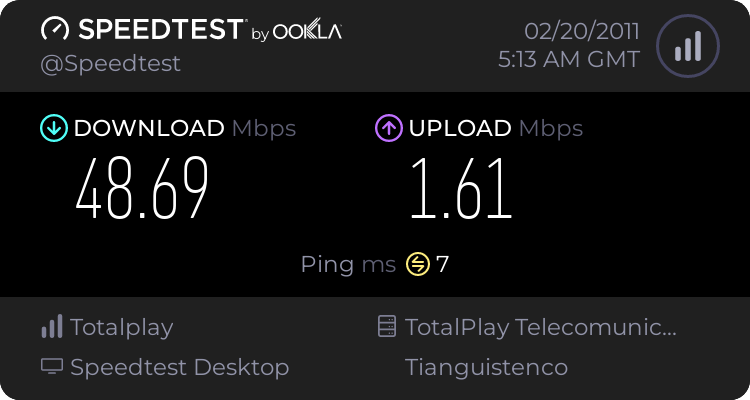
well end of this story a brand new updated router solved the problem:
(wireless)


Thanks to all who help.
 

My Computer My Computer

At a glance

Microsoft Windows 7 Ultimate 64 bits 7601 Mul...Intel(R) Core(TM) i7-3770K CPU @ 3.50GHz8.00 GBNVIDIA GeForce GTX 670
Computer type
PC/Desktop
Computer Manufacturer/Model Number
Custom Build
OS
Microsoft Windows 7 Ultimate 64 bits 7601 Multiprocessor Free Service Pack 1
CPU
Intel(R) Core(TM) i7-3770K CPU @ 3.50GHz
Motherboard
ASUSTeK Computer INC. P8Z68-V PRO GEN3
Memory
8.00 GB
Graphics Card(s)
NVIDIA GeForce GTX 670
Sound Card
Omega Striker
Monitor(s) Displays
Viewsonic vx2250wm
Screen Resolution
1920 x 1080 x 32 bits (4294967296 colors) @ 60 Hz
Hard Drives
V9CPETXT
Seagate 1TB.
PSU
Corsair Gold Series AX850
Case
nvidia 690 advanced II
Cooling
Air
Back
Top