Need help, new install of W7 Home Premium 64bit

Denea

New member
Local time
11:45 AM
Messages
8
Hello,

I hope I can get some assistance, with BSOD. I have built a custom desktop, and when I try to install Windows 7 Home Premium 64bit, I get BSOD's.

I get the following;

PAGE_FAULT_IN_NONPAGED_AREA
*** STOP: 0x00000050 (0xFFFFF900C084E000, 0x0000000000000001, 0xFFFFF96000113AF4, 0x0000000000000000)


DRIVER_IRQL_NOT_LESS_OR_EQUAL
*** STOP: 0x000000D1 (0x00000000059B15A8, 0x0000000000000002, 0x0000000000000000, 0xFFFFF88004844E21)


I have no idea what these mean, or what is causing this. If you need more information, please let me know.

Thanks for your time, and consideration with assistance to my issues.

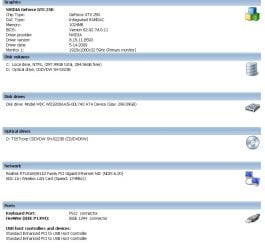
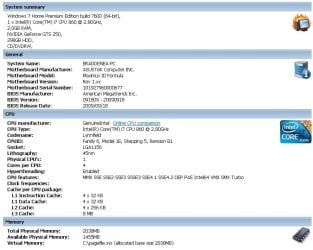
SPECS IN ATTACHMENTS
 

Attachments
  • BIT1.jpg
    BIT1.jpg
    68 KB · Views: 16
  • BIT2.jpg
    BIT2.jpg
    56.4 KB · Views: 11
Last edited:

My Computer My Computer

At a glance

Windows 7 Home Premium 64bit
OS
Windows 7 Home Premium 64bit
Hello,

I hope I can get some assistance, with BSOD. I have built a custom desktop, and when I try to install Windows 7 Home Premium 64bit, I get BSOD's.

The first one was "PAGE_FAULT_IN_NONPAGED_AREA", and after restarting my PC, now get "DRIVER_IRQL_NOT_LESS_OR_EQUAL".

I have no idea what these mean, or what is causing this. If you need more information, please let me know.

Thanks for your time, and consideration with assistance to my issues.


If you can access the HD

We really need the actual DMP file.

If you wish to have others assist you with your computer's BSOD symptoms, upload the contents of your "\Windows\Minidump" folder. The procedure:

* Copy the contents of \Windows\Minidump to another (temporary) location somewhere on your machine.
* Zip up the copy.
* Start your own thread in the "Crashes and Debugging" section of the forum and attach the ZIP archive to your post using the "paperclip" (file attachments) button.
* Briefly describe the problem history and circumstances in the same post. Somebody will attend to your query as soon as possible.
 

My Computer My Computer

At a glance

Win 8 Release candidate 8400[email protected]4 gigsNvidia 9600M
Computer Manufacturer/Model Number
HP Pavillion dv-7 1005 Tx
OS
Win 8 Release candidate 8400
CPU
[email protected]
Memory
4 gigs
Graphics Card(s)
Nvidia 9600M
Sound Card
HD built-in
Monitor(s) Displays
17" Wxga
Screen Resolution
1440x900
Cooling
none
Internet Speed
45Mb down 5Mb up
Hi zigzag!

Thanks for the quick response. Unfortunately, I am unable to do what you said...as I don't have Windows even installed on this PC. I just put it together today, and not sure why this would be doing this.

Is there any other way I can supply you more information, since no OS is currently on here.
 

My Computer My Computer

At a glance

Windows 7 Home Premium 64bit
OS
Windows 7 Home Premium 64bit
Denea,
Edit and fill in your system specs first.
Then update all drivers from manufactures website
Re-boot and then post back to us.

Welcome to Windows 7 Forum.
 

My Computer My Computer

At a glance

Windows 7 Home Premium 64bitIntel(R)Core(TM)2 quad [email protected] 2.39GHz6GB DDR2 6400GeForce 8500/512MB
Computer Manufacturer/Model Number
HP M9077c
OS
Windows 7 Home Premium 64bit
CPU
Intel(R)Core(TM)2 quad [email protected] 2.39GHz
Motherboard
ASUSeK
Memory
6GB DDR2 6400
Graphics Card(s)
GeForce 8500/512MB
Sound Card
Realtek High Def Audio
Monitor(s) Displays
HP w2408 LCD 24" widescreen
Screen Resolution
1920x1200
Cooling
6 pack of Bud
Keyboard
MS wireless Inteli
Mouse
MS wireless Inteli
Denea,
Edit and fill in your system specs first.
Then update all drivers from manufactures website
Re-boot and then post back to us.

Welcome to Windows 7 Forum.

I updated it with the specs I have. How am I supposed to update drivers, when I can even get windows installed on my desktop? I am new at custom builds, but everything has been recognized in BIOS.

I am new to all of this, so please bear with me.
 

My Computer My Computer

At a glance

Windows 7 Home Premium 64bit
OS
Windows 7 Home Premium 64bit
Your doing fine, Denea, just take your time to work through all steps to resolve the fail:

Please test your RAM with memtest86 CD for 5-6 passes. Swap RAM to reseat it, try install with only 2gb of RAM.

Do you have latest BIOS version update from Asus Support DOwnloads webpage for your model? If so, reset your CMOS: Clear CMOS - 3 Ways to Clear the CMOS - Reset BIOS

Try SATA controller set to AHCI first, then IDE if necessary.

Is your HD new? If not, test with maker's HD diag/repair full CD scan. Hard Drive Diagnostics Tools and Utilities (Storage) - TACKtech Corp.

Where did you get Win7? DId you burn it yourself? If so burn again using ImgBurn at 4x speed or try install from USB flash stick: http://www.sevenforums.com/tutorials/2432-usb-windows-7-installation-key-drive-create.html
http://www.sevenforums.com/tutorials/31541-windows-7-usb-dvd-download-tool.html?filter[2]=General%20Tips
YouTube - How to install Windows 7 from USB (WinToFlash)

Posting fuller specs in the bottom left of your post will get more help from others.
 
Greg,

Just got back from my buddies, and prior to receiving your response, we began pulling to test out some issues.

We started with pulling RAM, and were successful with getting Windows installed with 2GB. After the install process, we inserted the other 4GB. We do believe one slot for the RAM is bad, and left that one empty.

After the install, and reboot with 6GB in, I began to do Window updates (40), and after downloading all, I began to install. When I got to 9 of 40 installed, Windows updater froze, and eventually closed. I restarted the PC, and it began to configure. After configuration, I went back to Windows updater, and it then again failed. I then tried to run a test (score) of my hardware, and in the process, it crashed.

After the crash, the PC was restarted, and then came the BSOD again...not even making it to the Windows sign in screen. Repeated attempts were made, with no success.


At this time, I have a headache, and need sleep. I will have time mid-afternoon (east coast) to break it back down to 2GB to see if I can get Windows to at least load (which I am hoping it will, so I can run the tests you have advised).

I will load BIOS and change my SATA controller to AHCI, since it is currently in IDE.

The HD is new, and is a Western Digital (I will update my original post with hopefully as much specs as I can).

I purchased Windows 7 from Tiger Direct.


I really appreciate the response, and hope I can get this figured out.
 

My Computer My Computer

At a glance

Windows 7 Home Premium 64bit
OS
Windows 7 Home Premium 64bit
Hi again Denea -

The real geniuses here are in the Crashes & Debugging forum. Use this procedure to find and upload your bluescreen debug report so they can tell you quickly what is causing it: http://www.sevenforums.com/crashes-debugging/96879-blue-screen-death-bsod-posting-instructions.html That's what I would do first to get them working on the root cause.

While you wait I would focus on the RAM, test it thoroughly with memtest86 CD for at least 5-6 passes. Test individual sticks, try all slot combinations. If you have Kingston they will help you with it, even replace it for life. http://www.memtest86.com/download.html

If you can get to the Event Viewer>Admin View you may find errors logged which when Googled will let you know how others solved them. I also focus on the Performance log on Advanced TOols page accessed by clicking through WEI score link at Computer Properties. Look also for issues cued at the top of that page and Generate a System Health Report.

BIOS is best updated from Windows. To change to AHCI you'll need to follow this: http://www.sevenforums.com/tutorials/61869-ahci-enable-windows-7-vista.html?ltr=A

Explain your problem thoroughly but concisely in Debug forum post/upload as this will elevate you to the really smart people.:geek:
 
Last edited:

My Computer My Computer

At a glance

Win7 Enterprise, Win7 x86 (Ult 7600), Win7 x6...AMD fx8350 4ghz, AMD-32 2400mhz, AMD-64 3200m...2gb, 4gb on the Ult 7600, 4gb on Technet RTM,...Draw my own Graphics, several nVidia cards
Computer type
PC/Desktop
Computer Manufacturer/Model Number
Built them myself, Science Experiments !
OS
Win7 Enterprise, Win7 x86 (Ult 7600), Win7 x64 Ult 7600, TechNet RTM on AMD x64 (2.8Ghz)
CPU
AMD fx8350 4ghz, AMD-32 2400mhz, AMD-64 3200mhz, AMDx64 2.8G
Motherboard
SIS 755, ECS-K8M890M-M (Ult 7600), GigaByte & others
Memory
2gb, 4gb on the Ult 7600, 4gb on Technet RTM, 32gb on FX8350
Graphics Card(s)
Draw my own Graphics, several nVidia cards
Sound Card
on motherboard
Monitor(s) Displays
19" flat scr, 28" I-Inc widescr,22" Emprex Widescr, 23" Acer
Screen Resolution
1280 x 1024, 1440 x 900, 1920 x 1080
Hard Drives
6 pata Ide HD's & 2 Sata HD's
added 80gb external on Ult 7600 computer,
numerous extra 1tb, 2TB, 3Tb SATA HD's
A collection of ext HD Docks w/ HDs
PSU
430w, 550w, 600w, 700, 800, etc
Case
All Generic Full Towers
Cooling
Open Air & a few fans, some w/ colored LEDs
Keyboard
Compaq & Dell recycled from GoodWill
Mouse
Made in China Optical Wired Mouse
Internet Speed
Fast Cable InterNet
Antivirus
AVG Free on 24 different Desktops, NO Problems!
Browser
IE 8 is preferred, but use FireFox sometimes
Other Info
Linksys Routers, switches, & Hubs
Too Many USB Flash Drives to count, Biggest is 64GB !
Eight computers in my home network.
Sixteen computers at my business network.
Linked via TeamViewer !
Lots of old used spare computer parts everywhere!
Hey all,

I went an just ran with 2GB and my system started up fine. I attached some JPEG's of my system specs in my first initial post. Right now my system is running fine, and I will now start testing the RAM as nothing else has seemed to go wrong...leading me to believe its a RAM issue (which I hope it is, and not the motherboard).

I will post back with my results as I test each 2GB of RAM separately, and then all together.

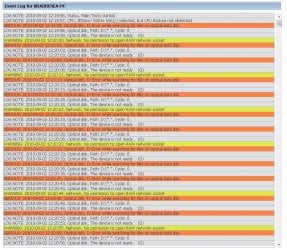
I also tested my system with BurnInTest and got the following results....which it failed. from this, is there an issue with my Optical drive? See attachments
 

Attachments

  • BIT3.jpg
    BIT3.jpg
    30.4 KB · Views: 14
  • BIT4.jpg
    BIT4.jpg
    168.8 KB · Views: 10

My Computer My Computer

At a glance

Windows 7 Home Premium 64bit
OS
Windows 7 Home Premium 64bit
Hey all,

I went an just ran with 2GB and my system started up fine. I attached some JPEG's of my system specs in my first initial post. Right now my system is running fine, and I will now start testing the RAM as nothing else has seemed to go wrong...leading me to believe its a RAM issue (which I hope it is, and not the motherboard).

I will post back with my results as I test each 2GB of RAM separately, and then all together.

I also tested my system with BurnInTest and got the following results....which it failed. from this, is there an issue with my Optical drive? See attachments

Well, first question with regards to that is, was there a CD rom in the drive when the test was run? If not, then re-run the test with a CD rom in there. It would give that error because it couldn't find anything as part of its test. You need to have some CD with data on it so that won't be a problem.
 

My Computer My Computer

At a glance

Windows 7 Ultimate x64 and Home Premium x64Intel i7 960 (3.2 GHz Quad Core)12 Gigs (Triple Channel)Alienware OEM nVidia GTX 560 Ti (1.25 Gig)
Computer Manufacturer/Model Number
Alienware Area 51 Desktop and Dell Inspirion 17R (N7010)
OS
Windows 7 Ultimate x64 and Home Premium x64
CPU
Intel i7 960 (3.2 GHz Quad Core)
Motherboard
Alienware Intel based X58
Memory
12 Gigs (Triple Channel)
Graphics Card(s)
Alienware OEM nVidia GTX 560 Ti (1.25 Gig)
Sound Card
Creative Labs X-Fi Titanium
Monitor(s) Displays
Samsung PX2370 LED 23" Monitor
Screen Resolution
1920x1080
Hard Drives
2 320 Gig SATA in Raid 1 Configuration (System/App)
1 1 Tera SATA (Games)
1 1 Tera SATA (Data/Music/Videos)
PSU
750 Watt Power Supply
Case
Alienware Area 51 Desktop
Cooling
Liquid Cooled
Keyboard
Logitech G510
Mouse
Microsoft Trackball Explorer
Internet Speed
Cable
Well, first question with regards to that is, was there a CD rom in the drive when the test was run? If not, then re-run the test with a CD rom in there. It would give that error because it couldn't find anything as part of its test. You need to have some CD with data on it so that won't be a problem.

Hi Keiichi, thanks for the response.

When I ran the test, there was no CD/DVD in the drive, so I guess that is where that error arrose.

I do believe I found the issue of the BSOD, and Windows not starting up properly. I removed the 2GB RAM which I am able to use Windows, and put in another one 2GB RAM. This one failed to startup Windows, and wanted me to restore, which I did, and still the same issue occurred. I then put in my 3rd 2GB RAM, and the same issue occurred which happened in the 2nd 2GB RAM.

I will attempt to install a few games on my system with the 2GB RAM which is working, and see if I have any further issues with any errors, BSOD.

So for now, I think I have 2 bad 2GB RAM.

I will keep you guys updated, and really appreciate everyones input, advice, and assistance with my issues.
 

My Computer My Computer

At a glance

Windows 7 Home Premium 64bit
OS
Windows 7 Home Premium 64bit
Are all your 2gb ram sticks the same Mfg & ram speed?
 

My Computer My Computer

At a glance

Win7 Enterprise, Win7 x86 (Ult 7600), Win7 x6...AMD fx8350 4ghz, AMD-32 2400mhz, AMD-64 3200m...2gb, 4gb on the Ult 7600, 4gb on Technet RTM,...Draw my own Graphics, several nVidia cards
Computer type
PC/Desktop
Computer Manufacturer/Model Number
Built them myself, Science Experiments !
OS
Win7 Enterprise, Win7 x86 (Ult 7600), Win7 x64 Ult 7600, TechNet RTM on AMD x64 (2.8Ghz)
CPU
AMD fx8350 4ghz, AMD-32 2400mhz, AMD-64 3200mhz, AMDx64 2.8G
Motherboard
SIS 755, ECS-K8M890M-M (Ult 7600), GigaByte & others
Memory
2gb, 4gb on the Ult 7600, 4gb on Technet RTM, 32gb on FX8350
Graphics Card(s)
Draw my own Graphics, several nVidia cards
Sound Card
on motherboard
Monitor(s) Displays
19" flat scr, 28" I-Inc widescr,22" Emprex Widescr, 23" Acer
Screen Resolution
1280 x 1024, 1440 x 900, 1920 x 1080
Hard Drives
6 pata Ide HD's & 2 Sata HD's
added 80gb external on Ult 7600 computer,
numerous extra 1tb, 2TB, 3Tb SATA HD's
A collection of ext HD Docks w/ HDs
PSU
430w, 550w, 600w, 700, 800, etc
Case
All Generic Full Towers
Cooling
Open Air & a few fans, some w/ colored LEDs
Keyboard
Compaq & Dell recycled from GoodWill
Mouse
Made in China Optical Wired Mouse
Internet Speed
Fast Cable InterNet
Antivirus
AVG Free on 24 different Desktops, NO Problems!
Browser
IE 8 is preferred, but use FireFox sometimes
Other Info
Linksys Routers, switches, & Hubs
Too Many USB Flash Drives to count, Biggest is 64GB !
Eight computers in my home network.
Sixteen computers at my business network.
Linked via TeamViewer !
Lots of old used spare computer parts everywhere!
I would contact OCZ tech support to get their help determining with certainty whether it is a specs mismatch or bad sticks. Most will replace the RAM in either case until you get it running right. But they each have their own testing protocols and may want to supervise it to expedite an RMA.
 
I would contact OCZ tech support to get their help determining with certainty whether it is a specs mismatch or bad sticks. Most will replace the RAM in either case until you get it running right. But they each have their own testing protocols and may want to supervise it to expedite an RMA.

Greg,

The RAM I had bought off a buddy, brand new (still in case, sealed)...but he has had sitting around (room temperature) since the middle of March. So, I don't have a warranty on the RAM.

How would OCZ Tech be able to determine if the specs are mismatched or bad? With them in place on Mobo, I can't even get Windows to load correctly, without crashing. If you think it would be good to contact them, I will, but they will most likely not replace them (if they are bad, which I am assuming they are) since I don't have a warranty on them, nor does my buddy.

Again, I do appreciate all of the help you guys have assisted me with.
 

My Computer My Computer

At a glance

Windows 7 Home Premium 64bit
OS
Windows 7 Home Premium 64bit
Hi Denea -

Best to go to the mobo Support page to find out the exact RAM specs. Then google the S/N off the sticks to see they are indeed as labeled.

You can't really count on mismatched RAM, even less on RAM that isn't perfectly spec'd. If your mobo is new then their tech support will tell you for sure.

I was hoping the RAM was purchased new since you said you have a new build. But it's entirely possible OCZ tech support will help you since it's possibly not more than a year old. Tell them you bought it retail.

If you want to know for sure whether the sticks are bad, run a memtest86 on them overnight to see if they fail under stress testing.
 
Actually, the ram itself should have a sticker with information besides OCS... You should be able to do a Google Search to determine a bit more (As some retailer might have that number match) to determine the specs. Same with the Motherboard you are using, if you can find the model number of the Motherboard, you should be able to do a google search for a manual or something and get specifications of what kind of ram it should be expecting.

As it seems the others sort of agree with part of an assessment that it could probably be a memory mismatch could be creating the memory glitches.

Edit - Well, I thought this was the thread where someone had two different manufactures of ram, but there is still always the case of mis-match that can also mess with the system.
 
Last edited:

My Computer My Computer

At a glance

Windows 7 Ultimate x64 and Home Premium x64Intel i7 960 (3.2 GHz Quad Core)12 Gigs (Triple Channel)Alienware OEM nVidia GTX 560 Ti (1.25 Gig)
Computer Manufacturer/Model Number
Alienware Area 51 Desktop and Dell Inspirion 17R (N7010)
OS
Windows 7 Ultimate x64 and Home Premium x64
CPU
Intel i7 960 (3.2 GHz Quad Core)
Motherboard
Alienware Intel based X58
Memory
12 Gigs (Triple Channel)
Graphics Card(s)
Alienware OEM nVidia GTX 560 Ti (1.25 Gig)
Sound Card
Creative Labs X-Fi Titanium
Monitor(s) Displays
Samsung PX2370 LED 23" Monitor
Screen Resolution
1920x1080
Hard Drives
2 320 Gig SATA in Raid 1 Configuration (System/App)
1 1 Tera SATA (Games)
1 1 Tera SATA (Data/Music/Videos)
PSU
750 Watt Power Supply
Case
Alienware Area 51 Desktop
Cooling
Liquid Cooled
Keyboard
Logitech G510
Mouse
Microsoft Trackball Explorer
Internet Speed
Cable
FYI 'From my experience with OCZ they will bend over bckwards to help you.
You can either contact support or go to their forum and a OCZ tech will respond qiuickly, you'll of course need the model # off the ram sticks. Fabe
http://www.ocztechnologyforum.com/forum/index.php
 

My Computer My Computer

At a glance

Windows 7 ultimate 64 bit / XP Home sp3intel Core 2 Duo E8400 3.0ghz8 gigs 1066 OCZ Fata1tyEVGA GTX 580 Call of Duty Black Ops Edition
Computer Manufacturer/Model Number
Self Built
OS
Windows 7 ultimate 64 bit / XP Home sp3
CPU
intel Core 2 Duo E8400 3.0ghz
Motherboard
Asus P5ND bios 1401
Memory
8 gigs 1066 OCZ Fata1ty
Graphics Card(s)
EVGA GTX 580 Call of Duty Black Ops Edition
Sound Card
Creative Soundblaster Audigy 2zs
Monitor(s) Displays
Asus 24in LCD's 2MS X2
Screen Resolution
1920x1080p @60Hz
Hard Drives
WD Caviar 500 Black/ WD Caviar 200 Blue
PSU
OCZ 700W GameXtreme
Case
NZXT Apollo
Cooling
Corsair H50 CPU/120mm x3 /60mm x2 /Corsair Dominator Ram
Keyboard
Logitech Bluetooth Wireless MX5000
Mouse
Logitech Bluetooth Wireless MX1000
Internet Speed
Download 19.83 Upload 0.97
Other Info
Logitech Z2300 Speakers/ Bose Noise Cancelling Headphones/Avermedia PCI-e Hybrid TV Bravo/Epson NX415 all in one/ 4 Port Powered USB Hub/ LG 10x Bluray Burner /TSST Corp DVDRW External
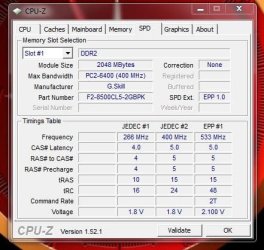
Just another thought. If you can get into the new install with win7 running with 1 ram stick at a time, you could run CPU-Z to see what make & model of the ram & the speed for each stick. Then write it down on paper for refference. Cpu_Z_Memory.JPG

:orb:

:ar:
 

Attachments

My Computer My Computer

At a glance

Win7 Enterprise, Win7 x86 (Ult 7600), Win7 x6...AMD fx8350 4ghz, AMD-32 2400mhz, AMD-64 3200m...2gb, 4gb on the Ult 7600, 4gb on Technet RTM,...Draw my own Graphics, several nVidia cards
Computer type
PC/Desktop
Computer Manufacturer/Model Number
Built them myself, Science Experiments !
OS
Win7 Enterprise, Win7 x86 (Ult 7600), Win7 x64 Ult 7600, TechNet RTM on AMD x64 (2.8Ghz)
CPU
AMD fx8350 4ghz, AMD-32 2400mhz, AMD-64 3200mhz, AMDx64 2.8G
Motherboard
SIS 755, ECS-K8M890M-M (Ult 7600), GigaByte & others
Memory
2gb, 4gb on the Ult 7600, 4gb on Technet RTM, 32gb on FX8350
Graphics Card(s)
Draw my own Graphics, several nVidia cards
Sound Card
on motherboard
Monitor(s) Displays
19" flat scr, 28" I-Inc widescr,22" Emprex Widescr, 23" Acer
Screen Resolution
1280 x 1024, 1440 x 900, 1920 x 1080
Hard Drives
6 pata Ide HD's & 2 Sata HD's
added 80gb external on Ult 7600 computer,
numerous extra 1tb, 2TB, 3Tb SATA HD's
A collection of ext HD Docks w/ HDs
PSU
430w, 550w, 600w, 700, 800, etc
Case
All Generic Full Towers
Cooling
Open Air & a few fans, some w/ colored LEDs
Keyboard
Compaq & Dell recycled from GoodWill
Mouse
Made in China Optical Wired Mouse
Internet Speed
Fast Cable InterNet
Antivirus
AVG Free on 24 different Desktops, NO Problems!
Browser
IE 8 is preferred, but use FireFox sometimes
Other Info
Linksys Routers, switches, & Hubs
Too Many USB Flash Drives to count, Biggest is 64GB !
Eight computers in my home network.
Sixteen computers at my business network.
Linked via TeamViewer !
Lots of old used spare computer parts everywhere!
Back
Top