Need help with changes not saving after logging back in

Bro

Windows n00b :D
Member
Local time
6:29 AM
Messages
31
Location
Miami, Florida, USA
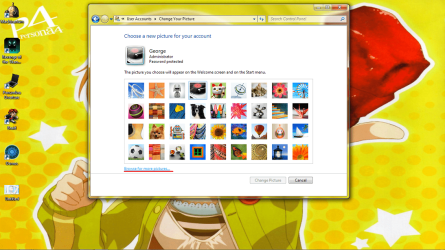
So, getting bored with my current theme, I wanted to change it up. Changed my log in screen, desktop wallpaper, and taskbar color. First problem came in when I went restarted my computer to save some other changes to the system, but upon logging back in, the wallpaper went from being set on "Fill" to "Stretch". This change is undone as shown in the first screenshot. Second thing to really bother me is when I try to change my Windows account icon to a picture I have saved; I try to click on "Browse for more pictures...", but the link doesn't respond at all. I've restarted several times, but to no avail. Anyone have any idea/have any fixes for these issues?

Thanks in advance.
 

Attachments

  • screeny1.png
    screeny1.png
    313.5 KB · Views: 2
  • screeny2.png
    screeny2.png
    225.8 KB · Views: 4

My Computer My Computer

Computer Manufacturer/Model Number
ASUSTeK Computer Inc./ASUS Notebook G60Vx Series
OS
Windows 7 Home Premium SP1 x64
CPU
Intel Core 2 Duo P7450 @ 2.13GHz
Motherboard
PEGATRON Corp. G60VX
Memory
2x2GB DDR2
Graphics Card(s)
NVIDIA GeForce GTX 260M
Sound Card
Realtek High Definition Audio
Monitor(s) Displays
16" HD/LED Backlight
Screen Resolution
1366 x 768
Hard Drives
320 GB Seagate ST9320423AS
Keyboard
Microsoft eHome MCIR 109 Keyboard
Mouse
Logitech M305 Wireless Mouse
Internet Speed
~25 MBPS
My own personal experience with this has shown the best thing to do is usually to just wipe all the temp and window settings from the machine (along with thumbnails) and start from scratch.
This can be done pretty easily using something like ccleaner's basic clean mode (I don't suggest using the included registry scanner though)

You can also go into folder options, and system settings and try resetting all those to defaults to see if the changes begin saving after that.
 

My Computer My Computer

Computer Manufacturer/Model Number
Insane hobo technologies. ;-)
OS
Windows 7 x64
CPU
Intel i7 2600k
Motherboard
Asrock z68 extreme 4 gen 3
Memory
G.skill Ripjaw 16gigs @ 1866
Graphics Card(s)
Nvidia gtx580 (evga)
Sound Card
Integrated HD audio + hdmi
Monitor(s) Displays
24" ASUS widescreen + 42" insignia
Screen Resolution
1080p (1920x1080)
Hard Drives
128 Samsung 830
256 Samsung 840
3 x 1tb storage drive (various)
1 western digital 1tb (eSATA)
1 Seagate 1tb (eSATA)
PSU
1 kilowatt SLI/Crossfire rated Silverstone modular
Case
NZXT Phantom + additional 220 fan
Cooling
Zalmann
Keyboard
Microsoft wireless 3000 (v2)
Mouse
MS - wireless 5000 (bluetrack)
Internet Speed
depends on if you ask me or my provider.
Other Info
The above information is provided as is, and the author assumes no responsibility for issues it may cause with your sanity or fanboyism.
My own personal experience with this has shown the best thing to do is usually to just wipe all the temp and window settings from the machine (along with thumbnails) and start from scratch.
This can be done pretty easily using something like ccleaner's basic clean mode (I don't suggest using the included registry scanner though)

You can also go into folder options, and system settings and try resetting all those to defaults to see if the changes begin saving after that.
Thanks for the suggestion Maguscreed, but even after doing this, nothing has changed. Can this be another kind of issue? Maybe a registry one? I'm not sure about that, but with my past history, a lot of my issues are tied to registry changes and the like.
 

My Computer My Computer

Computer Manufacturer/Model Number
ASUSTeK Computer Inc./ASUS Notebook G60Vx Series
OS
Windows 7 Home Premium SP1 x64
CPU
Intel Core 2 Duo P7450 @ 2.13GHz
Motherboard
PEGATRON Corp. G60VX
Memory
2x2GB DDR2
Graphics Card(s)
NVIDIA GeForce GTX 260M
Sound Card
Realtek High Definition Audio
Monitor(s) Displays
16" HD/LED Backlight
Screen Resolution
1366 x 768
Hard Drives
320 GB Seagate ST9320423AS
Keyboard
Microsoft eHome MCIR 109 Keyboard
Mouse
Logitech M305 Wireless Mouse
Internet Speed
~25 MBPS

My Computer My Computer

Computer Manufacturer/Model Number
Insane hobo technologies. ;-)
OS
Windows 7 x64
CPU
Intel i7 2600k
Motherboard
Asrock z68 extreme 4 gen 3
Memory
G.skill Ripjaw 16gigs @ 1866
Graphics Card(s)
Nvidia gtx580 (evga)
Sound Card
Integrated HD audio + hdmi
Monitor(s) Displays
24" ASUS widescreen + 42" insignia
Screen Resolution
1080p (1920x1080)
Hard Drives
128 Samsung 830
256 Samsung 840
3 x 1tb storage drive (various)
1 western digital 1tb (eSATA)
1 Seagate 1tb (eSATA)
PSU
1 kilowatt SLI/Crossfire rated Silverstone modular
Case
NZXT Phantom + additional 220 fan
Cooling
Zalmann
Keyboard
Microsoft wireless 3000 (v2)
Mouse
MS - wireless 5000 (bluetrack)
Internet Speed
depends on if you ask me or my provider.
Other Info
The above information is provided as is, and the author assumes no responsibility for issues it may cause with your sanity or fanboyism.
Darn it, even after all your help, nothing changes. Those threads also listed some things I've already attempted, like creating a theme and using that. Still nothing. I'm sorry for making you go through so much trouble. Thank you so much.

Hoping this thread stays around the first page long enough to grab others' attention.

EDIT: Actually, now that I think about it, could the account icon not being able to be changed be associated with a registry issue I was experiencing with the My Documents directory? I had an issue like that some time ago, and only now did this icon BS start up.
 
Last edited:

My Computer My Computer

Computer Manufacturer/Model Number
ASUSTeK Computer Inc./ASUS Notebook G60Vx Series
OS
Windows 7 Home Premium SP1 x64
CPU
Intel Core 2 Duo P7450 @ 2.13GHz
Motherboard
PEGATRON Corp. G60VX
Memory
2x2GB DDR2
Graphics Card(s)
NVIDIA GeForce GTX 260M
Sound Card
Realtek High Definition Audio
Monitor(s) Displays
16" HD/LED Backlight
Screen Resolution
1366 x 768
Hard Drives
320 GB Seagate ST9320423AS
Keyboard
Microsoft eHome MCIR 109 Keyboard
Mouse
Logitech M305 Wireless Mouse
Internet Speed
~25 MBPS
If you've been playing with the registry I can't really rule anything out.
Easiest way to test that would be to make another user account create the theme and restart.
If it works under the new user account. It is likely a registry value you've altered.
 

My Computer My Computer

Computer Manufacturer/Model Number
Insane hobo technologies. ;-)
OS
Windows 7 x64
CPU
Intel i7 2600k
Motherboard
Asrock z68 extreme 4 gen 3
Memory
G.skill Ripjaw 16gigs @ 1866
Graphics Card(s)
Nvidia gtx580 (evga)
Sound Card
Integrated HD audio + hdmi
Monitor(s) Displays
24" ASUS widescreen + 42" insignia
Screen Resolution
1080p (1920x1080)
Hard Drives
128 Samsung 830
256 Samsung 840
3 x 1tb storage drive (various)
1 western digital 1tb (eSATA)
1 Seagate 1tb (eSATA)
PSU
1 kilowatt SLI/Crossfire rated Silverstone modular
Case
NZXT Phantom + additional 220 fan
Cooling
Zalmann
Keyboard
Microsoft wireless 3000 (v2)
Mouse
MS - wireless 5000 (bluetrack)
Internet Speed
depends on if you ask me or my provider.
Other Info
The above information is provided as is, and the author assumes no responsibility for issues it may cause with your sanity or fanboyism.
Back
Top