Solved Need help with Dism.

groze

Tester
Power User
VIP
Local time
5:34 PM
Messages
1,162
I understand how to do the roll-up, after studying this. My questions is what do I put here in the name slot? I have windows 7 sp1 Home premium installed.

Would it be?
Code:
/Name:"Windows 7 HomePremium"
Dism /Mount-WIM /WimFile:C:\test\images\install.wim /Name:"Windows 7 HomeBasic" /MountDir:C:\test\offline
 

My Computer My Computer

At a glance

W10 32 bit, XUbuntu 18.xx 64 bitIntel(R) Celeron(R) CPU G1620T @ 2.40GHz, 240...4GBIntel HD graphics
Computer type
PC/Desktop
Computer Manufacturer/Model Number
Dell All in one Inspiron 2020
OS
W10 32 bit, XUbuntu 18.xx 64 bit
CPU
Intel(R) Celeron(R) CPU G1620T @ 2.40GHz, 2400 Mhz
Motherboard
Dell
Memory
4GB
Graphics Card(s)
Intel HD graphics
Sound Card
High Definition Audio Device
Monitor(s) Displays
20 inch Screen
Screen Resolution
W7=1280 x 720 & Linux Mint Xfce=1360 x 768
Hard Drives
500 GB hard drive
Keyboard
Usb
Mouse
Usb
Internet Speed
High-Speed
Antivirus
MSE
Browser
Main Browser Firefox
Other Info
I have done a clean install of Windows 7 using Dell re-installation disk (Dell sent me one). I also use Free Macrium reflect backup and restore.

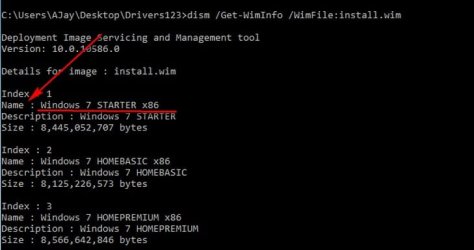
If you type in this command you will see exactly what 'name' you should use.

--- dism /Get-WimInfo /WimFile:install.wim ----
 

Attachments

  • aaa.jpg
    aaa.jpg
    25.7 KB · Views: 10

My Computer My Computer

At a glance

Win 7 Pro x64
Computer type
PC/Desktop
OS
Win 7 Pro x64
Browser
Chrome
Thank you. I might still get it a try at a later time. I was trying other methods of slipstreaming windows 7 sp1 but had some issues. I ended up doing my test without slipstreaming.
 

My Computer My Computer

At a glance

W10 32 bit, XUbuntu 18.xx 64 bitIntel(R) Celeron(R) CPU G1620T @ 2.40GHz, 240...4GBIntel HD graphics
Computer type
PC/Desktop
Computer Manufacturer/Model Number
Dell All in one Inspiron 2020
OS
W10 32 bit, XUbuntu 18.xx 64 bit
CPU
Intel(R) Celeron(R) CPU G1620T @ 2.40GHz, 2400 Mhz
Motherboard
Dell
Memory
4GB
Graphics Card(s)
Intel HD graphics
Sound Card
High Definition Audio Device
Monitor(s) Displays
20 inch Screen
Screen Resolution
W7=1280 x 720 & Linux Mint Xfce=1360 x 768
Hard Drives
500 GB hard drive
Keyboard
Usb
Mouse
Usb
Internet Speed
High-Speed
Antivirus
MSE
Browser
Main Browser Firefox
Other Info
I have done a clean install of Windows 7 using Dell re-installation disk (Dell sent me one). I also use Free Macrium reflect backup and restore.
Back
Top