Need Help With Monitoring logon activity on Systems in office

fizz000

New member
Local time
7:18 AM
Messages
5
Hello every one, i am new here and i have searched alot on the net for this but i cant find any thing about it. Its basically for my friends office. He has a small office with around 5 systems and all windows 7 and he wants
to monitor other systems in his office, their activities specially the log-on part. I have done MCTS certification in win 7. So i know we can use auditing and event subscription for data collection. But what i want to know is that can that be done on a homegroup(Sharing) network straight away using GP, or i need to install windows server 2008 and get some extra hardware and then connect the systems or can it be done directly without any extra hardware or it can just be done with windows server 2008 on one system. Its basically for monitoring nothing else not for saving data, or remote access or emailing, only monitoring. And i will be really thankfull if anyone can tell me if in case i need a server and hardware how much would that cost just an idea what wud it cost to get a network set up with a server. I dont know about servers or hardware related to that, my friend's business is new so he doesnt want to spend too much money at the moment, so that one reasong i am asking for a price above. I will be highly thankful if someone can help with this...
 

My Computer My Computer

At a glance

Windows 7 Ultimate 32-bit
OS
Windows 7 Ultimate 32-bit
Hello,
I have the MCTS in Win 7 Administration as well.

If I am understanding this right, this person wants to log all the local machine logon times for each computer on this office network, which, as you stated, can be done with the Event Viewer. Or is it a situation of logging in remotely to a shared machine for file sharing and storage, and he wants to know who logs in and when? That can all be monitored via the same method as well.

OR, does he want the logon, etc. logs for each individual machine sent to his computer remotely? This can be accomplished via the subscription feature in the event viewer.
 

My Computer My Computer

At a glance

Windows 7/8/8.1 x64 &&& Debian-Based LinuxAlways AMDAlways G-SkillAlways ATi/AMD
Computer Manufacturer/Model Number
Always changing!
OS
Windows 7/8/8.1 x64 &&& Debian-Based Linux
CPU
Always AMD
Motherboard
Always Asus
Memory
Always G-Skill
Graphics Card(s)
Always ATi/AMD
Internet Speed
Never fast enough
Antivirus
MBAM, MBAR, MBAE, Outpost (WinDefender Disabled)
Browser
Firefox w/plugins galore
Hello,

Thanks MSchild for replying. Its basically the first thing u said "this person wants to log all the local machine logon times for each computer on this office network" he wants all the reports/data on his computer.
 

My Computer My Computer

At a glance

Windows 7 Ultimate 32-bit
OS
Windows 7 Ultimate 32-bit
Hello,
I have the MCTS in Win 7 Administration as well.

If I am understanding this right, this person wants to log all the local machine logon times for each computer on this office network, which, as you stated, can be done with the Event Viewer. Or is it a situation of logging in remotely to a shared machine for file sharing and storage, and he wants to know who logs in and when? That can all be monitored via the same method as well.

OR, does he want the logon, etc. logs for each individual machine sent to his computer remotely? This can be accomplished via the subscription feature in the event viewer.

Hello,

Thanks MSchild for replying. Its basically the first thing u said "this person wants to log all the local machine logon times for each computer on this office network" he wants to get all the reports/data on his computer.
 

My Computer My Computer

At a glance

Windows 7 Ultimate 32-bit
OS
Windows 7 Ultimate 32-bit
Okay.. then it sounds to me like it's more like the last thing I said lol, that he wants all those logs sent to him remotely.

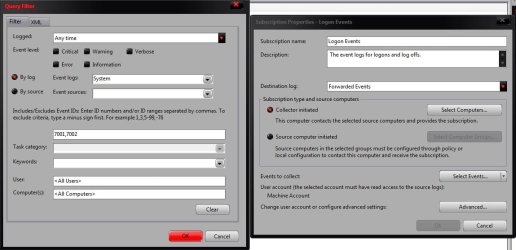
This can all be accomplished through the event viewer subscriptions. The Winlogon events should be logged under Windows > System. A quick search suggests Event ID 7001 is a local logon, and 7002 is a log off. Verifying on my machine, this seems to be accurate (you can of course add any Event IDs you think would be useful).

You will want to configure the Subscriptions on this person's machine to collect these logs from the remote machines on the domain like so:
subscriptions.jpg

You'll need to add each computer on the domain to the list of course, and there are some useful options for HTTPS delivery, etc. The config I screenshot would have all these events sent to the Forwarded Events view. The events themselves each contain the computer name, user SID's, and of course timestamps, so it's pretty straightforward to read through. Let me know if there is any aspect of this you're fuzzy on, and I'll do my best to clear it up.
 

My Computer My Computer

At a glance

Windows 7/8/8.1 x64 &&& Debian-Based LinuxAlways AMDAlways G-SkillAlways ATi/AMD
Computer Manufacturer/Model Number
Always changing!
OS
Windows 7/8/8.1 x64 &&& Debian-Based Linux
CPU
Always AMD
Motherboard
Always Asus
Memory
Always G-Skill
Graphics Card(s)
Always ATi/AMD
Internet Speed
Never fast enough
Antivirus
MBAM, MBAR, MBAE, Outpost (WinDefender Disabled)
Browser
Firefox w/plugins galore
Okay.. then it sounds to me like it's more like the last thing I said lol, that he wants all those logs sent to him remotely.

This can all be accomplished through the event viewer subscriptions. The Winlogon events should be logged under Windows > System. A quick search suggests Event ID 7001 is a local logon, and 7002 is a log off. Verifying on my machine, this seems to be accurate (you can of course add any Event IDs you think would be useful).

You will want to configure the Subscriptions on this person's machine to collect these logs from the remote machines on the domain like so:
View attachment 255969

You'll need to add each computer on the domain to the list of course, and there are some useful options for HTTPS delivery, etc. The config I screenshot would have all these events sent to the Forwarded Events view. The events themselves each contain the computer name, user SID's, and of course timestamps, so it's pretty straightforward to read through. Let me know if there is any aspect of this you're fuzzy on, and I'll do my best to clear it up.

OK so i then choose the collector initiated and then in select computers i select the system where i need to send the events to which computer, this wud be on the employee systems, right. And on the system that i need to collect the events i shud choose source initiated and add them. I am sorry i just recently got my certification and dont have that mush practical experiance...
 

My Computer My Computer

At a glance

Windows 7 Ultimate 32-bit
OS
Windows 7 Ultimate 32-bit
The config in the screenshot would be from the admin's machine. For each employee machine, you would select the 2nd option, Source Computer Initiated, and otherwise configure it similarly.

It's alright, I don't have much experience implementing this either. Actually I've only done it once, so it may be that you have to tinker with the settings here or there, but from what I can remember, that was the jist of how I got it working.
 

My Computer My Computer

At a glance

Windows 7/8/8.1 x64 &&& Debian-Based LinuxAlways AMDAlways G-SkillAlways ATi/AMD
Computer Manufacturer/Model Number
Always changing!
OS
Windows 7/8/8.1 x64 &&& Debian-Based Linux
CPU
Always AMD
Motherboard
Always Asus
Memory
Always G-Skill
Graphics Card(s)
Always ATi/AMD
Internet Speed
Never fast enough
Antivirus
MBAM, MBAR, MBAE, Outpost (WinDefender Disabled)
Browser
Firefox w/plugins galore
The config in the screenshot would be from the admin's machine. For each employee machine, you would select the 2nd option, Source Computer Initiated, and otherwise configure it similarly.

It's alright, I don't have much experience implementing this either. Actually I've only done it once, so it may be that you have to tinker with the settings here or there, but from what I can remember, that was the jist of how I got it working.

Thanks alot i will try it...:D
 

My Computer My Computer

At a glance

Windows 7 Ultimate 32-bit
OS
Windows 7 Ultimate 32-bit
np (:
 

My Computer My Computer

At a glance

Windows 7/8/8.1 x64 &&& Debian-Based LinuxAlways AMDAlways G-SkillAlways ATi/AMD
Computer Manufacturer/Model Number
Always changing!
OS
Windows 7/8/8.1 x64 &&& Debian-Based Linux
CPU
Always AMD
Motherboard
Always Asus
Memory
Always G-Skill
Graphics Card(s)
Always ATi/AMD
Internet Speed
Never fast enough
Antivirus
MBAM, MBAR, MBAE, Outpost (WinDefender Disabled)
Browser
Firefox w/plugins galore
Back
Top