- Local time
- 6:50 PM
- Messages
- 269
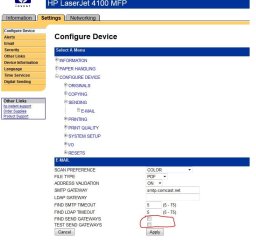
I hope this is the right place for this thread. I have a printer (HP 4101mfp) that has e-mail capabilities. It has worked in the past and then I ran in to problems where it would not send anymore e-mails. Been sitting on my "thing to do" and I have time now.
My previous settings were smtp.comcast.net in the "send" area of the settings, but it does not seem to work anymore with that. So I signed up for SMTP2GO and entered that smtp settings and still no joy.
The error I am getting is "Gateway not found"
I have the following equipment;
Windows 7 64-bit Pro
HP Laserjet 4101mfp with firmware 3.804.6
Router is WNDR4700
Cable Modem
ISP is Comcast
I read bits and pieces that the printer may use port 80 and that the router also uses that for the USB drive which I do have installed, but not sure.
I have also read bits and pieces, but nothing clear about if you can change the printer ports for this printer.
So I am at a loss here and just wondered if there is anything I can also look at or if there is someone here who may have had the issue and knows how to resolve it?
My previous settings were smtp.comcast.net in the "send" area of the settings, but it does not seem to work anymore with that. So I signed up for SMTP2GO and entered that smtp settings and still no joy.
The error I am getting is "Gateway not found"
I have the following equipment;
Windows 7 64-bit Pro
HP Laserjet 4101mfp with firmware 3.804.6
Router is WNDR4700
Cable Modem
ISP is Comcast
I read bits and pieces that the printer may use port 80 and that the router also uses that for the USB drive which I do have installed, but not sure.
I have also read bits and pieces, but nothing clear about if you can change the printer ports for this printer.
So I am at a loss here and just wondered if there is anything I can also look at or if there is someone here who may have had the issue and knows how to resolve it?
My Computer
- Computer type
- PC/Desktop
- Computer Manufacturer/Model Number
- Home Built
- OS
- Windows 10 Pro 64-bit
- CPU
- Core I7-6700
- Motherboard
- Asus Maximus VIII Hero
- Memory
- 8GB Corsair Dominator
- Graphics Card(s)
- Asus STRIX GTX 980Ti
- Monitor(s) Displays
- Asus PG278Q, Dell U2410
- Screen Resolution
- 2560 x 1440, 1920 x 1200
- Hard Drives
- 1 x Samsung 950 Pro 512GB
1 x 1TB HGST
- PSU
- 750W Seasonic
- Case
- Antec 900 v3
- Cooling
- Stock
- Internet Speed
- Cable Internet