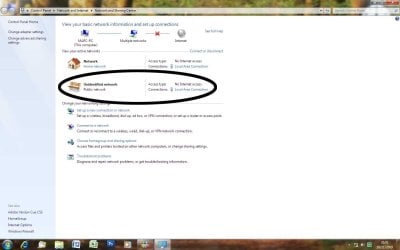
network and public network

clax

New member
Local time
7:44 AM
Messages
5
I am using Windows 7, when I startup I get my network and a public network with no internet availiable. I only get internet access when I disable and then re-enable my network connection. I have tried to disable this public network permanently, but without success as the same problem occurs after reboot. Any help would be greatfully recieved.
 

My Computer My Computer

OS
W7
CPU
Intel(R) Core(TM)2 Duo E8400 @3.00GHz 3.00
Motherboard
GIGABYTE GA-945GCM FSB 1066
Memory
1 X 2GB ram
Graphics Card(s)
RADEON X600 SERIES
Monitor(s) Displays
I-INC AH191D
Screen Resolution
1440X900
Hard Drives
1 X 750GB SATA SAMSUNG HD642JJ (FILES DISK)

1X 120GB MAXTOR 6Y120P0 (WIN 7 DISK)
PSU
ENCER ATX 300W
Fill out your system specs. The link is in my signature.
 

My Computer My Computer

Computer Manufacturer/Model Number
Dell XPS 15 L502x
OS
Windows 7 Ultimate x64 SP1
CPU
Core i7-2670QM
Memory
8GB DDR3 PC3-10600
Graphics Card(s)
Intel HD Graphics 3000 + GeForce GT 540M
Screen Resolution
1920x1080
Hard Drives
1TB 5400RPM Seagate
Fill out your system specs. The link is in my signature.

Cheers, i take it clicking on kegobeer was the link, but i didn't find anything there that resolved this. (I often need my things pointed out to me when it's plane for everyone else to see)

Any 'more obvious' help would be very welcome.

:o
 

My Computer My Computer

OS
W7
CPU
Intel(R) Core(TM)2 Duo E8400 @3.00GHz 3.00
Motherboard
GIGABYTE GA-945GCM FSB 1066
Memory
1 X 2GB ram
Graphics Card(s)
RADEON X600 SERIES
Monitor(s) Displays
I-INC AH191D
Screen Resolution
1440X900
Hard Drives
1 X 750GB SATA SAMSUNG HD642JJ (FILES DISK)

1X 120GB MAXTOR 6Y120P0 (WIN 7 DISK)
PSU
ENCER ATX 300W
A signature is a footer for emails. Check the attachment in this email. ;)

Regarding your network issue - did you create a home network, or did you create a public network? If you are unsure, look in your Network and Sharing Center and check the "View your active networks" section.
 

Attachments

  • Capture.JPG
    Capture.JPG
    14.2 KB · Views: 36

My Computer My Computer

Computer Manufacturer/Model Number
Dell XPS 15 L502x
OS
Windows 7 Ultimate x64 SP1
CPU
Core i7-2670QM
Memory
8GB DDR3 PC3-10600
Graphics Card(s)
Intel HD Graphics 3000 + GeForce GT 540M
Screen Resolution
1920x1080
Hard Drives
1TB 5400RPM Seagate
Cheers for clearing that up,

I created a home network, when i boot from cold I get no internet connection. I open up the network and sharing centre and get the screenshot below left. (notice the unidentified public network)


at present I remedy this by right clicking on a shortcut I have created, (see below right) selecting disable then doing the same again this time clicking enable. I then have no problems even when clicking restart. the unidentified public network has also disappeared.

All is good untill a full shut down followed by an initial boot at which point the the unidentified public network reappears. Hope this makes the problem clearer for you.

Thanks again

P.S. When I click on the pictures they pop up in there own window
 

Attachments

  • screen shot.jpg
    screen shot.jpg
    86.3 KB · Views: 149
  • screen shot2.jpg
    screen shot2.jpg
    46 KB · Views: 33
Last edited:

My Computer My Computer

OS
W7
CPU
Intel(R) Core(TM)2 Duo E8400 @3.00GHz 3.00
Motherboard
GIGABYTE GA-945GCM FSB 1066
Memory
1 X 2GB ram
Graphics Card(s)
RADEON X600 SERIES
Monitor(s) Displays
I-INC AH191D
Screen Resolution
1440X900
Hard Drives
1 X 750GB SATA SAMSUNG HD642JJ (FILES DISK)

1X 120GB MAXTOR 6Y120P0 (WIN 7 DISK)
PSU
ENCER ATX 300W
Those attachment links don't work. Can you try editing your post and attaching the files again?
 

My Computer My Computer

Computer Manufacturer/Model Number
Dell XPS 15 L502x
OS
Windows 7 Ultimate x64 SP1
CPU
Core i7-2670QM
Memory
8GB DDR3 PC3-10600
Graphics Card(s)
Intel HD Graphics 3000 + GeForce GT 540M
Screen Resolution
1920x1080
Hard Drives
1TB 5400RPM Seagate
Those attachment links don't work. Can you try editing your post and attaching the files again?

Removed the links, they were my first attempts at attaching the screenshots which i can see at the bottom of the post.
 

My Computer My Computer

OS
W7
CPU
Intel(R) Core(TM)2 Duo E8400 @3.00GHz 3.00
Motherboard
GIGABYTE GA-945GCM FSB 1066
Memory
1 X 2GB ram
Graphics Card(s)
RADEON X600 SERIES
Monitor(s) Displays
I-INC AH191D
Screen Resolution
1440X900
Hard Drives
1 X 750GB SATA SAMSUNG HD642JJ (FILES DISK)

1X 120GB MAXTOR 6Y120P0 (WIN 7 DISK)
PSU
ENCER ATX 300W
This problem seems to have resolved itself, as the last few times I have booted from cold the unidentified network hasn't appeared and I have been able to connect straight to the internet. I can only assume this is due to an automatic update as i have done nothing to correct it.

If it recurs I will let you know,

Cheers for the help.
 

My Computer My Computer

OS
W7
CPU
Intel(R) Core(TM)2 Duo E8400 @3.00GHz 3.00
Motherboard
GIGABYTE GA-945GCM FSB 1066
Memory
1 X 2GB ram
Graphics Card(s)
RADEON X600 SERIES
Monitor(s) Displays
I-INC AH191D
Screen Resolution
1440X900
Hard Drives
1 X 750GB SATA SAMSUNG HD642JJ (FILES DISK)

1X 120GB MAXTOR 6Y120P0 (WIN 7 DISK)
PSU
ENCER ATX 300W
I have exactly the same problem but it hasn't resolved itself, even after installing the updates.
Has anyone found an answer?
 

My Computer My Computer

OS
Windows 7
Back
Top