
Network discovery & computer browser svc issue, but no error in EV

Bagby

New member
Local time
3:37 PM
Messages
11
I have a small home network with a A)Win7 desktop, B)a Win7 laptop, and C)an XP desktop. I work primarily with A.

I did some network refiddling to replace a router. All seems to be working, but when I try to enable Network Discovery or File & Printer Sharing on A, they turn themselves right back off again.

Investigating this, I am informed that the Computer Browser service must be running.

This service isn't running. Started, it stops itself after a minute or so, with no error or warning in the event viewer, just a calm notice that the service has stopped. No reason given.

Just about all of the help I can find involves some sort of error code. I was misled into firewall issues, but the firewall doesn't come into it until Network Discovery is turned on.

Can anybody spare me some light to solve this?
 

My Computer My Computer

At a glance

Win7 Enterprise x64/WinXP x32 Professional
OS
Win7 Enterprise x64/WinXP x32 Professional
Usually just resetting winsock will fix this problem. At an elevated command prompt use the following commands one at a time, hit enter after each one.

netsh winsock reset catalog (reset winsock entries)

netsh int ip reset reset.log hit (reset TCP/IP stack)

Let me know if these commands have any effect on the problem you are seeing. :)
 

My Computer My Computer

At a glance

Windows 7 Ult, Windows 8.1 Pro,Q9650-4.275GHz, E8600 4.5GHz, E6750-3.8GHzG.Skill PC2 9600 1200Mhz 5 5 5 15 2TGTX480
Computer type
PC/Desktop
Computer Manufacturer/Model Number
Home built
OS
Windows 7 Ult, Windows 8.1 Pro,
CPU
Q9650-4.275GHz, E8600 4.5GHz, E6750-3.8GHz
Motherboard
Evga 780i FTW
Memory
G.Skill PC2 9600 1200Mhz 5 5 5 15 2T
Graphics Card(s)
GTX480
Sound Card
Asus Xonar D2
Monitor(s) Displays
HannsG
Screen Resolution
1680X1050
Hard Drives
GSkill Phoenix Pro 120GB SSD
PSU
ThermalTake Toughpower 1000Watt modular
Case
ThermalTake XaserV
Cooling
Xigmatek S1283
Keyboard
Logitech G15
Mouse
Logitech G9
Internet Speed
T1
Both commands completed correctly, though telling me I needed to reboot. I did so after entering both. I did have to restore my computer's static IP address, after which things were normal. Alas, this had no effect on my issues. Network Discovery, F&P Sharing, and the computer browser service all shut themselves off, and no errors in EV.
 

My Computer My Computer

At a glance

Win7 Enterprise x64/WinXP x32 Professional
OS
Win7 Enterprise x64/WinXP x32 Professional
Both commands completed correctly, though telling me I needed to reboot. I did so after entering both. I did have to restore my computer's static IP address, after which things were normal. Alas, this had no effect on my issues. Network Discovery, F&P Sharing, and the computer browser service all shut themselves off, and no errors in EV.

Well good then, at least we now know what is not the problem.

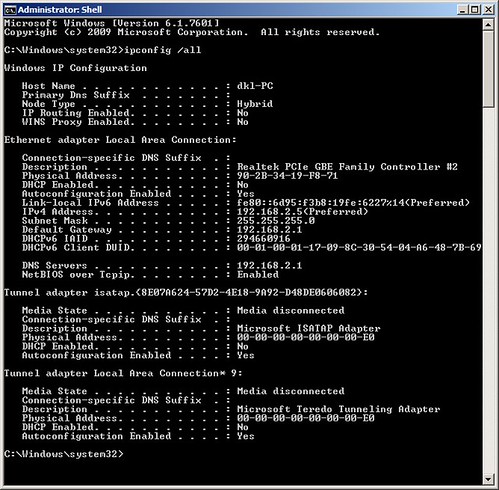
The problem you are seeing has quite a few different solutions but first I'd have to see a screen shot of the ipconfig/all from this machine in order to eliminate other possible problems. :)
 

My Computer My Computer

At a glance

Windows 7 Ult, Windows 8.1 Pro,Q9650-4.275GHz, E8600 4.5GHz, E6750-3.8GHzG.Skill PC2 9600 1200Mhz 5 5 5 15 2TGTX480
Computer type
PC/Desktop
Computer Manufacturer/Model Number
Home built
OS
Windows 7 Ult, Windows 8.1 Pro,
CPU
Q9650-4.275GHz, E8600 4.5GHz, E6750-3.8GHz
Motherboard
Evga 780i FTW
Memory
G.Skill PC2 9600 1200Mhz 5 5 5 15 2T
Graphics Card(s)
GTX480
Sound Card
Asus Xonar D2
Monitor(s) Displays
HannsG
Screen Resolution
1680X1050
Hard Drives
GSkill Phoenix Pro 120GB SSD
PSU
ThermalTake Toughpower 1000Watt modular
Case
ThermalTake XaserV
Cooling
Xigmatek S1283
Keyboard
Logitech G15
Mouse
Logitech G9
Internet Speed
T1
7826738292_38c3a1ec8c.jpg
7826738292
7826738292
7826738292
 

My Computer My Computer

At a glance

Win7 Enterprise x64/WinXP x32 Professional
OS
Win7 Enterprise x64/WinXP x32 Professional

No problems there at all.

Are you running any A/V software? If so does it have a firewall enabled?

Have you tried running the sfc/scannow command?
 

My Computer My Computer

At a glance

Windows 7 Ult, Windows 8.1 Pro,Q9650-4.275GHz, E8600 4.5GHz, E6750-3.8GHzG.Skill PC2 9600 1200Mhz 5 5 5 15 2TGTX480
Computer type
PC/Desktop
Computer Manufacturer/Model Number
Home built
OS
Windows 7 Ult, Windows 8.1 Pro,
CPU
Q9650-4.275GHz, E8600 4.5GHz, E6750-3.8GHz
Motherboard
Evga 780i FTW
Memory
G.Skill PC2 9600 1200Mhz 5 5 5 15 2T
Graphics Card(s)
GTX480
Sound Card
Asus Xonar D2
Monitor(s) Displays
HannsG
Screen Resolution
1680X1050
Hard Drives
GSkill Phoenix Pro 120GB SSD
PSU
ThermalTake Toughpower 1000Watt modular
Case
ThermalTake XaserV
Cooling
Xigmatek S1283
Keyboard
Logitech G15
Mouse
Logitech G9
Internet Speed
T1
I'm running TrustPort plain AV with no additional firewall. I have just the Win7 software firewall, and the router's firmware firewall, no others.

Sfc reports that it found corrupt files but was unable to fix some of them. Its log is attached. Hope you can parse it better than I can.
 

My Computer My Computer

At a glance

Win7 Enterprise x64/WinXP x32 Professional
OS
Win7 Enterprise x64/WinXP x32 Professional

My Computer My Computer

At a glance

Windows 7 Ult, Windows 8.1 Pro,Q9650-4.275GHz, E8600 4.5GHz, E6750-3.8GHzG.Skill PC2 9600 1200Mhz 5 5 5 15 2TGTX480
Computer type
PC/Desktop
Computer Manufacturer/Model Number
Home built
OS
Windows 7 Ult, Windows 8.1 Pro,
CPU
Q9650-4.275GHz, E8600 4.5GHz, E6750-3.8GHz
Motherboard
Evga 780i FTW
Memory
G.Skill PC2 9600 1200Mhz 5 5 5 15 2T
Graphics Card(s)
GTX480
Sound Card
Asus Xonar D2
Monitor(s) Displays
HannsG
Screen Resolution
1680X1050
Hard Drives
GSkill Phoenix Pro 120GB SSD
PSU
ThermalTake Toughpower 1000Watt modular
Case
ThermalTake XaserV
Cooling
Xigmatek S1283
Keyboard
Logitech G15
Mouse
Logitech G9
Internet Speed
T1
I ran into something close to what you're experiencing...what worked for me, now this is just what I did. I removed the whole network and started from scratch, redoing everything. Once I set the network up and added all my PC's and gave all permissions for who gets to share what with who...all worked like it was supposed to.
 

My Computer My Computer

At a glance

Windows 7 Ultimate 64 bitAMD Phenom II X4 965 Black EditionGSkill 4 X 2 GB PC 8500XFX Radeon HD 6790 D
Computer Manufacturer/Model Number
Custom built
OS
Windows 7 Ultimate 64 bit
CPU
AMD Phenom II X4 965 Black Edition
Motherboard
Gigabyte GA-MA790X-DS4
Memory
GSkill 4 X 2 GB PC 8500
Graphics Card(s)
XFX Radeon HD 6790 D
Sound Card
On board RealTek HD
Monitor(s) Displays
Dual monitors:Samsung SyncMaster S20B300
Screen Resolution
1600 X 900
Hard Drives
Seagate Barracuda 1TB (primary)
Seagate Barracuda 2 X 320 GB
PSU
Ultra X4 750 watt fully modular
Case
Thermaltake Overseer RX 1 full tower
Cooling
Core-Contact 92 mm CPU Cooler
Keyboard
Logitech G510
Mouse
Razor DeathAdder
Internet Speed
50/5 Mbps UL/DL
Other Info
Optical: Super Muliti DVD burner w/lightscribe, Hauppauge WinTV HVR-1800
System restore is an option but not ideal to fix this type of problem.

You might try running the http://www.sevenforums.com/tutorials/3413-repair-install.html a few times to try and sort out those file problems.

I'm afraid that's not really an option for me, as it would require total re-installation due to Microsoft's arbitrary restrictions, and it sounds like a don't-know-what-else-to-try-maybe-this-will-work sort of answer, not really trying to address a specific problem or issue at all.

From what I can parse of the log file, it's complaining about desktop gadget files, which I don't ever use at all.
 

My Computer My Computer

At a glance

Win7 Enterprise x64/WinXP x32 Professional
OS
Win7 Enterprise x64/WinXP x32 Professional
I am unclear on what you mean by "remove the whole network". Where I am right now, the network folder is empty. I can't see any other computer on it, and I'm told that "Network Discovery and File Sharing are turned off. Network computers and devices are not visible. Click to change ...", which doesn't. Indeed, that's the issue.

This seems as disconnected and removed as it can get. Is there some other step I'm not seeing?
 

My Computer My Computer

At a glance

Win7 Enterprise x64/WinXP x32 Professional
OS
Win7 Enterprise x64/WinXP x32 Professional
I am unclear on what you mean by "remove the whole network". Where I am right now, the network folder is empty. I can't see any other computer on it, and I'm told that "Network Discovery and File Sharing are turned off. Network computers and devices are not visible. Click to change ...", which doesn't. Indeed, that's the issue.

This seems as disconnected and removed as it can get. Is there some other step I'm not seeing?

I believe that statement was very general and has nothing to do with the problem you are seeing now.

Until you can fix the file integrity problems I don't think your situation will improve.
 

My Computer My Computer

At a glance

Windows 7 Ult, Windows 8.1 Pro,Q9650-4.275GHz, E8600 4.5GHz, E6750-3.8GHzG.Skill PC2 9600 1200Mhz 5 5 5 15 2TGTX480
Computer type
PC/Desktop
Computer Manufacturer/Model Number
Home built
OS
Windows 7 Ult, Windows 8.1 Pro,
CPU
Q9650-4.275GHz, E8600 4.5GHz, E6750-3.8GHz
Motherboard
Evga 780i FTW
Memory
G.Skill PC2 9600 1200Mhz 5 5 5 15 2T
Graphics Card(s)
GTX480
Sound Card
Asus Xonar D2
Monitor(s) Displays
HannsG
Screen Resolution
1680X1050
Hard Drives
GSkill Phoenix Pro 120GB SSD
PSU
ThermalTake Toughpower 1000Watt modular
Case
ThermalTake XaserV
Cooling
Xigmatek S1283
Keyboard
Logitech G15
Mouse
Logitech G9
Internet Speed
T1
Until you can fix the file integrity problems I don't think your situation will improve.

I have to think that you haven't actually analyzed the log file at all. Let's do that.

When SFC writes a new entry to this file, it is tagged with [SR]. (Other programs may also write to this file. If you want a completely clean file with just SFC entries, delete or rename the existing log file. When SFC can't repair a file, the entry begins with "Cannot repair member file". Any text editor can be used to search for "Cannot repair" in order to find the files causing the problems.

In this log, there is exactly one file that is doing so. It is a log file named MSDTC.LOG and SFC's complaint of it is that it cannot be found.

Running the MSDTC -install command will create or re-create this logfile in %windir%\System32\msdtc and install the distributed transaction coordinator service, which can be started, all without complaint, issue or error. But SFC continues to complain that it cannot find this one file, and not about anything else.

This makes me think that "file integrity problems" is an even more general statement that has even less to do with the actual problem.
 
Last edited:

My Computer My Computer

At a glance

Win7 Enterprise x64/WinXP x32 Professional
OS
Win7 Enterprise x64/WinXP x32 Professional
Until you can fix the file integrity problems I don't think your situation will improve.

I have to think that you haven't actually analyzed the log file at all. Let's do that.

When SFC writes a new entry to this file, it is tagged with [SR]. (Other programs may also write to this file. If you want a completely clean file with just SFC entries, delete or rename the existing log file. When SFC can't repair a file, the entry begins with "Cannot repair member file". Any text editor can be used to search for "Cannot repair" in order to find the files causing the problems.

In this log, there is exactly one file that is doing so. It is a log file named MSDTC.LOG and SFC's complaint of it is that it cannot be found.

Running the MSDTC -install command will create or re-create this logfile in %windir%\System32\msdtc and install the distributed transaction coordinator service, which can be started, all without complaint, issue or error. But SFC continues to complain that it cannot find this one file, and not about anything else.

This makes me think that "file integrity problems" is an even more general statement that has even less to do with the actual problem.

What I saw in the CBS. log was that sfc has to move bunches of files around as it tried to fix them and it also complained about dual ownership.

There appeared to be more problems than just one file there.

The only other fixes for this problem I can find are....

Please make sure the following services are enabled and running.
- DNS Client
- Function Discovery Resource Publication
- SSDP Discovery
- UPnP Device Host


Which is why I recommended the repair install. :sarc:

Of course having a system image from a point before the problems occurred would come in handy.
 
Last edited:

My Computer My Computer

At a glance

Windows 7 Ult, Windows 8.1 Pro,Q9650-4.275GHz, E8600 4.5GHz, E6750-3.8GHzG.Skill PC2 9600 1200Mhz 5 5 5 15 2TGTX480
Computer type
PC/Desktop
Computer Manufacturer/Model Number
Home built
OS
Windows 7 Ult, Windows 8.1 Pro,
CPU
Q9650-4.275GHz, E8600 4.5GHz, E6750-3.8GHz
Motherboard
Evga 780i FTW
Memory
G.Skill PC2 9600 1200Mhz 5 5 5 15 2T
Graphics Card(s)
GTX480
Sound Card
Asus Xonar D2
Monitor(s) Displays
HannsG
Screen Resolution
1680X1050
Hard Drives
GSkill Phoenix Pro 120GB SSD
PSU
ThermalTake Toughpower 1000Watt modular
Case
ThermalTake XaserV
Cooling
Xigmatek S1283
Keyboard
Logitech G15
Mouse
Logitech G9
Internet Speed
T1
UPnP Device Host was set to manual and was not running, though the others were. Starting it made no difference to the Computer Browser issue, though.

As I said, Windows refuses to do the repair install.

Restoring a previous system image is my final resort, if this can't be fixed. There are too many situations where windows seems to tie itself in irreparable knots, just like this one, and where ultimately, no one has any idea what could have gone wrong, or how to fix it.

SFC says it's ignoring dual ownership issues. Fine, it's ignoring them, so that's not a problem. EOS. What it IS saying is that a file that's right where it's supposed to be, is missing. I even restored MSDTC.LOG from the install disk to its correct location, yet SFC continues to complain that it's missing.

Bottom line, we have a diagnostic that's lying. Something else is wrong. The tool can't be trusted, so since we don't know what's wrong (and we can't see how what it says is wrong is even germaine to the actual issue -- why should the presence or absence of that log file matter to the Computer Browser service, and why doesn't CBS throw an error when it crashes, if it is crashing?-- we just scrap the whole mess and go back to either the beginning, or some point before it collapsed of its own weight. I'm not convinced that running down SFC's problems is not just a red herring and a distraction anyway, that if they were all solved, this would even affect the issue at hand.
 

My Computer My Computer

At a glance

Win7 Enterprise x64/WinXP x32 Professional
OS
Win7 Enterprise x64/WinXP x32 Professional
Back
Top