Network Error,Please Help!

diablo67

New member
Local time
4:11 PM
Messages
12
I have a desktop and a laptop,both running windows 7 pro.i created a homegroup,with the exact same homegroup name.i shared the folders i wanted to see on the desktop and the same on the laptop,i can see the folders,but when i try to access them from both computers,i get the same error...

Code:
windows cannot access\\XXXX\users\XXXX-check the spelling of the name.otherwisethere might be a problem with your network.
i checked the spelling and everything seems to be spelled correctly.not sure where to go from here.
 

My Computer

OS
windows 7 final 7600 build
What antivirus software are you using?
 

My Computer

Computer Manufacturer/Model Number
Home built
OS
Windows 7 Ultimate 32 bit
CPU
Intel(R) Pentium(R) 4 CPU 3.00GHz
Motherboard
ASUS P4P800-VM Motherboard Chipset: Intel 865G + ICH5
Memory
2.50 GB RAM
Graphics Card(s)
NVIDIA GeForce 7600 GS
Sound Card
SoundMax Integrated Digital Audio (Chip)
Monitor(s) Displays
ViewSonic VX 1962 wm
Screen Resolution
1680 X 1050
Hard Drives
Seagate Barracuda 7200.10 80 GB
ST380215A ATA Device 18.6 GB
Western Digital "My Book" external hard drive 750 GB
Cooling
Fan based
Keyboard
Microsoft Comfort Curve Keyboard 2000 v10 USB
Mouse
Logitec optic USB
Internet Speed
3.01 Mb/s download 0.64 Mb/s upload
Thanks. I am not a networking Guru; but I do now that some antivirus programs cause the problem you are having. We have some really good networking Gurus here. One of them will be along to help you.
 

My Computer

Computer Manufacturer/Model Number
Home built
OS
Windows 7 Ultimate 32 bit
CPU
Intel(R) Pentium(R) 4 CPU 3.00GHz
Motherboard
ASUS P4P800-VM Motherboard Chipset: Intel 865G + ICH5
Memory
2.50 GB RAM
Graphics Card(s)
NVIDIA GeForce 7600 GS
Sound Card
SoundMax Integrated Digital Audio (Chip)
Monitor(s) Displays
ViewSonic VX 1962 wm
Screen Resolution
1680 X 1050
Hard Drives
Seagate Barracuda 7200.10 80 GB
ST380215A ATA Device 18.6 GB
Western Digital "My Book" external hard drive 750 GB
Cooling
Fan based
Keyboard
Microsoft Comfort Curve Keyboard 2000 v10 USB
Mouse
Logitec optic USB
Internet Speed
3.01 Mb/s download 0.64 Mb/s upload
I have a desktop and a laptop,both running windows 7 pro.i created a homegroup,with the exact same homegroup name.i shared the folders i wanted to see on the desktop and the same on the laptop,i can see the folders,but when i try to access them from both computers,i get the same error...

Code:
windows cannot access\\XXXX\users\XXXX-check the spelling of the name.otherwisethere might be a problem with your network.
i checked the spelling and everything seems to be spelled correctly.not sure where to go from here.

Most likely you just need to give permissions to share the folder with your Homegroup. The tutorial below shows you how, for Homegroups go to steps number 10 and 11 in the link below.

We don't use the old double backslash \\User name\ to access files these days, we use the little folder icon on the task bar "lower left"

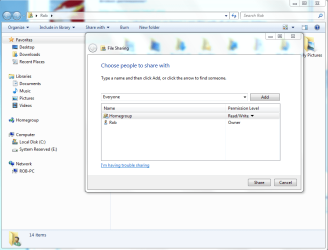
If you are using the Homegroup sharing feature it's most secure to have the premissions set for Homegroup Users only, so rather than having it say "Everyone" it should look like the picture below.

The "Everyone" shared with setting is if you want everyone in your network to have access to that file. If it says "Homegroup" then only members of the Homegroup will have access.

http://www.sevenforums.com/tutorials/24232-sharing-permissions.html?filter
 

Attachments

  • Share with Everyone.PNG
    Share with Everyone.PNG
    165 KB · Views: 41

My Computer

Computer type
PC/Desktop
Computer Manufacturer/Model Number
Home built
OS
Windows 7 Ult, Windows 8.1 Pro,
CPU
Q9650-4.275GHz, E8600 4.5GHz, E6750-3.8GHz
Motherboard
Evga 780i FTW
Memory
G.Skill PC2 9600 1200Mhz 5 5 5 15 2T
Graphics Card(s)
GTX480
Sound Card
Asus Xonar D2
Monitor(s) Displays
HannsG
Screen Resolution
1680X1050
Hard Drives
GSkill Phoenix Pro 120GB SSD
PSU
ThermalTake Toughpower 1000Watt modular
Case
ThermalTake XaserV
Cooling
Xigmatek S1283
Keyboard
Logitech G15
Mouse
Logitech G9
Internet Speed
T1
I have a desktop and a laptop,both running windows 7 pro.i created a homegroup,with the exact same homegroup name.i shared the folders i wanted to see on the desktop and the same on the laptop,i can see the folders,but when i try to access them from both computers,i get the same error...

Code:
windows cannot access\\XXXX\users\XXXX-check the spelling of the name.otherwisethere might be a problem with your network.
i checked the spelling and everything seems to be spelled correctly.not sure where to go from here.

Most likely you just need to give permissions to share the folder with your Homegroup. The tutorial below shows you how, for Homegroups go to steps number 10 and 11 in the link below.

We don't use the old double backslash \\User name\ to access files these days, we use the little folder icon on the task bar "lower left"

If you are using the Homegroup sharing feature it's most secure to have the premissions set for Homegroup Users only, so rather than having it say "Everyone" it should look like the picture below.

The "Everyone" shared with setting is if you want everyone in your network to have access to that file. If it says "Homegroup" then only members of the Homegroup will have access.

http://www.sevenforums.com/tutorials/24232-sharing-permissions.html?filter
yea,that didnt work,but thanks anyway.
 

My Computer

OS
windows 7 final 7600 build
I have a desktop and a laptop,both running windows 7 pro.i created a homegroup,with the exact same homegroup name.i shared the folders i wanted to see on the desktop and the same on the laptop,i can see the folders,but when i try to access them from both computers,i get the same error...

Code:
windows cannot access\\XXXX\users\XXXX-check the spelling of the name.otherwisethere might be a problem with your network.
i checked the spelling and everything seems to be spelled correctly.not sure where to go from here.

Most likely you just need to give permissions to share the folder with your Homegroup. The tutorial below shows you how, for Homegroups go to steps number 10 and 11 in the link below.

We don't use the old double backslash \\User name\ to access files these days, we use the little folder icon on the task bar "lower left"

If you are using the Homegroup sharing feature it's most secure to have the premissions set for Homegroup Users only, so rather than having it say "Everyone" it should look like the picture below.

The "Everyone" shared with setting is if you want everyone in your network to have access to that file. If it says "Homegroup" then only members of the Homegroup will have access.

http://www.sevenforums.com/tutorials/24232-sharing-permissions.html?filter
yea,that didnt work,but thanks anyway.

Didn't work? It's only worked 100's of millions times so far LOL. That is exactly how we access files and folders these days so I can't imagine why it wouldn't work for you also. It's all about permission settings with Homegroups, there are no exceptions to this rule, unless of course you installed an A/V software or third party firewall which can cause problems with sharing.

Honestly your post was so confusing I wasn't sure where to start but suffice to say that most of us do not use the old \\User name> method to access files, we use permissions and Windows Explorer these days "little folder icon lower left in your taskbar".

When you say something doesn't work with zero explanation you won't be getting any closer to solving your problem.
 

My Computer

Computer type
PC/Desktop
Computer Manufacturer/Model Number
Home built
OS
Windows 7 Ult, Windows 8.1 Pro,
CPU
Q9650-4.275GHz, E8600 4.5GHz, E6750-3.8GHz
Motherboard
Evga 780i FTW
Memory
G.Skill PC2 9600 1200Mhz 5 5 5 15 2T
Graphics Card(s)
GTX480
Sound Card
Asus Xonar D2
Monitor(s) Displays
HannsG
Screen Resolution
1680X1050
Hard Drives
GSkill Phoenix Pro 120GB SSD
PSU
ThermalTake Toughpower 1000Watt modular
Case
ThermalTake XaserV
Cooling
Xigmatek S1283
Keyboard
Logitech G15
Mouse
Logitech G9
Internet Speed
T1
Most likely you just need to give permissions to share the folder with your Homegroup. The tutorial below shows you how, for Homegroups go to steps number 10 and 11 in the link below.

We don't use the old double backslash \\User name\ to access files these days, we use the little folder icon on the task bar "lower left"

If you are using the Homegroup sharing feature it's most secure to have the premissions set for Homegroup Users only, so rather than having it say "Everyone" it should look like the picture below.

The "Everyone" shared with setting is if you want everyone in your network to have access to that file. If it says "Homegroup" then only members of the Homegroup will have access.

http://www.sevenforums.com/tutorials/24232-sharing-permissions.html?filter
yea,that didnt work,but thanks anyway.

Didn't work? It's only worked 100's of millions times so far LOL. That is exactly how we access files and folders these days so I can't imagine why it wouldn't work for you also. It's all about permission settings with Homegroups, there are no exceptions to this rule, unless of course you installed an A/V software or third party firewall which can cause problems with sharing.

Honestly your post was so confusing I wasn't sure where to start but suffice to say that most of us do not use the old \\User name> method to access files, we use permissions and Windows Explorer these days "little folder icon lower left in your taskbar".

When you say something doesn't work with zero explanation you won't be getting any closer to solving your problem.
thats the slashes the error presented,i didnt put them there.it confused me also.i read and followed your tut,but its still telling me the same thing,im not sure what the problem is,maybe its my computers.i know this is aggrevating as all hell.i shared my download folder on my desktop and started a homegroup.i then joined it on my laptop,i can see the download folder,when i click my desktop from my laptop.but when i click the download folder,i get the error i showed you.from both sides.and i am sorry for being confusing,but i get aggrevated when i cant figure something out,lol.i appreciate you helping me.
 
Last edited:

My Computer

OS
windows 7 final 7600 build
Ohhh ok, that is strange. If sharing doesn't work after setting up a Homegroup it's almost always because the permissions settings havn't been done correctly.

Try this Homegroup trouble shooting guide, going through each step one at a time, see if you can find anything that isn't set correctly on your system.

Ultimate Troubleshooting Guide for Windows 7 HomeGroup Connection Issues
 

My Computer

Computer type
PC/Desktop
Computer Manufacturer/Model Number
Home built
OS
Windows 7 Ult, Windows 8.1 Pro,
CPU
Q9650-4.275GHz, E8600 4.5GHz, E6750-3.8GHz
Motherboard
Evga 780i FTW
Memory
G.Skill PC2 9600 1200Mhz 5 5 5 15 2T
Graphics Card(s)
GTX480
Sound Card
Asus Xonar D2
Monitor(s) Displays
HannsG
Screen Resolution
1680X1050
Hard Drives
GSkill Phoenix Pro 120GB SSD
PSU
ThermalTake Toughpower 1000Watt modular
Case
ThermalTake XaserV
Cooling
Xigmatek S1283
Keyboard
Logitech G15
Mouse
Logitech G9
Internet Speed
T1
Back
Top