Network Icon

driecken

New member
There is a nice range of icons for windows 7, but there were a few that I really liked in windows vista ultimate that I don't seem to be able to find.

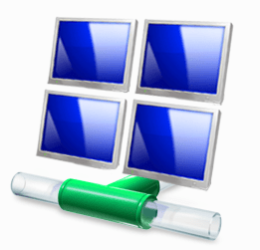
One of which that I can remember is the network icon, in vista you could right click, change icon... and I remember being able to select an network icon that was like two monitors stacked on top of each other creating 4 montiors total, and at the bottom was just like any other vista-windows 7 network icon, a connector tube.

I am unable to find this icon to change the desktop icon for "network" in windows 7, does anyone know the icon I am talking about, and any way to download or obtain it in some other way to use?

Thanks.
 

My Computer

OS
Windows 7 Ultimate x64
The image is located in C:\Windows\System32\netshell.dll :)
 

My Computer

Computer Manufacturer/Model Number
custom built
OS
Windows 7..duh!
CPU
C2Q 9450 3,6GHz
Motherboard
Asus Maximus Formula
Memory
4GB DDR2-1066
Graphics Card(s)
8800 GTX
Sound Card
Creative X-Fi Xtreme Music
Monitor(s) Displays
2x BenQ G2400W
Hard Drives
Seagate 750GB SATA 32MB,
Samsung 1000GB SATA 32MB,
Samsung 1500GB SATA 32MB,
PSU
Enermax Infiniti 720W
Case
Antec 900
Cooling
Zalman CNPS 9700
Mouse
Logitech MX Revolution
Internet Speed
16/1 Mbit down/up
Just to clarify; it's this icon you're looking for?
netwrk.jpg


If so, it IS located in said .dll:
netshell.jpg


If it's not that one, theres only one other I know:
netwrk.jpg


This one is located in /system32/imageres.dll :)
 

My Computer

Computer Manufacturer/Model Number
custom built
OS
Windows 7..duh!
CPU
C2Q 9450 3,6GHz
Motherboard
Asus Maximus Formula
Memory
4GB DDR2-1066
Graphics Card(s)
8800 GTX
Sound Card
Creative X-Fi Xtreme Music
Monitor(s) Displays
2x BenQ G2400W
Hard Drives
Seagate 750GB SATA 32MB,
Samsung 1000GB SATA 32MB,
Samsung 1500GB SATA 32MB,
PSU
Enermax Infiniti 720W
Case
Antec 900
Cooling
Zalman CNPS 9700
Mouse
Logitech MX Revolution
Internet Speed
16/1 Mbit down/up
Just to clarify; it's this icon you're looking for?
netwrk.jpg


If so, it IS located in said .dll:
netshell.jpg


If it's not that one, theres only one other I know:
netwrk.jpg


This one is located in /system32/imageres.dll :)

No but thank you, those icons I have no problem finding and using.

The icon I am trying to use is from vista it is this one:

networkicon.jpg
 

My Computer

OS
Windows 7 Ultimate x64
You can find that icon in the networkexplorer.dll.

2009-08-17_132006.png
 

My Computer

Computer Manufacturer/Model Number
Home Brew
OS
Windows 7 Ultimate Vista Ultimate x64
CPU
Core 2 Duo E8500 3.16Ghz @ 3.8Ghz
Motherboard
eVGA 750i FTW
Memory
2x2Gigs Patriot PC2-6400 LL
Graphics Card(s)
Inno3D GeForce GTX260 216 SP
Monitor(s) Displays
ASUS VW222U 22" 2ms Response time
Screen Resolution
1680x1050
Hard Drives
SATA 150GB
SATA II 250GB
USB IDE 750GB Ext.
PSU
HYTEC 600W & Thermaltake 650W Toughpower Power Exp
Case
Thermaltake Armor LCS (Liquid Cooling System)
Cooling
Liquid Cooling System
Keyboard
Logitech G15 Gaming Keyboard
Mouse
Logitech G9 Gaming Mouse
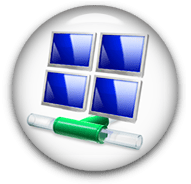
Cool. Can you make me a nice glass orb with that one? I have some more USMC videos I want to post. Just kidding...

It is only reasonable that Mr. Grim would know where that icon was.

How's this? :p

network orb.png
 

My Computer

Computer type
PC/Desktop
Computer Manufacturer/Model Number
Self built.
OS
Windows 7 RTM 64bit, Windows 8 Pro 64bit
CPU
Intel i5-2500K @ 3.3Ghz
Motherboard
Asus Maximus IV GENE-Z/GEN3
Memory
16GB G.Skill RaptorX 1600MHz DDR3
Graphics Card(s)
N570GTX Twin Frozr III Power Edition
Sound Card
SupremeFX X-Fi 2
Monitor(s) Displays
BenQ XL2420T 120Hz 24 inch gaming monitor, Acer V233H 23 inc
Screen Resolution
1920x1080
Hard Drives
320GB Seagate Barracuda
WD 1TB Black Caviar
2TB WD Green Caviar
Samsung SSD 840 PRO Series
PSU
CoolerMaster Silent Pro Gold 1200WATT 80 Plus Gold
Case
CoolerMaster HAF X RC-942
Cooling
CoolerMaster V6GT Multi-Platform CPU Cooler
Keyboard
Logitech G510 Gaming Keyboard
Mouse
Logitech G700 Gaming Mouse
Antivirus
Norton Internet Security
Browser
Firefox 21
Other Info
Logitech Extreme 3D Pro Gaming Joystick, Logitech G930 Wireless Gaming Headset
LoL, that icon is in the regular shell32.dll, and the one I've been using for my network icon all along :D
 

My Computer

Computer Manufacturer/Model Number
custom built
OS
Windows 7..duh!
CPU
C2Q 9450 3,6GHz
Motherboard
Asus Maximus Formula
Memory
4GB DDR2-1066
Graphics Card(s)
8800 GTX
Sound Card
Creative X-Fi Xtreme Music
Monitor(s) Displays
2x BenQ G2400W
Hard Drives
Seagate 750GB SATA 32MB,
Samsung 1000GB SATA 32MB,
Samsung 1500GB SATA 32MB,
PSU
Enermax Infiniti 720W
Case
Antec 900
Cooling
Zalman CNPS 9700
Mouse
Logitech MX Revolution
Internet Speed
16/1 Mbit down/up
LoL, that icon is in the regular shell32.dll, and the one I've been using for my network icon all along :D

That's true but that one is only 48x48, where as the one I mentioned is 256x256.

This is it's largest scalable size.

2009-08-18_002333.png
 

My Computer

Computer Manufacturer/Model Number
Home Brew
OS
Windows 7 Ultimate Vista Ultimate x64
CPU
Core 2 Duo E8500 3.16Ghz @ 3.8Ghz
Motherboard
eVGA 750i FTW
Memory
2x2Gigs Patriot PC2-6400 LL
Graphics Card(s)
Inno3D GeForce GTX260 216 SP
Monitor(s) Displays
ASUS VW222U 22" 2ms Response time
Screen Resolution
1680x1050
Hard Drives
SATA 150GB
SATA II 250GB
USB IDE 750GB Ext.
PSU
HYTEC 600W & Thermaltake 650W Toughpower Power Exp
Case
Thermaltake Armor LCS (Liquid Cooling System)
Cooling
Liquid Cooling System
Keyboard
Logitech G15 Gaming Keyboard
Mouse
Logitech G9 Gaming Mouse

Attachments

  • spooky.jpg
    spooky.jpg
    45.9 KB · Views: 221

My Computer

Computer Manufacturer/Model Number
Self Built
OS
XP Pro SP3 x86/Vista SP2 x64/Win7 x64 Triple-boot
CPU
AMD64 X2 AM2 5000+
Motherboard
Asus MSN-X Plus
Memory
Corsair TWX 2Gb (2x1Gb) DDR2 800Mhz
Graphics Card(s)
PCI-X 2.0 Inno3D (NVidia) 9500GT 1Gb DDR2
Sound Card
Onboard Realtec ALC662-GR
Monitor(s) Displays
Relisys 17' CRT (model unknown)
Screen Resolution
1024x768
Hard Drives
750Gb Samsung 7200-3Gb/s 32Mb Cache SATA
PSU
500W
Cooling
Standard AMD CPU Fan, One side, front and rear case fan.
Keyboard
Microsoft Multimedia Keyboard
Mouse
Samsung Optical
Internet Speed
10M

My Computer

Computer type
PC/Desktop
Computer Manufacturer/Model Number
Self built.
OS
Windows 7 RTM 64bit, Windows 8 Pro 64bit
CPU
Intel i5-2500K @ 3.3Ghz
Motherboard
Asus Maximus IV GENE-Z/GEN3
Memory
16GB G.Skill RaptorX 1600MHz DDR3
Graphics Card(s)
N570GTX Twin Frozr III Power Edition
Sound Card
SupremeFX X-Fi 2
Monitor(s) Displays
BenQ XL2420T 120Hz 24 inch gaming monitor, Acer V233H 23 inc
Screen Resolution
1920x1080
Hard Drives
320GB Seagate Barracuda
WD 1TB Black Caviar
2TB WD Green Caviar
Samsung SSD 840 PRO Series
PSU
CoolerMaster Silent Pro Gold 1200WATT 80 Plus Gold
Case
CoolerMaster HAF X RC-942
Cooling
CoolerMaster V6GT Multi-Platform CPU Cooler
Keyboard
Logitech G510 Gaming Keyboard
Mouse
Logitech G700 Gaming Mouse
Antivirus
Norton Internet Security
Browser
Firefox 21
Other Info
Logitech Extreme 3D Pro Gaming Joystick, Logitech G930 Wireless Gaming Headset
You can find that icon in the networkexplorer.dll.

View attachment 23572

Thanks, I appreciate that.

I usually don't toggle with icons all that often, but I always liked that one in vista, the regular network icon is a bit dull for my tastes.

I dont sift through sys32 all that often for icons, but as I recall that one was under the regular imagres.dll in vista ultimate?.

Any reason for the move in folder, or was it just invisible for some reason in imageres...? Supposing the just separated out what they could to save browsing space?
 

My Computer

OS
Windows 7 Ultimate x64

My Computer

Computer Manufacturer/Model Number
custom built
OS
Windows 7..duh!
CPU
C2Q 9450 3,6GHz
Motherboard
Asus Maximus Formula
Memory
4GB DDR2-1066
Graphics Card(s)
8800 GTX
Sound Card
Creative X-Fi Xtreme Music
Monitor(s) Displays
2x BenQ G2400W
Hard Drives
Seagate 750GB SATA 32MB,
Samsung 1000GB SATA 32MB,
Samsung 1500GB SATA 32MB,
PSU
Enermax Infiniti 720W
Case
Antec 900
Cooling
Zalman CNPS 9700
Mouse
Logitech MX Revolution
Internet Speed
16/1 Mbit down/up
Back
Top