

Shadowjk
Network Enthusiast
Networking Posting instructions
When Posting a Thread about network or internet Issues there are some information needed before we can Suggest a Solution So Please Read this with care
IPCONFIG
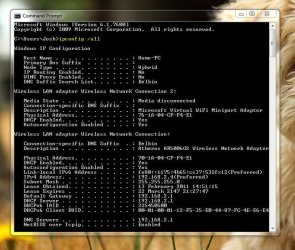
Along when creating a Thread about Wireless problems please Upload an Image of your IPCONFIG,
To do this Please Follow these Steps:
1. Click Start>All Programs>Accessories
Then Press Enter
3. After you have done that Please Run the Attached File AS ADMINISTRATOR Before you Post your Thread
The File will Flush you DNS Cache and Restore the HOSTS File
The Attached file contains the following information:
Hope This Helps,
Josh
When Posting a Thread about network or internet Issues there are some information needed before we can Suggest a Solution So Please Read this with care
Note
This may take some time
IPCONFIG
Along when creating a Thread about Wireless problems please Upload an Image of your IPCONFIG,
To do this Please Follow these Steps:
1. Click Start>All Programs>Accessories
a. Right Click on Command Prompt and click on Run as Administrator
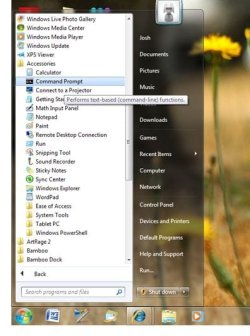
b. You may need to Click Continue if a UAC Prompt appears
2. Once the Command Prompt windows Opens Please type in the following codeb. You may need to Click Continue if a UAC Prompt appears
Code:
ipconfig /allThen Press Enter
a. This Will Provide some Information please Upload a Snip of the Information when you Create the Thread -
Go to Start>All Programs>Accessories
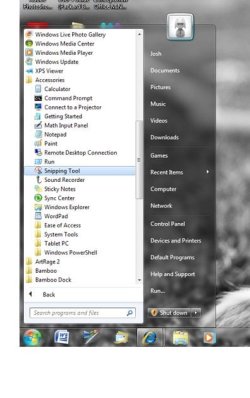
b Click on Snipping tool - After that Drag your Mouse over the Command Prompt Window and save the File as a Jpeg - Then Upload the Picture with your Thread
Go to Start>All Programs>Accessories
b Click on Snipping tool - After that Drag your Mouse over the Command Prompt Window and save the File as a Jpeg - Then Upload the Picture with your Thread
3. After you have done that Please Run the Attached File AS ADMINISTRATOR Before you Post your Thread
The File will Flush you DNS Cache and Restore the HOSTS File
Warning
BE WARNED, ONCE THE FILE HAS FINISHED IT WILL RESTART YOUR COMPUTER AND DELETE THE FILE
The Attached file contains the following information:
Code:
@Echo on
pushd\windows\system32\drivers\etc
attrib -h -s -r hosts
echo 127.0.0.1 localhost>HOSTS
attrib +r +h +s hosts
popd
ipconfig /release
ipconfig /renew
ipconfig /flushdns
netsh winsock reset all
netsh int ip reset all
shutdown -r -t 1
del %0
Hope This Helps,
Josh
Attachments
Last edited:
My Computer
- Computer type
- PC/Desktop
- Computer Manufacturer/Model Number
- Custom Built
- OS
- Windows 7 Professional x64 SP1 ; Windows Server 2012 R2 Standard
- CPU
- Intel Core i5 2400 @ 3.10GHz
- Motherboard
- Foxconn H67MP-S/-V/H67MP
- Memory
- 8.0GB DDR3 @ 665MHz (2GBx4)
- Graphics Card(s)
- AMD Radeon HD 6870
- Sound Card
- Realtek High Definition Audio
- Monitor(s) Displays
- AOC 2243W & SMB1930NW
- Screen Resolution
- 1440x900 & 1920x1080
- Hard Drives
- 977GB Seagate ST31000524AS ATA Drive (SATA)
250GB WD iSCSI attached Drive
- PSU
- 750W Gaming PSU
- Case
- Novatech Night
- Cooling
- Fan
- Keyboard
- Dell Standard PS/2 Keyboard
- Mouse
- R.A.T 07 Gaming Mouse
- Internet Speed
- Download: 10 Mbps Ping: 30ms Upload: 0.81 Mbps
- Browser
- Google Chrome
- Other Info
- Optiarc DVD RW AD-5260S ATA Device


