Network Problems Windows 7 x64

Almighty1

New member
I know you probably get this a lot on this forum, but I am very desperate now and really need help, any help will be greatly greatly appreciated. I upgraded windows 7 x64 from windows vista x86 on the day of the Windows 7 release and have had the problem since.

Heres my problem:
My internet connection keeps going, after a while of using the internet it will say 'no internet access' and if I try and share or sue the network It will say 'No network access'. However, when this happens it prevents me from shutting down also, i will got os htu down and will go onto the shut down screen saying 'Shutting Down' but will hang there for about 20 mins - an hour, at whcih point it will blue screena nd say somethign along the lines of "Critical Driver Failure".

When I installed windows 7 these are the drivers it installed automatically, I have tried visiting my manufacturers website, I have tried visiting the network manufacturers website.

If I go into my 'Device Manager' It will tell me my network card is manufactured by azure wave technologies but my drivers are provided by Ralink, so I went to both Ralink and AzureWave websites and there is no driver for my card, not even for vista or anywhere.

My PC is a 'Fujitsu Siemens Amilo Pi 3630', and my network card is WLAN AW-NU222. There is no mention of this card on the AzureWave website. In device manager it is named the standard '802.11 n/g/b Wireless LAN USB Adapter'.

It works when I wire my PC up and when I bridge a connection through a laptop, but for some reason when the internet fails, I don't seem to be able to use my Ipod Touch properly either on Itunes, I cannot disable the device when it has lost its connection as it will crash 'windows explorer' when I try, I have searched everywhere for a solution, I have tried everything I can possible think of.

Please someone help, Im sorry this is so long, I am just really desperate. Ive had to endure months of constant drop outs.

Kind Regards,
Almighty1
 

My Computer

Computer Manufacturer/Model Number
Fujitsu Siemens Amilo Pi 3630
OS
Windows 7 Home Premium x64
CPU
Intel Core 2 Quad Q8300 @ 2.5GHz
Motherboard
MS-7504VP-PV Nvidia GeForce 7100 nForce 630i
Memory
4096 DDR2
Graphics Card(s)
NVIDIA GeForce 9600 GT
Monitor(s) Displays
ViewSonic 19" VA22132w-2 1920 x 1080 (60Hz)
Hard Drives
640GB
Internet Speed
10mbps
Hi Almighty1, welcome to the SF. :D

Normally when installing another version of Windows, regardless if it has Update or not. It's recommended to backup all important documents etc, then install a fresh copy of Windows 7.

1. Check The Installed NIC Driver.
Okay we will need to check to see if the correct NIC driver is installed.
Click on Start > Control Panel.
Click on Network and Internet link.
Click View network status and tasks link.
On the left side, click Change adapter settings.
Right click on the Local Area Connection and select Properties.

Now under the box "Connection using:" click the Configure... button.
Click on the Driver tab and check that the correct network driver is installed.

2. Is The NIC Conflicting With Other Devices?
Click on Start > Control Panel.
Click on Network and Internet link.
Click View network status and tasks link.
On the left side, click Change adapter settings.
Right click on the Local Area Connection and select Properties.

Now under the box "Connection using:" click the Configure... button.
Click on the Resources tab. Check that nothing is present in the Conflicting device list.

3. I'll need you to run Command Prompt (run it as administrator)
type in ipconfig /all >>C:\ipconfig.txt
Then attach the ipconfig.txt to your post.
That way I can see what's going on with your network connection etc.
 
Last edited:

My Computer

Computer Manufacturer/Model Number
Me
OS
Windows 7 Ultimate 64bit
CPU
AMD Phenom 9950 Black Edition
Motherboard
Gigabyte GA-MA790GP-UD4H
Memory
4GB G-Skill DDR2 1066
Graphics Card(s)
x2 ATI 4850 512mb (enabled in crossfire)
Sound Card
ONBoard HD AUDIO
Monitor(s) Displays
Acer P221w 22" Widescreen
Screen Resolution
1600 * 1050
Hard Drives
Seagate 1TB SATAII
PSU
Antec 850 Watt PSU
Case
Coolermaster CM-690 with Transparent Side
Cooling
x5 120mm fans
Keyboard
Logitech G15 Gaming Keyboard
Mouse
Razer Lachesis 4000DPI
Internet Speed
24mb * 1mb ADSL2 Extreme ( Internode, go the node! )
Weird, I have exactly the same problem, an was just about to post about it! Hanging at shut down aswell. Although I am using a Realtek 8185 and all the correct manufacture drivers are installed?
 

My Computer

OS
Windows 7 home premium 64Bit
CPU
AMD X2 6000+ 3.10Ghz
Motherboard
Asus M2N-E SLI
Memory
6.00Gb DDR2 800mhz
Graphics Card(s)
Nvidia 8600GT
Sound Card
On board 7.1
Monitor(s) Displays
Samsung peeble 2232BW
Screen Resolution
1680X1050
Hard Drives
750GB
PSU
600W
Case
Asus
Cooling
Fans
Keyboard
ZBoard Merch
Mouse
Razer Diamondback
Internet Speed
>20MBPS
Other Info
Also runnig an Asus EEE pc 1005HA with Windows 7 Home Premium 32bit

My Computer

Computer Manufacturer/Model Number
Lenovo ThinkPad T60
OS
Windows 7 Ultimate 64Bit
CPU
GenuineIntel Intel(R) Core(TM) DuoCore T2400 @ 1.83GHz
Motherboard
Intel(R) 82801G (ICH7 Family)
Memory
2.00 GB
Graphics Card(s)
Mobile Intel(R) 945 Express Chipset
Sound Card
SoundMAX Integrated Digital HD Audio
Monitor(s) Displays
ThinkPad Display
Screen Resolution
1400x1050
Hard Drives
100Gb SATA
Keyboard
Standard Keyboard
Mouse
HID-compliant Mouse
Internet Speed
Cable Broadband - 54Mbps
Other Info
Intel(R) PRO/1000 PL Network Connection
11a/b/g Wireless LAN Mini PCI Express Adapter
Hi 'Guy With A Colt', thanks for the information, I have never read about doing any of these so I gave them a try, the correct drivers seem to be installed but for the second set fo instructions I did not understand, as there is no resources tab there.

But I did manage to get the ipconfig, here it is and I hope it helps.

And thankyou also aem, I followed the link as best I could but when I opened the .inf fiel I could not understand any of it or even know where to start searching for it.

Anymore help would be greatly appreciated.

PS. Also, I have tried a plug-in Belkin USB dongle and still get the same problem.
 

Attachments

Last edited:

My Computer

Computer Manufacturer/Model Number
Fujitsu Siemens Amilo Pi 3630
OS
Windows 7 Home Premium x64
CPU
Intel Core 2 Quad Q8300 @ 2.5GHz
Motherboard
MS-7504VP-PV Nvidia GeForce 7100 nForce 630i
Memory
4096 DDR2
Graphics Card(s)
NVIDIA GeForce 9600 GT
Monitor(s) Displays
ViewSonic 19" VA22132w-2 1920 x 1080 (60Hz)
Hard Drives
640GB
Internet Speed
10mbps
The driver that it insalls automatically, might not be the correct driver. The issue of internet dropouts can means a few thins but lets do a process of elimination. Lets try and see if we can eliminate the driver being the issue.

See if this help.

http://www.sevenforums.com/tutorials/49350-driver-selection-your-hardware-devices.html?ltr=D

OK, I have tried going through this again, this time I think I succeeded understanding it better, from what I can tell, even though the driver is done by Ralink, it has azurewave under the
"ExcludeFromSelect=*

[Manufacturer]" part. It says Azurewave, NTamd64, so there is no mention fo teh compatable OS, or am I doing something worng? I just really need help with this.

Thanks in advance, Almighty1
 

My Computer

Computer Manufacturer/Model Number
Fujitsu Siemens Amilo Pi 3630
OS
Windows 7 Home Premium x64
CPU
Intel Core 2 Quad Q8300 @ 2.5GHz
Motherboard
MS-7504VP-PV Nvidia GeForce 7100 nForce 630i
Memory
4096 DDR2
Graphics Card(s)
NVIDIA GeForce 9600 GT
Monitor(s) Displays
ViewSonic 19" VA22132w-2 1920 x 1080 (60Hz)
Hard Drives
640GB
Internet Speed
10mbps
Given the fact that vista drivers should work with w7, you only need to worry about whether it is x86 or AMD64 for now. I'm sure later on there will be some clearer indication as manufacturers get up to speed with w7 coding. For now try and see if you can match the PCI ID to the .inf file.

Let me know if you are having trouble with that aspect.
 

My Computer

Computer Manufacturer/Model Number
Lenovo ThinkPad T60
OS
Windows 7 Ultimate 64Bit
CPU
GenuineIntel Intel(R) Core(TM) DuoCore T2400 @ 1.83GHz
Motherboard
Intel(R) 82801G (ICH7 Family)
Memory
2.00 GB
Graphics Card(s)
Mobile Intel(R) 945 Express Chipset
Sound Card
SoundMAX Integrated Digital HD Audio
Monitor(s) Displays
ThinkPad Display
Screen Resolution
1400x1050
Hard Drives
100Gb SATA
Keyboard
Standard Keyboard
Mouse
HID-compliant Mouse
Internet Speed
Cable Broadband - 54Mbps
Other Info
Intel(R) PRO/1000 PL Network Connection
11a/b/g Wireless LAN Mini PCI Express Adapter
Given the fact that vista drivers should work with w7, you only need to worry about whether it is x86 or AMD64 for now. I'm sure later on there will be some clearer indication as manufacturers get up to speed with w7 coding. For now try and see if you can match the PCI ID to the .inf file.

Let me know if you are having trouble with that aspect.

I'm not sure, but I don't think the whole PCI ID applies to me? My network adapter is an "802.11 n/g/b Wireless LAN USB adapter" no a PCI adapter? Or am I getting these termings wrong?
 

My Computer

Computer Manufacturer/Model Number
Fujitsu Siemens Amilo Pi 3630
OS
Windows 7 Home Premium x64
CPU
Intel Core 2 Quad Q8300 @ 2.5GHz
Motherboard
MS-7504VP-PV Nvidia GeForce 7100 nForce 630i
Memory
4096 DDR2
Graphics Card(s)
NVIDIA GeForce 9600 GT
Monitor(s) Displays
ViewSonic 19" VA22132w-2 1920 x 1080 (60Hz)
Hard Drives
640GB
Internet Speed
10mbps
Well what does it say in the device Properties?
 

My Computer

Computer Manufacturer/Model Number
Lenovo ThinkPad T60
OS
Windows 7 Ultimate 64Bit
CPU
GenuineIntel Intel(R) Core(TM) DuoCore T2400 @ 1.83GHz
Motherboard
Intel(R) 82801G (ICH7 Family)
Memory
2.00 GB
Graphics Card(s)
Mobile Intel(R) 945 Express Chipset
Sound Card
SoundMAX Integrated Digital HD Audio
Monitor(s) Displays
ThinkPad Display
Screen Resolution
1400x1050
Hard Drives
100Gb SATA
Keyboard
Standard Keyboard
Mouse
HID-compliant Mouse
Internet Speed
Cable Broadband - 54Mbps
Other Info
Intel(R) PRO/1000 PL Network Connection
11a/b/g Wireless LAN Mini PCI Express Adapter
Well what does it say in the device Properties?

If I understand you correctly, you mean when I go into the details tab and select 'Hardware ID's' It says 'USB\VID_13D3&PID_3247&REV_0801' and 'USB\VID_13D3&PID_3247'. Hope that is what you mean.
 

My Computer

Computer Manufacturer/Model Number
Fujitsu Siemens Amilo Pi 3630
OS
Windows 7 Home Premium x64
CPU
Intel Core 2 Quad Q8300 @ 2.5GHz
Motherboard
MS-7504VP-PV Nvidia GeForce 7100 nForce 630i
Memory
4096 DDR2
Graphics Card(s)
NVIDIA GeForce 9600 GT
Monitor(s) Displays
ViewSonic 19" VA22132w-2 1920 x 1080 (60Hz)
Hard Drives
640GB
Internet Speed
10mbps
Have you tried searching in the .inf file for that string ie. 'USB\VID_13D3&PID_3247&REV_0801' ?
USB\VID or PCI\VEN are just different types of devices. where in device manager, is the deivce listed. Can u screen shot?
 

My Computer

Computer Manufacturer/Model Number
Lenovo ThinkPad T60
OS
Windows 7 Ultimate 64Bit
CPU
GenuineIntel Intel(R) Core(TM) DuoCore T2400 @ 1.83GHz
Motherboard
Intel(R) 82801G (ICH7 Family)
Memory
2.00 GB
Graphics Card(s)
Mobile Intel(R) 945 Express Chipset
Sound Card
SoundMAX Integrated Digital HD Audio
Monitor(s) Displays
ThinkPad Display
Screen Resolution
1400x1050
Hard Drives
100Gb SATA
Keyboard
Standard Keyboard
Mouse
HID-compliant Mouse
Internet Speed
Cable Broadband - 54Mbps
Other Info
Intel(R) PRO/1000 PL Network Connection
11a/b/g Wireless LAN Mini PCI Express Adapter
Its in the network adapters sub-category as you can see from the image.
 

My Computer

Computer Manufacturer/Model Number
Fujitsu Siemens Amilo Pi 3630
OS
Windows 7 Home Premium x64
CPU
Intel Core 2 Quad Q8300 @ 2.5GHz
Motherboard
MS-7504VP-PV Nvidia GeForce 7100 nForce 630i
Memory
4096 DDR2
Graphics Card(s)
NVIDIA GeForce 9600 GT
Monitor(s) Displays
ViewSonic 19" VA22132w-2 1920 x 1080 (60Hz)
Hard Drives
640GB
Internet Speed
10mbps
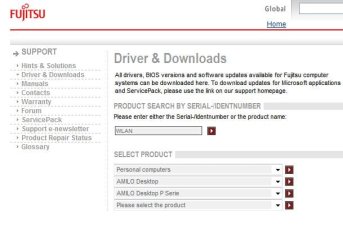
I see there are a few USB related drivers in here
Support - Fujitsu

Just put in a "WLAN" in the search like this
 

Attachments

  • Noname.jpg
    Noname.jpg
    37.5 KB · Views: 42

My Computer

Computer Manufacturer/Model Number
Lenovo ThinkPad T60
OS
Windows 7 Ultimate 64Bit
CPU
GenuineIntel Intel(R) Core(TM) DuoCore T2400 @ 1.83GHz
Motherboard
Intel(R) 82801G (ICH7 Family)
Memory
2.00 GB
Graphics Card(s)
Mobile Intel(R) 945 Express Chipset
Sound Card
SoundMAX Integrated Digital HD Audio
Monitor(s) Displays
ThinkPad Display
Screen Resolution
1400x1050
Hard Drives
100Gb SATA
Keyboard
Standard Keyboard
Mouse
HID-compliant Mouse
Internet Speed
Cable Broadband - 54Mbps
Other Info
Intel(R) PRO/1000 PL Network Connection
11a/b/g Wireless LAN Mini PCI Express Adapter
A question realted to this post:
Any idea why my Windows 7 PC continually displays " network identifying" or "no network" even though 2 other pcs on same hub work.
Strangely when I boot into XP it never has this issue.
I have checked all drivers (use driver genius and CNET to keep up2date).
I can provide any diagnostic data you require to help.

A Happy New Year to ALL
 

My Computer

Computer Manufacturer/Model Number
Custom Built
OS
Windows 7 Professional
CPU
AMD Athlon 64 x2 Dual core +4400
Motherboard
MSI-7185
Memory
4Gb
Graphics Card(s)
Nvidia GForce 7800 GT x 2
Sound Card
Creative Audigy
Monitor(s) Displays
Acver
Hard Drives
SATA X 2 - Maxtor
Case
Cooler Master
Cooling
Air
I see there are a few USB related drivers in here
Support - Fujitsu

Just put in a "WLAN" in the search like this

Thankyou, I am downloading now and will try it. I could only find an 'USB-WLAN11n' that I think would work, as when I uninstall the driver it appears as that ion my 'Device Manager'. I downlaoding the windows vista x64 version as there is no windows version and like you said, windows vista dirvers should work. I will post back if it works. *fingers crossed*

Thankyou.
 

My Computer

Computer Manufacturer/Model Number
Fujitsu Siemens Amilo Pi 3630
OS
Windows 7 Home Premium x64
CPU
Intel Core 2 Quad Q8300 @ 2.5GHz
Motherboard
MS-7504VP-PV Nvidia GeForce 7100 nForce 630i
Memory
4096 DDR2
Graphics Card(s)
NVIDIA GeForce 9600 GT
Monitor(s) Displays
ViewSonic 19" VA22132w-2 1920 x 1080 (60Hz)
Hard Drives
640GB
Internet Speed
10mbps
It did not work, I downlaoded it and ran the autorun, but when I selected install driver ti told me the device was 'unplugged'. So the setup checked to see if I had the right product whcih I do not, all other USB dirvers in the lsit predate even vista so I am back to square 1 sadly :(.
 

My Computer

Computer Manufacturer/Model Number
Fujitsu Siemens Amilo Pi 3630
OS
Windows 7 Home Premium x64
CPU
Intel Core 2 Quad Q8300 @ 2.5GHz
Motherboard
MS-7504VP-PV Nvidia GeForce 7100 nForce 630i
Memory
4096 DDR2
Graphics Card(s)
NVIDIA GeForce 9600 GT
Monitor(s) Displays
ViewSonic 19" VA22132w-2 1920 x 1080 (60Hz)
Hard Drives
640GB
Internet Speed
10mbps
What anti-virus software are you running ? Some add NDIS filters to network adapters that cause the adapter to not-work or become erratic
 

My Computer

OS
Windows 7
I have another name for the NDIS filter> Sabotage :sarc:
 

My Computer

Computer type
PC/Desktop
Computer Manufacturer/Model Number
Home built
OS
Windows 7 Ult, Windows 8.1 Pro,
CPU
Q9650-4.275GHz, E8600 4.5GHz, E6750-3.8GHz
Motherboard
Evga 780i FTW
Memory
G.Skill PC2 9600 1200Mhz 5 5 5 15 2T
Graphics Card(s)
GTX480
Sound Card
Asus Xonar D2
Monitor(s) Displays
HannsG
Screen Resolution
1680X1050
Hard Drives
GSkill Phoenix Pro 120GB SSD
PSU
ThermalTake Toughpower 1000Watt modular
Case
ThermalTake XaserV
Cooling
Xigmatek S1283
Keyboard
Logitech G15
Mouse
Logitech G9
Internet Speed
T1
Well, when I first got 7, I used AVG, then switched to AVAST!, now I'm happily running Microsoft Security Essentials. However I have been running Spybot - S&D since day one, not the resident scanner as that can conflict with MSE. But I dont think it would be that because I have switched programs several times and the network adpater worked perfectly on windows vista and my old XP x64 partition.
 

My Computer

Computer Manufacturer/Model Number
Fujitsu Siemens Amilo Pi 3630
OS
Windows 7 Home Premium x64
CPU
Intel Core 2 Quad Q8300 @ 2.5GHz
Motherboard
MS-7504VP-PV Nvidia GeForce 7100 nForce 630i
Memory
4096 DDR2
Graphics Card(s)
NVIDIA GeForce 9600 GT
Monitor(s) Displays
ViewSonic 19" VA22132w-2 1920 x 1080 (60Hz)
Hard Drives
640GB
Internet Speed
10mbps
I ahve found out another laptop running Windows 7 in my house is having a similar problem, as in the constant drop-outs, not the failing to shutdown.

Do you think it may have something to do with my router firmware? Or would that not make a difference? My router is Netgear wireless N router 'wnr2000' I believe?
 

My Computer

Computer Manufacturer/Model Number
Fujitsu Siemens Amilo Pi 3630
OS
Windows 7 Home Premium x64
CPU
Intel Core 2 Quad Q8300 @ 2.5GHz
Motherboard
MS-7504VP-PV Nvidia GeForce 7100 nForce 630i
Memory
4096 DDR2
Graphics Card(s)
NVIDIA GeForce 9600 GT
Monitor(s) Displays
ViewSonic 19" VA22132w-2 1920 x 1080 (60Hz)
Hard Drives
640GB
Internet Speed
10mbps
Back
Top