network sharing problems with windows vista

BIG RED

New member
Member
Local time
10:56 PM
Messages
31
i am trying to configure network sharing for my home network. i have a 3 total computers:

  • a laptop with windows vista installed (c1)
  • desktop with windows xp 64-bit (c2)
  • laptop with windows 7 (c3)

i was able to network share between the windows 7 laptop (c3) and c2. both comps see each other and i was able to access files and share a printer to c3. however, the problem now is between c1 and c2. the desktop computer is able to see c1. however, c1 does not see the desktop. when i try to access the laptops files through c2, it says that i do not have permission to access them, even if i have administrator rights. one thing to keep in mind is that c1 and c3 are able to see each other. however, i do not see the same content on c3 through the c1 as i do through the desktop.

c1 has some antivirus installed onto it but when i turn it off (exiting the program), there were no improvements. any suggestions would be immensely appreciated!
 

My Computer

OS
Windows 7 Home Premium
i am trying to configure network sharing for my home network. i have a 3 total computers:

  • a laptop with windows vista installed (c1)
  • desktop with windows xp 64-bit (c2)
  • laptop with windows 7 (c3)

i was able to network share between the windows 7 laptop (c3) and c2. both comps see each other and i was able to access files and share a printer to c3. however, the problem now is between c1 and c2. the desktop computer is able to see c1. however, c1 does not see the desktop. when i try to access the laptops files through c2, it says that i do not have permission to access them, even if i have administrator rights. one thing to keep in mind is that c1 and c3 are able to see each other. however, i do not see the same content on c3 through the c1 as i do through the desktop.

c1 has some antivirus installed onto it but when i turn it off (exiting the program), there were no improvements. any suggestions would be immensely appreciated!
Big Red Hi and welcome

You did not specify if you were using "homegroup" or workgroup" to network these computers. Typically homegroup is for windows 7 only machines and uses a newer version of IP. Workgroup is more designed for mixed environments.

If you are using homegroup on some networks it has sharing, and connectivity issues.

You can test this rather simply by setting up a new network connection using the workgroup model. If this new connection solves the problem then you can disable IPv6 and kill homegroup


Let us know if you require more assistance

Jan


My Computer

Computer Manufacturer/Model Number
LAPTOP. HP Pavilion dv7-4010TX .
OS
Win 7 Ultimate 64-bit. SP1.
CPU
Intel i7 -720QM.[1.6GHz Turbo Boost 2.8GHz. 6MB Cache.]
Memory
8 DDR 3 RAM. 1066MHZ
Graphics Card(s)
ATI 1024 MB. DDR3. Radeon HD5650
Monitor(s) Displays
17.3" High Definition Brightview LCD. LED Backlit.
Screen Resolution
1600 x 900.
Hard Drives
640GB
Case
Laptop / notebook.
Mouse
Logitech Anywhere mouse. MX.
Internet Speed
ADSL [ but too slow ]
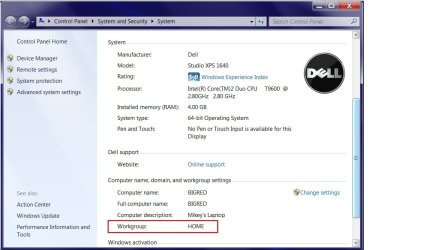
what if i look under the properties of the windows 7 comp? i believe i used homegroup to set up the network, but when i look in the properties of the comp, the name of the homegroup still appears as a workgroup. ive attached an image file to show you what i am referring to. workgroup_settings.jpg also i have used the same workgroup/homegroup name for all pc's.
 

My Computer

OS
Windows 7 Home Premium
Hello BigRed,

You would be far better served setting up a workgroup for this type of mixed network. What you are seeing in the picture you posted is that the name of your Workgroup is "Home".

You will need to make sure that all of your machines are using the same name for the Workgroup. It can be "Home" or better yet use the name "Workgroup" for the Workgroup instead.

You should leave the Homegroup and set up a workgroup instead.

http://www.sevenforums.com/tutorials/43980-homegroup-leave.html?filter

Although it is possible to set up a Homegroup in a mixed Op system network it would be much easier to set up a Workgroup in your case. This is especially true because you only have one Windows 7 machine in your network which means that your single Windows 7 machine would not have another machine to share libraries with. For this reason there is absolutely no reason to set up a Homegroup.

As for the A/V problem, sometimes uninstalling the A/V completely is the best to fix those types of problems.
 

My Computer

Computer type
PC/Desktop
Computer Manufacturer/Model Number
Home built
OS
Windows 7 Ult, Windows 8.1 Pro,
CPU
Q9650-4.275GHz, E8600 4.5GHz, E6750-3.8GHz
Motherboard
Evga 780i FTW
Memory
G.Skill PC2 9600 1200Mhz 5 5 5 15 2T
Graphics Card(s)
GTX480
Sound Card
Asus Xonar D2
Monitor(s) Displays
HannsG
Screen Resolution
1680X1050
Hard Drives
GSkill Phoenix Pro 120GB SSD
PSU
ThermalTake Toughpower 1000Watt modular
Case
ThermalTake XaserV
Cooling
Xigmatek S1283
Keyboard
Logitech G15
Mouse
Logitech G9
Internet Speed
T1
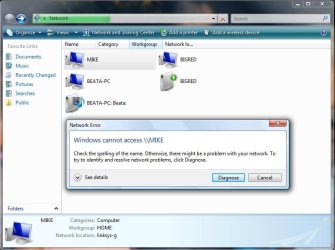
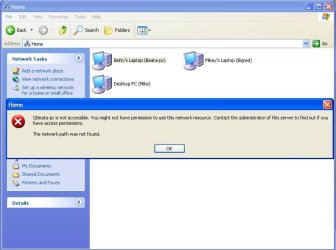
i have tried to do both suggestions. i have removed the homegroup that was made on the windows 7 machine. i have also uninstalled the a/v software on the vista machine. however, i still remain with the same problem. the only improvement made is that the windows 7 and windows vista machines now see each other and are able to access each others files. however, the main problem still remains with the windows vista laptop and the windows xp desktop. they both see each other, but i am not able to access either one through the other. i have provided attachments to show you the error message that i receive. i also noticed that the vista machine uses windows firewall with advanced security. are there any settings that need to be adjusted with this? am i better off just downgrading to regular windows firewall? if so, how is this done? again, any help would be greatly appreciated!

prob_vista.jpg

prob_xp.jpg
 

My Computer

OS
Windows 7 Home Premium
in addition, i also found some information regarding a/v with vista through this windows help manual:

Networking home computers running different versions of Windows

i tried opening the ports listed for sharing devices and file and printer sharing within the windows firewall with advanced security, but this did not make any improvements.
 

My Computer

OS
Windows 7 Home Premium
I had a workgroup problem at one time so I renamed the workgroup to a new name
" worklinksys " on all the computers & then rebooted all of them & it worked.

" Home " is almost to common of a workgroup name.
 

My Computer

Computer type
PC/Desktop
Computer Manufacturer/Model Number
Built them myself, Science Experiments !
OS
Win7 Enterprise, Win7 x86 (Ult 7600), Win7 x64 Ult 7600, TechNet RTM on AMD x64 (2.8Ghz)
CPU
AMD fx8350 4ghz, AMD-32 2400mhz, AMD-64 3200mhz, AMDx64 2.8G
Motherboard
SIS 755, ECS-K8M890M-M (Ult 7600), GigaByte & others
Memory
2gb, 4gb on the Ult 7600, 4gb on Technet RTM, 32gb on FX8350
Graphics Card(s)
Draw my own Graphics, several nVidia cards
Sound Card
on motherboard
Monitor(s) Displays
19" flat scr, 28" I-Inc widescr,22" Emprex Widescr, 23" Acer
Screen Resolution
1280 x 1024, 1440 x 900, 1920 x 1080
Hard Drives
6 pata Ide HD's & 2 Sata HD's
added 80gb external on Ult 7600 computer,
numerous extra 1tb, 2TB, 3Tb SATA HD's
A collection of ext HD Docks w/ HDs
PSU
430w, 550w, 600w, 700, 800, etc
Case
All Generic Full Towers
Cooling
Open Air & a few fans, some w/ colored LEDs
Keyboard
Compaq & Dell recycled from GoodWill
Mouse
Made in China Optical Wired Mouse
Internet Speed
Fast Cable InterNet
Antivirus
AVG Free on 24 different Desktops, NO Problems!
Browser
IE 8 is preferred, but use FireFox sometimes
Other Info
Linksys Routers, switches, & Hubs
Too Many USB Flash Drives to count, Biggest is 64GB !
Eight computers in my home network.
Sixteen computers at my business network.
Linked via TeamViewer !
Lots of old used spare computer parts everywhere!
In order to access the files on those machines you must also use the permission settings and actually share some files. You are reading much into this problem than there really is.

Pay close attention to the part about adding "Everyone" to the permissions list. You should always make sure that you can share files before installing any type of A/V software. I would also make sure that all machines are using the same name for the Workgroup.

It's best to use the Windows 7 default workgroup name "Workgroup" on all machines in the workgroup.

http://www.sevenforums.com/tutorials/24232-sharing-permissions.html?filter
 

My Computer

Computer type
PC/Desktop
Computer Manufacturer/Model Number
Home built
OS
Windows 7 Ult, Windows 8.1 Pro,
CPU
Q9650-4.275GHz, E8600 4.5GHz, E6750-3.8GHz
Motherboard
Evga 780i FTW
Memory
G.Skill PC2 9600 1200Mhz 5 5 5 15 2T
Graphics Card(s)
GTX480
Sound Card
Asus Xonar D2
Monitor(s) Displays
HannsG
Screen Resolution
1680X1050
Hard Drives
GSkill Phoenix Pro 120GB SSD
PSU
ThermalTake Toughpower 1000Watt modular
Case
ThermalTake XaserV
Cooling
Xigmatek S1283
Keyboard
Logitech G15
Mouse
Logitech G9
Internet Speed
T1
i have shared one folder on the vista machine. i was able to access the file through windows 7, but the xp machine still denies access. i have tried to change the name of the workgroup several times and i even tried using "workgroup". either case, the same error message appears on both the vista machine and the xp machine. also, i am more concerned with using this to share a printer that is connected to the xp machine with the windows vista machine.
 

My Computer

OS
Windows 7 Home Premium
Hello BIG RED. Can you see the Windows 7 shared files from your Windows XP ?
 

My Computer

Computer Manufacturer/Model Number
HP Pavilon Slimline
OS
Windows 7 Ultimate 64 bits
CPU
Dual Core Intel Core 2 Duo E7500
Motherboard
MSI MS-7525 (Boston)
Memory
2x[2048 MB DDR2-SDRAM (PC2-6400 / 800 MHz), 2 Gb]; Total:4Gb
Graphics Card(s)
Intel(R) G33/G31 Express Chipset Family (256 MB)
Sound Card
Realtek ALC662 @ Intel 82801GB ICH7 - HD Audio Controller
Monitor(s) Displays
HP 2009m 20'' LCD
Screen Resolution
1600x900
Hard Drives
SAMSUNG HD642JJ (596 GB)
For the XP machine, if it's XP pro you will need to turn off simple file sharing.
How to disable simple file sharing and how to set permissions on a shared folder in Windows XP

If you are using passwords to connect you will need to use the same user name and password on all machines.

If you are still having problem try this registry adjustment on the Windows 7 machine. Back up the registry first.

Solution is really easy just modify one key in registry:
HKEY_LOCAL_MACHINE\SOFTWARE\Microsoft\Windows\CurrentVersion\Policies\System
create or modify 32-bit DWORD: LocalAccountTokenFilterPolicy
set the value to: 1

After making sure you are using the same Workgroup name on all machines you should run the network set up wizard on the XP machine, reboot all machines and see if you can access files. You will need to set up shares on all machines by allowing for it using the permission settings. You need to set up a Workgroup in either event.
 

My Computer

Computer type
PC/Desktop
Computer Manufacturer/Model Number
Home built
OS
Windows 7 Ult, Windows 8.1 Pro,
CPU
Q9650-4.275GHz, E8600 4.5GHz, E6750-3.8GHz
Motherboard
Evga 780i FTW
Memory
G.Skill PC2 9600 1200Mhz 5 5 5 15 2T
Graphics Card(s)
GTX480
Sound Card
Asus Xonar D2
Monitor(s) Displays
HannsG
Screen Resolution
1680X1050
Hard Drives
GSkill Phoenix Pro 120GB SSD
PSU
ThermalTake Toughpower 1000Watt modular
Case
ThermalTake XaserV
Cooling
Xigmatek S1283
Keyboard
Logitech G15
Mouse
Logitech G9
Internet Speed
T1
Back
Top