
New card, wrong connector

RoWin7

New member
Power User
Local time
3:52 PM
Messages
1,406
Location
NYS, US
My monitor's picture was not of the right proportions, and we previously decided at this forum, by substituting another monitor, that it was the onboard graphics card at fault, not the monitor.

I bought a Dell AMD Radeon HD 6450 00WH7F 1GB Low Profile Graphics Card
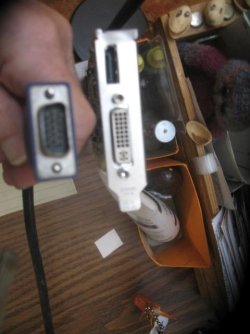
and it didn't occur to me that the connectors weren't universal. Here are my male VGA connector and the socket on the card.

I think the card might be for a DVID (not sure what that is.)

I don't use HDMI or DVID, just my VGA. Can I use this card for my VGA monitor if a buy an adapter?
If so, would this be the adapter? Installing the card was a PITA, and I'd rather not return it.
DVI to VGA Cable Adapter - DVI (M) to VGA (F) - 1 Pack - Male DVI to Female VGA (DVIVGAMF), Beige: Electronics
 

Attachments
  • VGA +dvid-.jpg
    VGA +dvid-.jpg
    45.7 KB · Views: 23

My Computer

Computer type
PC/Desktop
Computer Manufacturer/Model Number
HP p6-2020t
OS
Win 7 Ult 64-bit
CPU
G620 2.6GHZ Pentium R
Memory
6 GB
Monitor(s) Displays
25" HPLV2311
Screen Resolution
1920 x 1200
Hard Drives
1 SATA, 1 exterior SATA
Case
HP
Cooling
PSU
Antivirus
Glasswire
Browser
Waterfox; Firefox; Chrome for work
Other Info
Firewall--Glasswire
Similar specs in Gateway DX4200
Verizon FIOS Wired network

1 other Win7 computer-- has SSD
The StarTech adapter should work fine.

The top port on your card is a DisplayPort connector, while the bottom port is a dual-link DVI-I connector. VGA is an analog signal, while DVI-D is only digital. DVI-I supports both analog and digital, so can provide an analog VGA signal through an adapter.
 

My Computer

Computer type
PC/Desktop
Computer Manufacturer/Model Number
Dell Optiplex 7050
OS
Windows 7/8.1/10 multiboot
CPU
Intel Core i7-7700
Motherboard
Dell, Intel Q270 chipset
Memory
48GB (2x16GB Crucial DDR4-3200 + 2x8GB Hynix DDR4-2400)
Graphics Card(s)
Intel HD630 + AMD Radeon R7 450 PCIe
Monitor(s) Displays
Asus VC279 (27")
Screen Resolution
1920x1080
Hard Drives
Toshiba M.2 NVMe (256GB),
Samsung 960 Evo (500GB),
WD Red Plus 80EFBX (8TB)
Thanks, DG! I haven't had to replace a card in years, and I've unlearned too much. And what is DVI-D?

Do I have to "tell" the BIOS to use the new card, or will it find it?
 

My Computer

Computer type
PC/Desktop
Computer Manufacturer/Model Number
HP p6-2020t
OS
Win 7 Ult 64-bit
CPU
G620 2.6GHZ Pentium R
Memory
6 GB
Monitor(s) Displays
25" HPLV2311
Screen Resolution
1920 x 1200
Hard Drives
1 SATA, 1 exterior SATA
Case
HP
Cooling
PSU
Antivirus
Glasswire
Browser
Waterfox; Firefox; Chrome for work
Other Info
Firewall--Glasswire
Similar specs in Gateway DX4200
Verizon FIOS Wired network

1 other Win7 computer-- has SSD
DVI ("Digital Visual Interface") is normally meant to be a digital signal interface, but it allows for an alternate analog signal if your monitor does not support digital signals. DVI-D is a connector type that passes along only the digital signal, while DVI-I is a connector that supports DVI-D but also has a few extra pins to support analog video; those are the extra four pins around the large, flat blade.

Your card is normally meant to send out a digital signal, but the DVI-I connector allows it to be backward compatible with an analog monitor through the use of those extra four pins, though you'll need an adapter to mate them to a VGA cable.

If you have a DVI-D monitor you don't necessarily need a DVI-I cable and can use a plain DVI-D cable (without the four extra pins) with your card. The video signal will come through the large grid of pins. In contrast, if you have a VGA monitor you'll use the StarTech adapter and the video signal will come through the four extra pins instead of the large grid.

With most computers, you shouldn't need to change anything in the BIOS. If it doesn't auto-detect, though, you may need to check for a video setting in the BIOS. Typical options may be to use internal video, use an add-in card, or to auto-detect based on where it detects a monitor is connected.
 

My Computer

Computer type
PC/Desktop
Computer Manufacturer/Model Number
Dell Optiplex 7050
OS
Windows 7/8.1/10 multiboot
CPU
Intel Core i7-7700
Motherboard
Dell, Intel Q270 chipset
Memory
48GB (2x16GB Crucial DDR4-3200 + 2x8GB Hynix DDR4-2400)
Graphics Card(s)
Intel HD630 + AMD Radeon R7 450 PCIe
Monitor(s) Displays
Asus VC279 (27")
Screen Resolution
1920x1080
Hard Drives
Toshiba M.2 NVMe (256GB),
Samsung 960 Evo (500GB),
WD Red Plus 80EFBX (8TB)
I just got around to doing this. I'm on another computer now. No signal going to the monitor. The first time it said "no signal. Monitor going to sleep." I checked all the screws, and now there's nothing. Is it possible that it can run only on onboard video? Can't do anything with the BIOS because the screen is totally black.
 
Last edited:

My Computer

Computer type
PC/Desktop
Computer Manufacturer/Model Number
HP p6-2020t
OS
Win 7 Ult 64-bit
CPU
G620 2.6GHZ Pentium R
Memory
6 GB
Monitor(s) Displays
25" HPLV2311
Screen Resolution
1920 x 1200
Hard Drives
1 SATA, 1 exterior SATA
Case
HP
Cooling
PSU
Antivirus
Glasswire
Browser
Waterfox; Firefox; Chrome for work
Other Info
Firewall--Glasswire
Similar specs in Gateway DX4200
Verizon FIOS Wired network

1 other Win7 computer-- has SSD
Did you confirm in the BIOS what settings are available for video? Dells usually have an "auto" setting, but I don't know what might be available in your HP BIOS.
 

My Computer

Computer type
PC/Desktop
Computer Manufacturer/Model Number
Dell Optiplex 7050
OS
Windows 7/8.1/10 multiboot
CPU
Intel Core i7-7700
Motherboard
Dell, Intel Q270 chipset
Memory
48GB (2x16GB Crucial DDR4-3200 + 2x8GB Hynix DDR4-2400)
Graphics Card(s)
Intel HD630 + AMD Radeon R7 450 PCIe
Monitor(s) Displays
Asus VC279 (27")
Screen Resolution
1920x1080
Hard Drives
Toshiba M.2 NVMe (256GB),
Samsung 960 Evo (500GB),
WD Red Plus 80EFBX (8TB)
Reconnected the monitor to original jack. The BIOS is a CAR_716.ROM v7.16

The online manual says the PCI slot is for an "add-on card".

Slot Security says:
PCI express x16 slot1 >enable --only this one has the arrow
" " x1 slot 1 enable
" " x1 slot2 enable
" " x1 slot 3 enable
Mini card slot 1 enable

But I see only 1 PCI slot, where I plugged in the card. The manual also shows just 1 slot. The fan on the video card is running. Should there be a wire hooked up to it?
.......
I plugged it back into the original socket, and there's still no video.
 
Last edited:

My Computer

Computer type
PC/Desktop
Computer Manufacturer/Model Number
HP p6-2020t
OS
Win 7 Ult 64-bit
CPU
G620 2.6GHZ Pentium R
Memory
6 GB
Monitor(s) Displays
25" HPLV2311
Screen Resolution
1920 x 1200
Hard Drives
1 SATA, 1 exterior SATA
Case
HP
Cooling
PSU
Antivirus
Glasswire
Browser
Waterfox; Firefox; Chrome for work
Other Info
Firewall--Glasswire
Similar specs in Gateway DX4200
Verizon FIOS Wired network

1 other Win7 computer-- has SSD
I'm not familiar with HP BIOSes. It sounds like you're looking in the PCI slots configuration, but what I was expecting is a separate Video section. In mobos with onboard video, I wouldn't naturally assume the onboard video to be in the PCI section. But as I said, I don't know how HP does things.


PCI express x16 slot1 >enable --only this one has the arrow
I don't quite follow ... are you saying Slot 1 *is* enabled, or are you saying that Slot 1 has an *option* to enable it (i.e., that it's currently disabled)?
 

My Computer

Computer type
PC/Desktop
Computer Manufacturer/Model Number
Dell Optiplex 7050
OS
Windows 7/8.1/10 multiboot
CPU
Intel Core i7-7700
Motherboard
Dell, Intel Q270 chipset
Memory
48GB (2x16GB Crucial DDR4-3200 + 2x8GB Hynix DDR4-2400)
Graphics Card(s)
Intel HD630 + AMD Radeon R7 450 PCIe
Monitor(s) Displays
Asus VC279 (27")
Screen Resolution
1920x1080
Hard Drives
Toshiba M.2 NVMe (256GB),
Samsung 960 Evo (500GB),
WD Red Plus 80EFBX (8TB)
Slot#1 is enabled with the plug in the onboard socket. I'm presuming slot #1 is the onboard video. Will check BIOS again for more info.

Checked out the mobo, Pegatron 2AC2, and it says there's 1 PCIe x16 and the video can be used either way. But then up in the chart, it says there are 4.
Pegatron Corporation Pegatron 2AC2 - Best Compatible Pegatron 2AC2 Mobo

Maybe someone more familiar with the HP BIOS will drop in. I'm offering coffee, donuts and macadamia nut cookies.
 
Last edited:

My Computer

Computer type
PC/Desktop
Computer Manufacturer/Model Number
HP p6-2020t
OS
Win 7 Ult 64-bit
CPU
G620 2.6GHZ Pentium R
Memory
6 GB
Monitor(s) Displays
25" HPLV2311
Screen Resolution
1920 x 1200
Hard Drives
1 SATA, 1 exterior SATA
Case
HP
Cooling
PSU
Antivirus
Glasswire
Browser
Waterfox; Firefox; Chrome for work
Other Info
Firewall--Glasswire
Similar specs in Gateway DX4200
Verizon FIOS Wired network

1 other Win7 computer-- has SSD
Back
Top