

First of all the BIOS is set to AHCI.
All drivers are up to date and yes I've tried uninstalling controller drivers, the drive itself to no avail.
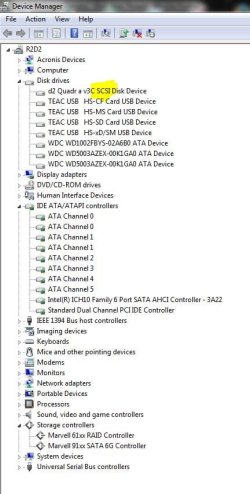
It's a 3TB LaCie eSata GPT volume (so Windows would accept an over-2TB drive), formatted NTFS (4 partitions).
It replaces a LaCie 1TB one which suddenly conked out - which was connected in exactly the same manner and showed OK as an ATA drive and as an HDD in the BIOS.
Furthermore that ATA Channel is now running at "Ultra DMA Mode 0" as distinct from Ultra DMA 6 with the old drive. Also the drive shows now as SATA I during the boot, before it was showing SATA II
I set AHCI recently with the OS already in place, so that may be a partial cause.
Any ideas to remedy this situation, or isn't it dire? I did some searching and found similar threads which I'm afraid didn't answer anything.
(See my system details & attached pic for more info).
All drivers are up to date and yes I've tried uninstalling controller drivers, the drive itself to no avail.
It's a 3TB LaCie eSata GPT volume (so Windows would accept an over-2TB drive), formatted NTFS (4 partitions).
It replaces a LaCie 1TB one which suddenly conked out - which was connected in exactly the same manner and showed OK as an ATA drive and as an HDD in the BIOS.
Furthermore that ATA Channel is now running at "Ultra DMA Mode 0" as distinct from Ultra DMA 6 with the old drive. Also the drive shows now as SATA I during the boot, before it was showing SATA II
I set AHCI recently with the OS already in place, so that may be a partial cause.
Any ideas to remedy this situation, or isn't it dire? I did some searching and found similar threads which I'm afraid didn't answer anything.
(See my system details & attached pic for more info).
Attachments
Last edited:
My Computer
At a glance
Win 7 Ult SP1/Win 10 Pro (all x64)Intel® Core™ i7-975 Extreme O/C to 4.02 GHz, ...24GB Corsair Vengeance DDR3 SDRAM at 1600MHz ...1792 MB NVIDIA® GeForce® GTX 295 Dual Core
- Computer type
- PC/Desktop
- Computer Manufacturer/Model Number
- Alienware® ALX X58
- OS
- Win 7 Ult SP1/Win 10 Pro (all x64)
- CPU
- Intel® Core™ i7-975 Extreme O/C to 4.02 GHz, 8MB Cache
- Motherboard
- Asus® P6T Deluxe V2 X58 LGA1366
- Memory
- 24GB Corsair Vengeance DDR3 SDRAM at 1600MHz - 6 x 4096MB
- Graphics Card(s)
- 1792 MB NVIDIA® GeForce® GTX 295 Dual Core
- Sound Card
- Onboard Soundmax® High-Definition 7.1 Performance Audio
- Monitor(s) Displays
- Samsung XL2370 LED backlit 23" W/S 2ms response time
- Screen Resolution
- 1920 X 1080
- Hard Drives
- 2 x 500gb SATA II
1 x 1TB SATA II
1 external eSATA LaCie 3TB
(Non-RAID)
- PSU
- Alienware® 1200 Watt Multi-GPU
- Case
- Alienware® P2 ALX Chassis with AlienIce™ 3.0 Video Cooling
- Cooling
- Alienware® High-Perf. Liquid Cooling + Acoustic Dampening
- Keyboard
- Microsoft® Wireless Entertainment 8000 + Logitech® G15 Wired
- Mouse
- Microsoft® Wireless Laser 8000 + Logitech® G9 Wired
- Internet Speed
- 1Gb/s
- Antivirus
- McAfee LiveSafe
- Browser
- Firefox - latest
- Other Info
- Using non-RAID on purpose as I find RAID to be too temperamental.
Now set to AHCI


